
개발 대상은 [비회원게시판 - 게시글확인] 페이지이다.
구성은 다음과 같다.
free_view.php: 게시글 내용 출력 페이지
board_view.css : 게시글 확인 페이지 CSS
1. Frontend & Backend
<free_view.php>
<?php
include "../db/db_con.php";
if (!isset($_GET["num"]))
echo "<script>location.href='./free_list.php</script>";
$sql = "select * from freeboard where num = {$_GET['num']}";
$result = mysqli_query($con, $sql);
$row = mysqli_fetch_assoc($result);
if ($row == 0)
echo "<script>location.href='./free_list.php'</script>";
$views = $row["views"];
$views++;
$sql = "update freeboard set views={$views} where (num={$_GET['num']})";
mysqli_query($con, $sql);
$sql = "select * from freeboard where num = {$_GET['num']}";
$result = mysqli_query($con, $sql);
$row = mysqli_fetch_assoc($result);
$num = $row["num"];
$title = $row["title"];
$content = $row["content"];
$writer= $row["writer"];
$write_time = $row["write_time"];
$display_date = date("Y-m-d H:i", strtotime($row['write_time']));
$views = $row["views"];
?>
<!DOCTYPE html>
<html>
<head>
<meta charset="UTF-8">
<title>자유 게시판</title>
<link rel="stylesheet" href="../css/board_view.css?v=<?=time()?>">
</head>
<body>
<?php include "../include/header.php" ?>
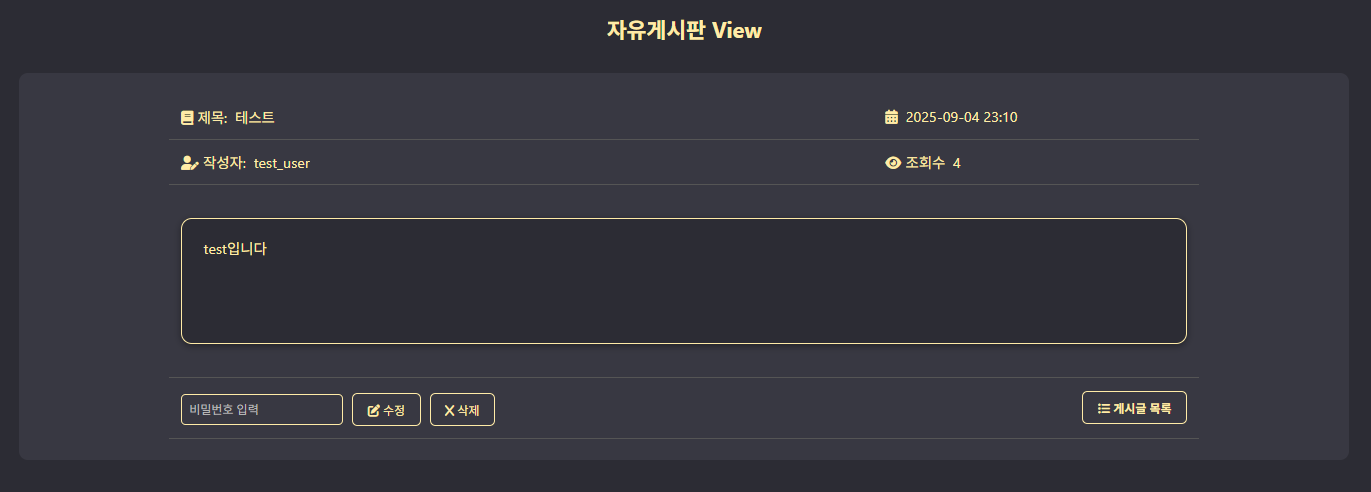
<h2>자유게시판 View</h2>
<div class="view-container">
<table>
<tr>
<td><i class='fa-solid fa-book'></i> <?php echo "제목: $title"?></td>
<td><i class='fa-solid fa-calendar-days'></i> <?php echo "$display_date"?></td>
</tr>
<tr>
<td><i class='fa-solid fa-user-pen'></i> <?php echo "작성자: $writer"?></td>
<td><i class= 'fa-solid fa-eye'></i> <?php echo "조회수 {$views}"?></td>
</tr>
<tr>
<td colspan=2><div class="view-content"><?php echo nl2br($content); ?></div></td>
</tr>
<tr>
<td>
<form method="POST" action="free_edit.php">
<input type="hidden" name=num value="<?php echo $num ?>">
<input id="input_pass" name="input_pass" placeholder="비밀번호 입력">
<button type="submit" name="type" value="modify"><i class="fa-solid fa-pen-to-square"></i> 수정</button>
<button type="submit" name="type" value="delete"><i class="fa-solid fa-x"></i> 삭제</button>
</form>
</td>
<td class="view-list-btn">
<button onclick="location.href='free_list.php'"><i class="fa-solid fa-list-ul"></i> 게시글 목록</button>
</td>
</tr>
</table>
</div>
</body>
</html>| free_view.php |
|---|
 |
-
1. 게시글 정보 검색
GET 방식으로 게시글 번호(num) 값을 전달받아, 그 값에 해당하는 게시글 필드를 freeboard 테이블에서 검색한다.
그 결과를 바탕으로 ($num, $title, $content, $writer, $write_time, $display_date, $views) 변수에 해당 게시글의 (게시글 번호, 게시글 제목, 게시글 내용, 게시글 작성자, 게시글 작성시간, 작성시간 출력 형태)를 저장한다.
-
2. 게시글 전처리:
1) 작성시간 출력형태: 만약 게시글이 당일날 작성된 것이라면 작성된 시간만 출력하며, 게시글 작성후 자정이 지난 이후에는 작성날짜와 시간을 모두 출력한다.
2) 조회수 카운트: free_view.php 페이지를 호출하게 되면 조회수(views) 값에 +1을 하여 조회수를 1씩 증가시킨다.
-
3. 게시글 출력:
테이블을 조회해서 얻은 ($num, $title, $content, $writer, $write_time, $display_date, $views) 값들을 토대로 각 위치에 출력한다.
-
4. 게시글 편집:
게시글을 수정 및 삭제하려면 해당 게시글 작성시 입력한 숫자 4자리의 비밀번호를 입력해야 한다.
→ 일치할시 free_edit.php 로 이동되어 처리된다.
