Seed란?
Seed는 데이터베이스에 초기 데이터를 삽입하는 기능이다.
NestJS에서는 보통 TypeORM을 사용하여 데이터베이스를 조작하고, TypeORM에서는 Seed 기능을 제공한다. Seed를 활용하여 데이터베이스에 초기 데이터를 자동으로 삽입하거나 테스트 데이터를 준비하는 것이 가능하다.
seed 파일 생성하기
src/seeds/1613122798443-SeedDb.ts
import { MigrationInterface, QueryRunner } from 'typeorm';

export class SeedDb1613122798443 implements MigrationInterface {
  name = 'SeedDb1613122798443';

  public async up(queryRunner: QueryRunner): Promise<void> {
    await queryRunner.query(
      `INSERT INTO tags (name) VALUES ('dragons'),('coffee'),('nestjs')`,
    );

    await queryRunner.query(
      //password is 123
      `INSERT INTO users (username, email, password) VALUES ('foo', 'foo@gmail.com', ' $2b$10$fAjh0vMJ1V788n8dAqU6lOFD5PS5BTi4.nbJpJU8rUbA3mvWg2g')`,
    );

    await queryRunner.query(
      `INSERT INTO articles (slug, title, description, body, "tagList", "authorId") VALUES
      ('first-article', 'First article', 'First article description', 'First article body',
      'coffee,dragons', 1), ('second-article', 'Second article', 'Second article description', 'Second article body','coffee,dragons', 1)`,
    );
  }

  public async down(): Promise<void> {}
}
태그, 사용자, article 등 필요한 테이블의 초기 데이터 삽입
- 마이그레이션 파일에서 사용되는 2가지 메서드)
up메서드에서 데이터를 삽입하는 쿼리들을 실행
down메서드는 마이그레이션 롤백 시에 실행될 코드를 정의
시드(seed) 파일은 초기 데이터를 데이터베이스에 삽입하는 역할을 하므로, 보통 up 메서드에서 데이터를 삽입하는 쿼리들을 정의하고, down 메서드는 필요하지 않으므로 비워둔다. 롤백하는 일은 흔치 않을테니까!
ormseedconfig.ts
import ormconfig from '@app/ormconfig';

const ormseedconfig = {
  ...ormconfig,
  migrations: ['src/seeds/*.ts'],
};

export default ormseedconfig;
ormseeddatasource.ts
import { DataSource } from 'typeorm';
import ormseedconfig from './ormseedconfig';

export default new DataSource(ormseedconfig);
package.json에
"db:seed": "ts-node -r tsconfig-paths/register ./node_modules/typeorm/cli.js -d src/ormseeddatasource.ts migration:run" 을 추가했는데,
이는 TypeScript를 실행하는 ts-node를 통해 typeorm의 CLI를 호출하여 데이터베이스에 시드 데이터를 삽입하는 커스텀 스크립트이다.
-d src/ormseeddatasource.ts 이 옵션으로 데이터베이스 연결 정보와 시드 데이터를 삽입하는데 필요한 설정들을 담은 데이터 소스 파일의 경로를 지정했다.
따라서 yarn db:seed 명령어로 seed 데이터를 삽입할 수 있게 된다.
정리하자면 순서는
yarn typeorm schema:drop(데이터 베이스 초기화) ->yarn typeorm migration:run(마이그레이션 파일 실행, 데이터 베이스 스키마 변경 - 새로운 테이블 생성 or 구조 변경) ->yarn db:seed(초기 데이터 삽입) 순으로 실행한다.
drop, migration:run 후 그리고 설정한 명령어 db:seed를 실행하면
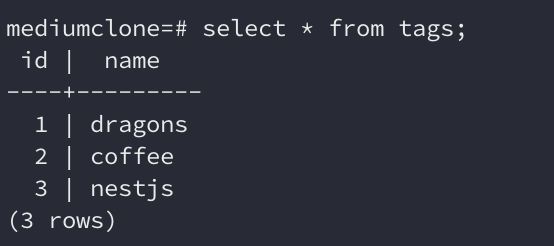
설정한 seed 데이터가 삽입된 것을 알 수 있다.