UICollectionView
- 셀을 그리드처럼 배치할 수 있는 유연한 목록 뷰
- 예: 갤러리 앱, 쇼핑 앱, 슬라이드 배너
UITableView는 "1열 리스트"만 가능하지만, UICollectionView는 "여러 열"로 자유로운 레이아웃 가능
UITableView와 차이점
| 항목 | UITableView | UICollectionView |
|---|
| 레이아웃 | 1열 세로 방향 | 가로/세로/그리드/자유롭게 |
| 커스터마이징 | 제한적 | 매우 유연 |
| 섹션 헤더/푸터 | 간단한 지원 | 더 유연하고 커스텀 가능 |
| 대표 레이아웃 | 고정 | UICollectionViewLayout으로 교체 가능 |
헤더 추가
1. 헤더용 뷰 클래스 구현
final class MyHeaderView: UICollectionReusableView {
    static let id = "MyHeaderView"

    private let titleLabel = UILabel()

    override init(frame: CGRect) {
        super.init(frame: frame)
        backgroundColor = .systemGroupedBackground
        titleLabel.font = .boldSystemFont(ofSize: 18)
        titleLabel.translatesAutoresizingMaskIntoConstraints = false
        addSubview(titleLabel)

        NSLayoutConstraint.activate([
            titleLabel.leadingAnchor.constraint(equalTo: leadingAnchor, constant: 16),
            titleLabel.centerYAnchor.constraint(equalTo: centerYAnchor)
        ])
    }

    required init?(coder: NSCoder) { fatalError() }

    func configure(text: String) { titleLabel.text = text }
}
2. 컬렉션 뷰에 등록
collectionView.register(
    MyHeaderView.self,
    forSupplementaryViewOfKind: UICollectionView.elementKindSectionHeader,
    withReuseIdentifier: MyHeaderView.id
)
3. dataSource에서 헤더 반환
func collectionView(_ collectionView: UICollectionView,
                    viewForSupplementaryElementOfKind kind: String,
                    at indexPath: IndexPath) -> UICollectionReusableView {

    guard kind == UICollectionView.elementKindSectionHeader else {
        return UICollectionReusableView()
    }

    let header = collectionView.dequeueReusableSupplementaryView(
        ofKind: kind,
        withReuseIdentifier: MyHeaderView.id,
        for: indexPath
    ) as! MyHeaderView

    header.configure(text: "섹션 \(indexPath.section) 헤더")
    return header
}
4. 레이아웃 delegate로 헤더 크기 지정
func collectionView(_ collectionView: UICollectionView,
layout collectionViewLayout: UICollectionViewLayout,
referenceSizeForHeaderInSection section: Int) -> CGSize {
return CGSize(width: collectionView.bounds.width, height: 44)
}
예제 코드
UICollectionView 생성UICollectionViewCell 등록dataSource로 데이터 연결delegate로 동작 제어UICollectionViewLayout로 레이아웃 설정
UIViewController
import UIKit
private enum Const {
static let cellWidth: CGFloat = 80.0
static let cellHeight: CGFloat = 80.0
static let lineSpacing: CGFloat = 10.0
static let itemSpacing: CGFloat = 10.0
static let sectionInsetLeft: CGFloat = 20.0
static let sectionInsetRight: CGFloat = 20.0
}
class MyCollectionViewController: UIViewController {
var collectionView: UICollectionView!
var items = [String]()
override func viewDidLoad() {
super.viewDidLoad()
for _ in 0..<10 {
items.append(contentsOf: ["🍎", "🍌", "🍇", "🍓", "🍑", "🍒"])
}
let layout = UICollectionViewFlowLayout()
layout.itemSize = CGSize(width: Const.cellWidth, height: Const.cellHeight)
layout.scrollDirection = .vertical
layout.minimumLineSpacing = Const.lineSpacing
layout.minimumInteritemSpacing = Const.itemSpacing
layout.sectionInset = .init(
top: 0.0,
left: Const.sectionInsetLeft,
bottom: 0.0,
right: Const.sectionInsetRight
)
collectionView = UICollectionView(frame: view.bounds, collectionViewLayout: layout)
collectionView.backgroundColor = .white
view.addSubview(collectionView)
collectionView.register(UICollectionViewCell.self, forCellWithReuseIdentifier: "cell")
collectionView.register(
MyHeaderView.self,
forSupplementaryViewOfKind: UICollectionView.elementKindSectionHeader,
withReuseIdentifier: MyHeaderView.id
)
collectionView.dataSource = self
collectionView.delegate = self
}
}
UICollectionViewDataSource
extension MyCollectionViewController: UICollectionViewDataSource {
func collectionView(_ collectionView: UICollectionView, numberOfItemsInSection section: Int) -> Int {
return items.count
}
func collectionView(_ collectionView: UICollectionView, cellForItemAt indexPath: IndexPath) -> UICollectionViewCell {
let cell = collectionView.dequeueReusableCell(withReuseIdentifier: "cell", for: indexPath)
cell.backgroundColor = .systemTeal.withAlphaComponent(0.2)
cell.layer.cornerRadius = 8
cell.contentView.subviews.forEach { $0.removeFromSuperview() }
let label = UILabel(frame: cell.bounds)
label.text = items[indexPath.item]
label.font = .systemFont(ofSize: 40)
label.textAlignment = .center
cell.contentView.addSubview(label)
return cell
}
func collectionView(_ collectionView: UICollectionView,
viewForSupplementaryElementOfKind kind: String,
at indexPath: IndexPath) -> UICollectionReusableView {
guard kind == UICollectionView.elementKindSectionHeader else {
return UICollectionReusableView()
}
let header = collectionView.dequeueReusableSupplementaryView(
ofKind: kind,
withReuseIdentifier: MyHeaderView.id,
for: indexPath
) as! MyHeaderView
header.configure(text: "과일 섹션 \(indexPath.section)")
return header
}
}
UICollectionViewDelegateFlowLayout
extension MyCollectionViewController: UICollectionViewDelegateFlowLayout {
func collectionView(_ collectionView: UICollectionView,
layout collectionViewLayout: UICollectionViewLayout,
referenceSizeForHeaderInSection section: Int) -> CGSize {
let width = collectionView.bounds.width
let height = 50.0
return .init(width: width, height: height)
}
}
UICollectionViewDelegate
extension MyCollectionViewController: UICollectionViewDelegate {
func collectionView(_ collectionView: UICollectionView, didSelectItemAt indexPath: IndexPath) {
print("선택된 항목: \(items[indexPath.item])")
}
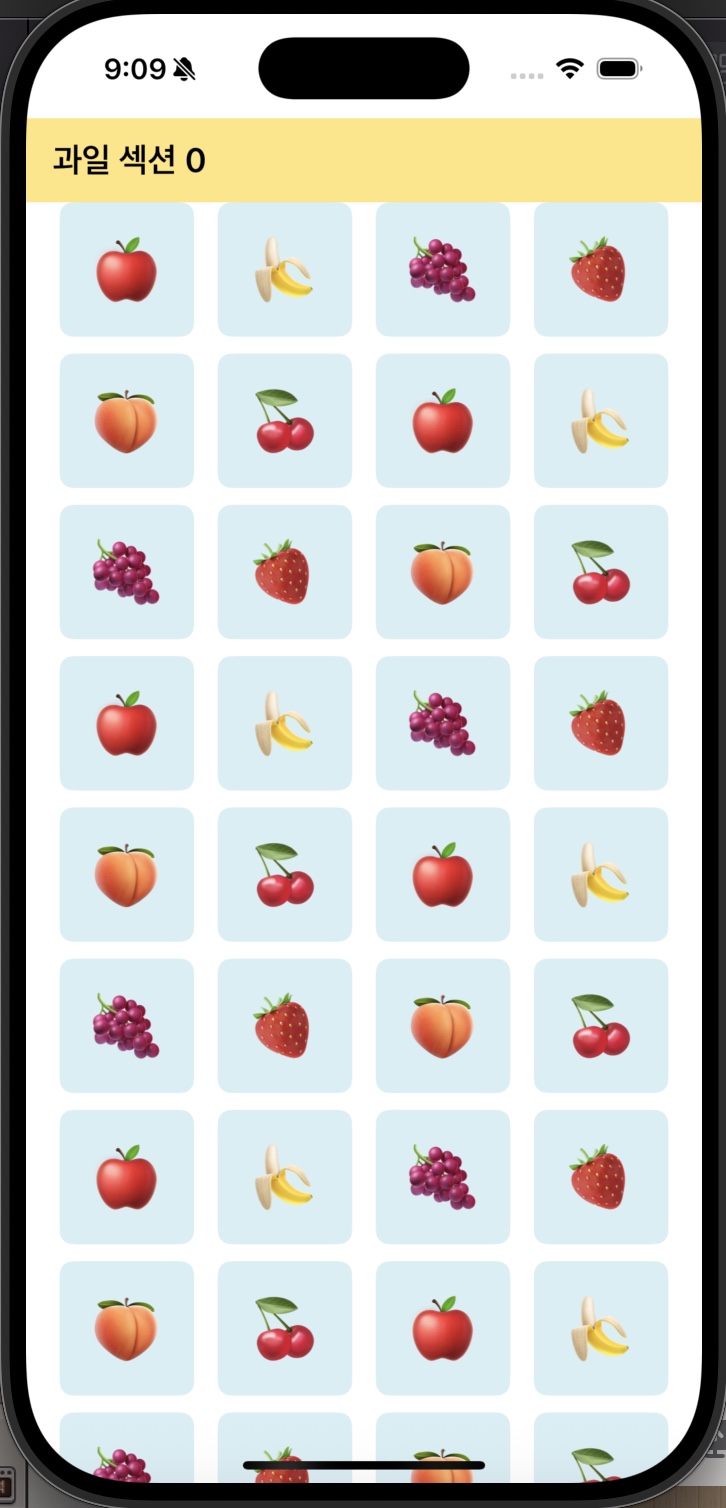
}
결과 화면