들어가며
이번주 AI 교육 과제는 저번주까지 했던 내용이 많았어서, 오늘은 agent와 tool에 대해서 간단하게 정리해보려고 한다.
Agent란
RAG는 "문서 기반 답변"에 강한 특징을 갖고 있는데, "최신 뉴스 또는 외부정보"의 경우 문서에는 없다는 한계가 있다.
따라서 LLM이 필요할 때 외부 도구를 호출하게 만드는 것이 Agent라고 할 수 있다.
Tool이란
Tool은 LLM이 직접 수행할 수 없는 작업 (검색, 계산, API 호출 등)을 대신 수행하여 실제 작업을 하는 함수를 말한다.
예를들어, 뉴스 검색 / DB 조회 / API 호출 등의 작업을 하는 함수가 있다.
def search_news(query: str) -> List[Dict[str, str]]:
            """Search Google News by input keyword"""
            news_tool = GoogleNews()
            return news_tool.search_by_keyword(query, k=5)
즉, 위 함수처럼 구글 뉴스를 검색해오는 함수를 tool이라고 할 수 있다.
Agent와 Tool
Agent는 "질문"을 입력받았을 때, 해당 질문에 대한 답을 얻기 위해 "어떤 Tool"을 사용할지, 언제 호출할 지 결정하는 "두뇌"라고 할 수 있다.
즉, Agent에게 요청을 보내면, agent는 스스로 본인에게 등록된 여러가지 tool중에 답변을 하기에 적합한 tool을 골라서 응답하게 된다.
예시코드로 보는 동작 방법
def _setup_search_agent(self):
        """구글 뉴스 검색 Agent 설정"""

        # google news 검색 tool 등록

        @tool
        def search_news(query: str) -> List[Dict[str, str]]:
            """Search Google News by input keyword"""
            news_tool = GoogleNews()
            return news_tool.search_by_keyword(query, k=5)

        # 도구 리스트
        tools = [search_news]

        ###################################################

        # Agent 프롬프트 생성
        prompt = ChatPromptTemplate.from_messages([
            ("system",
             "You are a helpful assistant. "
             "Make sure to use the `search_news` tool for searching keyword related news."),
            ("human", "{input}"),
            ("placeholder", "{agent_scratchpad}"),
        ])

        # Agent 생성
        agent = create_tool_calling_agent(self.llm, tools, prompt)

        # AgentExecutor 생성 (Agent를 실행하는 역할)
        self.search_agent = AgentExecutor(
            agent=agent,
            tools=tools,
            verbose=False,              # 상세 로그 출력 여부
            handle_parsing_errors=True  # 파싱 에러 자동 처리
        )
tool 등록 방법
@tool
        def search_news(query: str) -> List[Dict[str, str]]:
            """Search Google News by input keyword"""
            news_tool = GoogleNews()
            return news_tool.search_by_keyword(query, k=5)

        # 도구 리스트
        tools = [search_news]
agent를 생성할 때, 해당 agent에서 사용할 tool들을 등록해주게되는데, tool은 함수 정의 위에 @tool 어노테이션을 붙이면 tool로서 정의된다.
그리고 이렇게 tool로 정의된 함수들을 tools라는 도구리스트에 넣어준 뒤, Agent 생성 시 넘겨주면 agent가 사용할 수 있는 도구리스트들이 등록된다.
@tool을 붙이면 해당 함수는 Langchain tool 스펙 (이름/설명/입력 스키마) 으로 래핑이 된다.
이때, 함수 내에 정의한 """ Search ~~~ """ 주석이 tool 설명으로 등록되기에, agent가 tool을 선택할 때 영향을 주게 된다.
Agent 생성 방법
agent = create_tool_calling_agent(self.llm, tools, prompt)agent는 langchain.agent 라이브러리의 create_tool_calling_agent 함수를 통해 생성될 수 있다.
해당 함수는, 두뇌역할을 할 llm과 도구인 tools, 그리고 행동방식을 결정할 prompts를 인자로 받아서 agent를 생성한다.
이 함수는 Tool Calling 방식인데, LLM이 응답을 만들다가 도구호출이 필요하다고 판단할 시에 tool을 사용하는 방식을 말한다.
즉, LLM이 함수호출을 할 수 있게 tools과 프롬프트, LLM을 한 덩어리의 agent로 묶는 단계라고 할 수 있다.
Prompts 설계 방법
 prompt = ChatPromptTemplate.from_messages([
            ("system",
             "You are a helpful assistant. "
             "Make sure to use the `search_news` tool for searching keyword related news."),
            ("human", "{input}"),
            ("placeholder", "{agent_scratchpad}"),
        ])
prompts는 system 메시지 (언제 tool을 써야하는 지 명시) 를 갖는데, 이 메시지를 등록하지 않는다면, llm은 그냥 아는 척 답변하고 tool을 쓰지 않고 넘어갈 수 있다.
그리고 agent_scratchpad란, Agent가 내가 어떤 생각으로 어떤 tool을 호출했고, 결과가 뭐였는지를 기록하고 참조하는 공간이라고 할 수 있다.
이는 tool 호출 -> 결과 반영 -> 최종 답 생성과 같은 멀티스텝 reasoning에서 필수라고 한다.
즉, Agent는 단순히 한 번의 LLM 호출로 끝나지 않고
질문 -> 뉴스 검색 필요 판단 -> 검색 함수 호출 -> 결과 받음 -> 요약 생성 -> 답변 출력이러한 과정을 거치게 되는데, 각 단계마다의 결과를 기억해야하기에 저장하는 공간이 agent_scratchpad 라고 할 수 있다.
실행기(Executor)로 실제 사용가능하게 하기
 self.search_agent = AgentExecutor(
            agent=agent,
            tools=tools,
            verbose=False,              # 상세 로그 출력 여부
            handle_parsing_errors=True  # 파싱 에러 자동 처리
        )
AgentExecutor는 "실제 실행 엔진" 이다.
즉 agent가 실제로 어떤 방식 (상세로그 출력여부, 파싱에러 처리 여부 등)으로 실행될 지를 정하고 agent가 정말 작동할 수 있도록 실행 흐름을 관리하는 엔진이라고 할 수 있다.
이는 Agent가 단일 호출로 끝나지 않고 loop 구조로 동작할 수 있도록 도움을 준다.
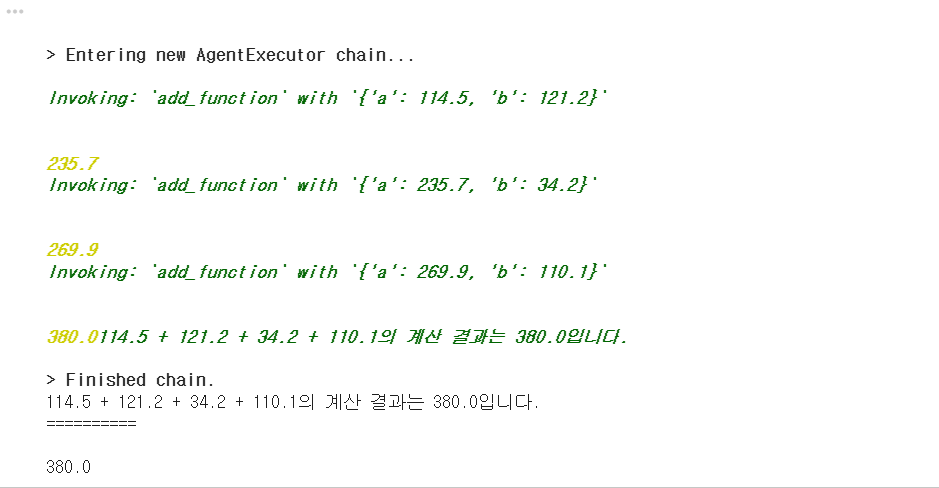
만약 verbose를 True로 선택한다면, 상세로그에서 scratchpad에 등록된 사고 과정을 볼 수도 있다.
결론
배우면 배울수록 신기하기도한데, 정말 다 코드로 이루어져있구나.... 이런식으로 코드를 짜서 작동하는구나 싶은게 많다. 얼른 공부해서 프로젝트 만들어보고싶다~.~