remind
CNN (Convolutional Neural Network)
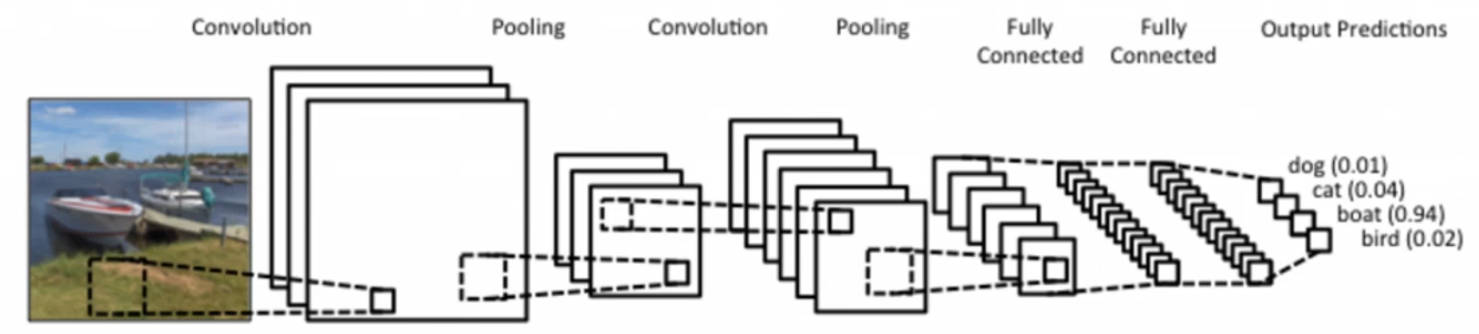
- 이미지 분류에서 가장 많이 쓰이는 방법.
- 일반적으로, convolution, pooling, fully connected 3개의 레이어로 구성된다.
- 이때 convolution, pooling 레이어는 이미지의 모서리, 선, 질감, 모양, 부분 패턴 등 특징을 추출하는 레이어이다. → 즉, 이미지를 숫자로 된 의미 있는 특징 벡터로 변환한다.
- fully connected는 앞에서 뽑힌 특징 벡터를 받아서 어떤 클래스인지 결정하는 분류 레이어이다. → 특징을 각 클래스의 확률로 바꾼다.
2D Convolution Layer
Convolution Layer의 입력 예시
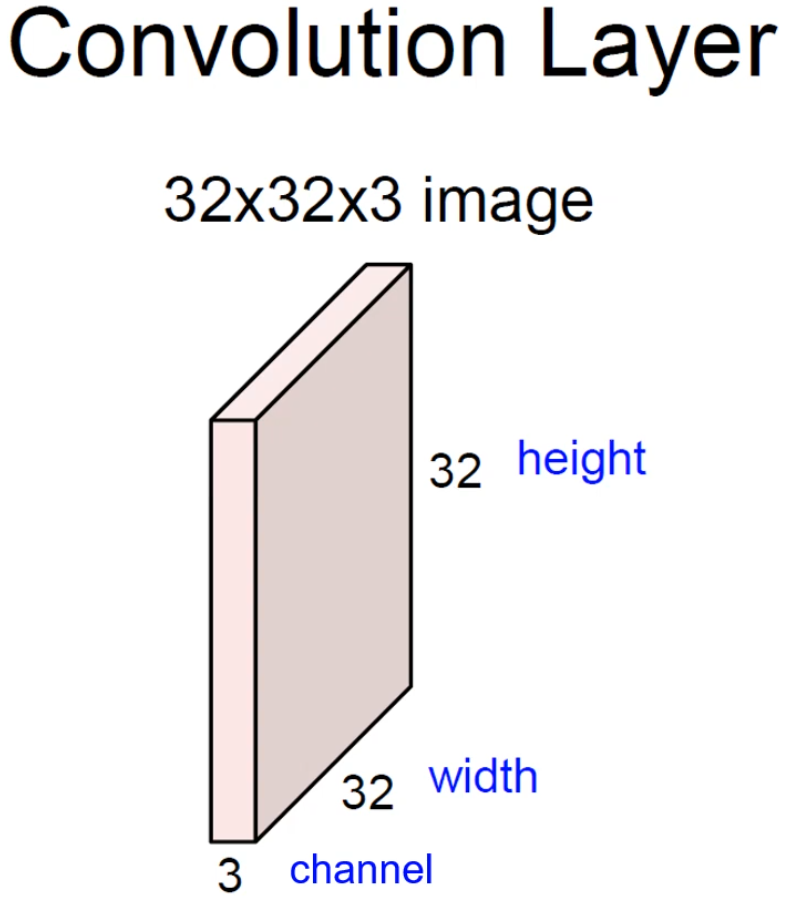
- 32×32×3 image : 일반적인 이미지가 입력으로 들어온 경우.
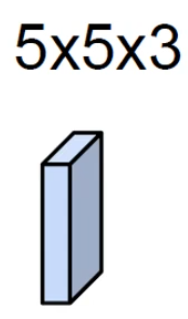
- 5×5×3 filter : 적당한 크기의 필터. 이때 채널의 크기는 항상 입력 채널의 크기와 같다.
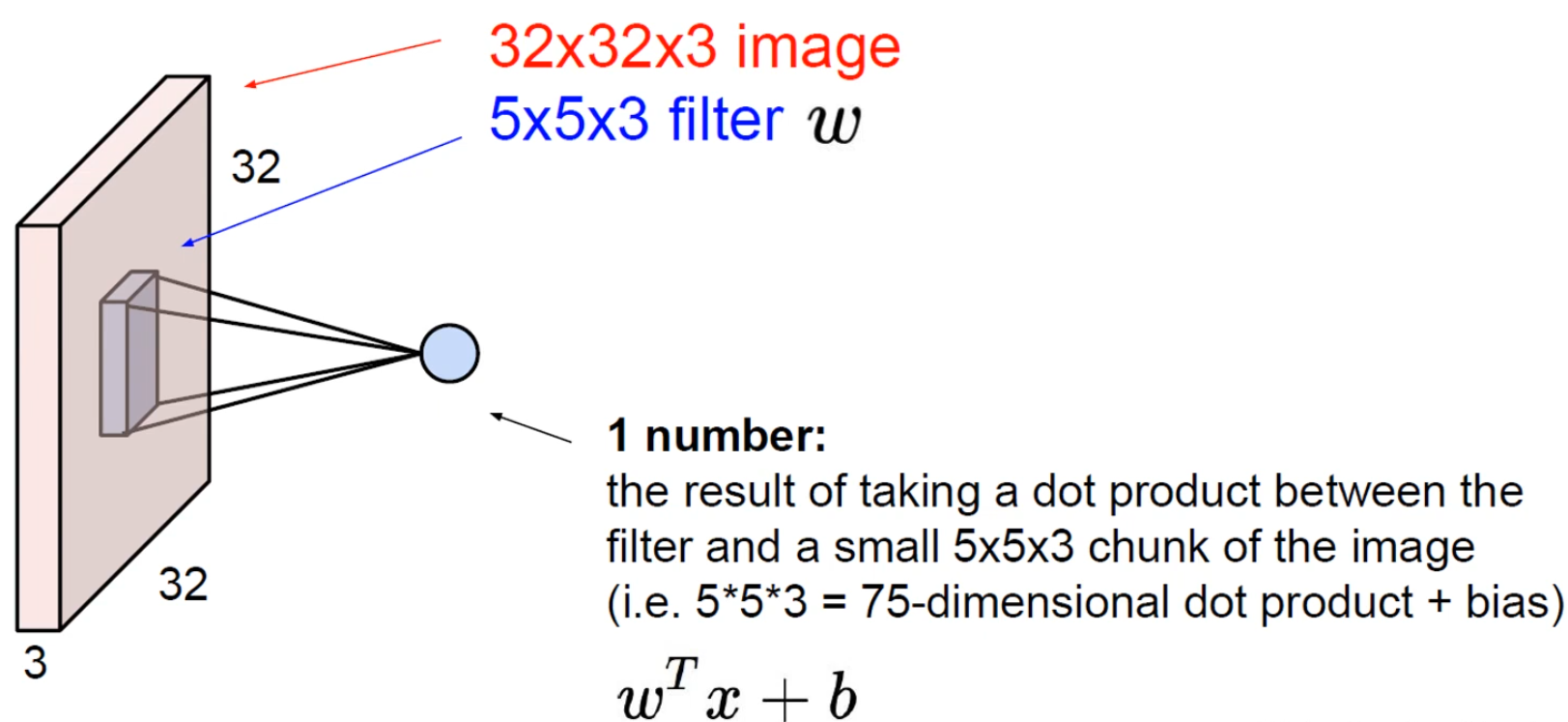
- 입력과 필터를 사용해 내적 연산을 진행하고, 1개의 숫자를 만들게 된다.
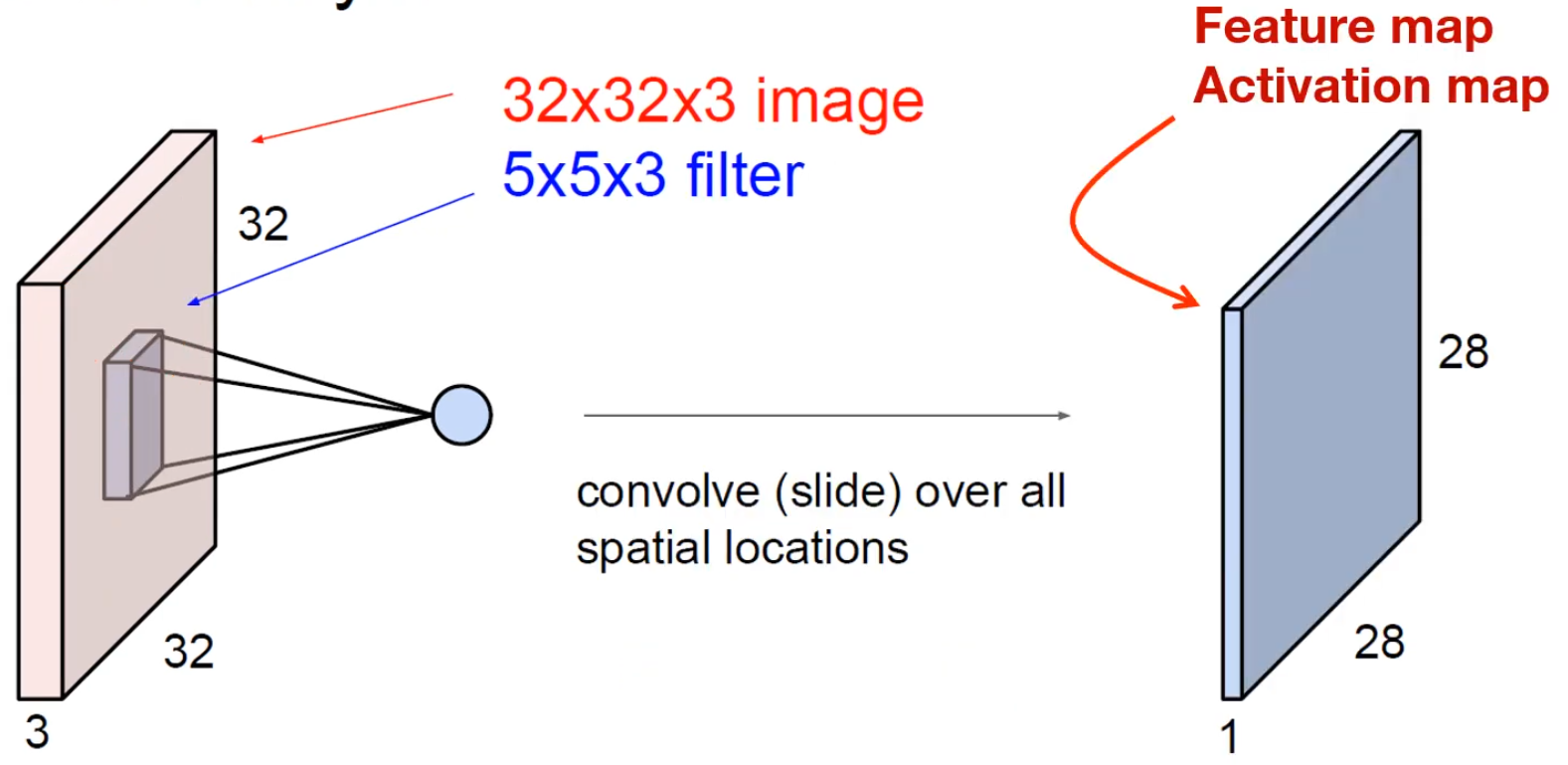
- 모든 연산을 종료하면 다음과 같은 output feature map 1장이 나오게 된다.
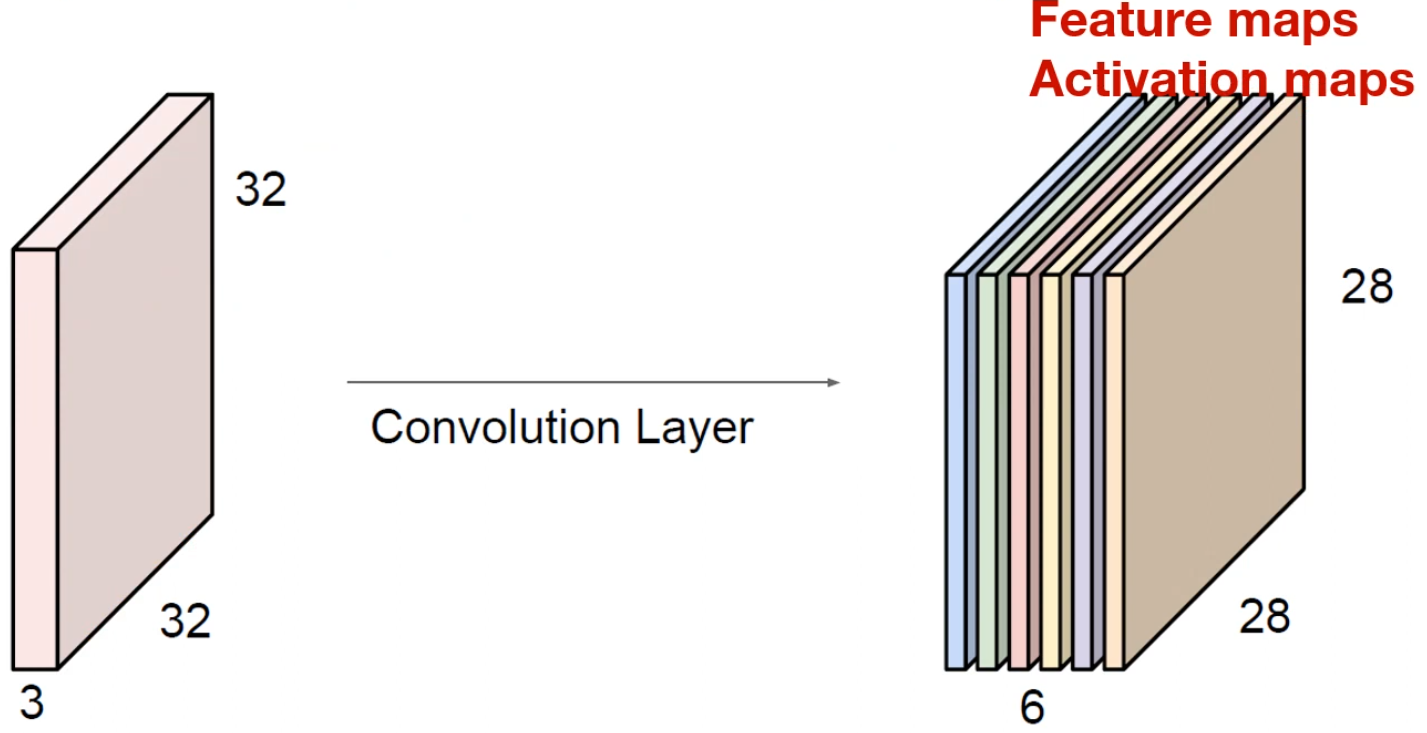
- filter 1개당 1개의 feature map이 나오므로, 6개의 필터를 사용하면 다음과 같이 채널이 6인 feature map이 생성되게 된다.
Computation
-
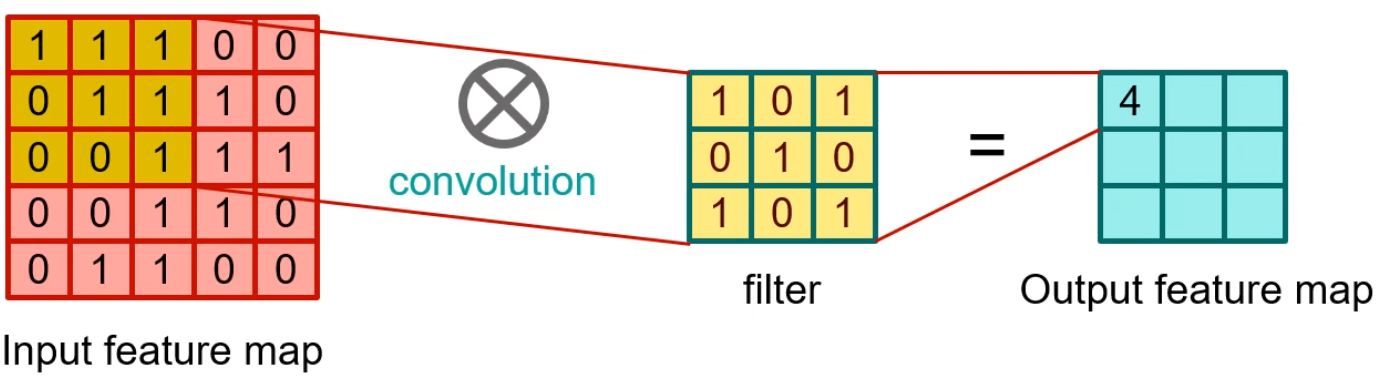
input feature와 filter의 연산 과정이다. input과 filter의 동일한 위치의 값을 곱하고, 그 숫자들을 전부 더하여 1개의 숫자를 만들어낸다.
-
예시:
...
Multi Channel, Many filters
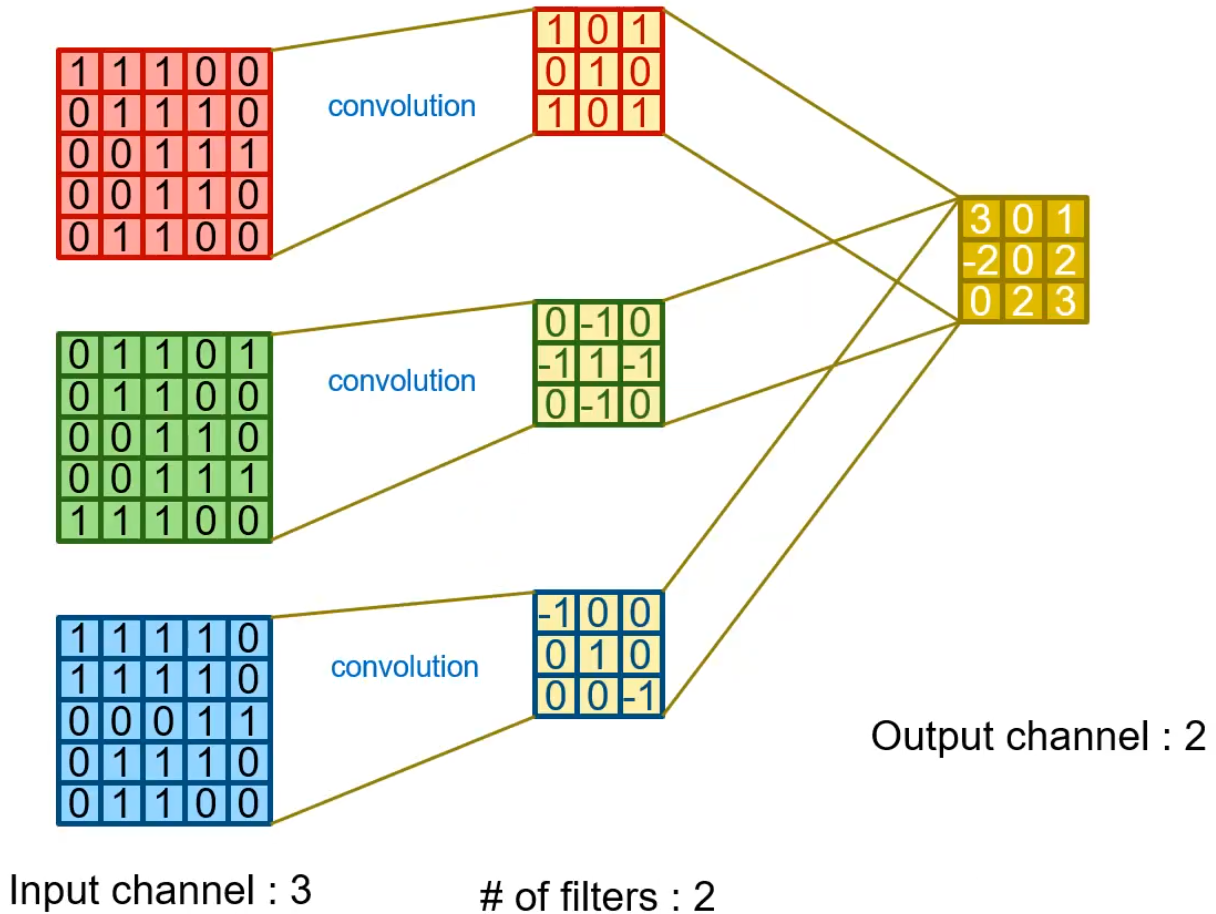
- RGB 하나의 이미지에 대해 2개의 필터를 사용했다.
4D Tensor
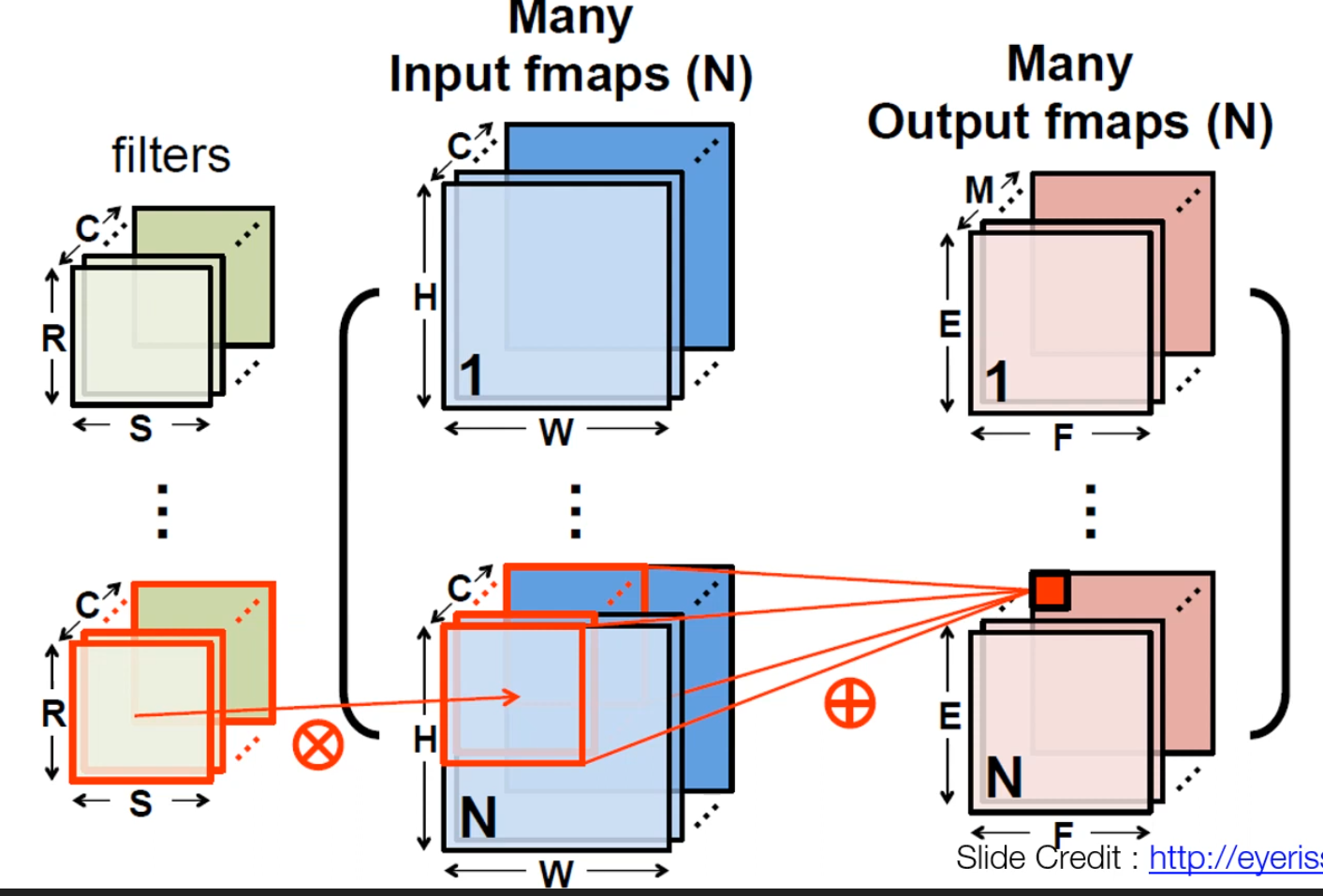
- 이 이미지와 같이 개 filter에 대해 개의 연산을 수행한다.
Activation Function
ReLU
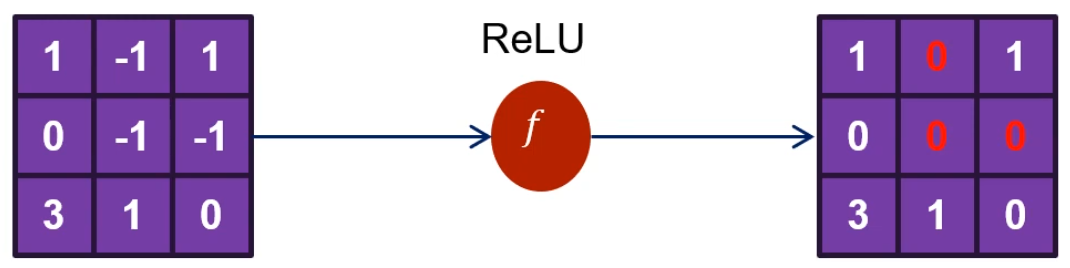
- 0보다 작은 값을 0으로 만든다.
Code 설명
tf.keras.layers.Conv2D 주요 인자
-
filters
정수. 출력 공간의 차원 수(즉, 컨볼루션의 출력 필터 개수). -
kernel_size
정수 하나 또는 길이 2의 정수 튜플/리스트. 2D 컨볼루션 윈도의 높이와 너비를 지정. 하나의 정수로 주면 모든 공간 차원에 동일한 값을 사용. -
strides
정수 하나 또는 길이 2의 정수 튜플/리스트. 높이와 너비 방향의 스트라이드를 지정한다. 하나의 정수로 주면 모든 공간 차원에 동일한 값을 사용한다.
단, stride 값을 1이 아닌 값으로 지정하면,dilation_rate도 1이 아닌 값으로 지정하는 것과는 호환되지 않는다. -
padding
"valid"또는"same"중 하나(대소문자 구분 없음). -
data_format
문자열."channels_last"(기본값) 또는"channels_first". 입력 차원 순서를 결정한다.channels_last→ 입력 형태:(batch, height, width, channels)channels_first→ 입력 형태:(batch, channels, height, width)
기본값은 사용자 Keras 설정 파일(~/.keras/keras.json)의image_data_format값을 따르고, 설정한 적이 없다면 기본은"channels_last"이다.
-
activation
사용할 활성화 함수. 아무것도 지정하지 않으면 활성화를 적용하지 않으며(즉, 선형 활성화), 이다. -
use_bias
레이어가 바이어스 벡터를 사용할지 여부를 나타내는 불리언이다. -
kernel_initializer
커널 가중치 행렬을 위한 이니셜라이저이다. -
bias_initializer
바이어스 벡터를 위한 이니셜라이저이다. -
kernel_regularizer
커널 가중치 행렬에 적용되는 정규화 함수이다. -
bias_regularizer
바이어스 벡터에 적용되는 정규화 함수이다.
padding 정리
| 구분 | Valid | Same |
|---|---|---|
| Value | ||
| Illustration | 패딩 없이 커널이 입력 내부만 스캔 | 위아래·좌우에 패딩을 추가해 출력 특성맵의 공간 크기가 이 되도록 맞춤 |
| Purpose | • 패딩이 없음 • 크기가 딱 나누어떨어지지 않으면 마지막 위치의 컨볼루션이 생략됨 | • 출력 크기를 수식적으로 다루기 편하도록 패딩 추가 • 흔히 ‘half padding’이라고도 부름 |
Code
1) import
import numpy as np
import tensorflow as tf
from tensorflow import keras
import matplotlib.pyplot as plt

print(tf.__version__)
print(keras.__version__)

tf.enable_eager_execution()
2) toy image
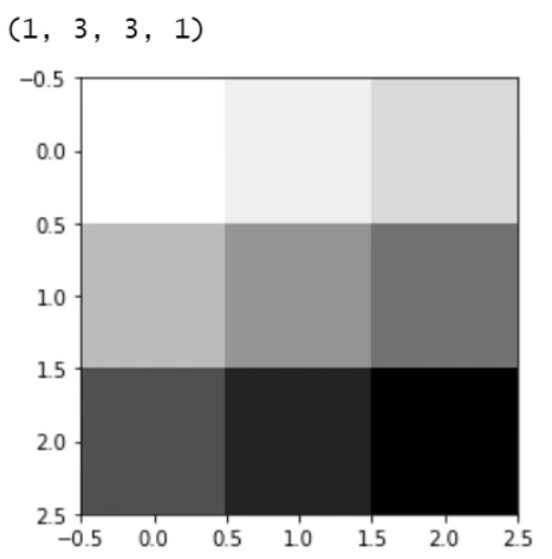
image = tf.constant(
    [
        [[1], [2], [3]],
        [[4], [5], [6]],
        [[7], [8], [9]],
    ],
    dtype=np.float32,
)

print(image.shape)

plt.imshow(image.numpy().reshape(3, 3), cmap="Greys")
plt.show()
3) Simple convolution Layer – No Padding
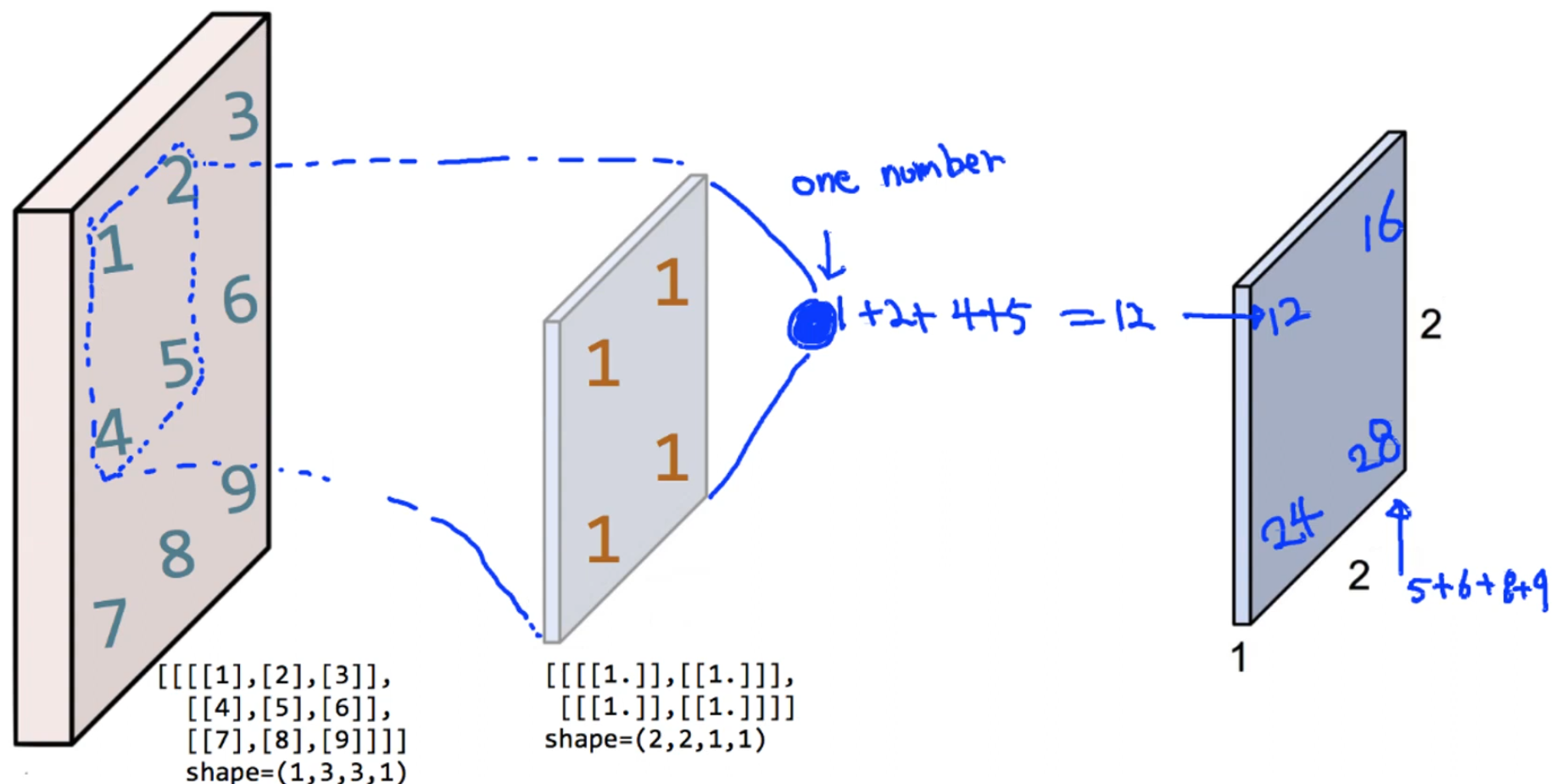
print("image.shape", image.shape)

weight = np.array(
    [
        [[[1.]], [[1.]]],
        [[[1.]], [[1.]]],
    ]
)
print("weight.shape", weight.shape)

weight_init = tf.constant_initializer(weight)

conv2d = keras.layers.Conv2D(
    filters=1,
    kernel_size=2,
    padding="VALID",
    kernel_initializer=weight_init,
)(image)

print("conv2d.shape", conv2d.shape)
print(conv2d.numpy().reshape(2, 2))

plt.imshow(conv2d.numpy().reshape(2, 2), cmap="gray")
plt.show()
4) Simple convolution Layer – add Padding
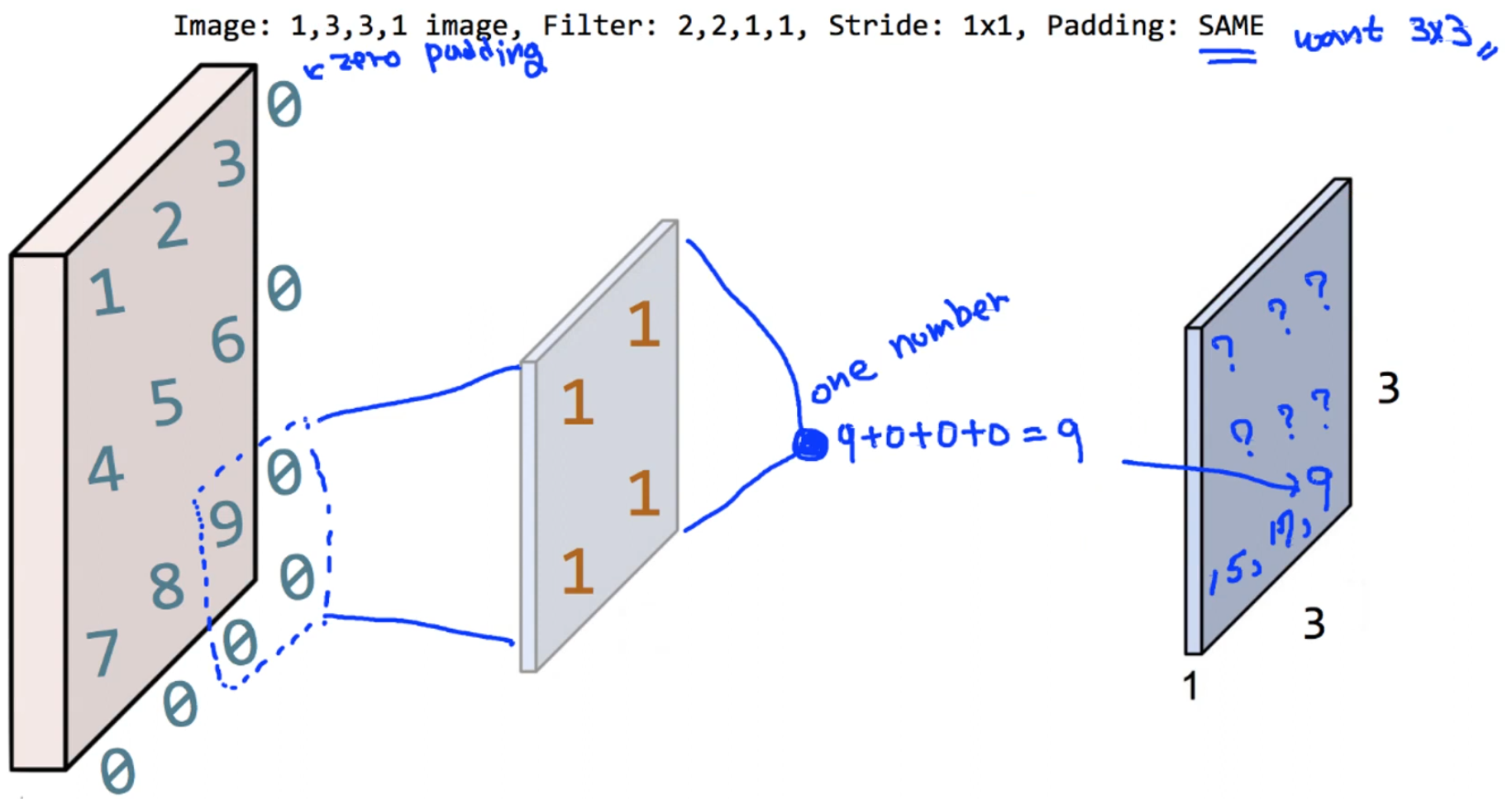
print("image.shape", image.shape)

weight = np.array(
    [
        [[[1.]], [[1.]]],
        [[[1.]], [[1.]]],
    ]
)
print("weight.shape", weight.shape)

weight_init = tf.constant_initializer(weight)

conv2d = keras.layers.Conv2D(
    filters=1,
    kernel_size=2,
    padding="SAME",
    kernel_initializer=weight_init,
)(image)

print("conv2d.shape", conv2d.shape)
print(conv2d.numpy().reshape(3, 3))

plt.imshow(conv2d.numpy().reshape(3, 3), cmap="gray")
plt.show()
5) 3 Filters
print("image.shape", image.shape)

weight = np.array(
    [
        [[[1., 10., -1.]], [[1., 10., -1.]]],
        [[[1., 10., -1.]], [[1., 10., -1.]]],
    ]
)
print("weight.shape", weight.shape)

weight_init = tf.constant_initializer(weight)

conv2d = keras.layers.Conv2D(
    filters=3,
    kernel_size=2,
    padding="SAME",
    kernel_initializer=weight_init,
)(image)

print("conv2d.shape", conv2d.shape)

feature_maps = np.swapaxes(conv2d.numpy(), 0, 3)

for i, feature_map in enumerate(feature_maps):
    print(feature_map.reshape(3, 3))
    plt.subplot(1, 3, i + 1)
    plt.imshow(feature_map.reshape(3, 3), cmap="gray")

plt.show()
Pooling
-
Max Pooling
필터의 범위 안에서 가장 큰 숫자를 선택한다.
⇒ 중요한 정보를 뽑아서 사이즈를 줄였으므로 Sub Sampling이라고도 부른다.
⇒ 주로 이 max pooling을 많이 쓰는데, 이는 숫자가 클수록 convolution 필터가 찾고자 했던 특징과 더 잘 맞기 때문이다.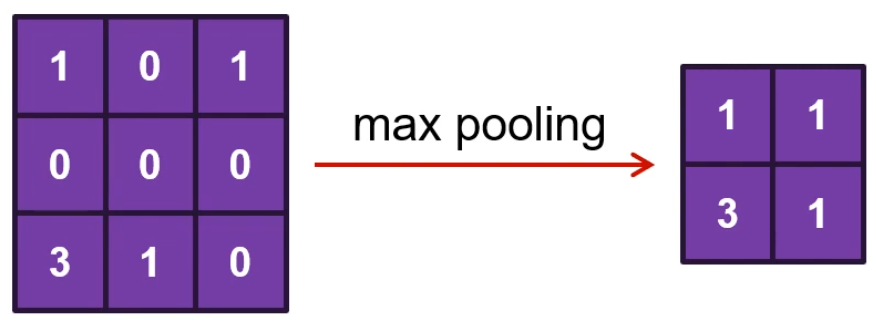
-
Average Pooling
필터의 범위 안 숫자의 평균을 가진다.
code
1) tf.keras.layers.MaxPool2D
__init__(
    pool_size=(2, 2),
    strides=None,
    padding="valid",
    data_format=None,
    **kwargs
)
2) Max Pooling
image = tf.constant(
    [
        [
            [[4], [3]],
            [[2], [1]],
        ]
    ],
    dtype=np.float32,
)

pool = keras.layers.MaxPool2D(
    pool_size=(2, 2),
    strides=1,
    padding="VALID",
)(image)
# padding을 "SAME"으로 바꾸면 처음 입력과 같은 크기의 결과가 나온다.
# pool = keras.layers.MaxPool2D(pool_size=(2, 2), strides=1, padding="SAME")(image)

print(pool.shape)
print(pool.numpy())
3) loading MNIST data
mnist = keras.datasets.mnist
class_names = ["0", "1", "2", "3", "4", "5", "6", "7", "8", "9"]

(train_images, train_labels), (test_images, test_labels) = mnist.load_data()

train_images = train_images.astype(np.float32) / 255.0
test_images = test_images.astype(np.float32) / 255.0

img = train_images[0]
plt.imshow(img, cmap="gray")
plt.show()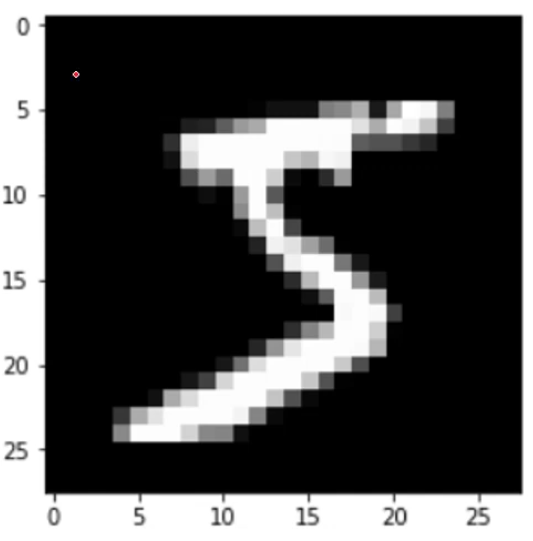
4) Convolution Layer
img = img.reshape(-1, 28, 28, 1)
# img는 numpy array로 반환되기 때문에 tensor로 변환해야 한다.
img = tf.convert_to_tensor(img)

weight_init = keras.initializers.RandomNormal(stddev=0.01)

conv2d = keras.layers.Conv2D(
    filters=5,
    kernel_size=3,
    strides=(2, 2),
    padding="SAME",
    kernel_initializer=weight_init,
)(img)

print(conv2d.shape)

feature_maps = np.swapaxes(conv2d.numpy(), 0, 3)
for i, feature_map in enumerate(feature_maps):
    plt.subplot(1, 5, i + 1)
    plt.imshow(feature_map.reshape(14, 14), cmap="gray")

plt.show()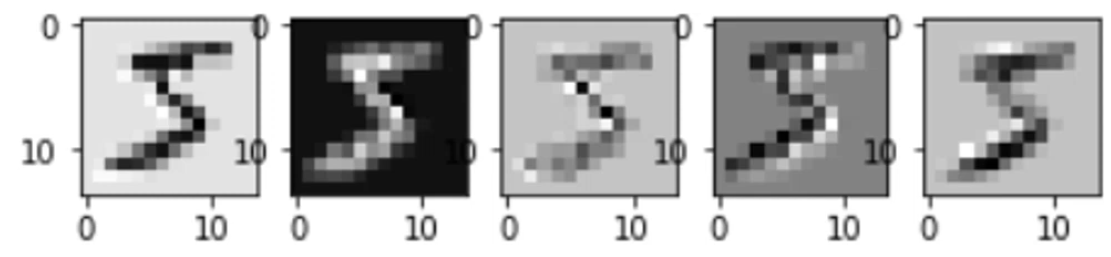
5) Pooling Layer
pool = keras.layers.MaxPool2D(
    pool_size=(2, 2),
    strides=(2, 2),
    padding="SAME",
)(conv2d)

print(pool.shape)

feature_maps = np.swapaxes(pool.numpy(), 0, 3)
for i, feature_map in enumerate(feature_maps):
    plt.subplot(1, 5, i + 1)
    plt.imshow(feature_map.reshape(7, 7), cmap="gray")

plt.show()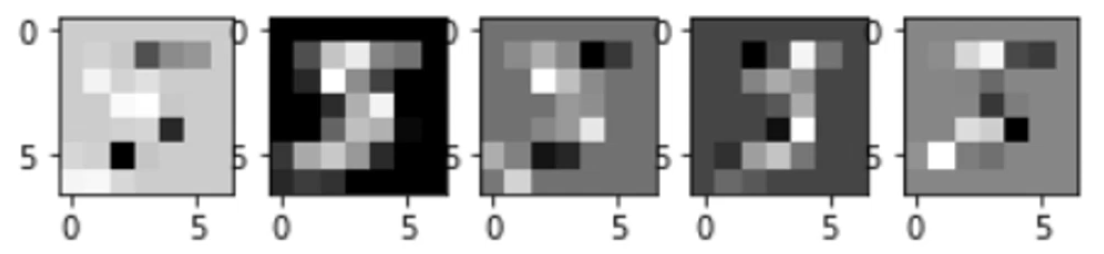
6) Fully Connected Layer
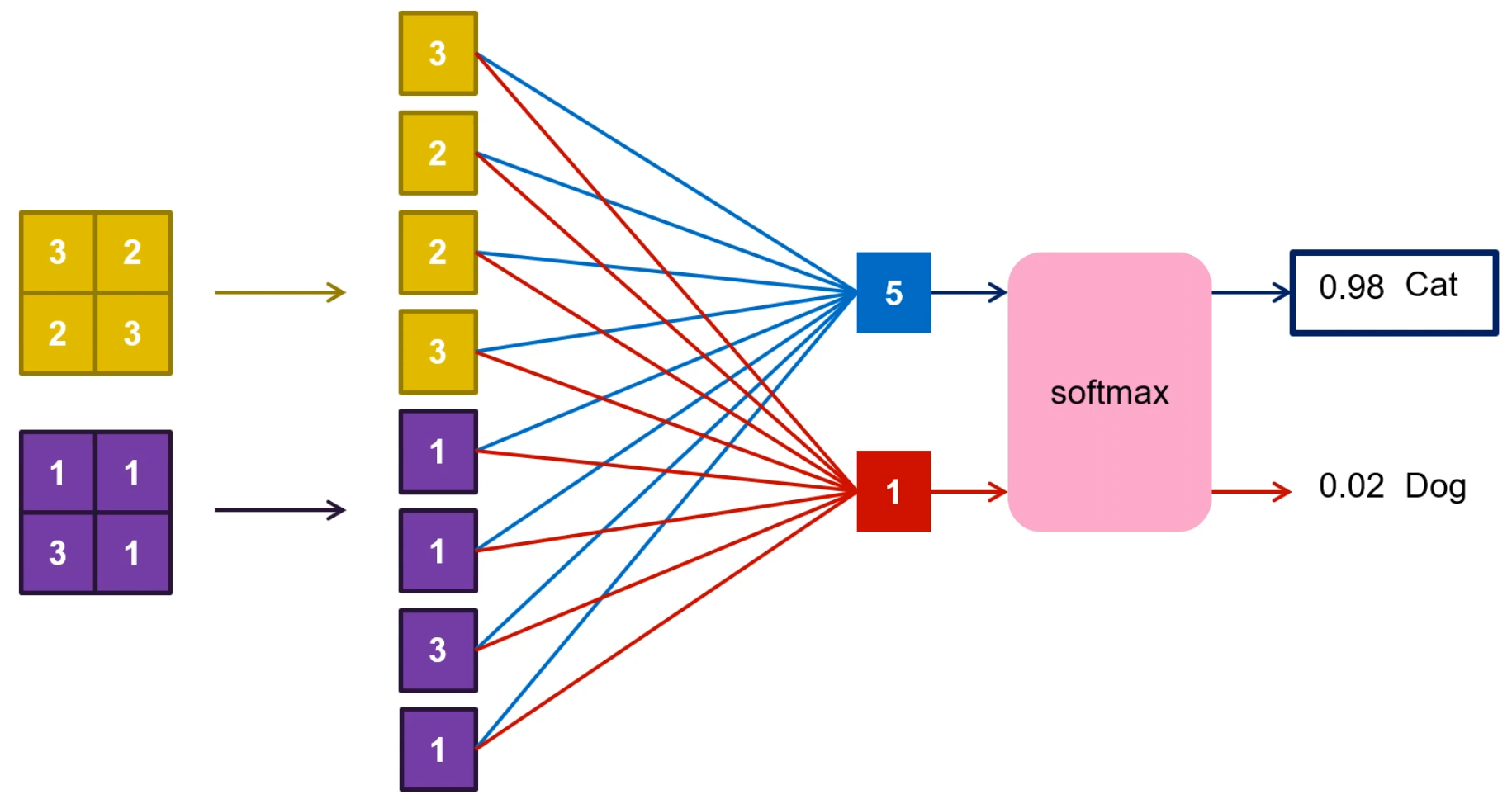
⇒ pooling 된 결과를 벡터 형태로 쭉 펴준 뒤, 전부 연결해서 FC로 만든다.
정리
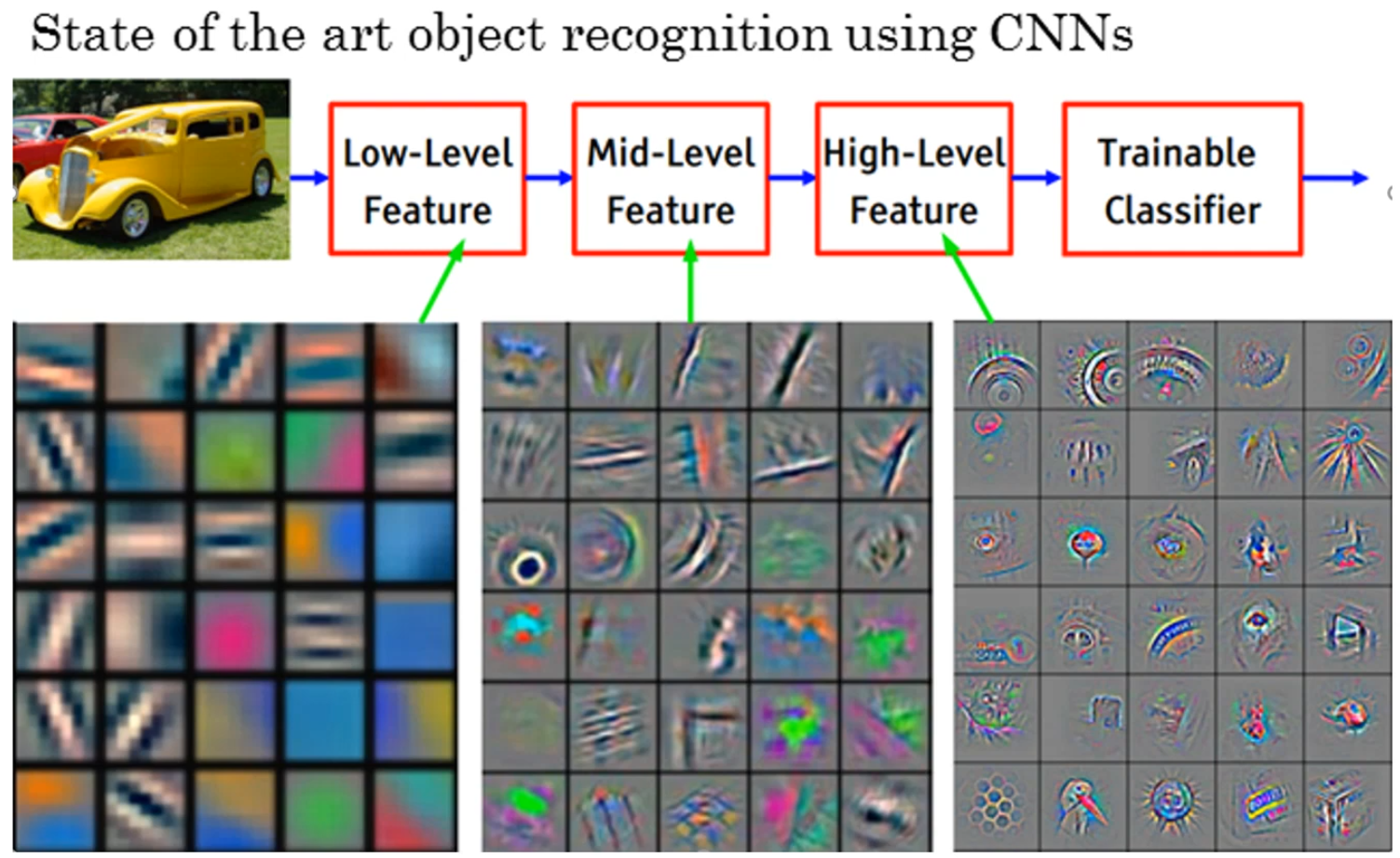
CNN은 convolution layer, pooling layer를 통해 feature를 뽑아내는 feature extraction 역할을 하고 마지막에 fully connected에서 실제 classification 하는 역할을 한다.
출처: 모두를 위한 딥러닝 강좌 2
https://www.youtube.com/watch?v=7eldOrjQVi0&list=PLQ28Nx3M4Jrguyuwg4xe9d9t2XE639e5C
