캔버스 만들기
  <body>
 	 <script src="app.js"></script>
    <canvas id="pong" width="600" height="400"></canvas>
  </body>
처음에 이렇데 했는데 에러코드로 Cannot read property 'getContext' of null, using canvas 만 뜨고 죽어도 캔버스가 안만들어 졌다.
문제점은 자바스크립트가 html이 로드되기전 먼저 실행되서 였다. 그래서
  <body>
    <canvas id="pong" width="600" height="400"></canvas>
    <script src="app.js"></script>
  </body>
스크립트를 나중에 불러주니 캔버스가 잘 만들어 졌다.
캔버스 부르기(js에서)
const canvas = document.getElementById("idname");
const ctx = canvas.getContext("2d");
이렇게 html 에서 <canvas> 태그를 이용해서 만든 캔버스를 js에서 사용할 수 있도록 부른다.
캔버스에서 사각형 만들기
ctx.rect(x,y,width,height)x: x 축이 위치할 곳 지정
y:y 축이 위치할 곳 지정
width: 넓이
height: 높이
캔버스에서 원만들기
ctx.arc(x, y, radius, startAngle, endAngle, countClockwise)
--------------------------------------------------------
function ball(x, y, r, color) {
  ctx.fillStyle = color;
  ctx.beginPath();
  ctx.arc(x, y, r, 0, Math.PI * 2, false);
  ctx.closePath();
  ctx.fill();
}

ball(300, 200, 100, "green");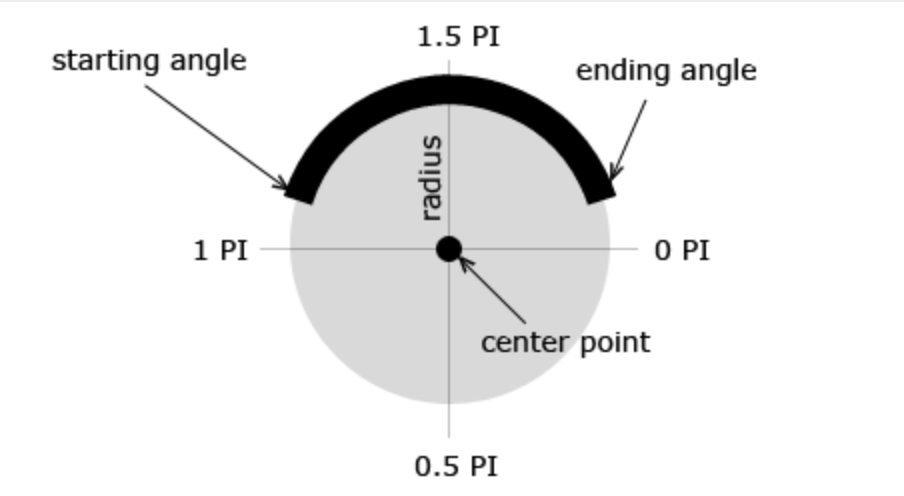
The arc() method creates a circular arc centered at (x, y) with a radius of radius. The path starts at startAngle, ends at endAngle, and travels in the direction given by anticlockwise (defaulting to clockwise).
- arc() 원을 만드는 method이다.
x와 y는 중심점을 나타낸다.
radius는 호의 반지름을 나타낸다.
startAngle와 endAngle는 호의 시작점과 끝점을 나타낸다.위 사진에서 오른쪽은 0PI, 아래는 0.5PI 등등 있는데 이 숫자로 시작점(startAngle)을 어디로 할지 정한다.Math.PI는 π를 나타냄.(π * 2 Radians = 360 degrees)
counterClockwise는 반전되는 효과를 나타냄.
-
beginPath()는 선을 시작하거나 현재 선을 reset한다.
-
closePath()는 현재 지점에서 시작지점으로 선을 만든다.
stroke() method는 캔버스에 선을 그리고, fill() method는 도형을 색칠한다(기본 색상은 검정색)
글씨 넣기
ctx.font = "30px Comic Sans MS";
ctx.fillStyle = "pink";
ctx.textAlign = "center";
ctx.fillText("score", canvas.width / 4, 30);
-
ctx.font = ""
property 종류
font-style,font-variant,font-weight,font-size/line-height,font-family 등등 -
ctx.fillStyle = " "
색 설정
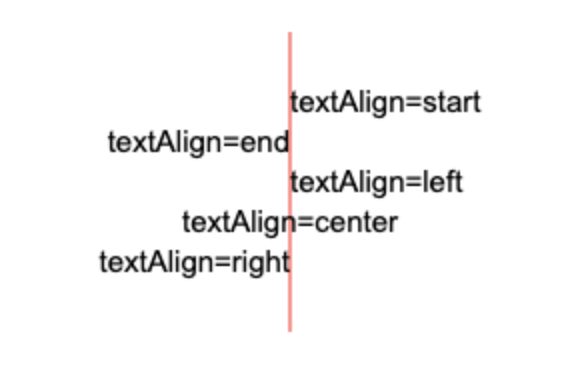
- ctx.textAlign="center|end|left|right|start";
고정된 기준으로 그 위치를 잡는다.
- ctx.fillText(text,x,y,maxWidth);
글씨 넣기
maxWidth는 optional