
- 템플릿 조각
- 공통 코드 조각을 가지고와서 원하는 부분에 추가 사용
- 템플릿 레이아웃
- 현재 코드 조각을 레이아웃에 넘겨서 사용
TemplateController
@Controller
@RequestMapping("/template")
public class TemplateController {

    @GetMapping("/layout")
    public String layout() {
        return "template/layout/layoutMain";
    }
}
template/layout/base.html
<html xmlns:th="http://www.thymeleaf.org">
<head th:fragment="common_header(title,links)">
  <title th:replace="${title}">레이아웃 타이틀</title>

  <!-- 공통 -->
  <link rel="stylesheet" type="text/css" media="all" th:href="@{/css/awesomeapp.css}">
  <link rel="shortcut icon" th:href="@{/images/favicon.ico}">
  <script type="text/javascript" th:src="@{/sh/scripts/codebase.js}"></script>

  <!-- 추가 -->
  <th:block th:replace="${links}" />
  </head>
template/layout/layoutMain.html
<!DOCTYPE html>
<html xmlns:th="http://www.thymeleaf.org">
<head th:replace="template/layout/base :: common_header(~{::title},~{::link})">
    <title>메인 타이틀</title>
    <link rel="stylesheet" th:href="@{/css/bootstrap.min.css}">
    <link rel="stylesheet" th:href="@{/themes/smoothness/jquery-ui.css}">
</head>
<body>
메인 컨텐츠
</body>
</html>
실행 결과
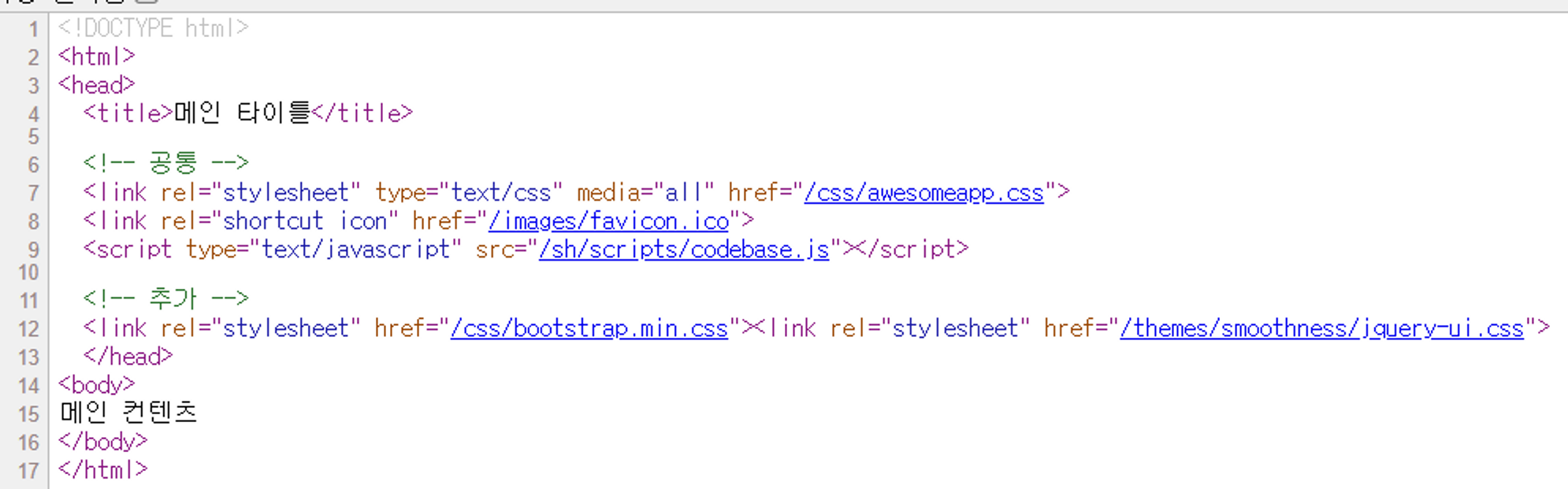
common_header(~{::title},~{::link})::title: 현재 페이지의 title 태그들을 전달한다.::link: 현재 페이지의 link 태그들을 전달한다.
layoutMain에서 <head th:replace="template/layout/base :: common_header(~{::title},~{::link})"> 호출
base의 <head th:fragment="common_header(title,links)"> ** 로 layoutMain** <head> 를 replace
레이아웃 파일(base)에 현재 코드 조각을 레이아웃 파일에 넘겨서 변경하는 하는 방식이다.
<html> 에 th:replace 를 써서 전체에 템플릿 레이아웃을 적용할 수 있다.

Just for fun