
공통영역을 템플릿화 하여 필요한 부분에서 해당 템플릿을 메서드처럼 불러 설정하는 템플릿 조각과 레이아웃 기능을 지원한다.
공통영역을 모듈화 시킨다.
TemplateController
package hello.thymeleaf.basic;

import org.springframework.stereotype.Controller;
import org.springframework.web.bind.annotation.GetMapping;
import org.springframework.web.bind.annotation.RequestMapping;

@Controller
@RequestMapping("/template")
public class TemplateController {

    @GetMapping("/fragment")
    public String template() {
        return "template/fragment/fragmentMain";
    }
}
template/fragment/footer.html
<!DOCTYPE html>
<html xmlns:th="http://www.thymeleaf.org">
<body>

<footer th:fragment="copy">
  푸터 자리 입니다.
</footer>

<footer th:fragment="copyParam (param1, param2)">
  <p>파라미터 자리 입니다.</p>
  <p th:text="${param1}"></p>
  <p th:text="${param2}"></p>
</footer>

</body>
</html>
template/fragment/fragmentMain.html
<!DOCTYPE html>
<html xmlns:th="http://www.thymeleaf.org">
<head>
  <meta charset="UTF-8">
  <title>Title</title>
</head>
<body>
<h1>부분 포함</h1>

<h2>부분 포함 insert</h2>
<div th:insert="~{template/fragment/footer :: copy}"></div>

<h2>부분 포함 replace</h2>
<div th:replace="~{template/fragment/footer :: copy}"></div>

<h2>부분 포함 단순 표현식</h2>
<div th:replace="template/fragment/footer :: copy"></div>

<h1>파라미터 사용</h1>
<div th:replace="~{template/fragment/footer :: copyParam ('데이터1', '데이터2')}"></div>

</body>
</html>
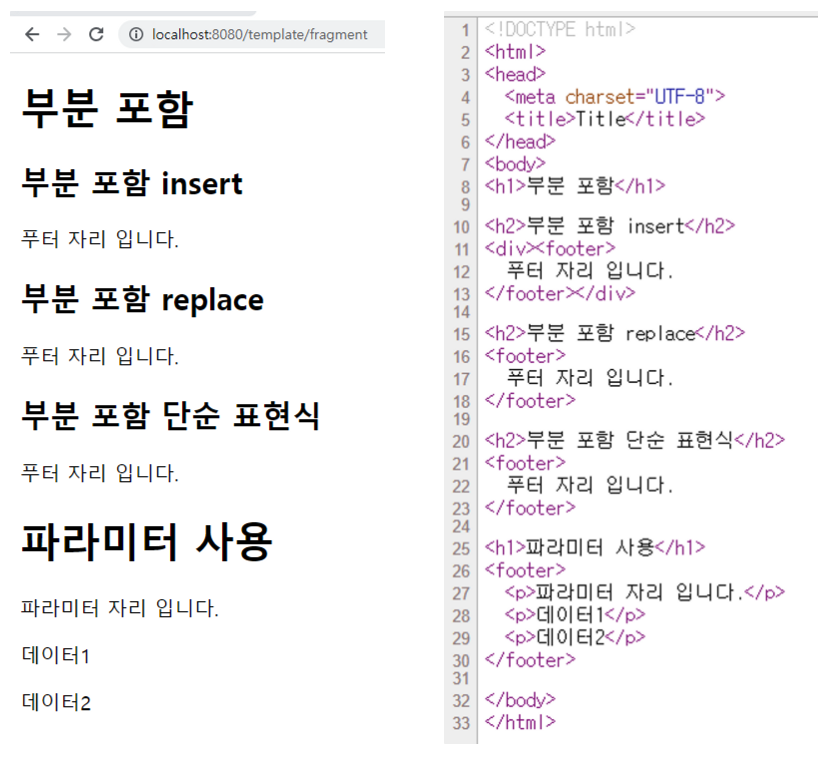
실행결과
부분 포함 insert
<div th:insert="~{template/fragment/footer :: copy}"></div>template/fragment/footer :: copy 는 template/fragment/footer.html 템플릿에 있는 th:fragment="copy" 라는 부분을 템플릿 조각으로 가져와서 사용한다는 의미이다.
th:insert 를 사용하면 현재 태그( div ) 내부에 추가한다.
부분 포함 replace
<div th:replace="~{template/fragment/footer :: copy}"></div>th:replace 를 사용하면 현재 태그( div )를 대체한다.
현재 태그( div )는 사라진다.
부분 포함 단순 표현식
<div th:replace="template/fragment/footer :: copy"></div>~{...} 를 사용하는 것이 원칙이지만 템플릿 조각을 사용하는 코드가 단순하면 이 부분을 생략할 수 있다.
파라미터 사용
파라미터를 전달해서 동적으로 조각을 렌더링 할 수도 있다.
<div th:replace="~{template/fragment/footer :: copyParam ('데이터1', '데이터2')}"></div>
Just for fun