개요
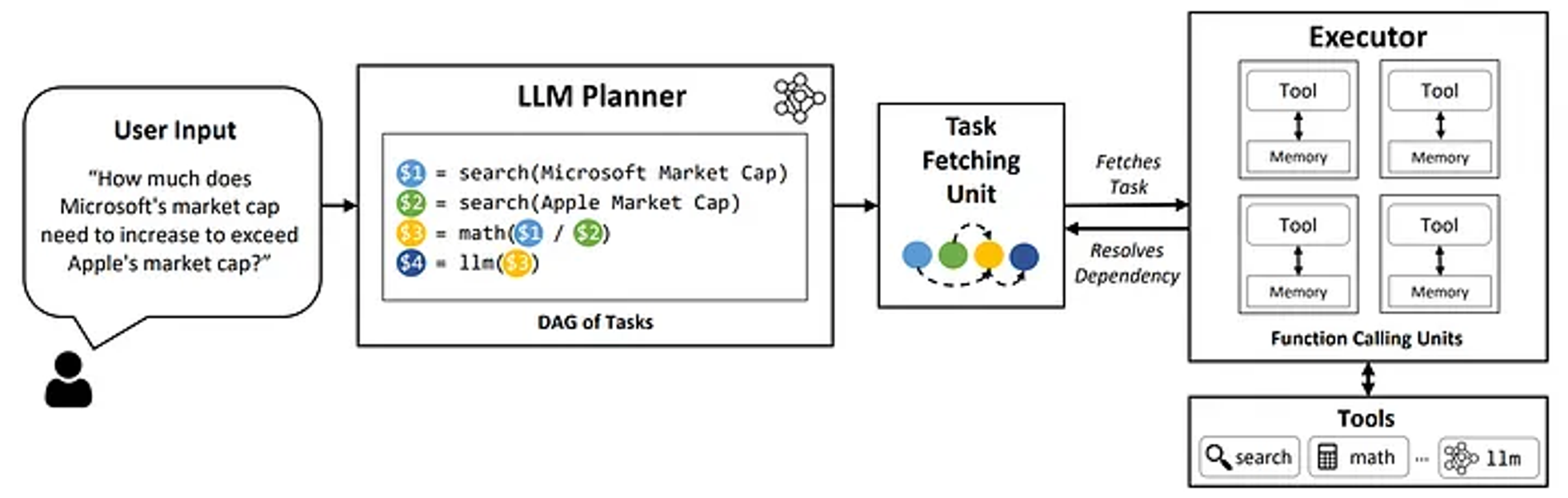
- Function calling이란, 사용자의 요청 프롬프트에 답하기 위해 predefined된 외부 함수를 호출하도록 모델에 지시하는 기능
- 즉 LLM과 외부 도구를 심리스하게 연결하는 메커니즘
Function Calling Mechanism
- 유저 프롬프트 분석
- 사용자가 LLM에 프롬프트를 제공하면, 모델은 function calling이 필요한지를 판단
- 프롬프트가 특정 액션(e.g., 지금 날씨 어때?)을 요구하는 경우, LLM은 함수를 호출할 필요가 있다고 판단함
- Function Argument 생성
- LLM이 함수 호출이 필요하다고 판단한 경우, JSON과 같은 structured representation 형태로 필요한 arguments를 생성
- 이러한 arguments는 유저 프롬프트 내 문맥에 따라 결정됨
- 외부 실행
- 당연하게도 LLM 자체에서 함수를 실행할 수는 없고, 외부 툴이나 API와 통신하면서 요청된 액션에 대한 답변을 구하게 됨
Use Cases
- 대화형 에이전트
사용자: “지금 성동구 날씨 어때?”
LLM:
get_current_weather(location: string, unit: ‘celsius’ | ‘fahrenheit’)LLM: 성동구 날씨는 맑음입니다!
- Context-aware한 답변을 위해 외부 툴 사용
- 데이터 추출 및 태깅
사용자: 이 위키피디아 문서에서 ‘사람 이름’ 추출해줘
LLM: 홍길동 <|sep|> 김정은 <|sep|> 루이 암스트롱
LLM:
transform_extracted_tokens_to_data(llm_response: string, separator: ‘<|sep|>’)LLM:
추출_인물_데이터.csv제공- Unstructured text → Structured data
- 답변을 위해 외부 툴을 사용하는 것이 아닌, LLM의 답변을 외부 툴을 통해 구조화하는 방식
- 대화형 지식 검색 엔진
사용자: ‘일론 머스크’에 대해 설명해줘
LLM:
find_db(entity: string)LLM:
find_info(database: db, entity: string)LLM: 일론 머스크는 미국의 미치광이 과학자이자 정신 나간 기업가로..
Models Supporting Function Calling
- OpenAI GPT: OpenAI Platform
- Google Gemini: Introduction to function calling | Generative AI on Vertex AI | Google Cloud
- Anthropic Claude: Tool use (function calling) - Anthropic
- Other Open-Weight Models
Function Calling Prompt Example
- meetkai/functionary-small-v3.2(Checkpoint weight: meta-llama/Meta-Llama-3.1-8B-Instruct)의 예시
from transformers import AutoModelForCausalLM, AutoTokenizer tokenizer = AutoTokenizer.from_pretrained("meetkai/functionary-small-v3.2") model = AutoModelForCausalLM.from_pretrained("meetkai/functionary-small-v3.2", device_map="auto", trust_remote_code=True) tools = [ { "type": "function", "function": { "name": "get_current_weather", "description": "Get the current weather", "parameters": { "type": "object", "properties": { "location": { "type": "string", "description": "The city and state, e.g. San Francisco, CA" } }, "required": ["location"] } } } ] messages = [{"role": "user", "content": "What is the weather in Istanbul and Singapore respectively?"}] final_prompt = tokenizer.apply_chat_template(messages, tools, add_generation_prompt=True, tokenize=False) inputs = tokenizer(final_prompt, return_tensors="pt").to("cuda") pred = model.generate_tool_use(**inputs, max_new_tokens=128, tokenizer=tokenizer) print(tokenizer.decode(pred.cpu()[0])) - 위와 같이 모델에 입력을 할 때,
tokenizer.apply_chat_template에tools템플릿을 적용한final_prompt의 형태는 다음과 같이 구성됨<|start_header_id|>system<|end_header_id|> You are capable of executing available function(s) if required. Only execute function(s) when absolutely necessary. Ask for the required input to:recipient==all Use JSON for function arguments. Respond in this format: >>>${recipient} ${content} Available functions: // Supported function definitions that should be called when necessary. namespace functions { // Get the current weather type get_current_weather = (_: { // The city and state, e.g. San Francisco, CA location: string, }) => any; } // namespace functions<|eot_id|><|start_header_id|>user<|end_header_id|> What is the weather for Istanbul?- 물론 이는 functionary 모델에 한정된 프롬프트로, 본인만의 프롬프트 템플릿으로 학습시킬 수도 있음
References

J의 틀에 몸을 녹여 맞추는 P