🦥 Git Branch Strategy
🦥
Git Branch Strategyis a strategy or a convention over agitandGitHubacross a team directly involved in developing anapplication.
Git Branch Strategy is critical in a project that involves more than a single person following the overhead that could incur from understanding individual approaches and methodologies on communal git and GitHub branches and commits.
It appears that there are two common git branch strategies:
- 🐱
GitHub Flow - 🐙
Git Flow
where the above strategies will be discussed in the following sections.
🐱 GitHub Flow
🐱
GitHub Flowis a strategy strictly suggested byGitHubfrom itsofficial document.
GitHub Flow simply and largely works upon a single main branch, the main (master) branch, and various sub-branches can be created upon demands, including developing features, bug fixes, and etc.
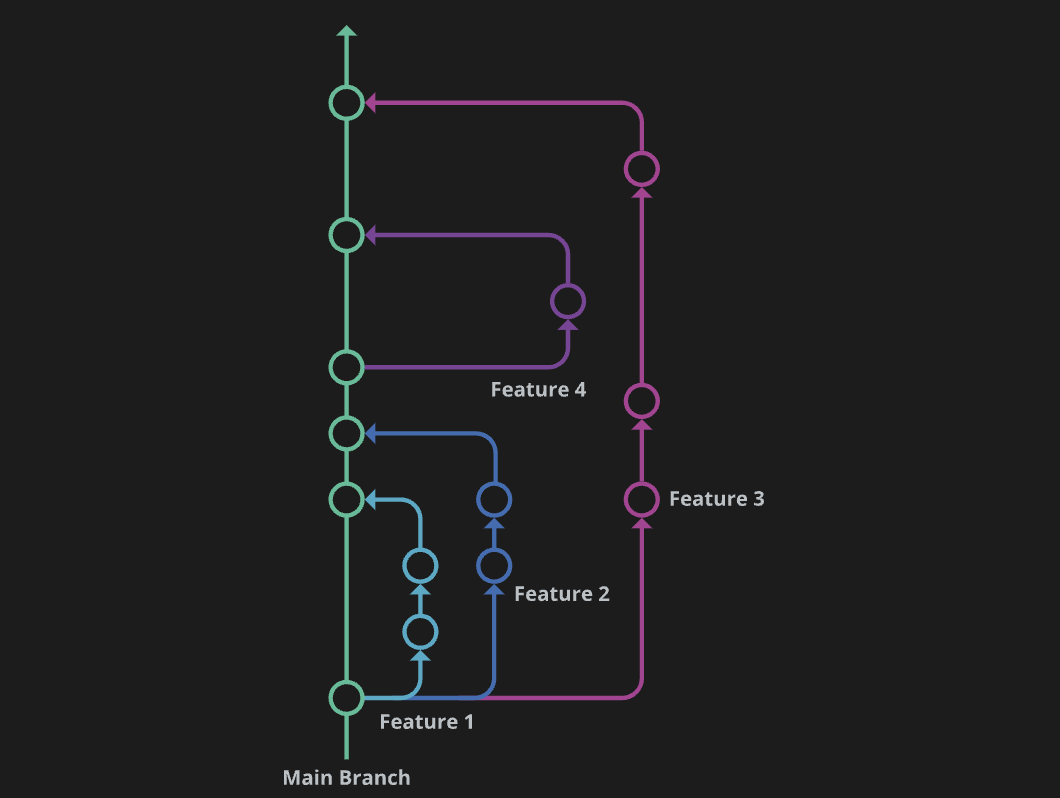 GitKraken Available at here
👨💻 Process
Overall processes of GitHub Flow can be described below:
- Create a
Branch - Make Changes
- Create a
PR(Pull Request) - Address
Reviews&Comments Merge BranchesDelete Branches
🧐 Cost-Benefit Analysis
GitHub Flow can offer the following advantages:
-
Consistent
CI/CDfollowed by itssimplicity.- hence suitable for small
projects
- hence suitable for small
As the trade-off to the above, the following challenges could occur:
-
Unable to support
multiple versionsofcodein production simultaneously. -
The lack of dedicated
development branches.- leading
GitHub Flowto bebug-prone
- leading
🐙 Git Flow
🐙
Git Flowis a strategy suggested bysoftware developerVincent Driessenin 2010 whereGit Flowdividesworkflowsinto varying types ofgit branches.
Git Flow aims to simplify the overall release process and further address issues that were unable to be addressed in the above GitHub Flow strategy.
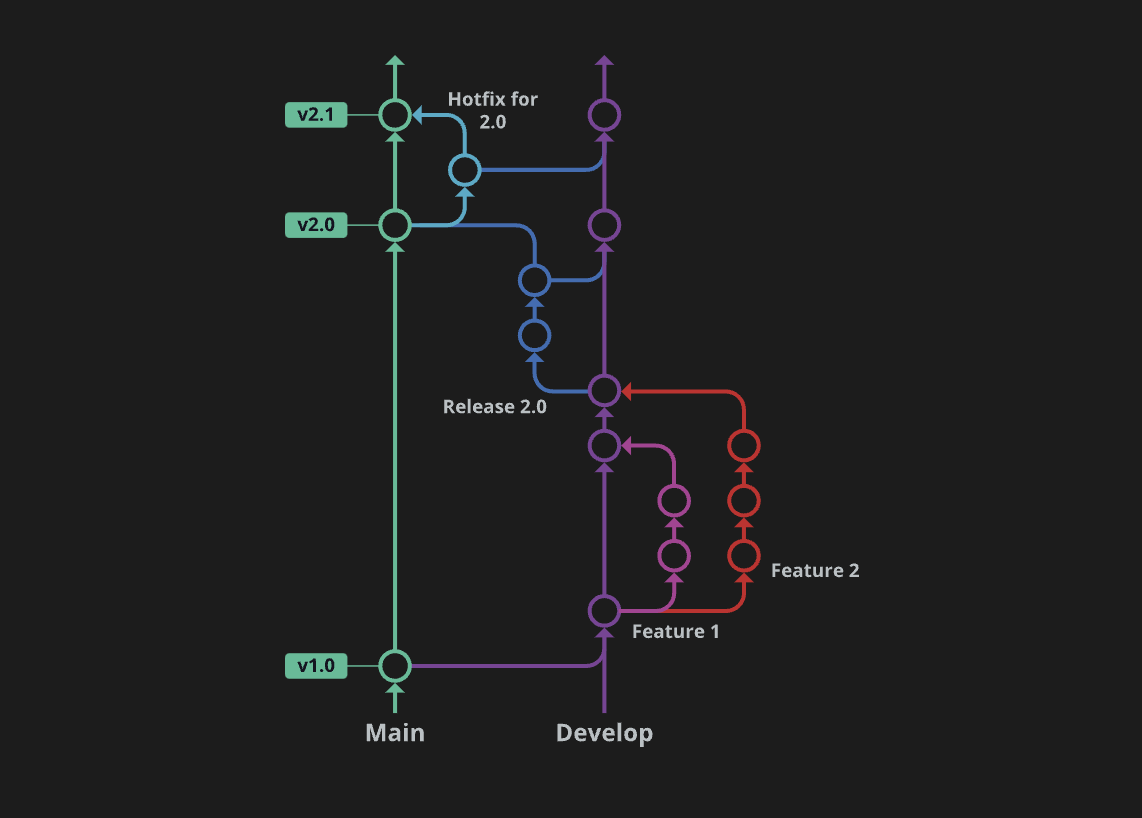 GitKraken Available at here
Git Flow introduces the following git branches as its functioning core:
MainDevelopFeatureReleaseHotfix
where the main and develop branches become the primary branches that persist over all git branch life-cycle and other feature, release, and hotfix branches in accordance to demands becomes created and removed.
👨💻 Process
There are no sequential processes within the Git Flow strategy. However, each branch has varying innate purposes where:
-
Main- contains
commit historyof publicly released versions.
- contains
-
Develop- responsible for storing all changes to the features.
-
Feature- responsible for developing
features - branches out from the
develop branch - the changes updated to the
develop branch
- responsible for developing
-
Release- responsible for
QA - branches out from the
develop branch - the changes updated to the
main branch
- responsible for
-
Hotfix- responsible for urgent
bug fixesafter the release from themain branch - the changes updated to the
main branch
- responsible for urgent
🧐 Cost-Benefit Analysis
The Benefits of Git Flow can be summarised as below:
-
Various types of
branchesenablework organisationto be more intuitive. -
Allows efficient testing over small
branches. -
Supports multiple
production code versions.
The Challenges of Git Flow are:
-
Can overcomplicate and slow the
development processandrelease cycle. -
Due to the long
development cycle, Not suitable forCI/CD.
📚 References