firebase.json은 간단히 말하면 firebase 설정파일이다.
해당 글처럼 firebase init을 진행하면 아래와 같이 firebase.json이 생성된다.
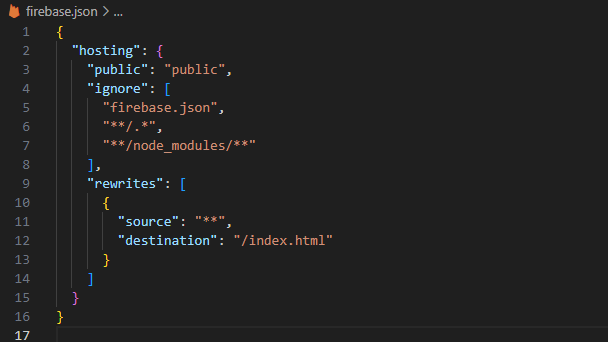
hosting이 최상위 key인 이유는,firebase init으로 세팅할 때 hosting 서비스로 프로젝트 시작을 선택했기 때문이다.public은 어떤 폴더 기준으로firebase deploy를 할 것인지 작성해주는 위치라고 생각하면 좋다.ignore은firebase deploy를 할 때 무시할 파일들을 입력하는 위치라고 생각하면 좋다.
중요한 것은 "rewrites" 항목이다.
public, ignore는 생성된대로 사용했지만, MPA 서비스로 개발할 때 rewrites 부분을 수정하며 진행하게 됐다.
앞선 글에서 SPA로 생성하여 현재는 "모든 path는 index.html로 연결된다" 가 기본값으로 입력되어 있다.
만약 firebase init할 때 'Configure as a single-page app?' 질문에 N이라 답하면 rewrites 부분이 아예 작성되지 않는다.
작성 방법은 간단하다. rewrites 배열 안에 source, destination을 key 값으로 갖는 dict 구조를 작성해주면 된다.
source: 접속하게될 url pathdestination:source로 접속 시 렌더할 html 파일 위치
이 때 "**" 이런 식으로 와일드 카드 입력도 가능하다고 한다. 그래서 SPA로 init할 경우 아래처럼 기본 작성되는 것이다.
"rewrites": [
  {
    "source": "**",
    "destination": "/index.html"
  }
]
MPA로 개발 시 많이 작성하게 될 것이란 이유는, rewrites 작성을 하지 않으면 각 폴더별로 index.html을 생성해야 해당 path에 대해 연결을 해준다.
그게 아니라면 메인페이지에서 모든 하위 페이지에 대해 html을 명시하여 url을 작성해줘야 하는데, 개인적으로 깔끔하게 보이지 않아서 선호하지 않는다.
또한 html 파일들을 별도의 폴더에 넣고 관리했는데, 모든 하위 페이지에 대해 url path에 경로가 하나가 끼어있는 것도 깔끔하지 않다 생각되어 필자는 rewrites를 작성했었다.
물론 매번 페이지 생성할 때마다 rewrites를 작성하기는 번거로움이 많다. 언제 어떤 식으로 변경될지도 모르는만큼, 애초에 html 파일 리스트를 읽어서 firebase.json을 작성해주는 js를 작성하여 사용했었다.
const fs = require('fs');
const path = require('path');

//////////////////////////////////////////////////////////////////////////////

// page 폴더 내의 모든 HTML 파일을 배열에 저장
const pageDir = path.join(__dirname, 'page');
const htmlList = [];

// 폴더 내 파일 목록을 읽어 HTML 파일만 필터링하여 배열에 저장
function findHtmlFiles(p, dir) {
  const files = fs.readdirSync(dir);

  files.forEach(file => {
    const fullPath = path.join(dir, file);
    const stat = fs.statSync(fullPath);

    if (stat.isDirectory()) {
      // 디렉토리인 경우 재귀적으로 탐색
      findHtmlFiles(p+'/'+file, fullPath);
    } else if (path.extname(file) === '.html') {
      // HTML 파일인 경우 파일명에서 확장자 제거하고 배열에 추가
      const fileNameWithoutExt = path.basename(file, '.html');
      htmlList.push(p+'/'+fileNameWithoutExt);
    }
  });
}
// 페이지 폴더 내 HTML 파일 찾기
findHtmlFiles('', pageDir);

//////////////////////////////////////////////////////////////////////////////

// firebase-template 생성
const firebaseTemplate = {
  hosting: {
    public: 'dist',
    ignore: [
      'firebase.json',
      '**/.*',
      '**/node_modules/**'
    ],
    rewrites: []  // rewrites 배열을 빈 배열로 시작
  },
  functions: [
    {
      source: "functions",
      codebase: "default",
      ignore: [
        "node_modules",
        ".git",
        "firebase-debug.log",
        "firebase-debug.*.log",
        "*.local"
      ],
      predeploy: [
        "npm --prefix \"$RESOURCE_DIR\" run lint"
      ]
    }
  ]
};

// htmlList의 값들을 rewrites 배열에 추가
htmlList.forEach(htmlFile => {
  firebaseTemplate.hosting.rewrites.push({
    source: `${htmlFile}`,
    destination: `/page${htmlFile}.html`
  });
});

// 최종 firebase-template을 firebase.json으로 저장
const firebaseOutput = path.join(__dirname, 'firebase.json');
fs.writeFileSync(firebaseOutput, JSON.stringify(firebaseTemplate, null, 2));
해당 코드는 page 폴더에서 하위로 내려가며, .html 확장자인 파일들을 찾아 리스트로 만든다.
모든 html 파일들을 /page 폴더에 넣어두고 관리하여 page로 작성된 것인데, views 폴더에 넣어둔다면 간단히 바꿔주면 된다.
이후 생성하려는 firebase.json 구조대로 미리 작성을 해둔 다음, rewrites 배열에 해당하는 html 폴더들을 작성해주면 된다.
이런 식으로 작성하고, firebase deploy 전에 한번씩 해당 코드를 실행해주면 되는데, 이 부분도 그냥 npm run deploy 스크립트를 node set-config.js && firebase deploy 실행하게 작성하여 한번에 처리했었다.
앞서 설명한 부분과 해당 코드의 firebase.json에서 다른 부분이 총 2가지 있다.
1. hosting.public 값이 'dist' 이다.
2. functions 가 추가되어 있다.
1번은 vite build를 실행하여 deploy할 파일들을 우선 dist 폴더에 생성하여 배포 대상을 dist 폴더로 잡았었고, 2번은 firebase에서 'cloud functions'를 사용하여 자동으로 생성되는 부분이다.