Temporal Filtering 이란 ?
영상 처리 또는 신호 처리에서 시간 축을 따라 신호의 변화를 부드럽게 만들어 노이즈를 줄이고
안정적인 결과를 얻기 위해 사용하는 필터링 기법이다.
주로 3D 센서나 카메라에서 출력되는
깊이(depth) 데이터 또는 RGB 프레임의 품질을 개선하기 위해 자주 사용된다.
기본 개념
특정 픽셀의 현재 프레임 값과 이전 프레임 값들을 참조하여 현재 프레임의 값을 조정한다.
이 방식으로 프레임 간의 갑작스러운 변화(노이즈나 오류 등)를 완화하여
더 일관성 있는 데이터를 생성할 수 있다.
ex)
깊이 센서의 경우 물체가 움직이지 않는데도 불구하고,
갑자기 깊이값이 크게 변할 때 temporal filter를 사용하면 이런 변화를 최소화할 수 있다.
어떻게 적용?
먼저, 어떻게 하면 여러 프레임의 값을 저장할 수 있을까에 대해 고민했다.
그 결과 다음과 같이 최대 8개의 프레임의 값을 보내고, 저장할 수 있도록 하였다.
Shader "Custom/Temporal_Color_Depth"
{
    Properties
    {
        [PerRendererData]
        _MainTex("MainTex", 2D) = "black" {}
        _OutputTex("Output Texture", 2D) = "black" {}

        [HideInInspector]
        _Colormaps("Colormaps", 2D) = "" {}

        _DepthScale("Depth Multiplier Factor to Meters", float) = 0.00001

        _MinRange("Min Range (m)", Range(0, 10)) = 0.15
        _MaxRange("Max Range (m)", Range(0, 20)) = 10.0

        [KeywordEnum(Viridis, Plasma, Inferno, Jet, Rainbow, Coolwarm, Flag, Gray)]
        _Colormap("Colormap", Float) = 0
    }
    SubShader
    {
        Tags { "QUEUE" = "Transparent" "IGNOREPROJECTOR" = "true" "RenderType" = "Transparent" "PreviewType" = "Plane" }
        Pass
        {
            ZWrite Off
            Cull Off
            Fog { Mode Off }

            CGPROGRAM
            #pragma vertex vert_img
            #pragma fragment frag

            #include "UnityCG.cginc"

            sampler2D _Colormaps;
            sampler2D _MainTex;
            float4 _Colormaps_TexelSize;

            // 최대 10개의 깊이 텍스처
            sampler2D _DepthTex1;
            sampler2D _DepthTex2;
            sampler2D _DepthTex3;
            sampler2D _DepthTex4;
            sampler2D _DepthTex5;
            sampler2D _DepthTex6;
            sampler2D _DepthTex7;
            sampler2D _DepthTex8;
            sampler2D _DepthTex9;
            sampler2D _DepthTex10;

            float _Colormap;
            float _MinRange;
            float _MaxRange;
            float _DepthScale;

            half4 frag(v2f_img pix) : SV_Target
            {
                float totalDepth = 0;
                float totalLeftDepth = 0;
                int count = 0;

                // 깊이 텍스처에서 픽셀 값 가져오기
                float depth1 = tex2D(_DepthTex1, pix.uv).r;
                if (depth1 > 0) { totalDepth += depth1; count++; }

                float depth2 = tex2D(_DepthTex2, pix.uv).r;
                if (depth2 > 0) { totalDepth += depth2; count++; }

                float depth3 = tex2D(_DepthTex3, pix.uv).r;
                if (depth3 > 0) { totalDepth += depth3; count++; }

                float depth4 = tex2D(_DepthTex4, pix.uv).r;
                if (depth4 > 0) { totalDepth += depth4; count++; }

                float depth5 = tex2D(_DepthTex5, pix.uv).r;
                if (depth5 > 0) { totalDepth += depth5; count++; }

                float depth6 = tex2D(_DepthTex6, pix.uv).r;
                if (depth6 > 0) { totalDepth += depth6; count++; }

                float depth7 = tex2D(_DepthTex7, pix.uv).r;
                if (depth7 > 0) { totalDepth += depth7; count++; }

                float depth8 = tex2D(_DepthTex8, pix.uv).r;
                if (depth8 > 0) { totalDepth += depth8; count++; }

                // 평균 깊이 값 계산
                float averageDepth = (count > 0) ? (totalDepth / count) : 0;

                // 깊이 값을 정규화
                float normalizedDepth = averageDepth * 0xffff * _DepthScale;
                normalizedDepth = (normalizedDepth - _MinRange) / (_MaxRange - _MinRange);

                if (normalizedDepth <= 0)
                     return 0;

                float colormapIndex = 1 - (_Colormap + 0.5) * _Colormaps_TexelSize.y;
                half4 color = tex2D(_Colormaps, float2(normalizedDepth, colormapIndex));

                return color; // 최종 색상 반환
            }
            ENDCG
        }
    }
    FallBack Off
}
즉, 셰이더에 총 8개의 프레임의 평균 깊이 값을 계산하는 방식을 사용했다.
그럼 값은 어떻게 보내주느냐에 대해 물어본다면 다음과 같은 함수를 FrameManager에서 활용하였다.
몇개의 프레임의 평균값을 보여줄 것인지 인스펙터창에서 지정할 수 있도록 코드를 작성하였다.
// 버퍼 내 프레임들의 평균값을 계산하여 새로운 텍스처에 적용하는 함수
public void ApplyTemporalFilter()
{
    if (frameBuffer.Count == 0) return;

    // 최대 프레임 수에 맞춰 텍스처를 셰이더의 프로퍼티에 전달
    for (int i = 0; i < frameBuffer.Count; i++)
    {
        temporalColor_depthMaterial.SetTexture($"_DepthTex{i + 1}", frameBuffer[i]);
    }

    // 남은 텍스처에 빈 텍스처를 할당
    for (int i = frameBuffer.Count; i < frameBufferSize; i++)
    {
        temporalColor_depthMaterial.SetTexture($"_DepthTex{i + 1}", Texture2D.blackTexture); // 빈 텍스처 할당
    }

    // 메인 텍스처를 렌더 타겟으로 설정
    RenderTexture tempRenderTexture = RenderTexture.GetTemporary(_width, _height, 0);

    // Blit을 사용하여 셰이더에서 처리한 결과를 렌더 텍스처에 저장
    Graphics.Blit(null, tempRenderTexture, temporalColor_depthMaterial);

    // 필터링된 결과를 최종 텍스처에 복사
    RenderTexture.active = tempRenderTexture;
    temporalcolorFilteredTexture.ReadPixels(new Rect(0, 0, _width, _height), 0, 0);
    temporalcolorFilteredTexture.Apply();

    // 렌더 텍스처 해제
    RenderTexture.ReleaseTemporary(tempRenderTexture);
}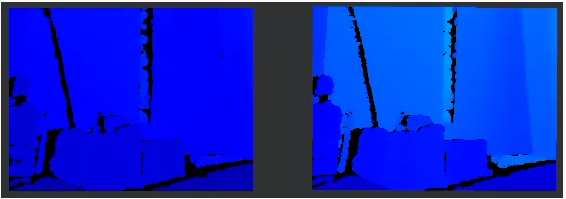
다음과 같이 Temporal Filter가 적용된 것을 볼 수 있다.
영상으로 봐야 Temporal Filter가 적용된 것을 잘 보여줄 수 있는데 업로드가 안되는 관계로.. (아쉽네요..)
소감
Hole Filling Filtering을 구현할 때보다 난이도가 좀 있었다.
먼저, 여러 프레임 값을 어떻게 넘겨줘야하는지부터 난관이었다.
일단 DepthTex를 이용하여 여러 프레임의 값을 일일이 저장하도록 하였는데
일단 잘 적용되긴 했지만 좀 찝찝한 감이 있다.
왜냐하면 더 효율적인 방법이 있을 것 같기 때문이다. 이 부분은 좀 더 알아봐야 할 것 같다.
이 부분에 대해서 더 알아본 결과, 보통 Shader는 값을 받아올 때 _MainTex로 값을 받아온다.
여러개의 DepthTex값을 받아와야 하는데 _MainTex는 단일 값만 받아올 수 있다.
그렇기 때문에 또 다른 스크립트를 사용하여 여러개의 프레임에 대한 평균값을 계산한 후에 _MainTex로 값을 보내주거나 혹은 다른 방법을 이용해야 효율적인 계산이 가능하다고 생각된다.
이에 대한 내용은 Temporal -> Hole Filling 포스팅에 적어두었다.
