OMF(Oracle Managed File)
오라클 데이터베이스의 운영체제 파일을 직접 관리하지 않아도 된다.
-
파일 이름이 아닌 데이터베이스 객체 관점에서 작업을 수행하면 된다.
- 테이블스페이스
- 리두로그파일
- 컨트롤파일
- 아카이브 파일
- 블록 변경 사항 추적 파일
- flashback database log
- RMAN 백업 -
omf 방식이 아닌 수동방식
CREATE TABLESPACE insa_tbs
DATAFILE ' ' SIZE 1M AUTOEXTEND ON
EXTENT MANAGEMENT LOCAL AUTOALLOCATE
SEGMENT SPACE MANAGEMENT AUTO;

ALTER TABLESPACE insa_tbs ADD DATAFILE ' ' SIZE 1M AUTOEXTEND ON;

DROP TABLESPACE insa_tbs INCLUDING CONTENTS AND DATAFILES CASCADE CONSTRAINTS;
데이터파일, 임시(temporary) 파일 omf 방식
-
데이터파일, 임시(temporary) 파일에 대한 기본 파일 시스템 디렉터리의 위치를 확인
show parameter db_create_file_dest -
omf 방식으로 저장될 위치 변경
alter system set db_create_file_dest='home/oracle/omf'; -
omf 방식으로 테이블스페이스 생성
create tablespace insa_tbs;

-
omf datafile format
o1_mf_%t_%u_.dbf
%t : tablespace name
%u : 고유성을 보장한 8자리 문자열 -
omf 방식으로 테이블스페이스에 데이터파일 추가
alter tablespace insa_tbs add datafile; -
잘못 추가된 데이터파일 삭제
alter tablespace insa_tbs drop datafile '/home/oracle/omf/ORA19C/datafile/o1_mf_insa_tbs_mh9j0qmm_.dbf'; -
omf 방식으로 테이블스페이스 삭제
- omf 방식으로 만들어진 데이터파일은 논리적으로 삭제하면 물리적으로는 자동삭제된다.
drop tablespace insa_tbs including contents;
redo log 파일 omf 방식
-
redo log file의 기본 시스템 디렉터리의 위치를 확인
show parameter db_recovery_file_dest -
redo log file group을 omf방식으로 추가
alter database add logfile;

-
omf 방식으로 생성된 redo log group 삭제
- omf 방식으로 생성되었기 때문에 논리적으로 삭제하면 물리적으로 자동삭제된다.
alter database drop logfile group 4; -
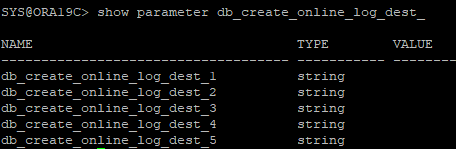
9i 버전 까지는 redo log file, control file의 OMF 방식을 구성하기위한 파라미터
show parameter db_create_online_log_dest_
-
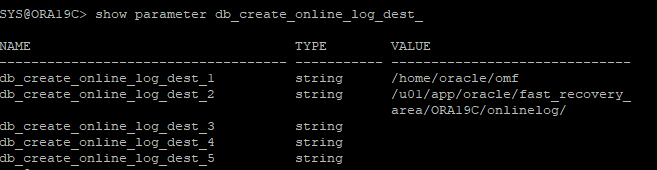
이전 파라미터 사용해보기
alter system set db_create_online_log_dest_1='/home/oracle/omf';
alter system set db_create_online_log_dest_2='/u01/app/oracle/fast_recovery_area/ORA19C/onlinelog/';
-
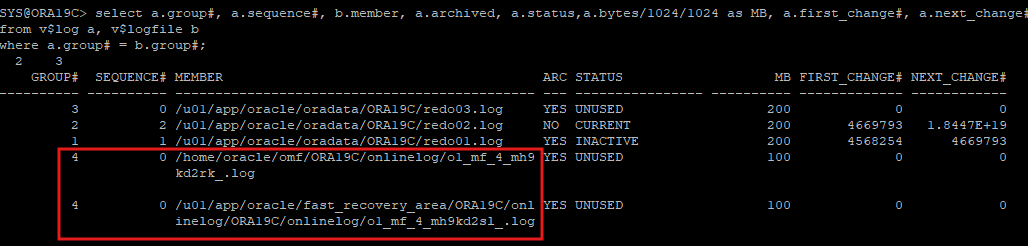
redo log group 추가
alter database add logfile;
-
omf방식의 redo logfile format
o1_mf_%g_%u_.log
%g : 그룹번호
%u : 고유성을 보장한 8자리 문자열
table reorganization(테이블 재구성)
1. DATA PUMP를 이용한 reorg
-
샘플테이블 생성
create table hr.reorg_test(id number, name varchar2(60)); -
샘플테이블에 데이터 입력
begin
	for i in 1..10000 loop
    	insert into hr.reorg_test(id,name)
        values(i, 'table/index reorganization example');
    end loop;
    commit;
end;
/-
샘플테이블의 segment 정보 확인
- dba_segments 뷰에서는 데이터가 있는 block의 수가 아니라 segment에 생성되어있는 모든 block의 수를 보여준다.
select extents, blocks, bytes from dba_segments where owner='HR' and segment_name='REORG_TEST';

-
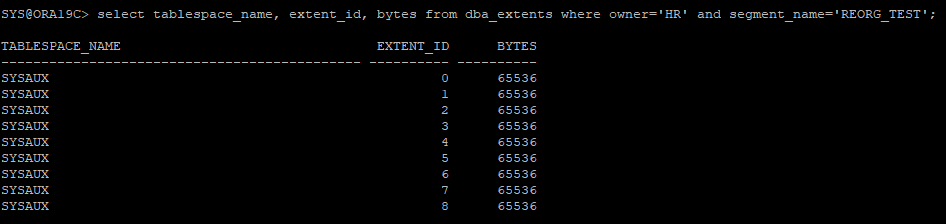
샘플테이블에 생성된 extent도 확인해본다
select tablespace_name, extent_id, bytes from dba_extents where owner='HR' and segment_name='REORG_TEST';
-
제약조건 생성
alter table hr.reorg_test add constraint reorg_id_pk primary key(id); -
생성된 제약조건 확인
select constraint_name, constraint_type, index_name from dba_constraints where table_name='REORG_TEST';

-
테이블 통계정보
- 처음에는 통계수집을 하지 않아 조회되지 않는다
select num_rows, blocks, avg_row_len from dba_tables where table_name='REORG_TEST';

-
테이블 통계 수집
execute dbms_stats.gather_table_stats('hr','reorg_test');

-
통계수집 후 다시 조회
- 한 행의 평균 byte는 39 byte 이다.
- dba_tables 뷰에서는 segment에 HWM(High watermark)가 찍혀있는 블록의 갯수까지만 조회할 수있다.
select num_rows, blocks, avg_row_len from dba_tables where table_name='REORG_TEST';

-
sqlplus에서 실행계획 만들기
explain plan for select * from hr.reorg_test where id=100; -
만들어진 실행계획 확인
select * from table(dbms_xplan.display);
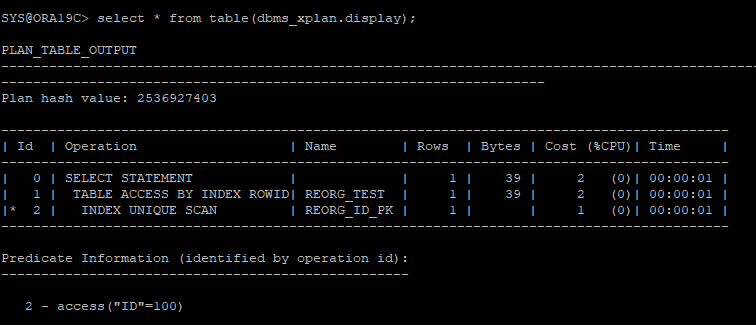
- access : 인덱스에서 rowid를 찾아서 rowid를 가지고 테이블에 access함,어느 블록에 있는지 알고있음
- filter : 데이터가 어느 블록에 있는지 알 수 없음.모든 블록에 access해야함 -
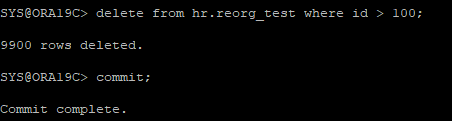
데이터 삭제
delete from hr.reorg_test where id > 100;
-
통계정보 다시 확인
select num_rows, blocks, avg_row_len from dba_tables where table_name='REORG_TEST';

- 통계정보가 바뀌지 않았는데 통계정보는 마지막 gatering 했을때의 값을 보여준다. -
통계정보를 다시 수집한 후에 확인하기
execute dbms_stats.gather_table_stats('hr','reorg_test');
select num_rows, blocks, avg_row_len from dba_tables where table_name='REORG_TEST';

-
data pump를 통해서 export 받기
- export 받을 논리적인 directory 생성
create directory pump_dir as '/home/oracle/oracle_pump';
- 생성한 PUMP directory 확인
select * from dba_directories where directory_name='PUMP_DIR';
- table 레벨로 export
expdp userid=system/oracle directory=pump_dir dumpfile=reorg_test.dmp tables=hr.reorg_test -
테이블 내용 삭제와 할당되어있는 extent 해지하기
trunc table hr.reorg_test -
truncate를 했기때문에 기존에 할당되어있던 extent들은 해지되어 최소 1개 extent만 기본값으로 남아있는걸 확인할 수 있다.
select extents, blocks, bytes from dba_segments where owner='HR' and segment_name='REORG_TEST';

-
테이블에 export 받아놓은 데이터값만 import
impdp system/oracle directory=pump_dir dumpfile=reorg_test.dmp tables=hr.reorg_test content=data_only; -
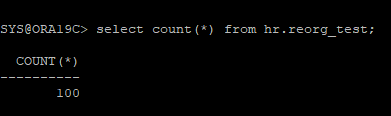
정상적으로 import 되었는지 확인
select count(*) from hr.reorg_test
-
통계정보를 확인해보면 다시 통계수집을 하지 않아 이전값 그대로이다.
select num_rows, blocks, avg_row_len from dba_tables where table_name='REORG_TEST';

-
통계수집 다시 하기
execute dbms_stats.gather_table_stats('hr','reorg_test'); -
통계정보 확인해보면 테이블이 reorg 되어 HWM가 4번째 BLOCK에 찍혀있는걸 알 수 있다.
select num_rows, blocks, avg_row_len from dba_tables where table_name='REORG_TEST';

2. 테이블 재구성(MOVE)을 이용한 reorg
- MOVE를 하는 동안에는 transaction이 막히고 index가 unusable 된다.
-
샘플테이블 생성
create table hr.reorg_test(id number, name varchar2(60)); -
샘플테이블에 데이터 입력
begin
	for i in 1..10000 loop
    	insert into hr.reorg_test(id,name)
        values(i, 'table/index reorganization example');
    end loop;
    commit;
end;
/-
샘플테이블의 segment 정보 확인
- dba_segments 뷰에서는 데이터가 있는 block의 수가 아니라 segment에 생성되어있는 모든 block의 수를 보여준다.
select extents, blocks, bytes from dba_segments where owner='HR' and segment_name='REORG_TEST';
-
샘플테이블에 생성된 extent도 확인해본다
select tablespace_name, extent_id, bytes from dba_extents where owner='HR' and segment_name='REORG_TEST';
-
제약조건 생성
alter table hr.reorg_test add constraint reorg_id_pk primary key(id); -
생성된 제약조건 확인
select constraint_name, constraint_type, index_name from dba_constraints where table_name='REORG_TEST';
-
테이블 통계정보
- 처음에는 통계수집을 하지 않아 조회되지 않는다
select num_rows, blocks, avg_row_len from dba_tables where table_name='REORG_TEST';
-
테이블 통계 수집
execute dbms_stats.gather_table_stats('hr','reorg_test');
-
통계수집 후 다시 조회
- 한 행의 평균 byte는 39 byte 이다.
- dba_tables 뷰에서는 segment에 HWM(High watermark)가 찍혀있는 블록의 갯수까지만 조회할 수있다.
select num_rows, blocks, avg_row_len from dba_tables where table_name='REORG_TEST';
-
sqlplus에서 실행계획 만들기
explain plan for select * from hr.reorg_test where id=100; -
만들어진 실행계획 확인
select * from table(dbms_xplan.display);
- access : 인덱스에서 rowid를 찾아서 rowid를 가지고 테이블에 access함,어느 블록에 있는지 알고있음
- filter : 데이터가 어느 블록에 있는지 알 수 없음.모든 블록에 access해야함 -
데이터 삭제
delete from hr.reorg_test where id > 100;
-
통계정보 다시 확인
select num_rows, blocks, avg_row_len from dba_tables where table_name='REORG_TEST';
- 통계정보가 바뀌지 않았는데 통계정보는 마지막 gatering 했을때의 값을 보여준다. -
통계정보를 다시 수집한 후에 확인하기
execute dbms_stats.gather_table_stats('hr','reorg_test');
select num_rows, blocks, avg_row_len from dba_tables where table_name='REORG_TEST';
-
인덱스 정보 확인
select index_name, status from dba_indexes where table_name='REORG_TEST';

-
테이블을 이관 작업(테이블 재구성)
- 현재 테이블의 테이블스페이스 조회
select f.tablespace_name, f.file_name,count(*)
from dba_extents e, dba_data_files f
where f.file_id = e.file_id
and e.segment_name = 'REORG_TEST'
and e.owner = 'HR'
group by f.tablespace_name, f.file_name;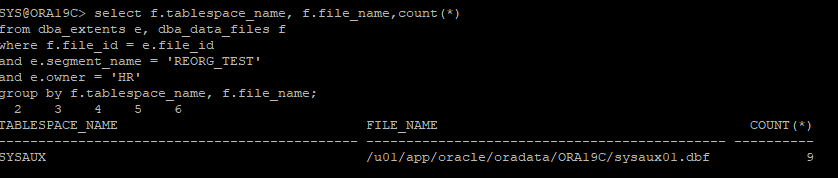
-
내부적으로
move는 temp tablespace에 테이블의 데이터를 copy한뒤 데이터 삭제 후 테이블에 input하는 로직을 가지고 있기 때문에 enable row movement를 수행하지 않는다. -
데이터를 다시 input 할때 rowid가 달라지기 때문에 index가 깨지는거다.
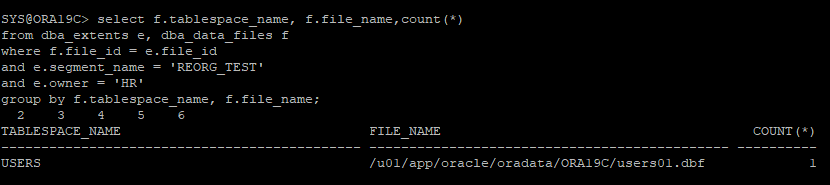
- 테이블의 테이블스페이스를 다른 테이블스페이스로 변경
alter table hr.reorg_test move tablespace users;- 같은 테이블스페이스 내에서 테이블 재구성
alter table hr.reorg_test move;- 다시 테이블스페이스 조회
-
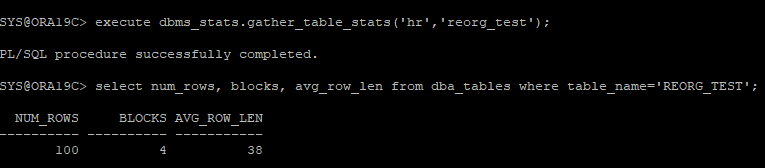
통계수집을 다시 한 후 테이블 통계정보 확인
execute dbms_stats.gather_table_stats('hr','reorg_test');
select num_rows, blocks, avg_row_len from dba_tables where table_name='REORG_TEST';
-
인덱스 정보 다시 확인
select index_name, status from dba_indexes where table_name='REORG_TEST';

- export,import 같은 경우에는 새롭게 rowid를 부여하기 때문에 index의 상태가 바뀌지 않지만 테이블을 재구성할 경우에는 rowid가 앞으로 당겨지는 상황이기 때문에 index의 상태가 unusable로 변경되어있다. -
unusable로 되어있는 index를 다시 valid 상태로 변경해줘야 한다.
alter index hr.reorg_id_pk rebuild online;
select owner, index_name, status from dba_indexes where table_name='REORG_TEST';

3. shrink를 통한 reorg
- online으로 reorg가 가능하다
- 인덱스는 valid 상태이다
-
샘플테이블 생성
create table hr.reorg_test(id number, name varchar2(60)); -
샘플테이블에 데이터 입력
begin
	for i in 1..10000 loop
    	insert into hr.reorg_test(id,name)
        values(i, 'table/index reorganization example');
    end loop;
    commit;
end;
/-
샘플테이블의 segment 정보 확인
- dba_segments 뷰에서는 데이터가 있는 block의 수가 아니라 segment에 생성되어있는 모든 block의 수를 보여준다.
select extents, blocks, bytes from dba_segments where owner='HR' and segment_name='REORG_TEST';
-
샘플테이블에 생성된 extent도 확인해본다
select tablespace_name, extent_id, bytes from dba_extents where owner='HR' and segment_name='REORG_TEST';
-
제약조건 생성
alter table hr.reorg_test add constraint reorg_id_pk primary key(id); -
생성된 제약조건 확인
select constraint_name, constraint_type, index_name from dba_constraints where table_name='REORG_TEST';
-
테이블 통계정보
- 처음에는 통계수집을 하지 않아 조회되지 않는다
select num_rows, blocks, avg_row_len from dba_tables where table_name='REORG_TEST';
-
테이블 통계 수집
execute dbms_stats.gather_table_stats('hr','reorg_test');
-
통계수집 후 다시 조회
- 한 행의 평균 byte는 39 byte 이다.
- dba_tables 뷰에서는 segment에 HWM(High watermark)가 찍혀있는 블록의 갯수까지만 조회할 수있다.
select num_rows, blocks, avg_row_len from dba_tables where table_name='REORG_TEST';
-
sqlplus에서 실행계획 만들기
explain plan for select * from hr.reorg_test where id=100; -
만들어진 실행계획 확인
select * from table(dbms_xplan.display);
- access : 인덱스에서 rowid를 찾아서 rowid를 가지고 테이블에 access함,어느 블록에 있는지 알고있음
- filter : 데이터가 어느 블록에 있는지 알 수 없음.모든 블록에 access해야함 -
데이터 삭제
delete from hr.reorg_test where id > 100;
-
통계정보 다시 확인
select num_rows, blocks, avg_row_len from dba_tables where table_name='REORG_TEST';
- 통계정보가 바뀌지 않았는데 통계정보는 마지막 gatering 했을때의 값을 보여준다. -
통계정보를 다시 수집한 후에 확인하기
execute dbms_stats.gather_table_stats('hr','reorg_test');
select num_rows, blocks, avg_row_len from dba_tables where table_name='REORG_TEST';
-
인덱스 정보 확인
select index_name, status from dba_indexes where table_name='REORG_TEST';
-
테이블을 이관작업 (테이블 재구성)
- 행이동을 하기 위한 준비작업
alter table hr.reorg_test enable row movement;- 행이동 할때
transaction이 발생해도 문제없다
- 데이터를 compact하게 땡겨서 최소한의 블록을 사용하게 한다.
- HWM는 조정되지 않고 그대로 있다.
alter table hr.reorg_test shrink space compact;- HWM(High Water Mark)를 앞으로 조정한다.
- HWM를 조정할때는transaction이 막힌다. table에 lock이 걸린다.
alter table hr.reorg_test shrink space;- 행 이동을 종료
alter table hr.reorg_test disable row movement; -
다시 통계수집후 통계정보 확인
execute dbms_stats.gather_table_stats('hr','reorg_test');
select num_rows, blocks, avg_row_len from dba_tables where table_name='REORG_TEST';

-
인덱스 정보 확인
select index_name, status from dba_indexes where table_name='REORG_TEST';

4. CTAS 통한 reorg
- online으로는 불가능하다.
- CTAS - drop - rename - 제약조건재생성
-
샘플테이블 생성
create table hr.reorg_test(id number, name varchar2(60)); -
샘플테이블에 데이터 입력
begin
	for i in 1..10000 loop
    	insert into hr.reorg_test(id,name)
        values(i, 'table/index reorganization example');
    end loop;
    commit;
end;
/-
샘플테이블의 segment 정보 확인
- dba_segments 뷰에서는 데이터가 있는 block의 수가 아니라 segment에 생성되어있는 모든 block의 수를 보여준다.
select extents, blocks, bytes from dba_segments where owner='HR' and segment_name='REORG_TEST';
-
샘플테이블에 생성된 extent도 확인해본다
select tablespace_name, extent_id, bytes from dba_extents where owner='HR' and segment_name='REORG_TEST';
-
제약조건 생성
alter table hr.reorg_test add constraint reorg_id_pk primary key(id); -
생성된 제약조건 확인
select constraint_name, constraint_type, index_name from dba_constraints where table_name='REORG_TEST';
-
테이블 통계정보
- 처음에는 통계수집을 하지 않아 조회되지 않는다
select num_rows, blocks, avg_row_len from dba_tables where table_name='REORG_TEST';
-
테이블 통계 수집
execute dbms_stats.gather_table_stats('hr','reorg_test');
-
통계수집 후 다시 조회
- 한 행의 평균 byte는 39 byte 이다.
- dba_tables 뷰에서는 segment에 HWM(High watermark)가 찍혀있는 블록의 갯수까지만 조회할 수있다.
select num_rows, blocks, avg_row_len from dba_tables where table_name='REORG_TEST';
-
sqlplus에서 실행계획 만들기
explain plan for select * from hr.reorg_test where id=100; -
만들어진 실행계획 확인
select * from table(dbms_xplan.display);
- access : 인덱스에서 rowid를 찾아서 rowid를 가지고 테이블에 access함,어느 블록에 있는지 알고있음
- filter : 데이터가 어느 블록에 있는지 알 수 없음.모든 블록에 access해야함 -
데이터 삭제
delete from hr.reorg_test where id > 100;
-
통계정보 다시 확인
select num_rows, blocks, avg_row_len from dba_tables where table_name='REORG_TEST';
- 통계정보가 바뀌지 않았는데 통계정보는 마지막 gatering 했을때의 값을 보여준다. -
통계정보를 다시 수집한 후에 확인하기
execute dbms_stats.gather_table_stats('hr','reorg_test');
select num_rows, blocks, avg_row_len from dba_tables where table_name='REORG_TEST';
-
인덱스 정보 확인
select index_name, status from dba_indexes where table_name='REORG_TEST';
-
테이블을 이관작업(테이블 재구성)
- 데이터 이관받을 테이블을 CTAS로 생성
create table hr.reorg_test_temp as select * from hr.reorg_test;- 기존 테이블 삭제
drop table hr.reorg_test;- rename해야할 테이블의 유저로 접속 후 rename
rename reorg_test_temp to reorg_test;

-
다시 sysdba 계정으로 접속 후 제약조건 생성
alter table hr.reorg_test add constraint reorg_id_pk primary key(id); -
통계정보 수집
execute dbms_stats.gather_table_stats('hr','reorg_test'); -
테이블의 통계 확인
select num_rows, blocks, avg_row_len from dba_tables where table_name='REORG_TEST';

5. redefinition을 통한 reorg
- online reorg가 가능하다.
-
샘플테이블 생성
create table hr.reorg_test(id number, name varchar2(60)); -
샘플테이블에 데이터 입력
begin
	for i in 1..10000 loop
    	insert into hr.reorg_test(id,name)
        values(i, 'table/index reorganization example');
    end loop;
    commit;
end;
/-
샘플테이블의 segment 정보 확인
- dba_segments 뷰에서는 데이터가 있는 block의 수가 아니라 segment에 생성되어있는 모든 block의 수를 보여준다.
select extents, blocks, bytes from dba_segments where owner='HR' and segment_name='REORG_TEST';
-
샘플테이블에 생성된 extent도 확인해본다
select tablespace_name, extent_id, bytes from dba_extents where owner='HR' and segment_name='REORG_TEST';
-
제약조건 생성
alter table hr.reorg_test add constraint reorg_id_pk primary key(id); -
생성된 제약조건 확인
select constraint_name, constraint_type, index_name from dba_constraints where table_name='REORG_TEST';
-
테이블 통계정보
- 처음에는 통계수집을 하지 않아 조회되지 않는다
select num_rows, blocks, avg_row_len from dba_tables where table_name='REORG_TEST';
-
테이블 통계 수집
execute dbms_stats.gather_table_stats('hr','reorg_test');
-
통계수집 후 다시 조회
- 한 행의 평균 byte는 39 byte 이다.
- dba_tables 뷰에서는 segment에 HWM(High watermark)가 찍혀있는 블록의 갯수까지만 조회할 수있다.
select num_rows, blocks, avg_row_len from dba_tables where table_name='REORG_TEST';
-
sqlplus에서 실행계획 만들기
explain plan for select * from hr.reorg_test where id=100; -
만들어진 실행계획 확인
select * from table(dbms_xplan.display);
- access : 인덱스에서 rowid를 찾아서 rowid를 가지고 테이블에 access함,어느 블록에 있는지 알고있음
- filter : 데이터가 어느 블록에 있는지 알 수 없음.모든 블록에 access해야함 -
데이터 삭제
delete from hr.reorg_test where id > 100;
-
통계정보 다시 확인
select num_rows, blocks, avg_row_len from dba_tables where table_name='REORG_TEST';
- 통계정보가 바뀌지 않았는데 통계정보는 마지막 gatering 했을때의 값을 보여준다. -
통계정보를 다시 수집한 후에 확인하기
execute dbms_stats.gather_table_stats('hr','reorg_test');
select num_rows, blocks, avg_row_len from dba_tables where table_name='REORG_TEST';
-
인덱스 정보 확인
select index_name, status from dba_indexes where table_name='REORG_TEST';
-
reorg대상 테이블과 똑같은 성격의 temp table 생성
create table hr.reorg_test_temp
(id number constraint reorg_temp_id_pk primary key,
name varchar2(60));-
테이블이 재정의가 가능한지 확인
execute dbms_redefinition.can_redef_table('hr','reorg_test', dbms_redefinition.cons_use_pk);

-
원본 테이블과 새로 재정의할 테이블을 설정하고, 원본 테이블과 새 테이블 간의 컬럼 매핑을 지정합니다.
- 시작하는 순간 reorg_test의 데이터가 reorg_test_temp에 들어간다.(CTAS로 하기때문에 자동으로 reorg가 된다)
- reorg_test에 dml를 수행하더라도 reorg_test_temp는 변경되지 않는다.
- 원본 테이블에 dml작업을 하였다면 sync를 맞추기 전까지는 원본테이블과 임시테이블의 값이 다를 수 있다.
execute dbms_redefinition.start_redef_table('hr','reorg_test','reorg_test_temp','id id,name name');

-
임시 테이블에 내용을 원본 테이블에 데이터를 동기화.
- 원본테이블에 변경된 내용이 있다면 원본테이블과 임시테이블의 sync를 맞춰준다.
execute dbms_redefinition.sync_interim_table('hr','reorg_test','reorg_test_temp'); -
재정의 작업을 완료하고, 임시 테이블을 원본 테이블로 대체.
- 원본 테이블의 object_id와 임시테이블의 object_id를 서로 변경하면서 reorg_test를 조회하면 reorg_test_temp가 가지고 있던 데이터를 조회하는 효과가 생긴다.
execute dbms_redefinition.finish_redef_table('hr','reorg_test','reorg_test_temp'); -
통계정보 확인
- reorg가 되어있던 임시테이블의 object_id로 원본테이블의 object_id가 변경되었기 때문에 통계정보도 임시테이블로 CTAS했던 시점의 통계정보를 확인할 수 있다.
select num_rows, blocks, avg_row_len from dba_tables where table_name='REORG_TEST';

-
인덱스 확인
- 인덱스의 이름이 바뀌어 있는데, 임시테이블의 object_id로 원본 테이블의 object_id가 변경되었기 때문에 임시테이블이 가지고 있던 인덱스 이름을 조회하는걸 알 수 있다.
select index_name, status from dba_indexes where table_name='REORG_TEST';

-
제약조건 확인
- 제약조건의 이름이 바뀌어 있는데, 임시테이블의 object_id로 원본 테이블의 object_id가 변경되었기 때문에 임시테이블이 가지고 있던 제약조건의 이름을 조회하는걸 알 수 있다.
select constraint_name, constraint_type, index_name from dba_constraints where table_name='REORG_TEST';