Tiny TFT Displays in Wearable Devices: Design Considerations and Use Cases
From fitness bands and smart rings to medical wearables and industrial wrist terminals, tiny TFT displays have become a key part of how wearable devices communicate with users. These compact screens must balance size, readability, power consumption, and durability—often in products that are worn all day, every day.
This article looks at how small TFT LCDs are used in wearables, what makes them different from larger displays, and what engineers should keep in mind when selecting and integrating them.
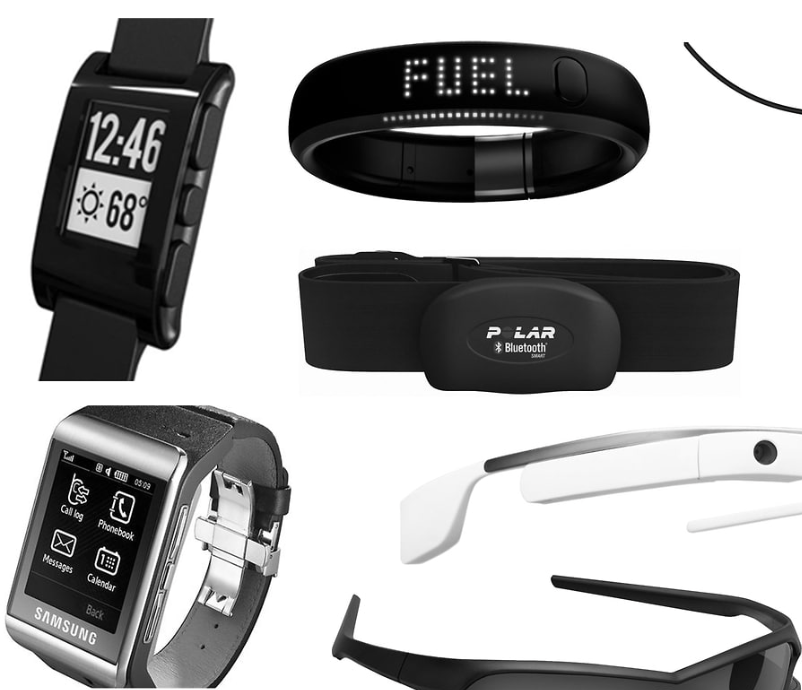
1. Why Tiny TFT Displays Matter in Wearables
Wearable devices live in a very different world compared to smartphones or tablets:
- Limited surface area – Housing diameters of 20–45 mm or narrow wristband widths severely restrict screen size.
- Battery-constrained – Most wearables run on tiny Li-ion / coin cell batteries and must last days or weeks on a charge.
- Always moving – Motion, vibration, and off-axis viewing are normal usage conditions.
- Harsh environments – Sweat, rain, body heat, and occasional impacts are expected.
Tiny TFT displays—commonly in the 0.7" to 2.0" range—provide a practical balance between:
- Sufficient resolution for icons, text, and simple animations
- Color capability for intuitive UI and status feedback
- Reasonable power consumption when paired with efficient backlighting and driving schemes
- Mature supply chains and well-understood manufacturing processes
While OLED is also used in some wearables, small TFT LCDs remain attractive for many designs due to cost, burn-in resistance, and long-term stability.
2. Typical Sizes and Form Factors
Wearable-oriented TFT modules are often available in:
- 0.7"–1.0" rectangular or square panels
- 1.1"–1.5" for compact wristbands, rings, and small medical devices
- 1.54"–2.0" for smartwatches, industrial wrist terminals, and bike computers
Common resolutions include:
- 80×160, 128×128, 128×160 (ultra-small screens)
- 240×240, 240×320 (round or square smartwatch-class displays)
Form factors:
- Rectangular for fitness trackers and slim devices
- Square for smartwatch-style UIs
- Circular (round TFT) for traditional-watch aesthetics
For each project, the chosen display shape must match both the mechanical design and the intended UI layout.
3. Key Electrical Interfaces
Due to their small size and limited pin count, tiny TFT displays rarely use full parallel RGB interfaces. Instead, they typically adopt serial interfaces optimized for low pin counts and modest bandwidth:
3.1 SPI (4-wire / 3-wire)
- Very popular in small TFT modules (especially ≤1.5")
- Simple to drive from low-cost MCUs
- Suitable for UIs with moderate refresh rates and partial-update schemes
- Ideal when board space is tight and you want to minimize connector pins
The trade-off is limited bandwidth: full-screen video is impractical, but simple animations and UI transitions are fine.
3.2 MIPI DSI (1-lane / 2-lane)
- Appears in higher-end smartwatch-class displays
- Offers much higher throughput compared to SPI
- Better suited for smooth animations and higher resolutions (e.g., 240×240)
- Usually paired with more capable application processors or wearable SoCs
MIPI DSI demands more complex PCB routing and driver configuration, but provides a premium user experience.
4. Optical Considerations for Wearables
Because wearables are used outdoors, in gyms, in factories, and under direct sunlight, optical performance is critical.
4.1 Brightness and Contrast
- Typical tiny TFT backlight brightness ranges from 200–500 nits
- Outdoor-oriented wearables may need 600–1000 nits for good sunlight readability
- Higher brightness improves visibility but increases power consumption and heat
Engineers often combine adequate brightness with optimized UI design (high-contrast colors, bold fonts, limited content per screen) to keep the display legible without always pushing the backlight to maximum.
4.2 Viewing Angle
- Many wearable devices tilt and rotate during use
- IPS or similar wide-viewing-angle technologies are preferred over narrow-angle TN panels
- For wrist-worn devices, good vertical viewing angles are especially important
4.3 Surface Treatments
Wearable displays may include:
- Anti-glare (AG) finishes to reduce reflections under strong light
- Anti-fingerprint (AF) or oleophobic coatings for smudge resistance
- Anti-scratch cover glass or chemically strengthened glass for durability
Optical bonding (laminating cover glass directly to the TFT) can improve contrast and reduce internal reflections, though it adds assembly cost.
5. Power Management Strategies
Display power is often the single largest consumer in a wearable device. Tiny TFT modules help, but thoughtful power management is still required.
5.1 Backlight Control
- Use PWM dimming to adjust brightness dynamically based on ambient light or user activity
- Allow the UI designer to define dark themes and minimalist layouts that require lower brightness
- Consider short auto-sleep timeouts where the screen dims or turns off entirely when not in use
5.2 Partial Updates and Smart Redraw
For SPI-based displays:
- Avoid full-screen redraws where possible
- Update only the regions that have changed (e.g., a step counter or progress bar)
- Design your UI framework to batch updates and minimize SPI transfers
5.3 Frame Rate Optimization
Not all screens need 60 fps:
- Many wearables feel smooth enough at 30 fps or even lower
- Static info screens (heart rate, time, battery) can update at 1–5 fps
Reducing frame rate can directly reduce CPU utilization and display power.
6. Mechanical and Environmental Design
Wearables face continuous physical stress, so tiny TFTs must be properly protected.
6.1 Cover Glass and Enclosure
- Use hardened cover glass or durable plastic lenses
- Ensure the frame design protects the display edges, which are more fragile
- Beware of pressure points: tight straps or metal bezels can flex the housing and stress the panel
6.2 Waterproofing and Sealing
- Wearable devices often need IP65+ splash resistance or full waterproofing
- Gaskets, O-rings, or adhesive seals around the display cutout are essential
- If using optical bonding, adhesives must be compatible with humidity and temperature cycling
6.3 Operating Temperature
Wearables experience:
- Body heat on the skin side
- Ambient extremes (cold outdoors, hot car dashboards)
Check the display’s specified operating range—commonly -20°C to +70°C for industrial-grade TFTs—and consider derating or protective algorithms.
7. Example Applications of Tiny TFT Displays in Wearables
7.1 Fitness Bands and Activity Trackers
Small rectangular TFTs (e.g., 0.96" or 1.1") are common in fitness bands:
- Show time, steps, heart rate, and notifications
- Provide simple icon-based navigation using swipes or side buttons
- Benefit from color coding (e.g., zone-based heart rate bars) for quick recognition
Design priorities here include low power, thin modules, and good outdoor readability.
7.2 Smartwatches
Smartwatches use slightly larger 1.2"–1.6" square or round TFTs:
- Higher resolutions (e.g., 240×240, 320×320) enable more detailed watch faces
- Support smooth animations and multi-screen navigation
- Often integrate capacitive touch with multi-gesture support
Developers must consider both UI density (how much data fits on a tiny screen) and legibility for quick glances.
7.3 Medical Wearables
Examples include:
- Continuous glucose monitors
- ECG patch readers
- Portable infusion pumps
In this field, tiny TFTs:
- Display clear numeric data and alarm status
- Require high contrast and reliable color coding (e.g., red for alarms)
- Must withstand cleaning agents and occasional drops
Regulatory environments may also demand long-term component availability and stable optical characteristics over time.
7.4 Industrial and Field Wearables
For:
- Barcode-scanning wrist terminals
- Maintenance assistant devices
- Smart safety gear
Tiny TFTs provide:
- Quick access to instructions, codes, and alerts
- Interfaces that are usable with gloves or in dirty environments
- Robust designs that survive dust, oil, and accidental knocks
Here, readability under harsh lighting and reliability outweigh purely aesthetic considerations.
7.5 Sports and Outdoor Gadgets
Bike computers, climbing trackers, GPS watches, and diving computers all rely on tiny TFTs to:
- Show speed, elevation, navigation cues, or dive depth
- Provide strong visibility in sunlight or underwater
- Offer low-power modes for long training sessions or expeditions
Outdoor wearables often pair high-brightness TFTs with transflective layers or special UI themes designed for extreme contrast.
8. UI and UX Design Tips for Tiny TFT Screens
Hardware is only half of the story. A well-designed user interface can make a small TFT screen feel far more capable than its size suggests.
-
Prioritize one task per screen
- Avoid clutter; focus on one key metric or action.
-
Use large, bold typography
- Users glance quickly at wearables; small fonts are easily missed.
-
Rely on color coding and simple iconography
- Green = OK, red = alert, blue = information, etc.
-
Minimize long text
- Short labels, abbreviations, and simple phrases work best.
-
Design around gestures or a small number of buttons
- Swipes and taps should be consistent across the UI.
-
Test in real environments
- Check readability in sunlight, during movement, and with different wrist positions.
9. Selecting a Tiny TFT Display for a Wearable Project
When choosing a module, engineers should evaluate:
- Size and shape – Dimensions, viewing area, and mechanical integration
- Resolution – Enough for clarity but balanced with performance requirements
- Interface – SPI for MCU-based designs, MIPI DSI for richer UIs and higher frame rates
- Brightness and contrast – Target environment: indoor, outdoor, or mixed
- Viewing angle / technology – IPS vs TN, color performance
- Touch integration – With or without capacitive or resistive touch
- Power consumption – Backlight current and driving voltage
- Operating temperature and durability – Industrial or consumer grade
- Long-term availability – Critical for medical and industrial wearables
Balancing these parameters early in the design process reduces the risk of costly redesigns later.
10. Conclusion
Tiny TFT displays play a central role in modern wearable devices, turning small form factors into useful, interactive tools. When properly selected and integrated, they provide:
- Clear, glanceable information
- Intuitive feedback through color and animation
- Robust performance in challenging environments
- Reasonable power consumption for day-long or week-long use
As wearable technology continues to expand into sports, health, industrial, and consumer domains, small TFT modules will remain a critical link between complex embedded systems and human users. For engineers, understanding the electrical, optical, and mechanical aspects of these displays is key to building wearables that are not only functional, but genuinely comfortable and delightful to use.