
내가 까먹을까봐 정리하는 노트..
왜 항상 Google auth 과정은 헷갈릴까!!!
Youtube Data Api를 사용하는 과정에서 local에서는 잘 되는데 ec2로 가면 항상 오류가 난다.
우선 Youtube Data Api를 사용하기 위해 auth 인증을 하는 부분의 코드이다.
authorize 함수에서 진행이 된다.
YoutubeApiUtil
public class YoutubeApiUtil {

    private static DataStoreFactory dataStoreFactory;
    private static final String CLIENT_SECRETS= "client_secret.json";

    private static final String APPLICATION_NAME = "APPLICATION_NAME";
    private static final JsonFactory JSON_FACTORY = JacksonFactory.getDefaultInstance();

    /**
     * Create an authorized Credential object.
     *
     * @return an authorized Credential object.
     * @throws IOException
     */
    public static Credential authorize(final NetHttpTransport httpTransport) throws IOException {
        Map<String, String> env = getenv();
        String SERVER = env.get("SERVER_DOMAIN");
        int PORT = Integer.parseInt(env.get("SERVER_PORT"));
        // Load client secrets.
        ClassPathResource resource = new ClassPathResource(CLIENT_SECRETS);
        GoogleClientSecrets clientSecrets =
                GoogleClientSecrets.load(JSON_FACTORY, new InputStreamReader(resource.getInputStream()));
        // Build flow and trigger user authorization request.
        GoogleAuthorizationCodeFlow flow =
                new GoogleAuthorizationCodeFlow.Builder(httpTransport, JSON_FACTORY, clientSecrets,
                        Collections.singleton(YouTubeScopes.YOUTUBE))
                        .setDataStoreFactory(dataStoreFactory)
                        .setAccessType("offline")
                        .build();
        LocalServerReceiver receiver = new LocalServerReceiver.Builder().setHost(SERVER).setPort(PORT).build();
        Credential credential =
                new AuthorizationCodeInstalledApp(flow, receiver).authorize("user");
        return credential;
    }

    /**
     * Build and return an authorized API client service.
     *
     * @return an authorized API client service
     * @throws GeneralSecurityException, IOException
     */
    public static YouTube getService() throws GeneralSecurityException, IOException {
        final NetHttpTransport httpTransport = GoogleNetHttpTransport.newTrustedTransport();
        dataStoreFactory = new FileDataStoreFactory(new File(".oauth-credentials"));
        Credential credential = authorize(httpTransport);
        return new YouTube.Builder(httpTransport, JSON_FACTORY, credential)
                .setApplicationName(APPLICATION_NAME)
                .build();
    }
}
해당 코드가 진행되면 google 로그인을 진행하는 창의 url이 출력이 된다.

(따로 화면으로 띄워지지 않는다. 아마 프론트에게 url을 반환하거나, url이 정해져 있으므로 전달하면 될 거 같다.)
GoogleAuthorizationCodeFlow
				.Builder(httpTransport, JSON_FACTORY, clientSecrets,
                        Collections.singleton(YouTubeScopes.YOUTUBE))
                        .setDataStoreFactory(dataStoreFactory)
                        .setAccessType("offline")
                        .build();
인증 정보 관리
dataStoreFactory를 통해 현재 인증된 credential 정보를 저장한다. 이로 인해 계속 로그인을 진행하지 않아도 인증된 정보를 통해 정보를 가져온다.
근데 계속 로그인되면 다른 회원은 로그인을 어떻게 하냐?!
Credential credential =
	new AuthorizationCodeInstalledApp(flow, receiver).authorize("user");
authorize("user") 에서 "user"에 userId값을 변경하여 넣어주면 된다.
해당 userId값에 따라서 credential의 여부를 판단한다.
redirect_uri
LocalServerReceiver receiver =
	new LocalServerReceiver.Builder().setHost(SERVER).setPort(PORT).build();
redirect_uri는 여기서 만들어진다.
SERVER에는 ec2의 domain 주소 (ec2-~~~-ap.northeast-2.com)
PORT는 8080와 겹치지 않는 포트번호를 작성한다.
.setRedirectUri 설정을 통해 default인 /Callback 부분을 변경할 수도 있다.
Google Cloud Console 설정
그리고 위에서 말했듯이 이 redirect_uri가 출력이 되므로
그거에 맞춰서
https://console.cloud.google.com/
google cloud console > api 및 서비스 > 사용자 인증 정보 > OAuth 2.0 클라이언트 ID > 승인된 리다이렉트 URI
에 넣으면 된다.
또한, 승인된 JavaScript 원본 쪽에는
ec2 도메인 을 넣어준다.
아래와 같이!
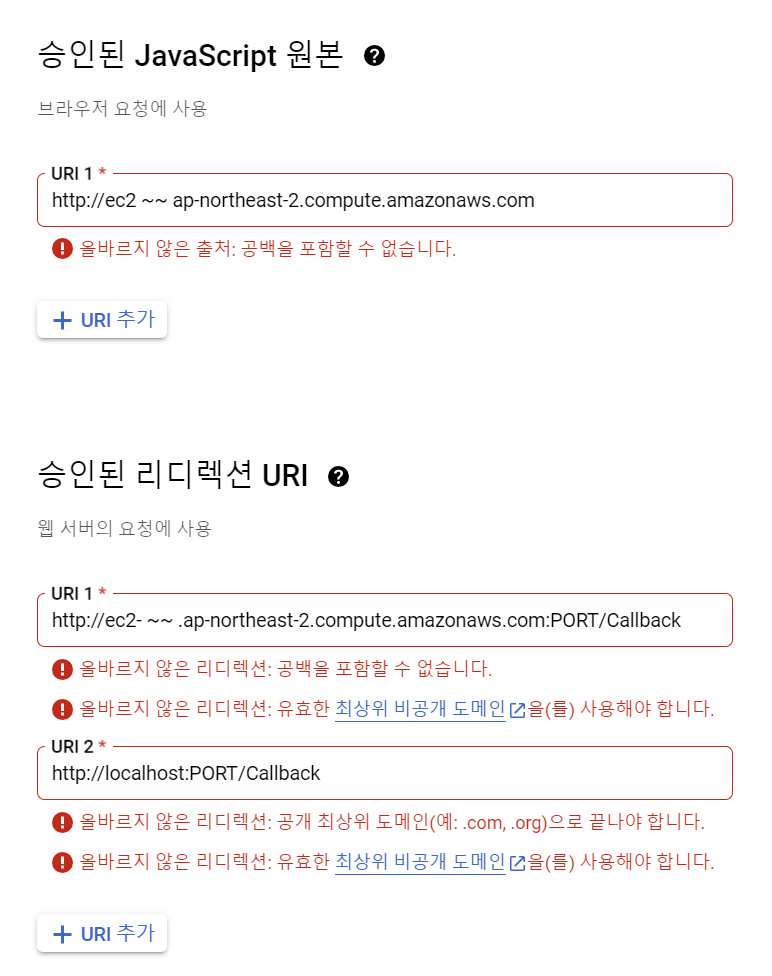
PORT는 내가 설정한 PORT로 넣어주면 된다.
(이후 client_sercret.json 을 다운받아 spring boot에 적용시키는 것도 잊지 말기)
현재 개발 과정이므로 내가 로그인 할 구글 계정을 미리 등록해놓는 것도 잊지 말자.
ec2 보안설정
현재 spring boot를 올릴 것이니 8080과 google auth 인증을 하기 위해 redirect_uri로 설정한 PORT도 같이 열어준다.
보안그룹 > 인바운드 규칙 편집 > 8080,PORT 를 열어준다.
오류
ec2에서 포트를 열지 않거나,
local에서 spring boot를 실행시켜 출력된 인증 url(redirect_uri가 ec2로 연결이 된 상태)로 들어간다면 페이지를 찾을 수 없다는 오류가 발생한다.
google auth 과정 중에 "흠.. 이 페이지에 연결할 수 없습니다." 뜨는 경우

ec2에서 spring boot를 가동시키고, > ec2 redirect_uri
local에서 가동시켜서, > local redirect_uri
이렇게만 허용이 된다.