model을 만들었으므로 db에 적용시켜야 함.
python manage.py makemigrations
python manage.py migrate
profileapp 에 views.py 작성
from django.shortcuts import render
from django.urls import reverse_lazy
from django.views.generic import CreateView

from profileapp.forms import ProfileCreationForm
from profileapp.models import Profile


# Create your views her.

class ProfileCreateView(CreateView):
     model = Profile
     context_object_name = 'target_profile'
     form_class = ProfileCreationForm
     success_url = reverse_lazy('accountapp:hello_world')
     template_name = 'profileapp/create.html'

     def form_valid(self, form):
          temp_profile = form.save(commit=False)
          temp_profile.user = self.request.user
          temp_profile.save()
          return super().form_valid(form)
✨form에서는 profile에 user_id를 입력받지 않음. image,nickname,message만 입력 받음. 여기서 user_id를 받게되면 남의 profile을 만들수 있는 가능성이 생김.
원래 함수
def form_valid(self, form):
	return super().form_valid(form)
form_valid를 통해 user_id를 입력받지 않고 받아옴. 없을 시 에러가 생김
temp_profile : 우리가 보낸 form데이터가 form에 들어가 있음. commit=False로 하면 임시 데이터가 됨. 아직 user_id정보는 없음.
temp_profile.user = self.request.user을 통해 user라는 데이터를 request를 보낸 당사자 user로 결정하여 넣어줌.
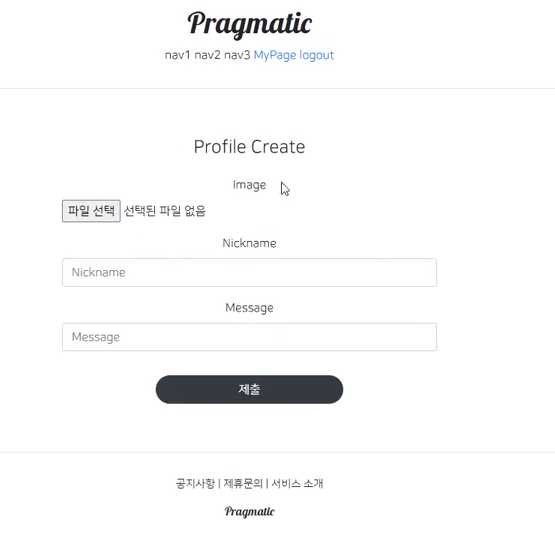
create.html 생성
profileapp -> template폴더 생성-> profileapp폴더 생성 -> create.html(accountapp에서 만들었던 create.html 재활용)
{% extends 'base.html'%}
{% load bootstrap4 %}

{% block content %}

    <div style="text-align: center;max-width:500px; margin: 4rem auto">
        <div class="mb-4"> {# margin bottom #}
            <h4>Profile Create</h4>
        </div>
        <form action="{% url 'profileapp:create' %}" method="post" enctype="multipart/form-data">
            {% csrf_token %}
            {% bootstrap_form form %}
            <input type="submit" class="btn btn-dark rounded-pill col-6 mt-3">
        </form>
    </div>
{% endblock %}
form에서 요청을 보낼 url을 profileapp:create로 수정
이미지 또한 보내주기 때문에 enctype설정
✨enctype : 정상적으로 이미지 파일을 받을수 있게함.
profileapp urls.py 설정
from django.urls import path

from profileapp.views import ProfileCreateView

app_name='profileapp'

urlpatterns = [
    path('create/', ProfileCreateView.as_view(), name='create'),
]
들어갈수 있는 경로 만들기
accountapp->detail.html에서 id가 그대로 노출되는것을 막고 대신에 nickname 노출 시키기.
{% if target_user.profile %}
            <h2 style="font-family: 'NanumSquareB'">
                {{ target_user.profile.nickname }}
            </h2>
            {% else %}
            <a href="{% url 'profileapp:create' %}">
                <h2 style="font-family: 'NanumSquareB'">
                    Create Profile
                </h2>
            </a>
            {% endif %}
profile이 없다면 Create.html로 이동하는 url 보여주기

화이팅