1. ProfileUpdateView 만들기
user updateview재활용
profileapp -> views.py
class ProfileUpdateView(UpdateView):
     model = Profile
     context_object_name = 'target_profile'
     form_class = ProfileCreationForm
     success_url = reverse_lazy('accountapp:hello_world')
     template_name = 'profileapp/update.html'
2. url등록
urls.py -> update ulr 추가. 어떤 profile에 접근해야하는지 확인하기 위해 pk를 받는다
urlpatterns = [
    path('create/', ProfileCreateView.as_view(), name='create'),
    path('update/<int:pk>', ProfileUpdateView.as_view(), name='update'),
]
3. update.html 작성
user의 update.html 재활용
{% extends 'base.html'%}
{% load bootstrap4 %}

{% block content %}

    <div style="text-align: center;max-width:500px; margin: 4rem auto">
        <div class="mb-4"> {# margin bottom #}
            <h4>Update Profile</h4>
        </div>
        <form action="{% url 'profileapp:update' pk=target_profile.pk %}" method="post" enctype="multipart/form-data">
            {% csrf_token %}
            {% bootstrap_form form %}
            <input type="submit" class="btn btn-dark rounded-pill col-6 mt-3">
        </form>
    </div>
{% endblock %}<form action="{% url 'profileapp:update' pk=target_profile.pk %}" method="post" enctype="multipart/form-data">이부분만 수정
4. detail.html에서 updateView로 라우팅해줄 edit 링크 만들기
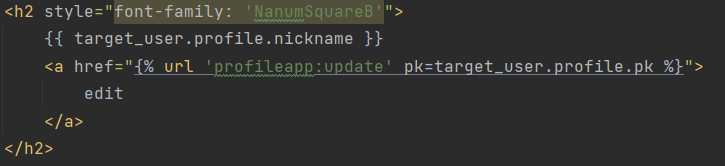
5. detail.html에 프로필 이미지와 메세지 띄우기
<img src="{{ target_user.profile.image.url }}" alt=""
                 style="height: 12rem; width:12rem; border-radius: 20rem; margin-bottom: 2rem;">
😫이렇게만 하면 라우팅 안해놨기 때문에 이미지가 안띄워짐.
pragmatic -> urls.py에 추가적으로 미디어에 관련한 세팅이 필요합니다.
urlpatterns = [
    path('admin/', admin.site.urls),
    path('accounts/', include('accountapp.urls')),
    path('profiles/', include('profileapp.urls')),
] + static(settings.MEDIA_URL, document_root=settings.MEDIA_ROOT)
static을 가져오고(conf.urls 에 있는 static) 그안에 settings(conf.setinsgs)를 가져옴으로서 pragmatic settings안에 적었던 모든 값들을 사용할 수 있음.
이렇게 해야 서버에서 이미지를 보내줄 수 있음.
메세지 띄우기
<h5 style="margin-bottom:3rem">
                {{ target_user.profile.message }}
            </h5>
6. decorator를 통해 프로필 주인인지 체크
pragmatic에 있는 decorator 재활용
decorators.py
from django.http import HttpResponseForbidden

from profileapp.models import Profile


def profile_ownership_required(func):
    def decorated(request,*args,**kwargs):
        profile = Profile.objects.get(pk=kwargs['pk'])
        if not profile.user == request.user:
            return HttpResponseForbidden()
        return func(request,*args,**kwargs)
    return decorated
urls에서 update로 받는 pk로 받아서 프로필의 주인을 확인.
이 profile의 유저와 request를 보내는 user가 같은지 확인
views.py에 데코레이터 추가
@method_decorator(profile_ownership_required, 'get')
@method_decorator(profile_ownership_required, 'post')
class ProfileUpdateView(UpdateView):
     model = Profile
     context_object_name = 'target_profile'
     form_class = ProfileCreationForm
     success_url = reverse_lazy('accountapp:hello_world')
     template_name = 'profileapp/update.html'
화이팅