
해당 포스팅은 GOAT 자바스크립트 책으로 공부한 내용을 정리한 것이다.
배열의 연산
자바스크립트에서 자주 사용되는 배열의 메서드와 연산방법에 대해 정리하였다.
1. push(), pop()
- push() - 배열의 마지막에 원소 추가
- pop() - 마지막 원소 제거
<body>
<div class="container">
  <div class="row my-3">
    <div class="col">
      <div class="form-check">
        <label><input class="form-check-input" type="checkbox" name="city" value="paris">파리</label>
      </div>
      <div class="form-check">
        <label><input class="form-check-input" type="checkbox" name="city" value="sydney">시드니</label>
      </div>
      <div class="form-check">
        <label><input class="form-check-input" type="checkbox" name="city" value="seoul">서울</label>
      </div>
    </div>
    <div class="col"></div>
  </div>
</div>

<script>
  let lists = [];
  const checkboxes = document.querySelectorAll('[name="city"]');
  // 체크박스에 대한 onchange 이벤트 트리거가 발생하면 setListGroup() 호출
  for (let checkbox of checkboxes) {
    checkbox.onchange = setListGroup;
  }

  function setListGroup() {
    resetListGroup(); // 이전 저장 리스트 삭제

    for (let checkbox of checkboxes) {
      if (checkbox.checked) { // 체크된 체크박스만 배열에 push
        lists.push('<li class="list-group-item">' + checkbox.value + '</li>');
      }
    }
    // col의 두번째 영역에 리스트 그룹 삽입
    const target = document.querySelector('.col:nth-of-type(2)');
    target.innerHTML = '<ul class="list-group">' + lists.join('') + '</ul>';
  }

  function resetListGroup() { // 배열 list 초기화
    if (lists.length) {
      console.log('[전]', lists.toString());
      while (lists.length) {
        lists.pop();
        console.log('[후]', lists.toString());
      }
    }
  }
</script>
</body>
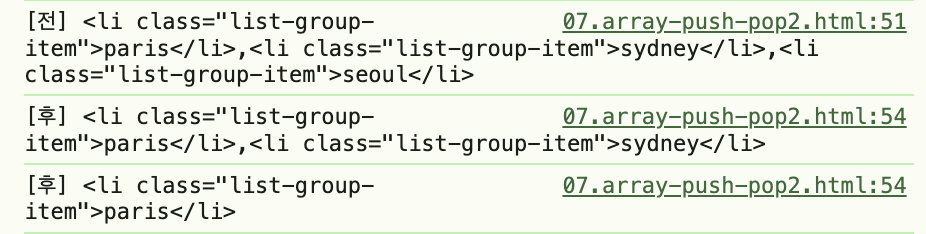
해당 과정에서 리스트에 push, pop 하는 과정을 볼 수 있다. 만약 pop하는 과정이 없으면 기존 배열에 이어서 추가된다. 따라서 pop으로 리스트를 초기화해준 뒤 체크박스 선택된 것만 push해줘서 중복된 값이 없도록 해준다.
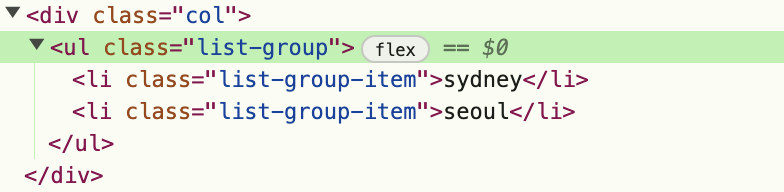
체크박스 선택에 따라 새롭게 만들어진 리스트 그룹은 브라우저의 [페이지 소스 보기] 메뉴에서는 볼 수 없다. 개발자 도구의 요소(elements) 메뉴에서 확인할 수 있다.
2. splice(), slice()
- splice() - 배열의 기존 요소를 삭제 또는 교체하거나 새로운 요소를 추가하는 메서드
array.splice(start, deleteCount, item1, item2...); - slice() - 배열의 시작부터 마지막 전까지 값을 복사하여 새로운 배열로 반환한다. 원본 배열은 변경되지 않는다.
array.slice(start, end);
3. concat()
- 여러개의 배열을 하나의 배열로 연결하는 메서드
array.concat(array1, array2, array3...N);
4. sort(), reverse()
5. forEach(), map()
- forEach() - 배열의 요소를 각각 한 번씩 순회하는 반복문 요소
const numbers = [1, 3, 5, 7];

  numbers.forEach(function(value, index, numbers) {
    console.log(value, index, numbers);
    numbers.forEach(loopNumber1);

  function loopNumber1(item, index) {
    console.log(item, index);
  }
});- map() - 배열의 요소를 각각 한 번씩 순회하면서 특정 함수를 실행하는 연산의 결과로 새로운 배열 생성하는 메서드
const numbers = [1, 3, 5, 7];

let newArray1 = numbers.map(function(value, index, numbers) {
    return 10 + value;
  });
  console.log(newArray1); // [11, 13, 15, 17]

  let newArray2 = numbers.map(loopNumber2);

  function loopNumber2(item, index) {
    return 10 * item;
  }
6. filter(), reduce()
- filter() - 배열의 요소를 각각 한번씩 순회하면서 특정 조건을 통과하는 원소로만 구성된 새로운 배열을 생성하는 메서드
array.filter(function(item, index, array){});
const numbers = [1, 3, 5, 7, 9];

  const remains = numbers.filter(function(value, index) {
    return (value % 3) == 1;
});- reduce() - 배열의 요소를 각각 한번씩 순회하면서 실행하는 연산의 결과를 반환하는 메서드
array.reduce(function(total, item, index, array){}, initalValue);
const sum = numbers.reduce(makeSum, 10);

  function makeSum(total, item, index) {
    console.log('total, item, index', total, item, index);
    return total + item;
  }
  console.log('sum', sum);
7. 구조분해할당
구조 분해 할당은 배열이나 객체의 속성을 해체하여 그 값의 전부 혹은 일부를 개별 변수에 담을 수 있게 하는 표현식이다.
const casts = ['홍길동', '일지매', '임꺽정'];

  // 배열값을 이용한 예전 방법
  const cast01 = casts[0]; // 홍길동
  const cast02 = casts[1]; // 일지매
  const cast03 = casts[2]; // 임꺽정

  // 구조 분해 할당(Destructuring Assignment)
  const [cast11, cast12, cast13] = casts;
다양한 구조분해할당 방법:
    const casts = ['홍길동', '일지매', '임꺽정', '전우치'];

    const [cast11, , , cast14] = casts;
    console.log(cast11, cast14); // 홍길동 전우치

    const [cast21, ...rest] = casts; // 나머지 연산자
    console.log(cast21, rest); // 홍길동 [일지매, 임꺽정, 전우치]

    const [a, b, c] = '장길산';
    console.log(a, b, c); // 장 길 산

    const { name, age } = { name: '전우치', age: 21 };
    console.log(name, age); // 전우치 21
"스프레드 연산자"와 "나머지 연산자"는 동일한 형태로 보이지만, "스프레드 연산자"는 배열을 그 요소로 확장하는 반면, "나머지 연산자"는 여러 요소를 하나의 요소로 압축한다.
    // 스프레드 연산자(Spread Operator)
    const firstArray = [1, 2, 3];
    const secondArray = [4, 5, 6];
    const arrayCombined = [...firstArray, ...secondArray];
    console.log(arrayCombined); // [1,2,3,4,5,6]
// 나머지 연산자(Rest Operator)
const myArray = [1, 2, 3, 4, 5, 6];
const [one, two, ...rest] = myArray;
console.log(one, two, rest); // 1,2 [3,4,5,6]문자열
1. charAt(), indexOf()
- charAt() - 특정한 위치에 있는 문자 반환
string.charAt(인덱스) - indexOf() - 위치를 인덱스로 반환. 만약 반환될 수 없다면 -1 반환
string.indexOf(찾아볼 문자, 탐색 시작 인덱스)
2. include(), startsWith(), endsWith()
- include() - 특정 문자열이 포함되는지 true/false로 반환
- startsWith(), endsWith() - 특정 문자열로 시작하거나 끝나는지 true/false로 반환
3. match(), search(), replace()
- match() - 문자열에서 매개변수로 전달되는 문자열이나 정규표현식의 조건으로 매칭되는 값을 배열로 반환. 매칭되지 않을 경우 null 반환
- search() - 문자열에서 매개변수로 전달되는 문자열이나 정규표현식의 조건으로 매칭되는 값을 인덱스로 반환. 매칭되지 않을 경우 -1 반환
- replace() - 문자열에서 매개변수로 전달되는 문자열이나 정규표현식의 조건으로 매칭되는 값을 '새로운 문자열'로 교체하거나 지정된 함수가 반환. 매칭되지 않을 경우 아무런 변화 없음
정규표현식
정규표현식이란 RegExp 객체로 문자열을 탐색하기 위한 패턴을 표현하는 방법이다.
| 탐색조건 | 설명 |
|---|---|
| i | 대소문자 구별없이 탐색 |
| g | 매칭되는 모든 조건 반환 |
| m | 여러줄 매칭 수행 |
-
/패턴/탐색조건 -
new RegExp(패턴, 탐색조건)
searchBox.onsearch = function() {
  var re = new RegExp(this.value, 'g');

  let newText = textBox.innerText.replace(re, function(x) {
    return '<span class="bg-white">' + x + '</span>';
  });

  textBox.innerHTML = newText;
}
RegExp 형식을 사용하지 않고 replaceAll()을 사용하여 매칭되는 모든 문자에 대해 교체할 수 있다. 탐색조건 g가 필요없어 패턴이나 문자열 값이 아닌 변수로 매개변수를 전달할 수 있다.
searchBox.onsearch = function () {
  let newText = textBox.innerText.replaceAll(this.value, function(x) {
    return '<span class="bg-warning">' + x + '</span>';
  });

  textBox.innerHTML = newText;
}
https://github.com/dyeon-dev