
첫번째 프로젝트가 끝난지 얼마 안된 것 같은데 벌써 두번째 프로젝트를 시작했습니다!
2주 정도 이론 강의, 실시간 강의를 들으며 자격증도 취득하고 조금 휴식한 후 다시 달리고 있습니다. 지치기도 하지만 짧은 기간동안 많이 성장하는 것 같아 뿌듯한 나날을 보내고 있습니다 😊
📂 프로젝트 요구사항
이번 프로젝트는 직원들을 위한 급여 및 업무 관리 플랫폼을 개발해보는 것입니다.
필수 구현 과제는 급여 내역 확인 및 정정 신청 페이지 구현, 캘린더를 통한 업무 확인 페이지 구현하고 각각에 필요한 기능을 구현하는 것입니다.
첫번째 프로젝트와 달리 라이브러리 사용에 제한이 없고 styled-component, Redux, firebase, react를 필수로 사용해야합니다.
프로젝트를 할때마다 알고 있는 지식이 아닌 새로 학습하며 구현해나가는 것이 불안하고 어색하기도 했는데요. 강사님께서 개발자는 그게 일상이기 때문에 스스로 해보며 학습할 수 있는 커리큘럼을 짜놓은 거라고 언급하셨어요! 지치더라도 포기하지 말고 끈기와 도전정신을 기를 수 있는 좋은 경험이라고 생각합니다 👍👍
💫 우리 팀의 프로젝트
이번에도 팀이 랜덤으로 구성됐는데요. 총 5명의 팀원 중 세분과 처음 프로젝트를 해봐서 기대가 됐습니다.
저희 팀은 먼저 급여 관리가 어느 단체에 가장 필요할까 생각해봤고 영화관 알바🍿 를 떠올리게 됐습니다. 매주 스케줄과 파트를 유동적으로 바꾸고 새벽까지 일을 하는 경우가 많아 업무 일정을 기록하고 급여를 명확히 볼 수 있는 서비스가 있으면 좋겠다고 생각했습니다.
매점, 매표, 플로어로 나눠 스케줄을 입력하고 캘린더로 확인하고, 급여를 확인하고, 이이신청을 할 수 있는 기능을 중점으로 개발을 하고 있습니다.
캘린더 쉽게 구현하기 react-calender 🗓
저는 캘린더를 다뤄보고 싶어. 일정 관리 페이지를 맡아 개발하고 있습니다.
react-calender를 처음 써봤는데요!
공식 문서도 잘돼있고 스타일도 쉽게 변경할 수 있어 정말 유용한 라이브러리라고 느꼈습니다.
간단하게 사용법을 공유드려볼게요
npm install react-calender로 설치를 한 후
// src/components/calender/Calender.tsx
export const CalendarComponent = () => {
	// 날짜 선택시(셀 선택) 실행할 함수 - 그 날짜, 그 날짜의 스케줄 필터링해서 전역 상태에 저장
	const handleDateClick = (date: Date) => {
		dispatch(selectDate(date));

		const filteredS = filterSchedulesByDateAndSort(schedules, date);

		console.log('filteredS:', filteredS); // 디버깅용

		dispatch(filteredSchedules(filteredS));
	};

	// 각 셀에 넣을 내용 - 일정 바 넣음
	const tileContent = ({ date }: { date: Date }) => {
		const daySchedules = schedules
			.filter((schedule) => toDate(schedule.start_date_time).toDateString() === date.toDateString())
			.sort(
				(a, b) =>
					toDate(a.start_date_time).getTime() - toDate(b.start_date_time).getTime() ||
					toDate(a.created_at).getTime() - toDate(b.created_at).getTime(),
			)
			.slice(0, 2);
		return daySchedules.length > 0 ? (
			<>
				{daySchedules.map((s: TSchedule) => (
					<S.ScheduleBar key={s.schedule_id} $category={s.category}>
						{s.category}
					</S.ScheduleBar>
				))}
			</>
		) : null;
	};

    // 날짜 포맷 변경(숫자만 나오게)
    export const formatCalendarDay = (locale: string | undefined, date: Date): string => {
        const day = date.getDate();
        return day < 10 ? `0${day}` : `${day}`;
    };

	return (
		<S.CalenderContainer>
			<S.StyledCalendar
				locale="ko-KR" /* 한국어 */
				onClickDay={handleDateClick}  /* 셀 클릭시 */
				value={selectedDate} /* 선택된 날짜 */
				view="month" /* 뷰 단위 - 일반적인 calender 형태 */
				formatDay={formatCalendarDay} /* 요일 커스텀 */
				calendarType="gregory" /* 일요일부터 시작 */
				prev2Label={null} /* 년 단위 이동 없앰 */
				next2Label={null} /* 년 단위 이동 없앰 */
				tileContent={tileContent} /* 셀 안 내용 */
			/>
		</S.CalenderContainer>
	);
};
자세한 내용은 공식 문서를 참고해주세요!
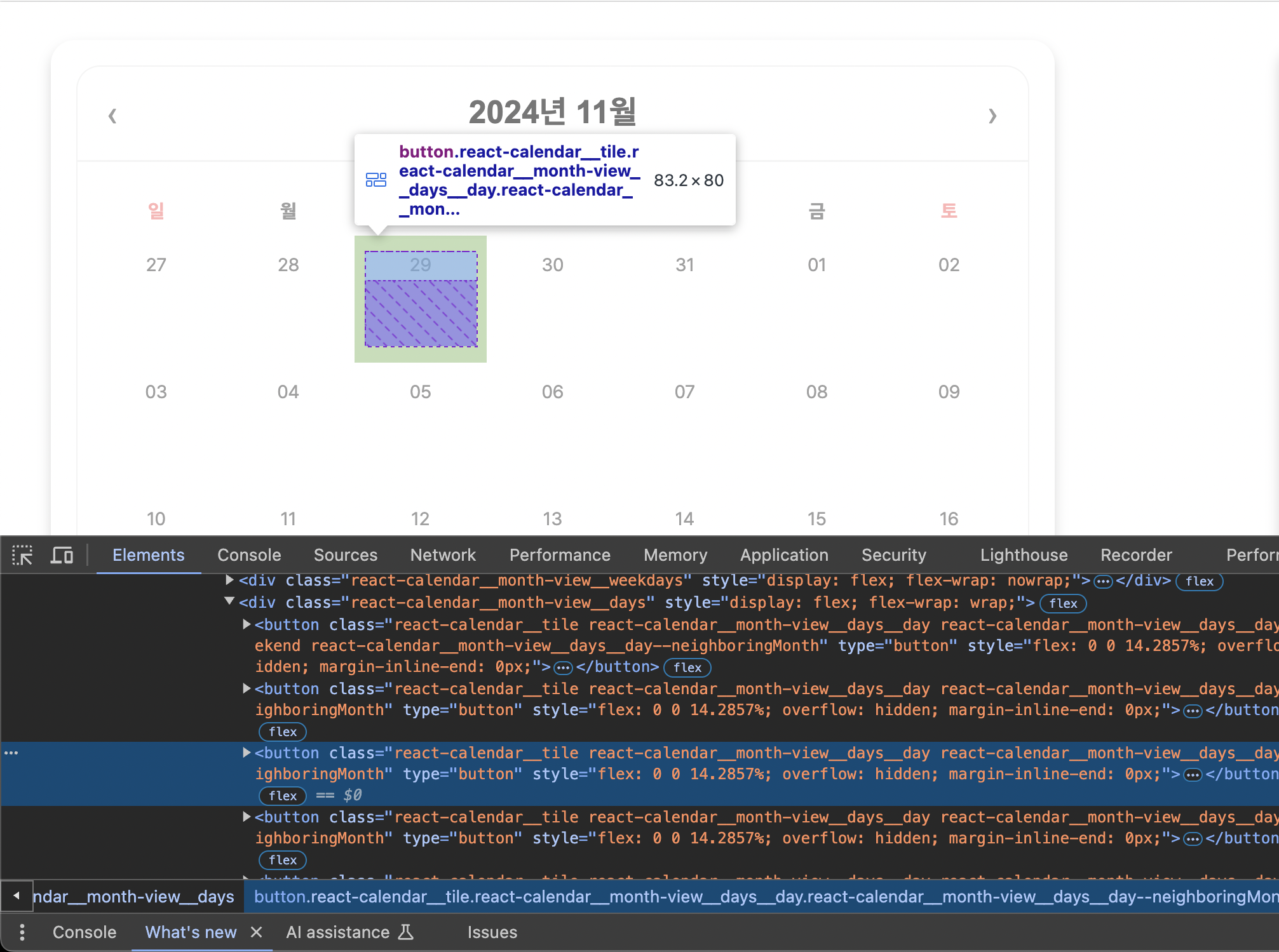
스타일은 요소의 클래스이름을 보며 수정했습니다.
// src/components/calender/Calender.styles.ts
import styled from 'styled-components';
import Calendar from 'react-calendar';
import 'react-calendar/dist/Calendar.css'; //css 파일을 가져와 수정합니다
import { TScheduleCategory } from '@/types/schedule';

export const CalenderContainer = styled.div`
	...
`;

export const StyledCalendar = styled(Calendar)`
	font-family: 'Pretendard', sans-serif;
	width: 600px;
	height: 520px;
	border-radius: var(--medium-border-radius);
	border: 1px solid var(--color-pale-gray);
	/* 네비게이션 */
	.react-calendar__navigation {
		border-bottom: 1.5px solid var(--color-pale-gray);
		height: 60px;

		span {
			font-size: var(--font-large);
			font-weight: 700;
			color: var(--color-dark-gray);
		}
	}

	.react-calendar__navigation__arrow {
		font-size: var(--font-large);
		color: var(--color-regular-gray);
	}

	.react-calendar__navigation button:enabled:hover {
		background-color: var(--color-white);
		color: var(--color-blue);
		border-radius: var(--medium-border-radius);
	}
	.react-calendar__navigation button:enabled:focus {
		background-color: var(--color-white);
		border-radius: var(--medium-border-radius);
	}

	/* 월 뷰 */
	.react-calendar__month-view {
		padding: 0 var(--space-small) var(--space-xsmall);
		abbr {
			/* 텍스트 */
			color: var(--color-regular-gray);
			font-size: var(--font-small);
		}
	}

	/* 주 뷰 */
	.react-calendar__month-view__weekdays {
		abbr {
			font-size: var(--font-medium);
			font-weight: 700;
			text-decoration: none;
		}
		.react-calendar__month-view__weekdays__weekday--weekend {
			abbr {
				color: var(--color-coral);
			}
		}
	}

	/* 일 뷰 */
	.react-calendar__tile {
		text-align: center;
		height: 80px;
		display: flex;
		flex-direction: column;
		justify-content: flex-start;
		align-items: center;
		overflow: hidden;
	}
	/* hover, focus, 선택됐을 시 */
	.react-calendar__tile:enabled:hover,
	.react-calendar__tile:enabled:focus,
	.react-calendar__tile--active,
	.react-calendar__tile--now:enabled:hover,
	.react-calendar__tile--now:enabled:focus {
		background-color: var(--color-pale-gray);
		border-radius: var(--small-border-radius);
	}

	.react-calendar__tile--now {
		background-color: var(--color-pale-gray-light);
		border-radius: var(--small-border-radius);
	}
`;

/* 셀 안 내용 */
export const ScheduleBar = styled.div<{ $category: TScheduleCategory }>`
	width: 100%;
	padding: 0 var(--space-xsmall);
	margin: 2px 0 5px;
	text-align: center;
	background-color: ${({ $category }) =>
		$category === '매표'
			? 'var(--color-blue)'
			: $category === '매점'
				? 'var(--color-caramel)'
				: 'var(--color-coral)'};
	color: var(--color-dark-gray);
	font-size: var(--font-small);
	border-radius: var(--small-border-radius);
`;
이 외에도 Redux로 비동기 작업을 처리하며 어려운 부분도 많지만 끝까지 계획한 프로젝트를 잘 만들 수 있으면 좋겠습니다. 파이팅 🔥🔥