EKS Amazon linux 2023 user-data
EKS Managed NodeGroup을 Launch Template으로 생성하여 사용중
Worker Node로 amazon linux2를 사용하였고 amazon linux 2023으로 변경하려고 함
AMI만 변경한다고 되지 않음
현상
terraform으로 시도하였으나 장렬히 실패
╷
│ Error: waiting for EKS Node Group (dev-eks-cluster:dev-eks-nodegroup) version update (b683b587-ee4e-3ec0-9398-fada7bcf94bc): unexpected state 'Failed', wanted target 'Successful'. last error: : NodeCreationFailure: Couldn't proceed with upgrade process as new nodes are not joining node group dotcom-eks-ng-dev
│
│   with aws_eks_node_group.node_group,
│   on 30-nodegroup.tf line 1, in resource "aws_eks_node_group" "node_group":
│    1: resource "aws_eks_node_group" "node_group" {
│
╵
확인
EC2 instance화면에서 확인시
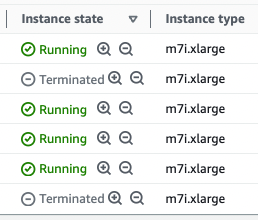
instance는 생성되었으나, NodeGroup에 Join되지 못함
EKS Compute탭에서 Nodegreoup 확인시

기존 2개 사용중인데 계속 2개 유지
해결 방법
Amazon linux 2023 부터는 Nodeadm이 사용되며 Nodeadm이 인식할 수 있는 NodeConfig를 설정해야 한다.
이것을 Launch Template Userdata에 추가해야함
기존 LaunchTemplate
MIME-Version: 1.0
Content-Type: multipart/mixed; boundary="==BOUNDARY=="
--==BOUNDARY==
Content-Type: text/x-shellscript; charset="us-ascii"
#!/bin/bash
/etc/eks/bootstrap.sh ${cluster_name}
--==BOUNDARY==--
변경한 LaunchTemplate
MIME-Version: 1.0
Content-Type: multipart/mixed; boundary="==MYBOUNDARY=="
--==MYBOUNDARY==
Content-Type: application/node.eks.aws; charset="us-ascii"

---
apiVersion: node.eks.aws/v1alpha1
kind: NodeConfig
spec:
  cluster:
    name: ${cluster_name}
    apiServerEndpoint: ${값}
    certificateAuthority: ${값}
    cidr: ${값}
--==MYBOUNDARY==--
(필수값만 넣었다. 원한다면 kubelet 설정도 추가할 수 있다.)
해결 방법 상세
값이 뭔데요...?
네...값에 뭘 넣어야하냐면...
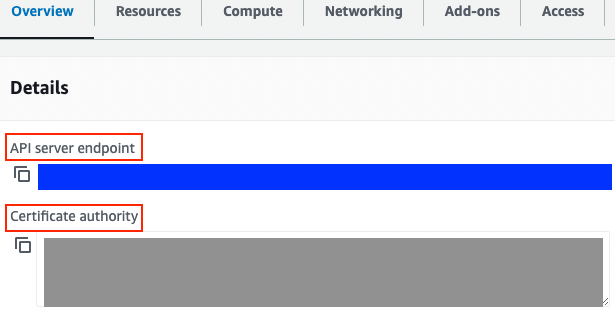
Overview탭
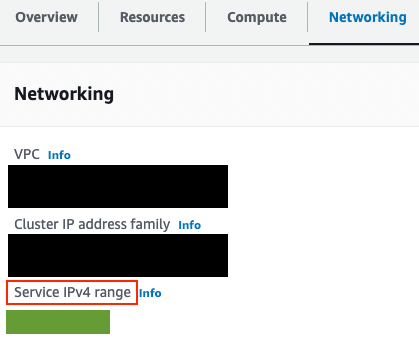
Networking탭
apiServerEndpoint: 파란색을 넣으세요. (https://부터 .com까지 전부)
certificateAuthority: 회색을 넣으세요. (예시랑 다르게 너무 긴데요? 예시와 다르게 전부 넣으셔야 합니다.)
cidr: 초록색을 넣으세요.
terraform으로 작성했는데........
apiServerEndpoint: ${aws_eks_cluster.cluster.endpoint}
certificateAuthority: ${aws_eks_cluster.cluster.certificate_authority[0].data}
cidr: ${aws_eks_cluster.cluster.kubernetes_network_config[0].service_ipv4_cidr}
참고 문헌
https://awslabs.github.io/amazon-eks-ami/nodeadm/
https://docs.aws.amazon.com/eks/latest/userguide/al2023.html
