개요
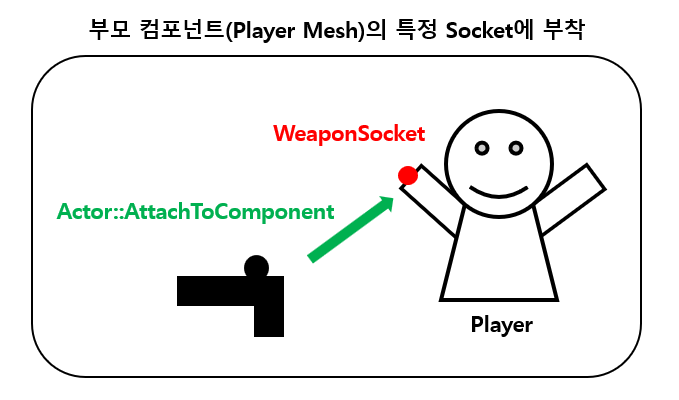
Attach는 어떤 SceneComponent(또는 액터의 RootComponent)를 다른 SceneComponent의 자식으로 연결하여, 부모의 이동/회전에 따라가게 만든다. (소켓 이름을 지정하면 소켓 기준으로 붙는다.)
Detach는 이 연결을 끊는다. 액터 단위로 끊으면 RootComponent 기준, 컴포넌트 단위로 끊으면 그 컴포넌트만 분리된다.
- 흔히 게임에서 무기를 장착/해제할 때 사용한다.
- 맨 처음
AttachToComponent와DetachFromActor를 사용했을때, 왜DetachFromComponent를 사용하지 않는지 사용법이 궁금해 적어보는 글
이 글은 언리얼 엔진 5.6 기준으로 작성되었습니다.
기본 사용법
종류는 굉장히 많지만, 사용 방법은 매우 단순하다.
1. 실행 중 무기를 캐릭터 손 소켓에 부착
WeaponActor->AttachToComponent(
    Character->GetMesh(),
    FAttachmentTransformRules::SnapToTargetNotIncludingScale,
    FName("WeaponSocket_R")
);- RootComponent가 WeaponSocket_R 소켓에 부착된다.
2. 액터 전체를 손에서 떼기 (월드 좌표 유지)
WeaponActor->DetachFromActor(FDetachmentTransformRules::KeepWorldTransform);- 해제 후에도 화면에서 제자리로 보이게 유지. (분리된 자리에 멈춘다.)
3. 액세서리 컴포넌트만 분리 후 물리 적용
ScopeMesh->DetachFromComponent(FDetachmentTransformRules::KeepWorldTransform);
ScopeMesh->SetSimulatePhysics(true);- 액터는 손에 계속 붙어 있고, 스코프 메쉬만 물리효과를 적용한 채로 분리된다. (2번과 다르게 땅에 떨어진다.)
내부 동작
Attach 과정
요약
AttachToComponent호출 →USceneComponent::AttachToComponent()내부에서 AttachChildren 배열에 부모-자식 관계 등록- Transform Rule에 따라 RelativeTransform 재계산 및 부모의 이동 시 Tick/Update 단계에서 상대 변환 적용
실제 과정을 살펴보자
Weapon->AttachToComponent(Parent, Rules, SocketName);이 함수가 호출되면, USceneComponent::AttachToComponent()를 거쳐서 실제 부모-자식 관계를 설정한다.
1. 기존 관계 해제
- 이미 다른 부모에 붙어 있다면
DetachFromComponent()로 이전 부모의AttachChildren배열에서 제거하고 연결을 끊는다.
2. 부모 설정 및 소켓 기록
AttachParent에 새로운 부모를 저장하고 소켓 이름을 기록한다((없다면 NAME_None)). 이후 부모의AttachChildren에 자신을 추가한다.
3. Transform Rule 적용
FAttachmentTransformRules에 따라 상대 변환(RelativeTransform)을 계산한다.- 예: KeepWorld
// 현재 보이는 월드 좌표를 유지하도록 역산
RelativeTransform = Parent->GetComponentToWorld().Inverse() * WorldTransform;
4. 물리 상태 처리
bWeldSimulatedBodies값에 따라 물리 상태를 처리한다. 값이true면 부모의 물리 바디에 병합되어 하나처럼 움직이게된다.
5. 매 프레임마다 위치 갱신
- 부착 이후에는 매 프레임
UpdateComponentToWorld()에서
ComponentToWorld = RelativeTransform * Parent->GetComponentToWorld();- 위처럼 계산되어 부모의 이동/회전을 따라간다.
Detach 과정
요약
DetachFromComponent는 AttachChildren에서 제거하고, RelativeTransform을 WorldTransform으로 변환 후 저장DetachFromActor는 RootComponent에 대해 위 과정을 수행
1. Transform 보존
- KeepWorld: 현재 WorldTransform을 계산해 저장 → 화면상 동일한 위치 유지
- KeepRelative: 상대 좌표만 유지 (부모가 사라지면 그 좌표가 곧 월드좌표로 해석)
2. 부모-자식 관계 해제
AttachParent=nullptr수행 후 부모의AttachChildren에서 자신을 제거한다. 소켓역시AttachSocketName=NAME_None으로 정리된다.
3. 물리 상태 전환
- Detach 자체는 물리를 켜지 않는다.
- 드롭 시에는
SetSimulatePhysics(true)를 별도 호출을 하는 경우가 많다.- 무기 Drop시 땅에 떨어지게 하기 등
함수별 차이
호출 주체가 Component인지 Actor인지에 따라 구분된다.
| 함수 | 호출 주체 | 역할 | 주의 |
|---|---|---|---|
AActor::AttachToComponent(Parent, Rules, Socket) | Actor | 이 Actor의 RootComponet를 Parent의 RootComponet를 부착 | Parent가 등록되어있어야 유효함, 소켓부착가능, 성공여부 반환 |
AActor::AttachToActor(ParentActor, Rules, Socket) | Actor | 이 Actor의 RootComponet를 상대 액터의 RootComponet를 부착 | 소켓 가능, 성공 여부 반환 |
AActor::DetachFromActor(DetachmentRules) | Actor | 이 Actor의 RootComponet를 부모에서 분리 | |
USceneComponent::AttachToComponent(Parent, Rules, Socket) | Component | 이 SceneComponet를 Parent에 부착 | 등록 전,후 모두 호출 가능하지만 생성자에서는 SetupAttachment권장 |
USceneComponent::DetachFromComponent(DetachmentRules) | Component | 이 SceneComponet를 부모에서 분리 | 컴포넌트 단위로 세밀하게 분리 가능 |
Actor vs Component 선택
- 정밀 제어(부품 분리/교체)가 목적이면 USceneComponent API를, 액터 전체를 들고 붙였다 떼는 흐름이면 AActor API를 우선 고려하는 것이 좋다.
- 즉, DetachFromComponent와 같은 USceneComponent API는 특정 SceneComponent 단위에서 개별적인 동작을 주고 싶을 때 매우 유용
- 위의 예시와 같이, "총"을 뗄거면 Actor를, 총은 손에 붙어있는데 "스코프"가 떨어진다면 Component로 제어하는 게 좋을 듯
추가 설명
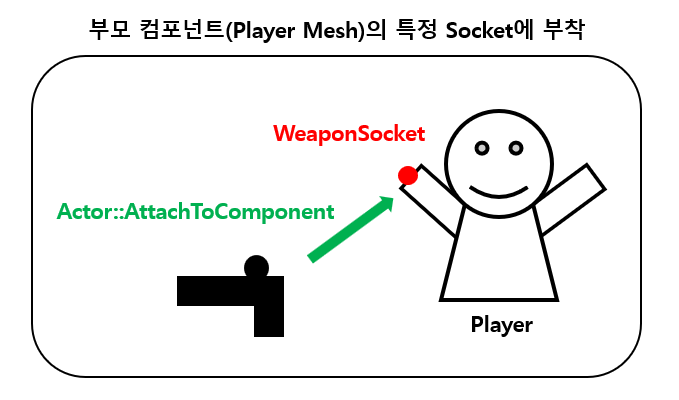
AActor::AttachToComponent
- 부모 컴포넌트를 지정해서 부착 (AttachToActor의 경우 부모의 Root에 붙는다)
- 총 액터를 액터 루트를 캐릭터 메쉬 컴포넌트의 손 소켓에 부착할 때
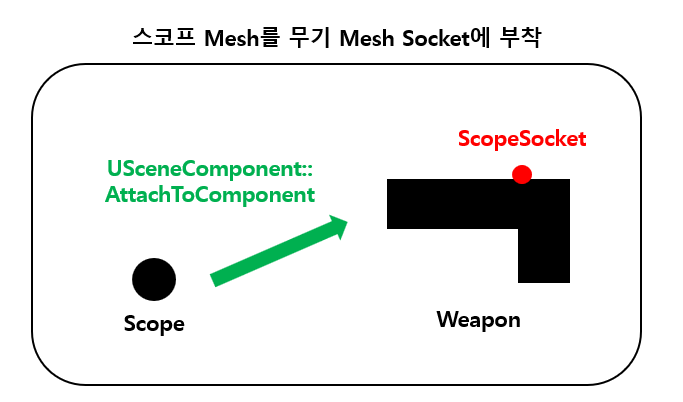
USceneComponent::AttachToComponent
- 루트가 아닌 임의의 ScencComponent 사이를 직접 연결
- 액터 내부의 특정 부품끼리 연결할 때
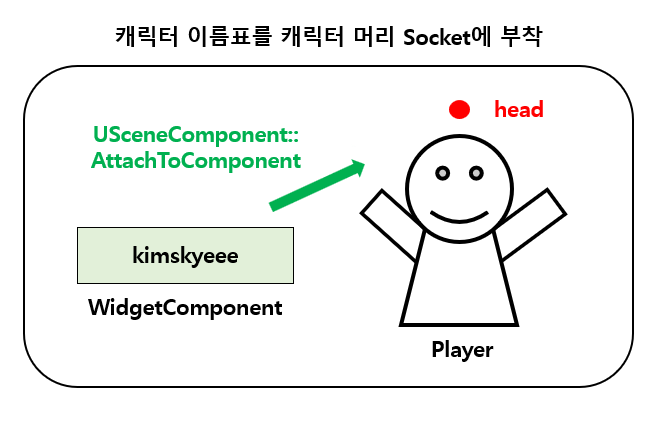
- 캐릭터 이름표 (WidgetComponent)를 붙이는 것도 예시가 될 수 있겠음!
Actor API와의 관계
void AActor::DetachFromActor(const FDetachmentTransformRules& Rules)
{
    if (RootComponent)
    {
        RootComponent->DetachFromComponent(Rules);
    }
}
bool AActor::AttachToActor(AActor* ParentActor, const FAttachmentTransformRules& AttachmentRules, FName SocketName)
{
if (RootComponent && ParentActor)
{
USceneComponent* ParentDefaultAttachComponent = ParentActor->GetDefaultAttachComponent();
if (ParentDefaultAttachComponent)
{
return RootComponent->AttachToComponent(ParentDefaultAttachComponent, AttachmentRules, SocketName);
}
}
return false;
}DetachFromActor, AttachToActor는 각각DetachFromComponent, AttachToComponent를 호출하는 래퍼이다.AttachToActor는 내부적으로는 부모 액터의 기본 부착 컴포넌트를 찾아AttachToComponent()를 호출하는 구조이다.- 반대로
DetachFromActor는 RootComponent를 기준으로DetachFromComponent()를 호출한다. - Actor 단위로 쓰기 편하게 한 레벨 더 감싼 것으로 실질적인 부착/해제 로직은 USceneComponent 계층에서 이루어진다는 것을 알 수 있다.
SetupAttachment
언리얼엔진은 생성자에서의 연결은 SetupAttachment(Parent, Socket)를 권장한다.
- 생성자 단계에서는 컴포넌트들이 아직 월드에 등록되지 않은 상태
- 즉,
AttachToComponent()를 사용하면 부모 컴포넌트가 아직RegisterComponent()되지 않아IsRegistered()false로 실패하거나, 월드 변환이 꼬일 수 있다. - 대신 언리얼엔진이 권장하는
SetupAttachment()는 등록 전 계층을 미리 지정하는 일종의 예약시스템이다.SetupAttachment: 나중에 여기로 붙여줘!
- 그러면 엔진
UActorComponent::RegisterComponent()함수가 컴포넌트 등록 시, 예약된 부모-자식 관계를 실제 계층 구조로 반영한다!RegisterComponent: 붙일게~! (...)
- 이 함수는 컴포넌트를 월드에 등록한다.
UActorComponent::RegisterComponent()함수는 액터가 생성될 때 자동으로 호출 되므로, BeginPlay전에 모든 컴포넌트는 등록된다고 보면 된다.
Transform Rule 이해
Attach와 Detach 모두 공식문서에서 Transform Rule을 따른다고 적혀있는데, Transform Rule은 뭘까?
FAttachmentTransformRules (붙일 때)
FAttachmentTransformRules(EAttachmentRule InLocationRule, EAttachmentRule InRotationRule, EAttachmentRule InScaleRule, bool bInWeldSimulatedBodies)
		: LocationRule(InLocationRule) // 부착 시 위치에 적용할 규칙
		, RotationRule(InRotationRule) // 부착 시 회전에 적용할 규칙
		, ScaleRule(InScaleRule) // 부착 시 스케일에 적용할 규칙
		, bWeldSimulatedBodies(bInWeldSimulatedBodies)
{}- 세 축(Location/Rotation/Scale)을 묶어 자주 사용하는 조합 프리셋이 존재한다. (꼭 써야하는 것은 아님)
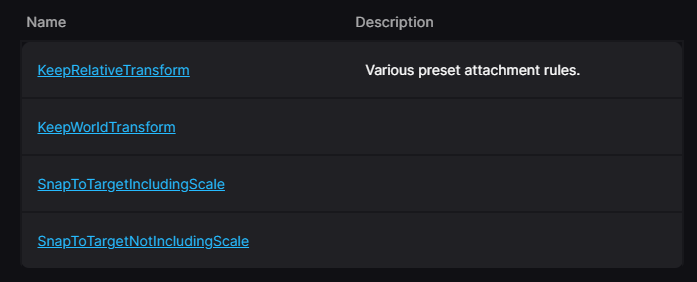
bWeldSimulatedBodiestrue면 자식(시뮬레이션 중인 컴포넌트)의 바디를 부모 바디에 병합해, 하나처럼 움직인다. (자식 독립 시뮬레이션 제거)
EAttachmentRule의 의미
FAttachmentTransformRules Rules(
    EAttachmentRule::SnapToTarget,   // Location
    EAttachmentRule::SnapToTarget,   // Rotation
    EAttachmentRule::KeepWorld,      // Scale
    /*bWeldSimulatedBodies=*/false
);
1. KeepRelative
- 지금 상대 변환(Parent-Relative Transform)을 그대로 유지
- 부모의 변환을 따라간다.
2. KeepWorld
- 지금 보이는 World Transform을 유지
- 부모가 바뀌어도 보이는 위치, 회전, 스케일이 변하지 않도록 역산해 새로운 상대 변환을 설정한다.
3. SnapToTarget
- 부모의 부착 지점(컴포넌트/소켓)의 원점에 맞춤
- 스케일에 대해서는 ScaleRule이 결정
- 보통 소켓 정렬에 사용한다
스케일 규칙의 실제 예시
-
IncludingScale(=SnapToTarget + Scale: SnapToTarget)
- 부모 소켓의 스케일까지 그대로!
-
NotIncludingScale(=SnapToTarget + Scale: KeepRelative)
- 위치/회전만 스냅하고, 자식의 현재 스케일을 유지
- 무기/이펙트 소켓 정렬에서 가장 흔히 쓰인다.
FDetachmentTransformRules (뗄 때)
FDetachmentTransformRules(EDetachmentRule InLocationRule, EDetachmentRule InRotationRule, EDetachmentRule InScaleRule, bool bInCallModify)
		: LocationRule(InLocationRule)
		, RotationRule(InRotationRule)
		, ScaleRule(InScaleRule)
		, bCallModify(bInCallModify)
{}bCallModify- 에디터에서 되돌리기가 필요한 Detach일때
true, 보통은 기본값(false)를 사용한다.
- 에디터에서 되돌리기가 필요한 Detach일때
EDetachmentRule의 의미
1. KeepRelative
- 지금의 상대 변환 값을 그대로 유지한다. (부모 좌표계)
- 분리 순간 부모가 사라지면 그 상대 변환값이 월드값으로 해석됨
2. KeepWorld
- 떼는 순간의 World Transfrom을 유지한다.
- 즉, 화면에서 그대로 그 자리에 남아있음
- 드롭/분리에서는 보통 이 Rule을 채택
예시
내가 이해하기 위해 간단하게 기록해 놓는다
부모 P, 자식 C가 있다고 가정
- 부모 P(World): 위치 (100, 0, 0), 회전 90°, 스케일 (2,2,2)
- 자식 C(World): 위치 (120, 0, 0), 회전 90°, 스케일 (1,1,1)
1. C를 P에 Attach(KeepWorld)
- C가 화면상 그대로 보이도록 상대값을 역산한다.
- C는 부모에 붙었지만 월드에서 보이는 모습은 동일
2. C를 P에 Attach(SnapToTargetNotIncludingScale)
- 부모의 원점, 회전에 정렬 / 스케일은 C를 유지
- 는 (0,0,0), 회전 0, 스케일은 기존 값 유지
3. 분리 Detach(KeepWorld)
- 지금 보이는 월드를 그대로 유지 는 변하지 않고 부모 자식 관계만 끊김
4. 분리 Detach(KeepRelative)
// 부모 P(100,0,0)에 상대 위치 (10,0,0)으로 붙어있던 자식 C
Detach(KeepRelative)
// → 월드에서 (110,0,0)이 됨 (P가 사라져 상대=월드로 승격)- 현재 상대값을 그대로 월드에 투영 (잘 사용하지 않음)
마무리
- Attach/Detach는 단순히 부모-자식 관계를 잇고 끊는 기능이지만, 시점(생성자 vs 런타임), 대상(Actor vs Component), Transform Rule(KeepWorld/KeepRelative/SnapToTarget)에 따라 결과가 크게 달라진다.
- 프로젝트에서 이해하고 있다면 좌표 문제, 부착 실패 문제를 예방할 수 있을 것!
맛보기 정리 | 네트워크에서 Attach/Detach(부착 정보)도 서버 권한이 우선한다. 즉, 클라이언트에서 임의로 변경하면 서버가 강제로 서버에 기록된 Attach 관계로 정정한다.
- AActor 내부에는
AttachmentReplication이라는 멤버가 있고, 여기에 현재 어떤 액터/컴포넌트에 부착되었는지 정보가 서버기준으로 저장된다. - 서버에서 Attach/Detach를 수행하면 이 멤버가 갱신되고, 클라이언트의
OnRep_AttachmentReplication()가 호출되며 클라이언트의 로컬 상태를 서버 값으로 덮어쓴다. - 따라서 클라이언트 로컬 전용 Attach를 하고 싶으면 bReplicateMovement=false 등 비복제 상태로 만들어야 한다!
- 자세한 건 나중에 추가
참고 자료
- Unreal Engine 5.6 소스코드
- Unreal Engind Docs: https://dev.epicgames.com/documentation/en-us/unreal-engine/BlueprintAPI/Transformation/DetachFromActor
- Unreal Engind Docs: https://dev.epicgames.com/documentation/en-us/unreal-engine/components-in-unreal-engine