상호작용 UI 띄우는 두 가지 방식
1️⃣ 화면 고정 UI (InteractionPromptWidget):
화면 중앙이나 하단에 고정된 프롬프트
→ 델리게이트로 타입 받아서 표시
2️⃣ 액터 위 3D UI (WidgetComponent):
상호작용 가능한 오브젝트 머리 위에 뜨는 프롬프트
→ BeginHighlight()에서 SetVisibility(true)
이제 액터에서 원하는 상호작용 키와 하이라이트를 설정해주면 된다.
하이라이트를 쓰지 않는 액터도 있으니 SetRenderCustomDepth 는 인터페이스에서 제외하기
하이라이트 머티리얼
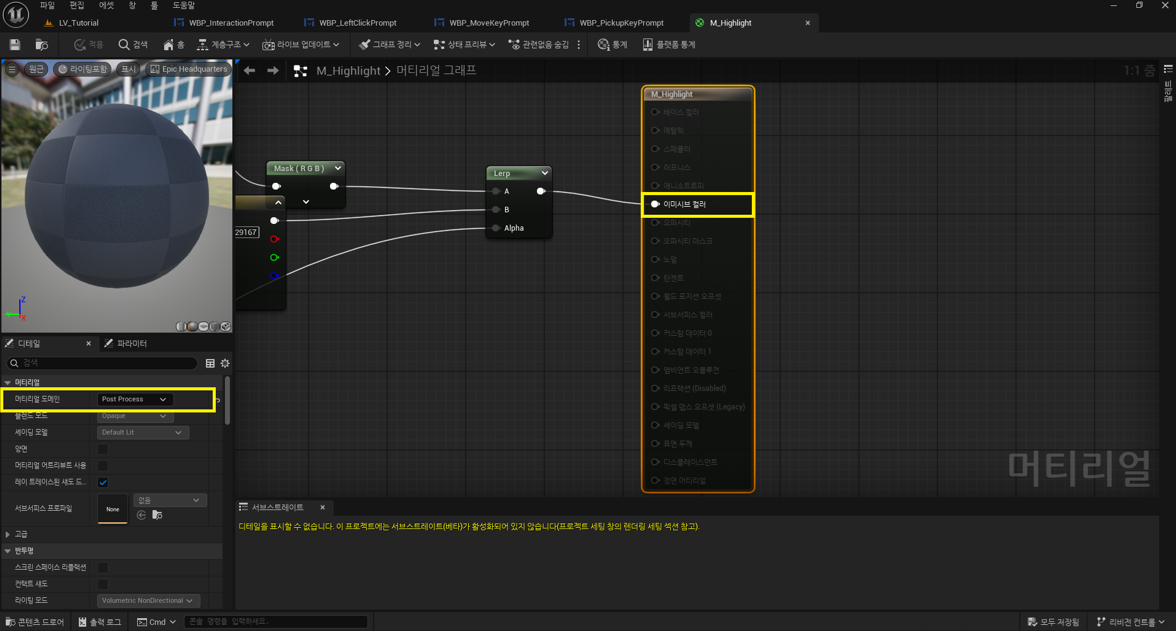
머티리얼 도메인 : Post Process
이미시브 컬러에 연결
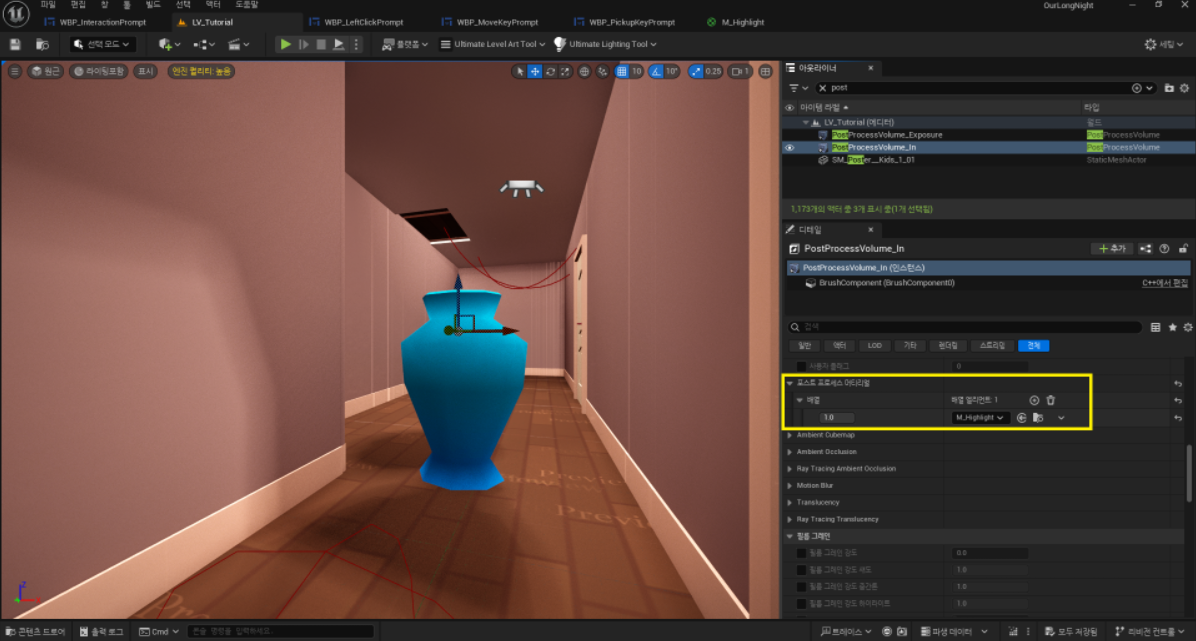
포스트 프로세스 머티리얼에 추가하기
C++
LNCustomizeStation.h
public:
	UPROPERTY(VisibleAnywhere, BlueprintReadOnly, Category="Components")
	TObjectPtr<UWidgetComponent> InteractionWidget;

	virtual void BeginHighlight() override;
	virtual void EndHighlight() override;

	virtual void LeftClickInteract(AActor* Interactor) override;
	virtual EInteractionType GetInteractionType_Implementation() const override;
LNCustomizeStation.cpp
ALNCustomizeStation::ALNCustomizeStation()
{
	StationMesh->SetCustomDepthStencilValue(255);

	InteractionWidget = CreateDefaultSubobject<UWidgetComponent>(TEXT("InteractionWidget"));
	InteractionWidget->SetupAttachment(StationMesh);
	InteractionWidget->SetWidgetSpace(EWidgetSpace::Screen);
	InteractionWidget->SetVisibility(false);
	InteractionWidget->SetCollisionEnabled(ECollisionEnabled::NoCollision);
}

void ALNCustomizeStation::BeginPlay()
{
	Super::BeginPlay();

	if (StationMesh)
	{
		StationMesh->SetRenderCustomDepth(false);
	}
}

void ALNCustomizeStation::LeftClickInteract(AActor* Interactor)
{
	ALNCharacter* Character = Cast<ALNCharacter>(Interactor);
	if (!IsValid(Character)) return;

	ALNControllerInGame* PC = Cast<ALNControllerInGame>(Character->GetController());
	if (!IsValid(PC)) return;

	if (PC->IsCustomizeOpen())
	{
		return;
	}
	// 커스터마이징 메뉴 생성
	PC->Client_OpenCustomizeUI();
}

EInteractionType ALNCustomizeStation::GetInteractionType_Implementation() const
{
	return EInteractionType::LeftClick;
}

void ALNCustomizeStation::BeginHighlight()
{
	if (StationMesh)
	{
		StationMesh->SetRenderCustomDepth(true);
	}

	if (InteractionWidget)
	{
		InteractionWidget->SetVisibility(true);
	}
}

void ALNCustomizeStation::EndHighlight()
{
	if (StationMesh)
	{
		StationMesh->SetRenderCustomDepth(false);
	}

	if (InteractionWidget)
	{
		InteractionWidget->SetVisibility(false);
	}
}
BP
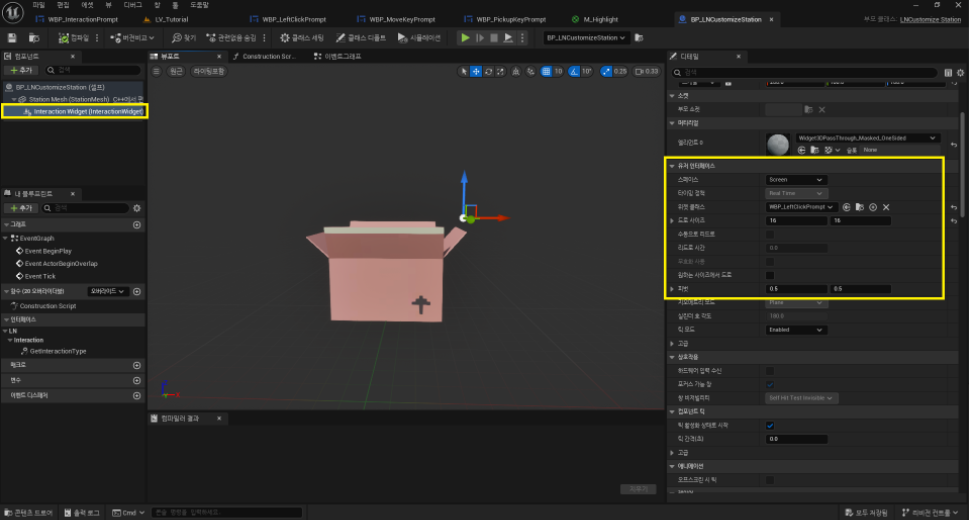
위젯 클래스에 해당 상호작용 위젯을 넣고 사이즈 설정하기
뷰포트에서 상호작용 키 위치 설정할 수 있다.
이런 방식으로 LeftClickPrompt와 MoveKeyPrompt 구현하기