함수 추가
.h
class UWidgetComponent;

public:
	virtual void LeftClickInteract(AActor* Interactor) override;
    virtual EInteractionType GetInteractionType_Implementation() const override;
    virtual void BeginHighlight() override;
    virtual void EndHighlight() override;

    UPROPERTY(VisibleAnywhere, BlueprintReadOnly, Category="Components")
    TObjectPtr<UWidgetComponent> InteractionWidget;
. cpp
#include "Components/WidgetComponent.h"

ALNHarmonyPlayActor::ALNHarmonyPlayActor()
{
	// Root Component
	GemMesh = CreateDefaultSubobject<UStaticMeshComponent>(TEXT("GemMesh"));
	RootComponent = GemMesh;
	GemMesh->SetCustomDepthStencilValue(255);
	GemMesh->SetCollisionEnabled(ECollisionEnabled::QueryOnly);
	GemMesh->SetCollisionResponseToChannel(ECC_Visibility, ECR_Block);

	InteractionWidget = CreateDefaultSubobject<UWidgetComponent>(TEXT("InteractionWidget"));
	InteractionWidget->SetupAttachment(GemMesh);
	InteractionWidget->SetWidgetSpace(EWidgetSpace::Screen);
	InteractionWidget->SetVisibility(false);
	InteractionWidget->SetCollisionEnabled(ECollisionEnabled::NoCollision);
}

void ALNHarmonyPlayActor::BeginPlay()
{
	Super::BeginPlay();

	if (GemMesh)
	{
		GemMesh->SetRenderCustomDepth(false);
	}
}

void ALNHarmonyPlayActor::LeftClickInteract(AActor* Interactor)
{
	// 좌클릭 시 일어날 상호작용
	Interact();
}

EInteractionType ALNHarmonyPlayActor::GetInteractionType_Implementation() const
{
	return EInteractionType::LeftClick;
}

void ALNHarmonyPlayActor::BeginHighlight()
{
	if (GemMesh)
	{
		GemMesh->SetRenderCustomDepth(true);
	}

	if (InteractionWidget)
	{
		InteractionWidget->SetVisibility(true);
	}
}

void ALNHarmonyPlayActor::EndHighlight()
{
	if (GemMesh)
	{
		GemMesh->SetRenderCustomDepth(false);
	}

	if (InteractionWidget)
	{
		InteractionWidget->SetVisibility(false);
	}
}
이렇게 하니까 하이라이트 + 상호작용 UI 표시가 나오지 않았다.
메시 컴포넌트에 충돌 설정이 명시적으로 없어서 코드 추가하기
충돌 설정(Collision Response)
생성자에서 메시 컴포넌트에 충돌 설정 코드 넣기
GemMesh->SetCollisionEnabled(ECollisionEnabled::QueryOnly);
GemMesh->SetCollisionResponseToChannel(ECC_Visibility, ECR_Block);
상호작용 UI는 나왔는데 하이라이트 표시가 안 나왔다.
레벨에 Post Process Volume 배치를 하고 하이라이트 머티리얼을 설정해줘야 한다.
Post Process Volume 배치
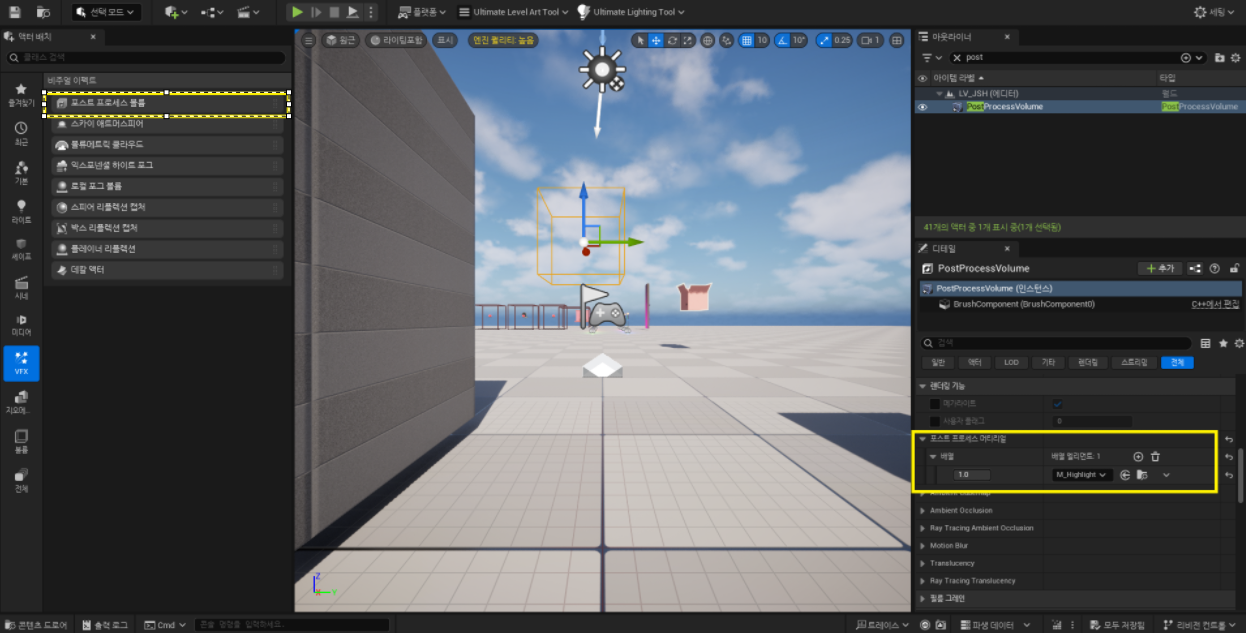
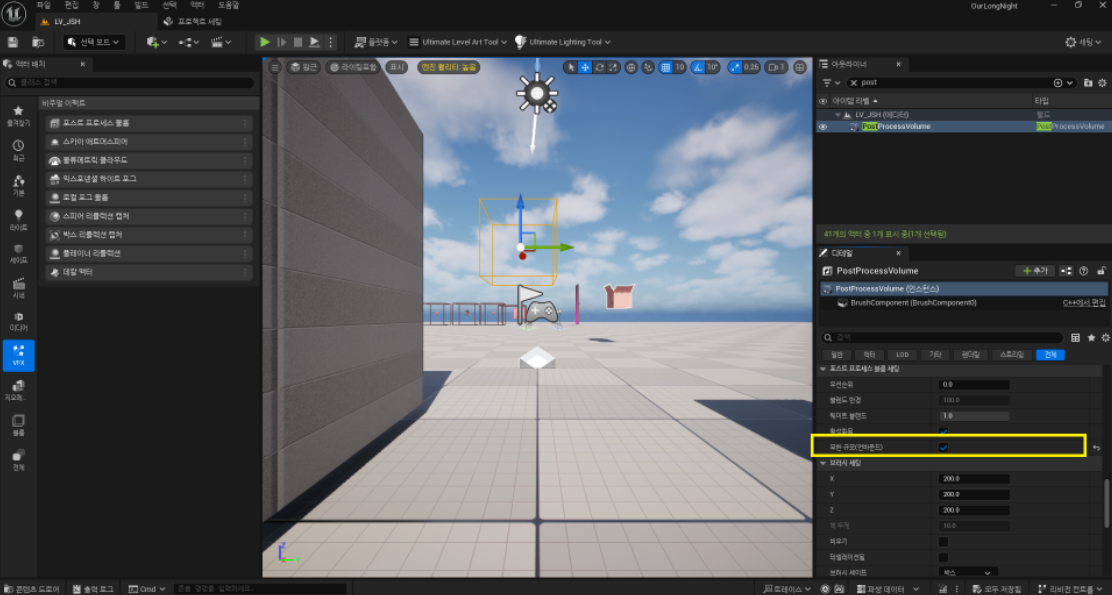
- Window > Place Actors 열기
- Visual Effects 카테고리 선택
- Post Process Volume 찾아서 레벨에 드래그
- Details 패널에서:
- Infinite Extent 체크 (범위가 무한대가 되어서 맵 전체에 적용)
- Rendering Features > Post Process Materials 배열에 하이라이트 머티리얼 추가