🦉Header.
- Django 소스코드를 해석하여 작성한 포스트입니다.
- 😍 틀린 부분이 있거나, 피드백은 언제든지 환영합니다.
👀Reference.
python manage.py runserver는 어떻게?
python manage.py runserver
위 커맨드를 입력하면 어떻게 작동할까?
Django에서 manage.py를 통한 Command의 처리는
입력한 Command Line을
list: sys.argv를 이용하여'명령어'에 대응하는 모듈을 찾고,
모듈 내 class: Command 의 instance를 생성하고
해당 command instance의method: run_from_argv를 실행시켜주는 과정이다.
python manage.py
python manage.py를 통해
python으로 manage.py를 실행하게 된다.
이 때, 우리는 python manage.py 뒤에 'runserver'라는 argument를 붙여주게되는데,
이를 sys.argv에 담아 활용하게 된다.
python manage.py runserver
sys.argv =['D:\\...\\manage.py', 'runserver']
# LAB: python_djang_practice/rest_api/REST_API/manage.py

def main():
	os.environ.setdefault('DJANGO_SETTINGS_MODULE", 'django_study.settings')

	try:
		from django.core.management import execute_from_command_line
	except:

		...

	execute_from_command_line(sys.argv)

if __name__ == '__main__':
	main()
Command Line을 List로 변환한 sys.argv를 execute_from_command_line에 그대로 전달하여 진행한다.
execute_from_command_line
sys.argv를 통하여 Class: ManagementUtility의 instance를 생성하고
내부의 method: execute를 호출한다.
# LAB: .venv/Lib/site-packages/django/core.management/__init__.py

def execute_from_command_line(argv=None):
	utility = ManamentUtility(argv)
	utility.execute()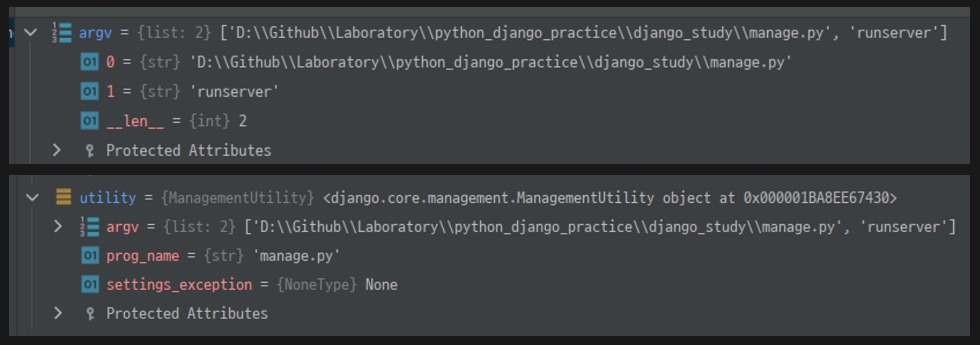
utitiliy.execute
Class: ManagementUtility는 django-admin과 manage.py를 통해 입력한 CommandLine의 실행을 담당한다.
# LAB: .venv.Lib/site-packages/django/core.management/__init__.py

class ManagementUtility:
	"""
  Encapsulate the logic of the django-admin and manage.py utilities.
  """

	def __init__(self, argv=None)
		self.argv = argv or sys.argv[:]
		...

	def execute(self):
		"""
    Given the command-line arguments, figure out which subcommand is being
    run, create a parser appropriate to that command, and run it.
    """

		try:
			subcommand = self.argv[1]
		except IndexError:
			subcommand = "help"

		parser = CommandParser(...)
			...
        try:
			...

        except CommandError:
            pass  # Ignore any option errors at this point.
			...

		else:
			self.fetch_command(subcommand).run_from_argv(self.argv)
utility instance의 method: execute는 self.argv[1]인 ‘runserver’를 subcommand에 할당하고,
Class: CommandParser 를 통해 유효성검사와, 초기화 작업을 해준다.(이 부분은 전체적 흐름을 위해 생략하겠습니다.)
이후 self.fetch_command(subcommand).run_from_argv(self.argv) 를 호출한다.
🎇
self.fetch_command이 부분이 실질적으로subcommand를 통하여,
알맞은 Class와 연결시켜주는 부분이다.
utility.fetch_command
subcommand에 할당된 'runserver'를 이용하여,
이에 해당하는 모듈을 찾아서 연결시켜주는 작업을 할 것이다.
# LAB: .venv.Lib/site-packages/django/core.management/__init__.py

class Managementutility:

	def fetch_command(self, subcommand):
		"""
    Try to fetch the given subcommand, printing a message with the
    appropriate command called from the command line (usually
    "django-admin" or "manage.py") if it can't be found.
    """

		commands = get_commands()

		try:
			app_name = commands[subcommand]
		except KeyError:
			...

		if isinstance(app_name, BaseCommand):
			klass = app_name
		else:
			klass = load_command_class(app_name, subcommand)
		return klass
commands = get_commands() 를 통해 명령어와 모듈을 연결시킨 dict을 받아온다.
get_commands
명령어(subcommand)와 모듈 이름을 연결시켜주는 dict을 반환한다.
django.core의 management.commands 패키지와 설치된 app들을 뒤져서,
dict를 만들어주는 것.
def get_commands():
    """
    Return a dictionary mapping command names to their callback applications.

    Look for a management.commands package in django.core, and in each
    installed application -- if a commands package exists, register all
    commands in that package.

    Core commands are always included. If a settings module has been
    specified, also include user-defined commands.

    The dictionary is in the format {command_name: app_name}. Key-value
    pairs from this dictionary can then be used in calls to
    load_command_class(app_name, command_name)

    If a specific version of a command must be loaded (e.g., with the
    startapp command), the instantiated module can be placed in the
    dictionary in place of the application name.

    The dictionary is cached on the first call and reused on subsequent
    calls.
    """
    commands = {name: "django.core" for name in find_commands(__path__[0])}

   ...

    return commands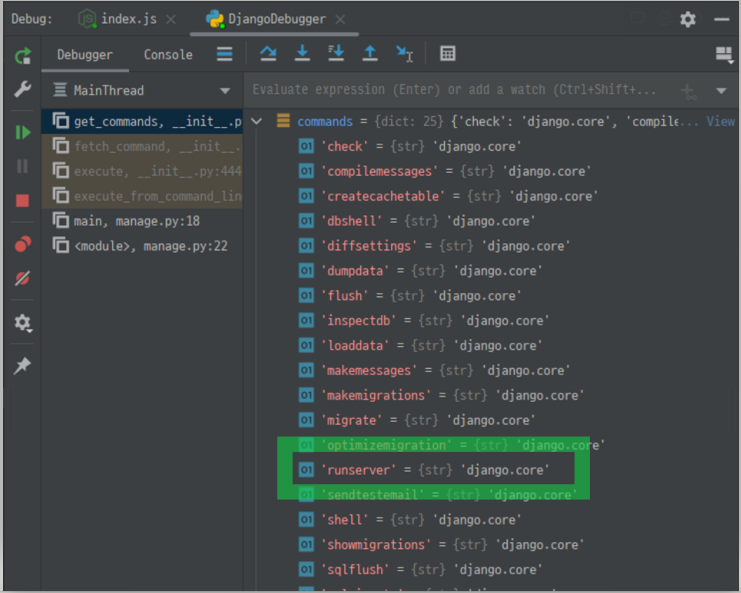
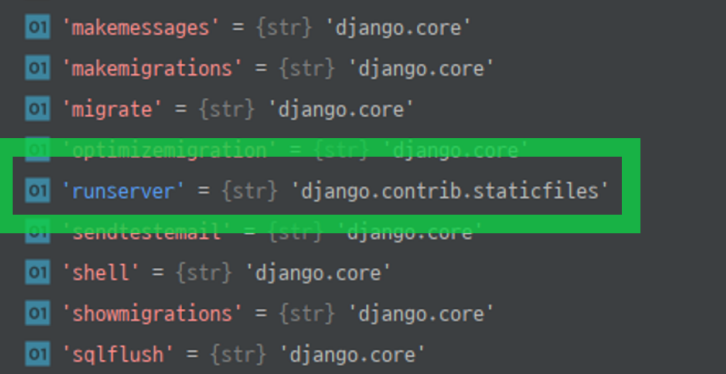
그런데, runserver에 대하여 처음에는 django.core 였는데
django.contrib.staticfiles로 바뀌는 것을 볼 수 있다.
utility.fetch_command
다시 돌아와서, subcommand인 'runserver'를 통해
app_name 변수를 통해 연결시킬 모듈을 확정한 다음,
load_command_class 를 통해 연결시킬 모듈의 Class: Command
의 Instance를 생성한다.
# LAB: .venv.Lib/site-packages/django/core.management/__init__.py

class Managementutility:

	def fetch_command(self, subcommand):
		"""
    Try to fetch the given subcommand, printing a message with the
    appropriate command called from the command line (usually
    "django-admin" or "manage.py") if it can't be found.
    """

		commands = get_commands()

		try:
			app_name = commands[subcommand]
		except KeyError:
			...

		else:
			klass = load_command_class(app_name, subcommand)
		return klass
klass = load_command_class(app_name, subcommand)

load_command_class
해당되는 package의 경로를 찾아
Class: Command Class의 instance를 반환한다.
# django.core.management.__init__.py

def load_command_class(app_name, name):
		"""
    Given a command name and an application name, return the Command
    class instance. Allow all errors raised by the import process
    (ImportError, AttributeError) to propagate.
    """
    module = import_module("%s.management.commands.%s" % (app_name, name))
    return module.Command()
다시 utility.execute
utility.fetch_command(subcommand)에 의해 생성된 instance의
method: run_from_argv를 호출함으로써,
'runserver'라는 명령어의 구체적인 기능을 python을 통해 수행할 수 있게된다.
# LAB: .venv.Lib/site-packages/django/core.management/__init__.py

class ManagementUtility:
	"""
  Encapsulate the logic of the django-admin and manage.py utilities.
  """

	def __init__(self, argv=None)
		self.argv = argv or sys.argv[:]
		...

	def execute(self):
		"""
    Given the command-line arguments, figure out which subcommand is being
    run, create a parser appropriate to that command, and run it.
    """

		try:
			subcommand = self.argv[1]
		except IndexError:
			subcommand = "help"

		parser = CommandParser(...)
			...
        try:
			...

        except CommandError:
            pass  # Ignore any option errors at this point.
			...

		else:
			self.fetch_command(subcommand).run_from_argv(self.argv)
개략적인 Sequence Diagram은 다음과 같다.
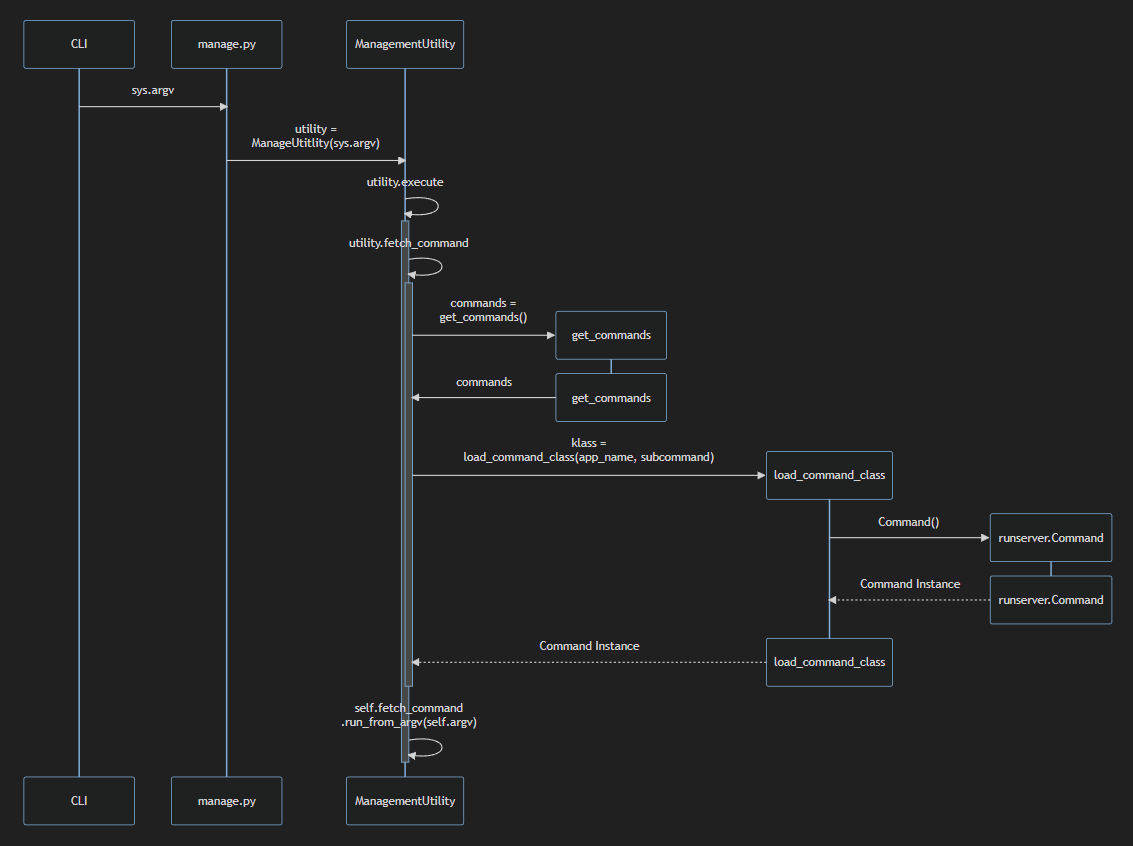
runserver의 명령어에 해당하는
모듈을 찾아서, Command instance의 생성까지 설명해보았다.
다음 글에서는, 이렇게 만들어진 ‘runserver’에 의한 Command instance가
run_from_argv를 통해서 어떻게 개발서버를 구성하고 작동시키는지에 대해
정리해보고자 한다.