FCM이란?
Firebase는 모바일 및 웹 애플리케이션 개발 플랫폼입니다. 제공하는 서비스로는 인증, 실시간 데이터베이스, 클라우드 스토리지, 호스팅, 원격 구성, 분석 등이 있습니다.
그리고 여기서 Firebase Cloud Messaging은 사용자 앱이 서버에 연결되어 있지 않아도 기기 내부 연결을 통해 보낼 수 있는 Firebase에서 제공하는 메시지 서비스 입니다.
왜 필요할까?
서버에서 모바일 장치에 보내는 알림 또는 메시지로, 사용자의 앱이 서버와 연결되지 않았을 때(백그라운드 상태 혹은 종료 상태) 기기의 내부 연결을 통해 메시지를 보내기 위해서입니다.
무엇보다 무료라는 강점이 있습니다..
동작 과정
구성요소 : 앱(사용자 폰), 서버, Firebase
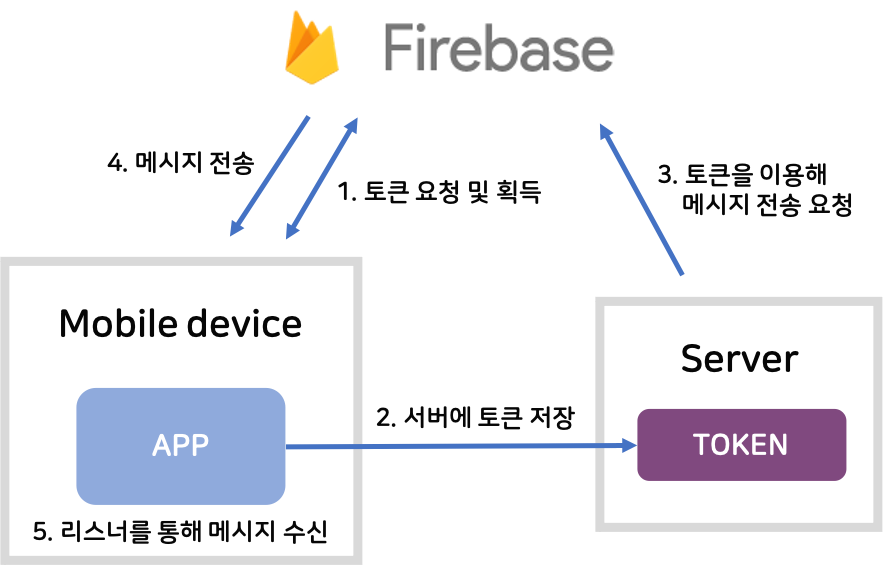
- 사용자는 앱을 설치하고, 회원가입 및 로그인을 했을 때 1회 Firebase로 토큰을 요청합니다.
- 사용자는 토큰을 받으면 서버에 토큰을 저장합니다. 이 토큰은 사용자 기기 식별자 역할을 합니다.
- 서버는 해당 토큰을 이용해 사용자 앱이 서버와 연결되어 있지 않을 때 메시지 전송을 요청합니다.
- Firebase는 서버가 메시지 전송 요청과 함께 넘긴 토큰이 올바른지 검증하고, 유효하다면 그 토큰을 가지는 사용자 폰으로 메시지를 전송합니다.
- 사용자 폰은 리스너를 통해 해당 메시지를 수신합니다.
Firebase 적용
@react-native-firebase 라이브러리와 FCM을 이용해 푸시 알림을 구현해보겠습니다.
설치 및 기본 실행
라이브러리 설치
yarn add @react-native-firebase/app @react-native-firebase/messaging
npx react-native start
npx react-native run-android
Firebase 에뮬레이터로 테스트
- 파이어베이스 프로젝트 생성
- 안드로이드 앱 추가(프로젝트 내의 패키지 이름과 동일)
- google-service.json을 지정된 위치
/app/src/*에 넣어주기! - Firebase SDK build.gradle에 추가
//최상위 build.gradle.kts
    dependencies {
        classpath("com.android.tools.build:gradle")
        classpath("com.facebook.react:react-native-gradle-plugin")
        classpath("org.jetbrains.kotlin:kotlin-gradle-plugin")
        classpath("com.google.gms.google-services:com.google.gms.google-services.gradle.plugin:4.4.2") //추가
    }

    allprojects {
    repositories {
        google()
        mavenCentral()
    }
}
//app 하위 build.gradle
apply plugin: "com.google.gms.google-services"
dependencies {
// The version of react-native is set by the React Native Gradle Plugin
implementation("com.facebook.react:react-android")
if (hermesEnabled.toBoolean()) {
implementation("com.facebook.react:hermes-android")
} else {
implementation jscFlavor
}
// Import the Firebase BoM
implementation(platform("com.google.firebase:firebase-bom:33.1.0")) // Add this line
implementation("com.google.firebase:firebase-messaging") // Add this line for FCM
}- App.tsx 수정
로그로 남게 수정하겠습니다.
import React, { useEffect } from 'react';
import messaging from '@react-native-firebase/messaging';
import { SafeAreaView, ScrollView, StatusBar, StyleSheet, Text, useColorScheme, View } from 'react-native';

import {
  Colors,
  DebugInstructions,
  Header,
  LearnMoreLinks,
  ReloadInstructions,
} from 'react-native/Libraries/NewAppScreen';

type SectionProps = {
  title: string;
  children: React.ReactNode;
};

function App(): React.JSX.Element {
  const isDarkMode = useColorScheme() === 'dark';

  useEffect(() => {
    // FCM 토큰 수신 및 출력
    const getToken = async () => {
      try {
        const token = await messaging().getToken();
        console.log('FCM Token:', token); // 토큰을 로그로 출력
      } catch (error) {
        console.error('Error getting FCM token:', error);
      }
    };

    getToken();

    // 포그라운드 메시지 수신 처리
    const unsubscribe = messaging().onMessage(async remoteMessage => {
      console.log('A new FCM message arrived!', JSON.stringify(remoteMessage));
    });

    return () => unsubscribe();
  }, []);

  const backgroundStyle = {
    backgroundColor: isDarkMode ? Colors.darker : Colors.lighter,
  };

  return (
    <SafeAreaView style={backgroundStyle}>
      <StatusBar
        barStyle={isDarkMode ? 'light-content' : 'dark-content'}
        backgroundColor={backgroundStyle.backgroundColor}
      />
      <ScrollView
        contentInsetAdjustmentBehavior="automatic"
        style={backgroundStyle}
      >
        <Header />
        <View
          style={{
            backgroundColor: isDarkMode ? Colors.black : Colors.white,
          }}
        >
          <Section title="Step One">
            Edit <Text style={styles.highlight}>App.tsx</Text> to change this
            screen and then come back to see your edits.
          </Section>
          <Section title="See Your Changes">
            <ReloadInstructions />
          </Section>
          <Section title="Debug">
            <DebugInstructions />
          </Section>
          <Section title="Learn More">
            Read the docs to discover what to do next:
          </Section>
          <LearnMoreLinks />
        </View>
      </ScrollView>
    </SafeAreaView>
  );
}

const styles = StyleSheet.create({
  //..style 기본 코드
});

export default App;
- 알림 테스트
로그로 받은 FCM 토큰을 기기로 등록하여 테스트할 수 있습니다.
https://console.firebase.google.com/project/chat-push-ada05/notification/compose?hl=ko


티스토리 이사 준비 중..