Fetch
- 서버에서 데이터를 가져와서 활용할 수 있는 방법
<!doctype html>
<html lang="ko">
<head>
    <meta charset="UTF-8">
    <title>Fetch 시작하기</title>
    <script src="https://ajax.googleapis.com/ajax/libs/jquery/3.5.1/jquery.min.js"></script>
		<script>
		</script>
</head>
<body>
    Fetch 연습을 위한 페이지
</body>
</html>
fetch("여기에 URL을 입력").then(res => res.json()).then(data => {
		console.log(data)
})
- fetch의 기본 골격
- fetch("여기에 URL을 입력")
: 이 URL로 웹 통신을 요청. 괄호 안에 다른 것이 없다면 GET!
- .then(res => res.json())
: 통신 요청을 받은 데이터는 res라는 이름으로 JSON화 함
- .then(data => {
console.log(data)=> 개발자 도구에 찍어보기
})
: JSON 형태로 바뀐 데이터를 data라는 이름으로 붙여 사용
<!doctype html>
<html lang="ko">
<head>
    <meta charset="UTF-8">
    <title>Fetch 시작하기</title>
    <script src="https://ajax.googleapis.com/ajax/libs/jquery/3.5.1/jquery.min.js"></script>
    <script>
        fetch("여기에 URL을 입력").then(res => res.json()).then(data => {
            console.log(data)
        })
    </script>
</head>
<body>
    Fetch 연습을 위한 페이지
</body>
</html>
- Fetch 코드
fetch("여기에 URL을 입력") ← 이 URL로 웹 통신 요청을 보낼 거야!
- ← 이 괄호 안에 URL밖에 들어있지 않다면
기본상태인 GET!
.then() ← 통신 요청을 받은 다음 이렇게 할 거야!res ⇒ res.json()
- ← 통신 요청을 받은 데이터는 res 라는 이름을 붙일 거야(변경 가능)
- ← res는 JSON 형태로 바꿔서 조작할 수 있게 할 거야!
.then(data ⇒ {}) ←JSON 형태로 바뀐 데이터를 data 라는 이름으로 붙일거야
미세먼지 데이터 출력
fetch("http://spartacodingclub.shop/sparta_api/seoulair")
	.then(res => res.json())
	.then(data => {
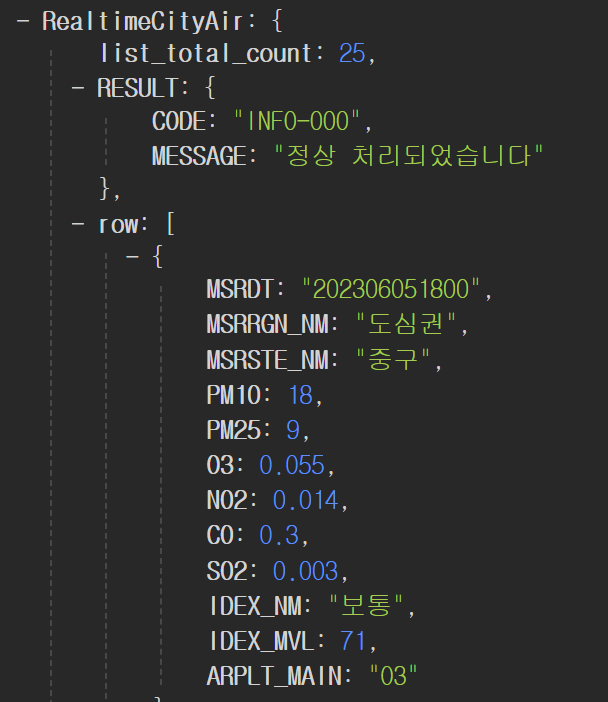
		console.log(data['RealtimeCityAir']['row'][0]);
	})
- fetch("미세먼지 URL 삽입")
- RealtimeCityAir의 row에 미세먼지 데이터가 들어가 있는 것을 확인
fetch("http://spartacodingclub.shop/sparta_api/seoulair")
.then(res => res.json())
.then(data => {
let rows = data['RealtimeCityAir']['row']
rows.forEach((a) => {
console.log(a)
})
})
fetch("http://spartacodingclub.shop/sparta_api/seoulair")
.then(res => res.json())
.then(data => {
let rows = data['RealtimeCityAir']['row']
rows.forEach((a) => {
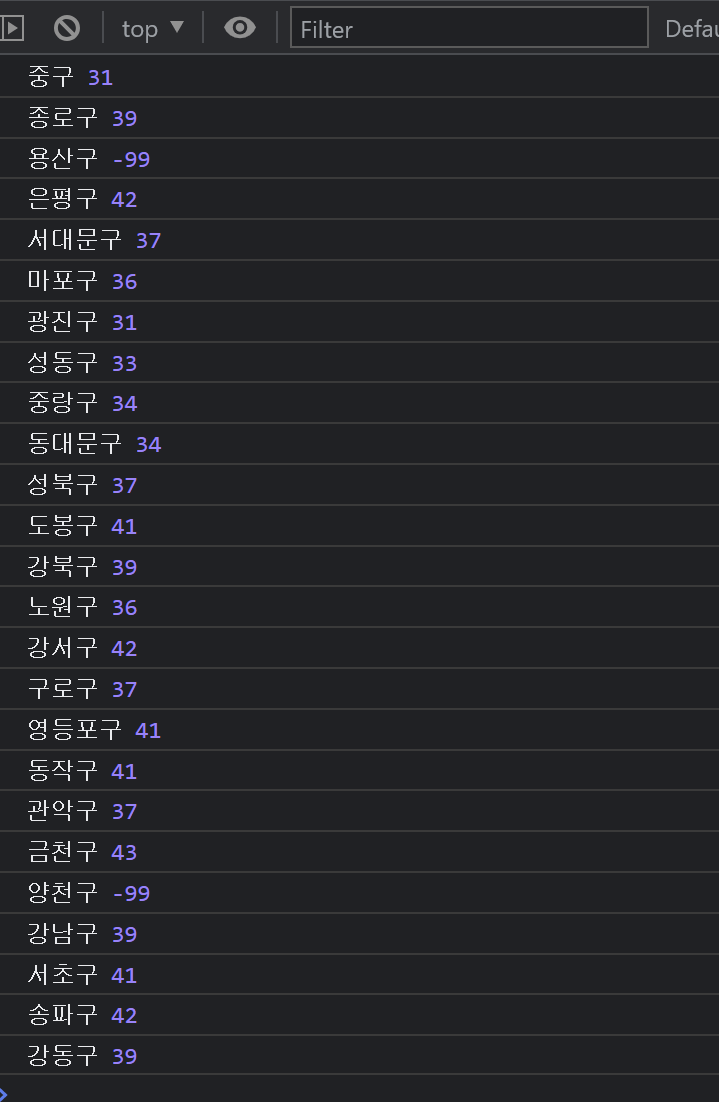
console.log(a['MSRSTE_NM'], a['IDEX_MVL'])
})
})
- 이름 키 값인 "MSRSTE_NM", 미세먼지 수치 키값인 "IDEX_MVL" 출력
fetch("http://spartacodingclub.shop/sparta_api/seoulair").then(res => res.json()).then(data => {
		let rows = data['RealtimeCityAir']['row']
		rows.forEach((a) => {
			console.log(a['MSRSTE_NM'], a['IDEX_MVL'])
		})
	})