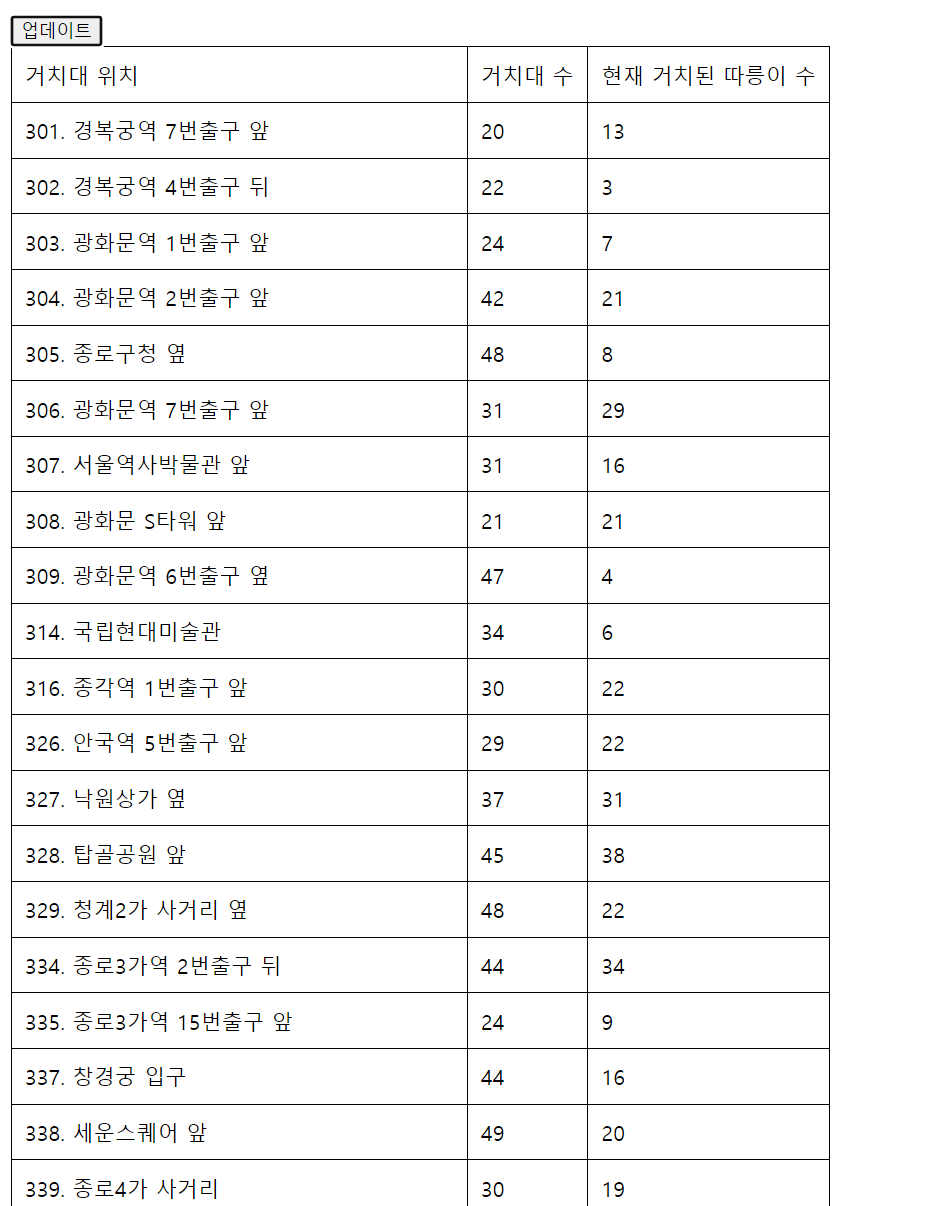
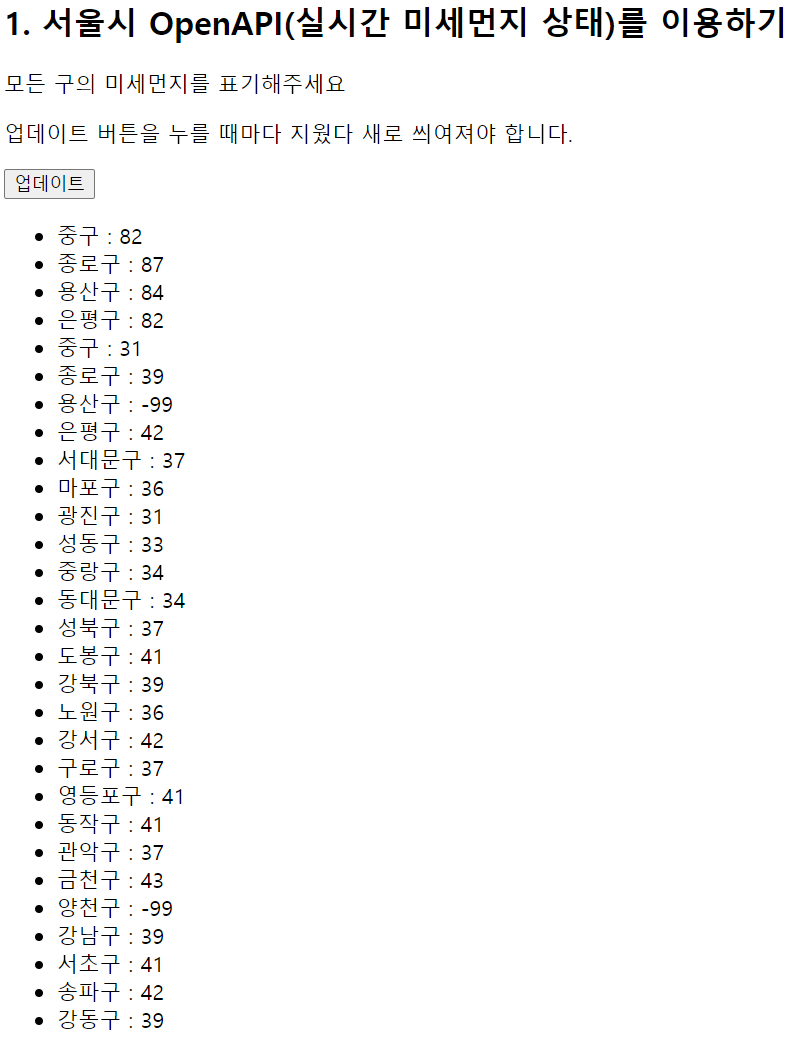
전체 코드
<!doctype html>
<html lang="ko">
<head>
    <meta charset="UTF-8">
    <title>미세먼지 API로Fetch 연습하고 가기!</title>
    <script src="https://ajax.googleapis.com/ajax/libs/jquery/3.5.1/jquery.min.js"></script>
    <style type="text/css">
        div.question-box {
            margin: 10px 0 20px 0;
        }
    </style>
    <script>
        function q1(){
           fetch("http://spartacodingclub.shop/sparta_api/seoulair").then(res => res.json()).then(data => {
                let rows = data['RealtimeCityAir']['row']
                $('#names-q1').empty()
                rows.forEach((a) => {
                    let gu_name = a['MSRSTE_NM']
                    let gu_mise = a['IDEX_MVL']
                    let temp_html = `<li>중구 : 82</li>`
                    $('#names-q1').append(temp_html)
                })
            })
        }
    </script>
</head>
<body>
    <h1>Fetch 연습하자!</h1>
    <hr />
    <div class="question-box">
        <h2>1. 서울시 OpenAPI(실시간 미세먼지 상태)를 이용하기</h2>
        <p>모든 구의 미세먼지를 표기해주세요</p>
        <p>업데이트 버튼을 누를 때마다 지웠다 새로 씌여져야 합니다.</p>
        <button onclick="q1()">업데이트</button>
        <ul id="names-q1">
            <li>중구 : 82</li>
            <li>종로구 : 87</li>
            <li>용산구 : 84</li>
            <li>은평구 : 82</li>
        </ul>
    </div>
</body>
</html>
<script>
        function q1() {
            fetch("http://spartacodingclub.shop/sparta_api/seoulair").then(res => res.json()).then(data => {
    </script>
- fetch("미세먼지 Open API URL 삽입")
let rows = data['RealtimeCityAir']['row']
- 데이터를 저장할 변수 rows 지정
- RealtimeCityAir의 row에 미세먼지 데이터가 들어가 있으므로 추출
console.log(rows)
- 원하는 것이 제대로 출력이 되었는지 확인하고자 할 때는 console!!
rows.forEach((a) => {
        let gu_name = a['MSRSTE_NM']
        let gu_mise = a['IDEX_MVL']
- 리스트를 반복하여 출력하기 위해 반복문인 forEach((a)=> { }) 사용
- 우리가 찾아야 할 값은 구의 이름과, 구의 미세먼지 수치의 value 추출
let temp_html = `<li>중구 : 82</li>`
$('#names-q1').append(temp_html)
- 웹에 붙일 temp_html = ``을 써놓고 고민 시작
- 어떤 html을 만들어야 하는가! 바로
<li>중구 : 82</li>
- `` 안에 붙여넣기
- temp_html을 어디에다 붙여줘야 하는가! 바로 ul 안!!
- ul의 아이디 값은 names-q1 즉, $('#names-q1')
- append 사용
- 이렇게 하면 중구만 계속 붙음
- 우리가 원하는 것은 서울시의 미세먼지 API이기 때문에 ${ }를 사용하여 gu_name과 gu_mise를 입력해줌
let temp_html = `<li>${gu_name} : ${gu_mise}</li>`
$('#names-q1').append(temp_html)
- 중구는 구의 이름이기 때문에 gu_name이, 82는 구의 미세먼지 수치이기 때문에 gu_mise가 들어감
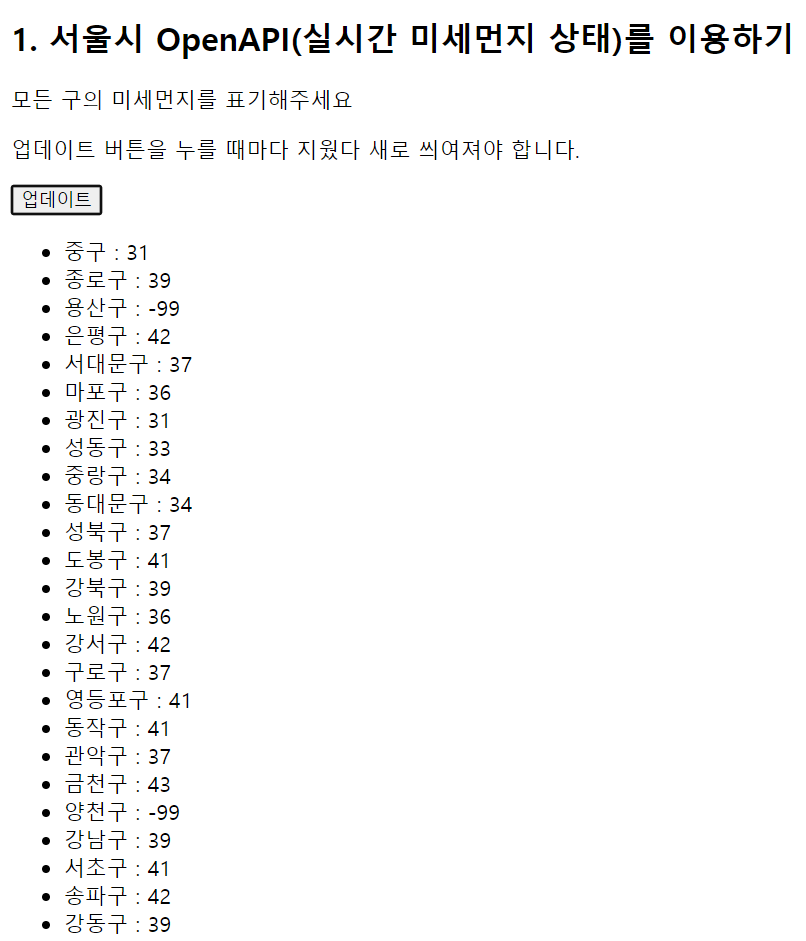
> $('#names-q1').empty()
- 중복을 방지하기 위해 반복문이 시작되기 전에 넣어줌
더 나아가기
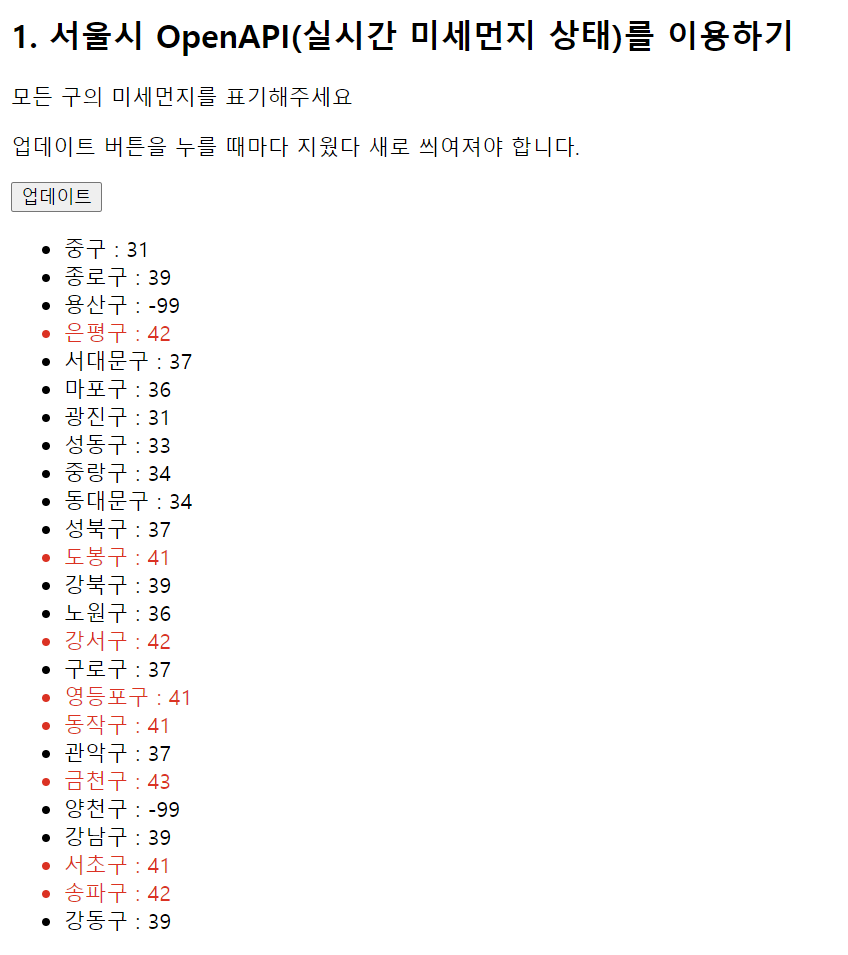
미세먼지 수치가 40이상인 곳은 빨갛게 보이게 하자!
let temp_html = `<li class="bad">${gu_name} : ${gu_mise}</li>`
- 빨갛게 보이게 할 부분인 li의 클래스 이름을 "bad"로 지정
.bad {
   color: red;
     }
- 빨갛게 보이게 하기 위해 color를 red로 지정
- 여기서 문제!!!
- 이렇게 하면 모든 수치들이 다 빨간색으로 출력됨
let temp_html = ``
if (gu_mise > 40) {
       temp_html = `<li class="bad">${gu_name} : ${gu_mise}</li>`
   } else {
       temp_html = `<li>${gu_name} : ${gu_mise}</li>`
   }
- 빈 temp_html 생성
- 조건문 사용 ( if - else)
- 수치가 40이 넘으면 빨간색, 아니면 그대로 출력
서울시 OpenAPI(실시간 따릉이 현황)을 이용하기
fetch("http://spartacodingclub.shop/sparta_api/seoulbike").then(res => res.json()).then(data => {
   let rows = data['getStationList']['row']
- fetch("따릉이 API URL 삽입")
- getStationList의 row 값 추출
rows.forEach((a) => { } )
- rows를 출력하기 위해 반복문 forEach 사용
let name = a['stationName']
let rack = a['rackTotCnt']
let bike = a['parkingBikeTotCnt']
- 거치대 위치, 거치대 수, 현재 거치된 따릉이 수의 값의 변수를 지정해줌
let temp_html = `<tr>
                    <td>${name}</td>
                    <td>${rack}</td>
                    <td>${bike}</td>
                 </tr>`
- 빈 temp_html = ``을 먼저 만들고 무엇을 갖다 붙일 지 생각
- 아래와 같이 tr 태그에 있는 값을 붙여야 함
<tr>
  <td>102. 망원역 1번출구 앞</td>
  <td>22</td>
  <td>0</td>
</tr>
- 이 때 거치대 위치, 거치대 수, 현재 거치된 따릉이 수 순이므로 ${ }을 사용해 순서대로 적음
$('#names-q1').append(temp_html)
- temp_html을 tr태그의 id 값 = "names-q1"에 붙여야함
$('#names-q1').empty()
전체 코드
<!doctype html>
<html lang="ko">
<head>
<meta charset="UTF-8">
<title>Fetch 연습하고 가기!</title>
<script src="https://ajax.googleapis.com/ajax/libs/jquery/3.4.1/jquery.min.js"></script>
<style type="text/css">
div.question-box {
margin: 10px 0 20px 0;
}
table {
border: 1px solid;
border-collapse: collapse;
}
td,
th {
padding: 10px;
border: 1px solid;
}
</style>
<script>
function q1() { fetch("http://spartacodingclub.shop/sparta_api/seoulbike").then(res => res.json()).then(data => {
let rows = data['getStationList']['row']
$('#names-q1').empty()
rows.forEach((a) => {
let name = a['stationName']
let rack = a['rackTotCnt']
let bike = a['parkingBikeTotCnt']
let temp_html = `<tr>
<td>${name}</td>
<td>${rack}</td>
<td>${bike}</td>
</tr>`
$('#names-q1').append(temp_html)
})
})
}
</script>
</head>
<body>
<h1>Fetch 연습하자!</h1>
<hr />
<div class="question-box">
<h2>2. 서울시 OpenAPI(실시간 따릉이 현황)를 이용하기</h2>
<p>모든 위치의 따릉이 현황을 보여주세요</p>
<p>업데이트 버튼을 누를 때마다 지웠다 새로 씌여져야 합니다.</p>
<button onclick="q1()">업데이트</button>
<table>
<thead>
<tr>
<td>거치대 위치</td>
<td>거치대 수</td>
<td>현재 거치된 따릉이 수</td>
</tr>
</thead>
<tbody id="names-q1">
<tr>
<td>102. 망원역 1번출구 앞</td>
<td>22</td>
<td>0</td>
</tr>
<tr>
<td>103. 망원역 2번출구 앞</td>
<td>16</td>
<td>0</td>
</tr>
<tr>
<td>104. 합정역 1번출구 앞</td>
<td>16</td>
<td>0</td>
</tr>
</tbody>
</table>
</div>
</body>
</html>