Lodash
lodash
: array, object, string 등 데이터를 쉽게 변환해 사용할 수 있게 도와준다.
:-.메소드로 사용한다.
throttle(쓰로틀)
: 매 밀리세컨드마다 최대 한번 호출!
throttle
mouse, scroll 등 이벤트는 1초 안에도 과다하게 호출될 수 있다.
이벤트가 연속적으로 과도하게 발생하고 있다면 정해진 일정 시간마다 _throttle 콜백함수를 호출하여 이벤트를 조절할 수 있다.
예시
// 스크롤이 500px 이상이면 0.3초마다 console에 'scroll event' 문구가 찍히도록 함
window.addEventListener('scroll',function(){
  if(window.scrollY > 500){console.log('scroll event');}
},300)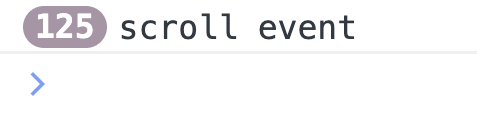
// 스크롤이 500px 이상이면 0.3초마다 throttle로 조절해 console에 'throttle!' 문구가 찍히도록 함(0.3초에 한번 실행)
window.addEventListener('scroll',_.throttle(function(){
  if(window.scrollY > 500){console.log('throttle!');}
},300))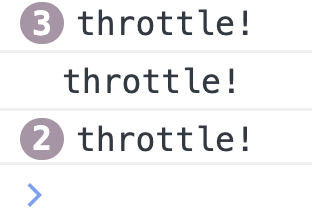
같은 이벤트지만 throttle을 적용했을때 핸들러 호출 횟수가 훨씬 적다!
debounce(디바운스)
: 마지막 호출 이후 일정 밀리세컨드 이후 지연해 호출!
debounce
const input = document.querySelector('input');
const eventSpan = document.querySelector('.event');
const debounceSpan = document.querySelector('.debounce');

let num = 0;
let debouncednum = 0;

const keyeventFn = function(){
  eventSpan.innerText = num++
}

const debounceFn = _.debounce(function(){
  debounceSpan.innerText=debouncednum++
},300)

input.addEventListener('keyup',function(){
  keyeventFn()
  debounceFn()
})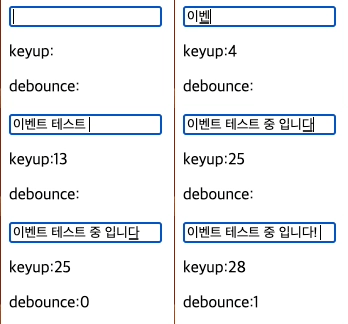
_.debounce 적용했을때 입력이 끝나고 숫자가 나타나는걸 알 수 있다

유익한 자료 감사합니다.