01.Data Wrangling?
데이터 랭글링(Data Wrangling)은 원천 데이터를 준비하여 분석이나 모델링에 사용할 수 있는 형태로 변환하는 과정을 말한다.
이전에는 주로 데이터 정제(cleansing)라고 하며, 정형화된 데이터를 준비하는 데 사용되던 말이다.
그러나 최근에는 비정형 데이터와 정형 데이터가 함께 사용되고 새로운 유형의 데이터가 등장함에 따라 데이터 랭글링이라는 용어가 주로 사용되고 있다. 데이터 랭글링은 데이터를 수집하고 변환하며, 결측치 처리, 이상치 제거, 데이터 포맷 변경, 변수 생성, 데이터 통합 등 다양한 작업을 포함할 수 있다.
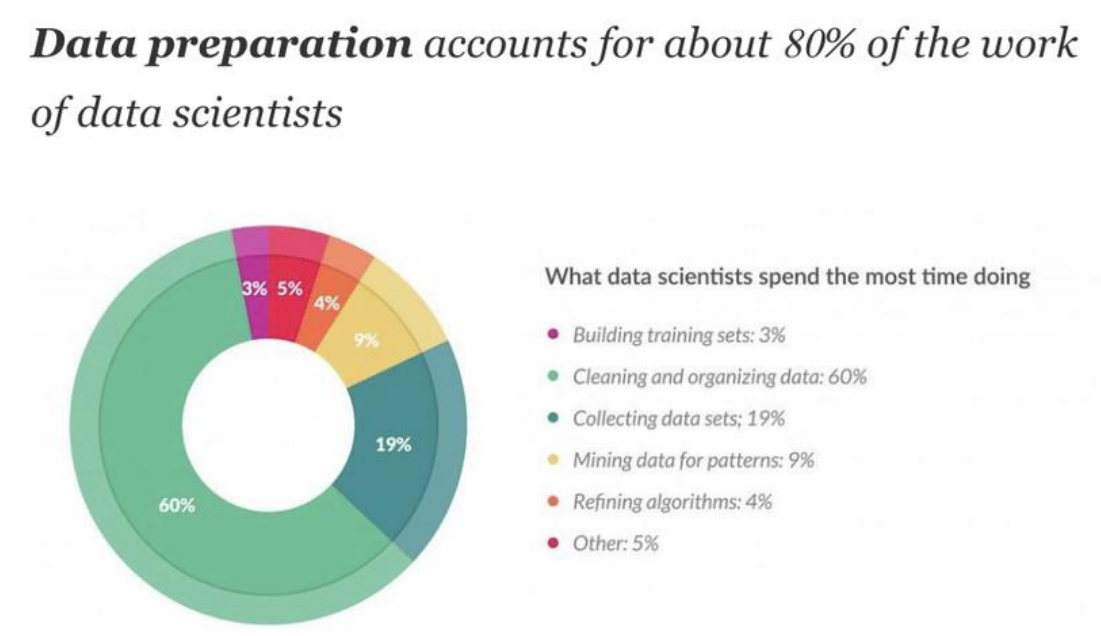
위 자료에서 볼 수 있다시피, 실제로 Data Wrangling은 data scientists들의 주요 업무 중 하나 이다.
02.Data Wrangling의 주요 단계
1.Gathering Data
파일, 데이터베이스, 웹 서버, API 등 다양한 소스에서 데이터를 수집한다.
2.Assessing Data(데이터 평가)
데이터의 품질과 구조 문제를 평가한다. 이는 데이터 불일치, 누락된 값, 재구조화 필요성을 식별하고 진단하는 것을 포함
3.Cleaning Data
평가 단계에서 식별된 문제를 해결한다. 이는 잘못된 데이터의 수정, 대체, 제거를 포함한다. 기술에는 중복 제거, 누락된 값 채우기, 오류 수정 등이 포함된다.
4.Transforming Data(데이터 변환)
분석에 더 적합하게 데이터의 형식이나 구조를 변경한다. 데이터 정규화, 데이터 스케일링, 정보 집계, 피벗 테이블 작성 등이 포함된다.
5.Enriching Data(데이터 풍부화)
다른 데이터 소스와 병합하여 데이터를 향상시키거나, 파생 속성을 추가하거나, 데이터를 더욱 정보적으로 만들기 위한 계산을 수행한다.
6.Validating and Publishing Data
데이터가 분석 목적에 맞는 기준과 표준을 충족하는지 확인한다. 일관성 검사, 품질 보증을 포함하며, 마지막으로 분석이나 보고를 위해 데이터를 사용할 수 있게 만든다.
03.실습
A.실습설명
데이터셋
실습 예제에서는 NYC weather data(뉴욕시의 일일 기상 데이터)를 사용하여 데이터 랭글링 과정을 소개한다.
데이터의 초기 상태를 이해하고, 문제점(예: 중복 값, 누락된 값, 비현실적인 값 등)을 식별하는 과정부터 시작하여, 이러한 문제를 단계별로 해결하는 방법을 설명한다.
todo
이 실습은 다음과 같은 과정을 포함한다:
- 데이터의 중복 제거
- 누락된 값과
-inf/inf값의 처리 - 데이터의 정제와 풍부화
- 최종적으로 클리닝된 데이터셋의 구성
데이터 정보
YC weather data에는 아래와 같은 정보가 포함되어있다.
- PRCP: 강수량(밀리미터)
- SNOW: 강설량(밀리미터)
- SNWD: 적설량(밀리미터)
- TMAX: 일일 최고 온도(섭씨)
- TMIN: 일일 최저 온도(섭씨)
- TOBS: 관측 시점의 온도(섭씨)
- WESF: 눈 속의 물량(밀리미터)
데이터 외부 정보
데이터를 파악하기 위한 외부 정보는 아래와 같다.
- 미국 국립기상청에 따르면, 1934년 2월 9일에 중앙 공원에서 기록된 가장 낮은 온도는 -15°F (-26.1°C)였다.
- 태양의 광구(photosphere)의 온도는 대략 5,505°C이다.
-26.1°C보다 낮거나 5,505°C보다 높으면 데이터가 이상이 있음을 알 수 있다.
B.실습
주요 코드
01.Understanding data
df = pd.read_csv('data/MDA_04_dirty_data.csv')
print(df.head())
print(df.describe())
print(df.info())
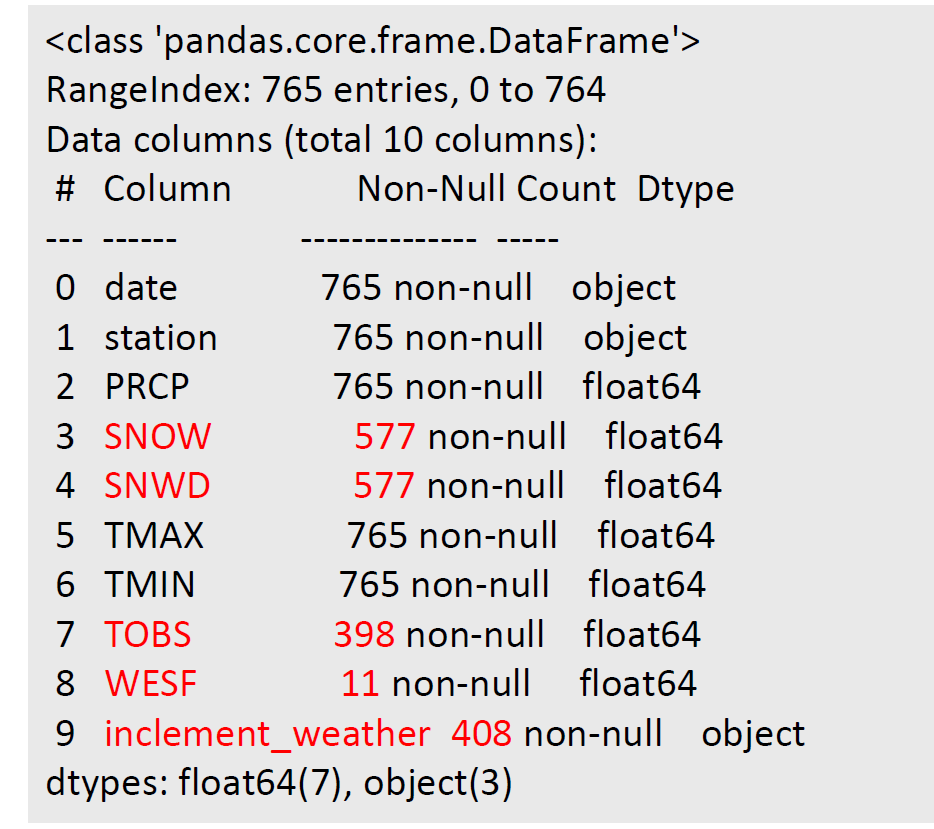
특히, df.info를 통해 정재할 null값에 대해 알 수 있다.
02. Understanding Nulls-1
print(df[df.WESF.isna()==False])'WESF' 열에서 결측치가 아닌 행들만을 출력한다.
03. Understanding Nulls :2
contain_nulls = df[
df.SNOW.isna() | df.SNWD.isna() | df.TOBS.isna()
| df.WESF.isna() | df.inclement_weather.isna()
]
print(contain_nulls.shape[0])
print(contain_nulls.head(10))
어느 열이라도 결측치를 포함하는 행들을 확인하고 그 수를 세는 데 사용. 이는 결측치 처리 전에 데이터를 탐색하고 결측치의 분포를 이해하는 데 도움을 준다.
04. Understanding inf/-inf :1
def get_inf_count(df):
return {
col: df[df[col].isin([np.inf, -np.inf])].shape[0] for col in df.columns
}
print(get_inf_count(df))
각 열에서 무한대 값을 포함하는 행의 수를 출력
05. Understanding inf/-inf :2
snow = pd.DataFrame({
'np.inf Snow Depth': df[df.SNWD == np.inf].SNOW.describe(),
'-np.inf Snow Depth': df[df.SNWD == -np.inf].SNOW.describe()
})
print(snow)
'SNWD' 열의 값이 무한대 또는 음의 무한대인 행들의 'SNOW' 열의 분포를 이해하는 데 사용
06. Understanding ‘data’ and ‘station’ :object
print(df.describe(include='object’))describe() 함수는 기본적으로 수치형 열에 대한 요약 정보를 제공. include 매개변수를 사용하여 특정 데이터 타입의 열에 대한 정보를 요청할 수 있다. 여기서 'object'는 문자열 열을 의미
문자열 열에 대한 describe() 함수의 출력은 다음을 포함한다.
- count: 결측치를 제외한 행의 수
- unique: 고유한 값의 수
- top: 가장 자주 등장하는 값
- freq: 가장 자주 등장하는 값의 빈도
06. Understanding ‘data’ and ‘station’ :Duplication information
print(df[df.duplicated(keep=False)].head(10))이 코드는 데이터프레임
df에서 중복된 행을 찾아 그 중 처음 10개를 출력
df.duplicated(keep=False): 이는df데이터프레임에서 중복된 행을 찾는다.duplicated()함수는 각 행이 중복인지 아닌지를 나타내는 불리언 시리즈를 반환keep=False매개변수는 모든 중복 행을 True로 표시하도록 설정합니다. 즉, 첫 번째 중복 행만 False로 표시하고 나머지를 True로 표시하는 기본 설정을 무시한다. 3개가 중복되면 첫번째 값을 포함하여 출력한다.df[df.duplicated(keep=False)]: 위에서 얻은 불리언 시리즈를 사용하여 중복된 행만 선택. 이는 중복된 행으로 구성된 새 데이터프레임을 반환한다.
06. Data Wrangling
# 1. make the date a datetime (We don't need time (hour/minutes…) information.)
df.date = pd.to_datetime(df.date)
# 2. save the WEST information
station_qm_wesf = df[df.station == '?'].drop_duplicates('date').set_index('date').WESF
# 3. sort ‘?’ to the bottom
df.sort_values('station', ascending=False, inplace=True)
# 4. drop duplicates based on the date column keeping the first occurrence
# which will be the valid station if it has data
df_deduped = df.drop_duplicates('date’)
# 5. remove the station column because we are done with it
df_deduped = df_deduped.drop(columns='station').set_index('date').sort_index()
# 6. Insert the saved WESF value.
# combine_first(): Combine two DataFrame objects by filling null values in one DataFrame with non-null values
df_deduped = df_deduped.assign(
WESF=lambda x: x.WESF.combine_first(station_qm_wesf)
)
print(df_deduped.shape)
df.date = pd.to_datetime(df.date): 'date' 열의 데이터 타입을 datetime으로 변환station_qm_wesf = df[df.station == '?'].drop_duplicates('date').set_index('date').WESF: 'station' 열이 '?'인 행들을 선택하고, 이 중 'date'에 대해 중복되는 행들을 제거
그 후 'date' 열을 인덱스로 설정하고, 'WESF' 열만 남긴다. 이를station_qm_wesf에 저장df.sort_values('station', ascending=False, inplace=True): 'station' 열을 기준으로 데이터프레임을 내림차순으로 정렬. 이렇게 하면 'station' 값이 '?'인 행들이 데이터프레임의 아래쪽으로 이동한다.
ascending=False: 이 파라미터는 정렬 방식을 내림차순으로 정렬('station' 열을 기준으로 내림차순으로 데이터프레임을 정렬)inplace=True:inplace=True이면 새로운 데이터프레임을 생성하는 것이 아닌, 원래의 데이터프레임이 정렬된 상태로 바뀐다.
df_deduped = df.drop_duplicates('date'): 'date' 열을 기준으로 중복된 행들을 제거. 중복된 경우 첫 번째 행만 남기게 된다. 이렇게 생성된 새로운 데이터프레임을df_deduped에 저장df_deduped = df_deduped.drop(columns='station').set_index('date').sort_index(): 'station' 열을 제거하고, 'date' 열을 인덱스로 설정한 후 인덱스를 기준으로 정렬df_deduped = df_deduped.assign(WESF=lambda x: x.WESF.combine_first(station_qm_wesf)):df_deduped의 'WESF' 열에 결측치가 있을 경우, 이전에 저장한station_qm_wesf의 값을 사용하여 결측치를 채운다.combine_first()함수는 첫 번째 데이터프레임의 결측치를 두 번째 데이터프레임의 값으로 채워준다.print(df_deduped.shape): 최종적으로 수정된 데이터프레임df_deduped의 형태(행과 열의 수)를 출력
07.Handling nulls - Remove
print(df_deduped.dropna().shape)
df_deduped =df_deduped.dropna(thresh=df_deduped.shape[1] * .80)
print(df_deduped)
df_deduped =df_deduped.dropna(
how='all', subset=['inclement_weather', 'SNOW', 'SNWD’]
)
print(df_deduped)
df_deduped =df_deduped.dropna(how=‘all’)
print(df_deduped.shape)
print(df_deduped.dropna().shape):dropna()함수는 결측치를 포함하는 모든 행을 삭제합니다. 따라서df_deduped.dropna().shape는 결측치를 모두 제거한 후의 데이터프레임의 형태(행과 열의 수)를 반환합니다. 이를 출력하여 결측치를 제거한 후 데이터프레임의 크기를 확인합니다.df_deduped = df_deduped.dropna(thresh=df_deduped.shape[1] * .80):dropna(thresh=n)함수는 결측치가 아닌 값이n개 미만인 행을 제거합니다. 여기서는df_deduped.shape[1]로 열의 개수를 구하고, 이를 0.80에 곱하여thresh값을 설정하였습니다. 즉, 각 행에서 결측치가 아닌 값이 전체 열의 80% 미만인 경우 해당 행을 제거합니다. 이렇게 변경된 데이터프레임을 출력합니다.df_deduped = df_deduped.dropna(how='all', subset=['inclement_weather', 'SNOW', 'SNWD’]):dropna(how='all', subset=[...])함수는subset에 지정된 열들에서 모든 값이 결측치인 행을 제거합니다. 여기서는 'inclement_weather', 'SNOW', 'SNWD' 열을 선택하였습니다. 즉, 이 세 열 모두에서 값이 결측치인 행을 제거합니다. 이렇게 변경된 데이터프레임을 출력합니다.df_deduped = df_deduped.dropna(how='all'):dropna(how='all')함수는 모든 열의 값이 결측치인 행을 제거합니다. 이렇게 변경된 데이터프레임의 형태(행과 열의 수)를 출력합니다.
08.Handling nulls - Fill
print(df_deduped['WESF'].fillna(0, inplace=True))
print(df_deduped)
df_deduped=df_deduped.assign(
TMAX=lambda x: x.TMAX.fillna(method='ffill’), #backward fill : ‘bfill’
TMIN=lambda x: x.TMIN.fillna(method='ffill')
)
print(df_deduped)
df_deduped=df_deduped.assign(
SNWD=lambda x: x.SNWD.clip(0, x.SNOW)
)
print(df_deduped)
print(df_deduped['WESF'].fillna(0, inplace=True))와print(df_deduped):fillna(0, inplace=True)함수는 'WESF' 열의 결측치를 0으로 바꿉니다.inplace=True는 이 변경사항을 원래의 데이터프레임에 바로 적용합니다. 그런데fillna()함수는 반환값이 없다는 점에 주의해야 합니다. 따라서 첫 번째print()함수는 아마도None을 출력할 것입니다. 두 번째print()함수는 변경된 데이터프레임을 출력합니다.df_deduped=df_deduped.assign(TMAX=lambda x: x.TMAX.fillna(method='ffill’), TMIN=lambda x: x.TMIN.fillna(method='ffill'))와print(df_deduped):assign()함수는 새로운 열을 추가하거나 기존 열을 수정합니다. 여기서는 'TMAX'와 'TMIN' 열의 결측치를 이전 행의 값으로 채웁니다 (method='ffill'은 forward fill을 의미합니다). 그런데 'backward fill'에 대한 주석이 있으므로, 이전 행 대신 다음 행의 값으로 채우려면method='bfill'을 사용하면 됩니다. 변경된 데이터프레임을 출력합니다.df_deduped=df_deduped.assign(SNWD=lambda x: x.SNWD.clip(0, x.SNOW))와print(df_deduped):clip()함수는 값의 범위를 제한합니다. 여기서는 'SNWD' 열의 값이 0 이하이면 0으로, 'SNOW' 열의 값 이상이면 'SNOW' 열의 값으로 바꿉니다. 즉, 'SNWD'의 값은 0과 'SNOW' 사이에 있어야 합니다. 변경된 데이터프레임을 출력합니다.
09.Handling nulls - Impute
df_deduped=df_deduped.assign(
TMAX=lambda x: x.TMAX.fillna(x.TMAX.median()),
TMIN=lambda x: x.TMIN.fillna(x.TMIN.median()),
#average of TMAX and TMIN
TOBS=lambda x: x.TOBS.fillna((x.TMAX + x.TMIN) / 2)
)
print(df_deduped)
print(df_deduped.head(10))
df_deduped=df_deduped.reindex(
pd.date_range('2018-01-01', '2018-12-31', freq='D')).apply(lambda x: x.interpolate())
print(df_deduped.head(10))
df_deduped=df_deduped.assign(TMAX=lambda x: x.TMAX.fillna(x.TMAX.median()), TMIN=lambda x: x.TMIN.fillna(x.TMIN.median()), TOBS=lambda x: x.TOBS.fillna((x.TMAX + x.TMIN) / 2))와print(df_deduped):assign()함수는 새로운 열을 추가하거나 기존 열을 수정합니다. 여기서는 'TMAX'와 'TMIN' 열의 결측치를 각각의 중앙값으로 채우고, 'TOBS' 열의 결측치를 'TMAX'와 'TMIN'의 평균으로 채웁니다. 변경된 데이터프레임을 출력합니다.print(df_deduped.head(10)),df_deduped=df_deduped.reindex(pd.date_range('2018-01-01', '2018-12-31', freq='D')).apply(lambda x: x.interpolate()),print(df_deduped.head(10)): 먼저, 데이터프레임의 처음 10행을 출력합니다. 그런 다음reindex()함수를 사용하여 2018년 1월 1일부터 12월 31일까지의 날짜로 인덱스를 재설정합니다 (freq='D'는 하루 간격을 의미합니다). 그리고interpolate()함수를 사용하여 결측치를 인접한 값들을 사용하여 추정합니다. 마지막으로 변경된 데이터프레임의 처음 10행을 출력합니다.
10.lambda
lambda는 Python에서 익명 함수(anonymous function)를 생성하는 키워드입니다. 이는 이름 없이, 특정한 동작을 수행하는 함수를 정의할 때 사용됩니다. 이러한 함수는 일반적으로 한 줄로 표현되며, 단일 표현식에 의해 정의됩니다.
lambda arguments: expressionarguments는 함수의 입력값이며, expression은 arguments를 사용하여 계산한 결과값입니다.
위의 코드에서 lambda는 assign() 함수와 apply() 함수에 사용되었습니다:
assign()함수에서는lambda를 사용하여 각 열에 대한 동작을 정의하였습니다. 예를 들어,TMAX=lambda x: x.TMAX.fillna(x.TMAX.median())는 'TMAX' 열의 결측치를 해당 열의 중앙값으로 채우는 동작을 정의하였습니다. 여기서x는 데이터프레임을 의미합니다.apply()함수에서는lambda를 사용하여 각 열에 대해interpolate()함수를 적용하였습니다. 여기서x는 각 열을 의미합니다.
lambda함수는 코드를 간결하게 만들어 주며, 특히 함수를 다른 함수의 인자로 전달할 때 유용합니다.
전체 코드
pd.set_option('display.max_columns', None)
df = pd.read_csv("/content/drive/MyDrive/MDA_05_dirty_data.csv")
df.head()

# Understanding data - describe()
print(df.describe())

# Understanding data - info()
print(df.info())

# Understanding Nulls : (1) WESF has only 11 non-null values: how do they look like?
print(df[df.WESF.isna()==False])

# Understanding Nulls : (2) How many entries have at least one null value?
contain_nulls = df[
df.SNOW.isna() | df.SNWD.isna() | df.TOBS.isna()
| df.WESF.isna() | df.inclement_weather.isna()
]
print(contain_nulls.shape[0])
print(contain_nulls.head(10))


# Understanding inf/-inf: (1) Find the number of inf/-inf values per column in the df
def get_inf_count(df):
    return {
    col: df[df[col].isin([np.inf, -np.inf])].shape[0] for col in df.columns
    }
print(get_inf_count(df))

# Understanding inf/-inf: (2) Take a deep look at the ‘SNWD(Snow depth)’
# Since snow depth (SNWD) and snowfall amount (SNOW) are closely related, let's interpret SNWD's inf/-inf information through SNOW.
snow = pd.DataFrame({
'np.inf Snow Depth': df[df.SNWD == np.inf].SNOW.describe(),
'-np.inf Snow Depth': df[df.SNWD == -np.inf].SNOW.describe()
})
print(snow)

# Understanding ‘data’ and ‘station’
print(df.describe(include='object'))

# Understanding ‘data’ and ‘station’ : Duplication information
print(df[df.duplicated(keep=False)].head(10))
# default는 keep=True
# 그러면 중복값 중 첫째  값은 안나온다.
# 이렇게 확인할 때에는 첫번째 행을 킵 없이!!!!


# Understanding ‘data’ and ‘station’ : Unique value of the station whose WESF value is not null
print(df[df.WESF.notna()].station.unique())

# 1. make the date a datetime (We don't need time (hour/minutes…) information.)
df.date = pd.to_datetime(df.date)
# 2. save the WEST information
station_qm_wesf = df[df.station == '?'].drop_duplicates('date').set_index('date').WESF
# 3. sort ‘?’ to the bottom
df.sort_values('station', ascending=False, inplace=True)
# 4. drop duplicates based on the date column keeping the first occurrence
# which will be the valid station if it has data
df_deduped = df.drop_duplicates('date')
# 5. remove the station column because we are done with it
df_deduped = df_deduped.drop(columns='station').set_index('date').sort_index()
# 6. Insert the saved WESF value.
# combine_first(): Combine two DataFrame objects by filling null values in one DataFrame with non-null values
df_deduped = df_deduped.assign(
WESF=lambda x: x.WESF.combine_first(station_qm_wesf)
)
print(df_deduped.shape)