1차 과제
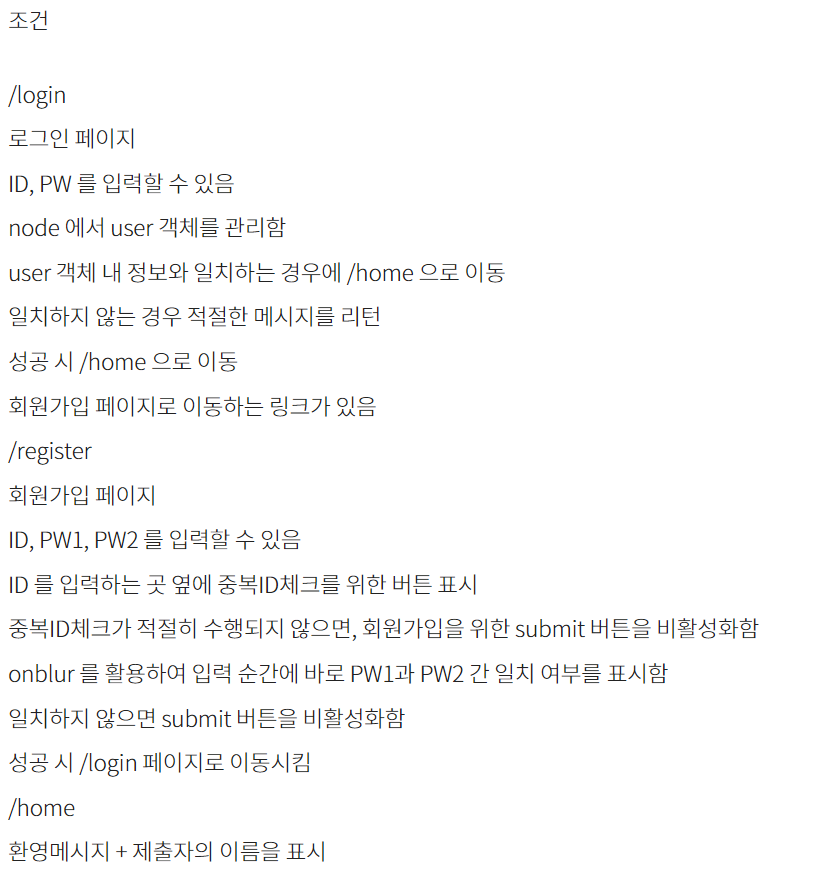
다음과 같은 조건을 만족하여야 한다.
- login.html
<!DOCTYPE html>
<html lang="ko">
<head>
    <meta charset="UTF-8">
    <meta name="viewport" content="width=device-width, initial-scale=1.0">
    <title>로그인</title>
    <link rel="stylesheet" href="/styles.css">
</head>
<body>
    <div class="login-container">
        <h1>로그인</h1>
        <form action="/login" method="POST">
            <div class="form-group">
                <label for="loginId">ID:</label>
                <input type="text" id="loginId" name="id" oninput="enableLoginButton()" required>
            </div>
            <div class="form-group">
                <label for="loginPassword">비밀번호:</label>
                <input type="password" id="loginPassword" name="password" oninput="enableLoginButton()" required>
            </div>
            <div class="form-group">
                <button type="submit" id="loginBtn" class="inactive" disabled>로그인</button>
            </div>
            <div class="form-group">
                <a href="/register">회원가입</a>
            </div>
        </form>
    </div>
    <script src="/scripts.js"></script>
</body>
</html>
- 로그인 폼
<form action="/login" method="POST">
: 로그인 폼을 정의하며, 사용자가 입력한 ID와 비밀번호가 /login 경로로 POST 방식으로 전송된다
- ID 입력 필드
<input type="text" id="loginId" name="id" required>
: ID를 입력받는 텍스트 필드이다oninput="enableLoginButton()"
: 사용자가 입력할 때마다 enableLoginButton() 함수를 호출한다. 이는 ID가 입력될 때 로그인 버튼을 활성활하는 기능을 수행
- register.html
<!DOCTYPE html>
<html lang="ko">
<head>
    <meta charset="UTF-8">
    <meta name="viewport" content="width=device-width, initial-scale=1.0">
    <title>회원가입</title>
    <link rel="stylesheet" href="/styles.css">
    <script>
        let isDuplicateChecked = false;  // 중복 체크 여부 추적

        // 페이지 로드 시 기본적으로 회원가입 버튼 비활성화
        document.addEventListener('DOMContentLoaded', function() {
            document.getElementById('submitBtn').disabled = true;  // 기본적으로 비활성화
        });

        // ID 입력 시 중복 체크 버튼 활성화
        function handleIDInput() {
            const idInput = document.getElementById('id').value;
            const duplicateCheckBtn = document.getElementById('duplicateCheckBtn');
            duplicateCheckBtn.disabled = idInput.length < 1; // 한 글자 이상일 때만 활성화

            // ID가 변경되면 중복 체크가 필요하므로 플래그 초기화
            isDuplicateChecked = false;
            enableSubmitButton();  // 버튼 활성화 여부 확인
        }

        // ID 중복 체크
        function checkDuplicateID() {
            const id = document.getElementById('id').value;
            const checkResult = document.getElementById('checkResult');
            const submitBtn = document.getElementById('submitBtn');

            if (!id) {
                checkResult.innerHTML = 'ID를 입력해주세요';
                return;
            }

            // 서버로 중복 체크 요청
            fetch(`/check-id?id=${id}`)
                .then(response => response.json())
                .then(data => {
                    if (data.exists) {
                        checkResult.innerHTML = '이미 사용 중인 ID입니다.';
                        isDuplicateChecked = false; // 중복된 경우
                        submitBtn.disabled = true;  // ID가 중복되면 회원가입 버튼 비활성화
                    } else {
                        checkResult.innerHTML = '사용 가능한 ID입니다.';
                        isDuplicateChecked = true;  // 사용 가능한 경우
                    }
                    enableSubmitButton();  // 중복 체크 후 회원가입 버튼 활성화 여부 확인
                });
        }

        // 비밀번호 일치 여부 확인
        function checkPasswordMatch() {
            const pw1 = document.getElementById('password1').value;
            const pw2 = document.getElementById('password2').value;
            const pwMatchResult = document.getElementById('pwMatchResult');

            if (pw1 && pw2) {
                if (pw1 === pw2) {
                    pwMatchResult.innerHTML = '비밀번호가 일치합니다.';
                } else {
                    pwMatchResult.innerHTML = '비밀번호가 일치하지 않습니다.';
                }
            } else {
                pwMatchResult.innerHTML = ''; // 둘 다 입력하지 않은 경우 메시지 지움
            }

            enableSubmitButton();  // 비밀번호 확인 후 회원가입 버튼 활성화 여부 확인
        }

        // 회원가입 버튼 활성화
        function enableSubmitButton() {
            const pw1 = document.getElementById('password1').value;
            const pw2 = document.getElementById('password2').value;
            const submitBtn = document.getElementById('submitBtn');

            // ID 중복 체크가 완료되고, 비밀번호가 일치하며, 비밀번호가 입력되었을 때만 회원가입 버튼 활성화
            if (isDuplicateChecked && pw1 === pw2 && pw1.length > 0 && pw2.length > 0) {
                submitBtn.disabled = false;  // 활성화
            } else {
                submitBtn.disabled = true;  // 비활성화
            }
        }

        // onblur로 실시간 비밀번호 확인
        function handlePasswordBlur() {
            checkPasswordMatch();
        }
    </script>
</head>
<body>
    <div class="register-container">
        <h1>회원가입</h1>
        <form action="/register" method="POST">
            <div class="form-group">
                <label for="id">ID:</label>
                <input type="text" id="id" name="id" oninput="handleIDInput()">
                <button type="button" id="duplicateCheckBtn" disabled onclick="checkDuplicateID()">중복 ID 체크</button>
                <span id="checkResult" style="color: red;"></span>
            </div>
            <div class="form-group">
                <label for="password1">비밀번호:</label>
                <input type="password" id="password1" name="password1" oninput="checkPasswordMatch()" onblur="handlePasswordBlur()">
            </div>
            <div class="form-group">
                <label for="password2">비밀번호 확인:</label>
                <input type="password" id="password2" name="password2" oninput="checkPasswordMatch()" onblur="handlePasswordBlur()">
                <span id="pwMatchResult" style="color: red;"></span>
            </div>
            <div class="form-group">
                <button type="submit" id="submitBtn" disabled>회원가입</button>
            </div>
        </form>
    </div>
</body>
</html>
- scripts.js
let isDuplicateChecked = false;  // 중복 체크 여부 추적(기본값 : false)

// 페이지 로드 시 기본적으로 회원가입 버튼 비활성화
document.addEventListener('DOMContentLoaded', function() {
    document.getElementById('submitBtn').disabled = true;  // 기본적으로 비활성화
});

// ID 입력 시 중복 체크 버튼 활성화
function handleIdInput() {
    const idInput = document.getElementById('id').value;
    const checkDuplicateBtn = document.getElementById('checkDuplicateBtn');

    // ID 입력이 한 글자라도 있으면 중복 체크 버튼 활성화
    checkDuplicateBtn.disabled = idInput.length === 0;

    // ID가 변경되면 중복 체크가 필요하므로 플래그 초기화
    isDuplicateChecked = false;
    enableSubmitButton();  // 회원가입 버튼 활성화 여부 확인
}

// ID 중복 체크
function checkDuplicateID() {
    const id = document.getElementById('id').value;
    const checkResult = document.getElementById('checkResult');

    if (!id) {
        checkResult.innerHTML = 'ID를 입력해주세요';
        isDuplicateChecked = false;  // 입력이 없으면 중복 체크를 하지 않는다
        enableSubmitButton();  // 버튼 활성화 여부 확인하기
        return;
    }

    // 서버로 중복 체크 요청
    fetch(`/check-id?id=${id}`)
        .then(response => response.json())
        .then(data => {
            if (data.exists) {
                checkResult.innerHTML = '이미 사용 중인 ID입니다.';
                isDuplicateChecked = false;  // 중복된 경우
            } else {
                checkResult.innerHTML = '사용 가능한 ID입니다.';
                isDuplicateChecked = true;  // 사용 가능한 경우
            }
            enableSubmitButton();  // 중복 체크 후 회원가입 버튼 활성화 여부 확인
        });
}

// 비밀번호 일치 여부 확인
function checkPasswordMatch() {
    const pw1 = document.getElementById('password1').value;
    const pw2 = document.getElementById('password2').value;
    const pwMatchResult = document.getElementById('pwMatchResult');

    if (pw1 && pw2) {
        if (pw1 === pw2) {
            pwMatchResult.innerHTML = '비밀번호가 일치합니다.';
        } else {
            pwMatchResult.innerHTML = '비밀번호가 일치하지 않습니다.';
        }
    } else {
        pwMatchResult.innerHTML = '';  // 비밀번호가 입력되지 않았을 경우 초기화
    }

    enableSubmitButton();  // 비밀번호 확인 후 회원가입 버튼 활성화 여부 확인
}

// 회원가입 버튼 활성화
function enableSubmitButton() {
    const pw1 = document.getElementById('password1').value;
    const pw2 = document.getElementById('password2').value;
    const submitBtn = document.getElementById('submitBtn');

    // ID 중복 체크가 완료되고, 비밀번호가 일치하며, 비밀번호가 입력되었을 때만 회원가입 버튼 활성화
    if (isDuplicateChecked && pw1 === pw2 && pw1.length > 0 && pw2.length > 0) {
        submitBtn.disabled = false;  // 활성화
        submitBtn.classList.add('active');  // 'active' 클래스 추가
    } else {
        submitBtn.disabled = true;  // 비활성화
        submitBtn.classList.remove('active');  // 'active' 클래스 제거
    }
}

// 로그인 버튼 활성화
function enableLoginButton() {
    const idInput = document.getElementById('loginId').value;
    const passwordInput = document.getElementById('loginPassword').value;
    const loginBtn = document.getElementById('loginBtn');

    // ID와 비밀번호가 모두 입력되었을 때만 로그인 버튼 활성화(한 개라도 입력되면 활성화)
    if (idInput.length > 0 && passwordInput.length > 0) {
        loginBtn.disabled = false;
        loginBtn.classList.remove('inactive');
        loginBtn.classList.add('active');
    } else {
        loginBtn.disabled = true;
        loginBtn.classList.remove('active');
        loginBtn.classList.add('inactive');
    }
}
- style.css
/* 전체 화면 설정 */
body {
    font-family: Arial, sans-serif;
    display: flex;
    justify-content: center;
    align-items: center;
    height: 100vh;
    margin: 0;
    background-color: #f5f5f5;
}


/* 로그인 컨테이너 스타일 */
.login-container {
    background-color: white;
    padding: 2rem;
    border-radius: 10px;
    box-shadow: 0 4px 8px rgba(0, 0, 0, 0.1);
    text-align: center;
    width: 300px;
}

/* 회원가입 컨테이너 스타일 */
.register-container {
    background-color: #ffffff;
    padding: 40px;
    border-radius: 10px;
    box-shadow: 0 4px 8px rgba(0, 0, 0, 0.1);
    width: 400px;
    text-align: center;
}

h1 {
    margin-bottom: 30px;
    font-size: 24px;
    color: #333;
}

.form-group {
    margin-bottom: 20px;
    text-align: left;
}

label {
    display: block;
    margin-bottom: 5px;
    font-weight: bold;
    color: #333;
}

input[type="text"], input[type="password"] {
    width: 100%;
    padding: 10px;
    margin-bottom: 10px;
    border: 1px solid #ccc;
    border-radius: 5px;
}

input[type="text"]:focus,
input[type="password"]:focus {
    outline: none;
    border-color: #007bff;
}

button {
    width: 100%;
    padding: 10px;
    background-color: #007bff;
    color: white;
    border: none;
    border-radius: 5px;
    cursor: pointer;
    font-size: 16px;
}

/* 비활성화된 상태 */
button.inactive {
    background-color: #ccc;
    cursor: not-allowed;
}

/* 활성화된 상태 */
button.active {
    background-color: #007bff;
    cursor: pointer;
}

/* 활성화된 상태에서 마우스를 올렸을 때 */
button.active:hover {
    background-color: #0056b3;
}

button:not(.inactive):hover {
    background-color: #0056b3;
}

button:disabled {
    background-color: #ccc;
    cursor: not-allowed;
}

/* 활성화된 버튼에 마우스를 올릴 때 */
button:hover:enabled {
    background-color: #0056b3;
}

a {
    display: block;
    margin-top: 1rem;
    color: #007bff;
    text-decoration: none;
}

a:hover {
    text-decoration: underline;
}- server.js
const express = require('express');
const session = require('express-session');
const bodyParser = require('body-parser');
const path = require('path');  // 경로 설정을 위해 path 모듈

const app = express();
app.use(bodyParser.urlencoded({ extended: true }));

// 정적 파일 경로 설정
app.use(express.static(path.join(__dirname, 'views')));

app.use(session({
    secret: 'your_secret_key',
    resave: false,
    saveUninitialized: true
}));

let users = [];

// 기본 경로로 접속 시 /login으로 리다이렉트
app.get('/', (req, res) => {
    res.redirect('/login');
});

// 로그인 페이지
app.get('/login', (req, res) => {
    res.sendFile(path.join(__dirname, 'views', 'login.html'));
});

// 회원가입 페이지
app.get('/register', (req, res) => {
    res.sendFile(path.join(__dirname, 'views', 'register.html'));
});

app.post('/login', (req, res) => {
    const { id, password } = req.body;
    const user = users.find(u => u.id === id && u.password === password);

    if (user) {
        req.session.user = user;
        res.redirect('/home');
    } else {
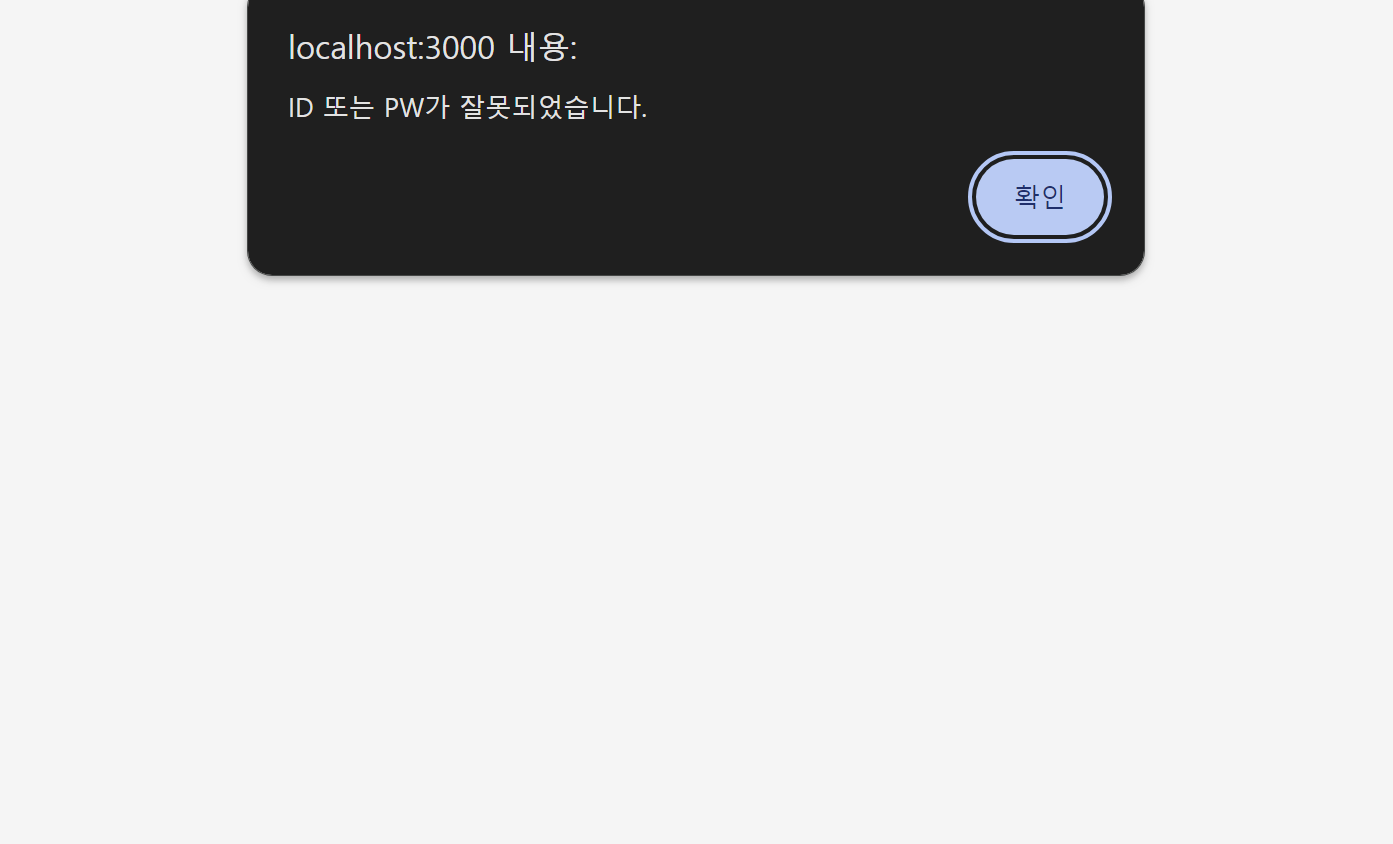
        res.send('<script>alert("ID 또는 PW가 잘못되었습니다."); window.location="/login";</script>');
    }
});

app.post('/register', (req, res) => {
    const { id, password1, password2 } = req.body;

    if (users.some(u => u.id === id)) {
        return res.send('<script>alert("중복된 ID입니다."); window.location="/register";</script>');
    }

    if (password1 !== password2) {
        return res.send('<script>alert("비밀번호가 일치하지 않습니다."); window.location="/register";</script>');
    }

    users.push({ id, password: password1, name: '박규동 교수' });
    res.redirect('/login');
});

// 홈 페이지
app.get('/home', (req, res) => {
    if (req.session.user) {
        res.send(`
            <h1>환영합니다, ${req.session.user.name}님! 오실줄 알 고 있었습니다</h1>
            <p>저는 정보융합학부 20학번 정유빈 입니다</p>
        `);
    } else {
        res.redirect('/login');
    }
});

// ID 중복 체크
app.get('/check-id', (req, res) => {
    const id = req.query.id;
    const exists = users.some(u => u.id === id);
    res.json({ exists });
});

app.listen(3000, () => {
    console.log('서버가 http://localhost:3000 에서 실행 중입니다.');
});
최종본
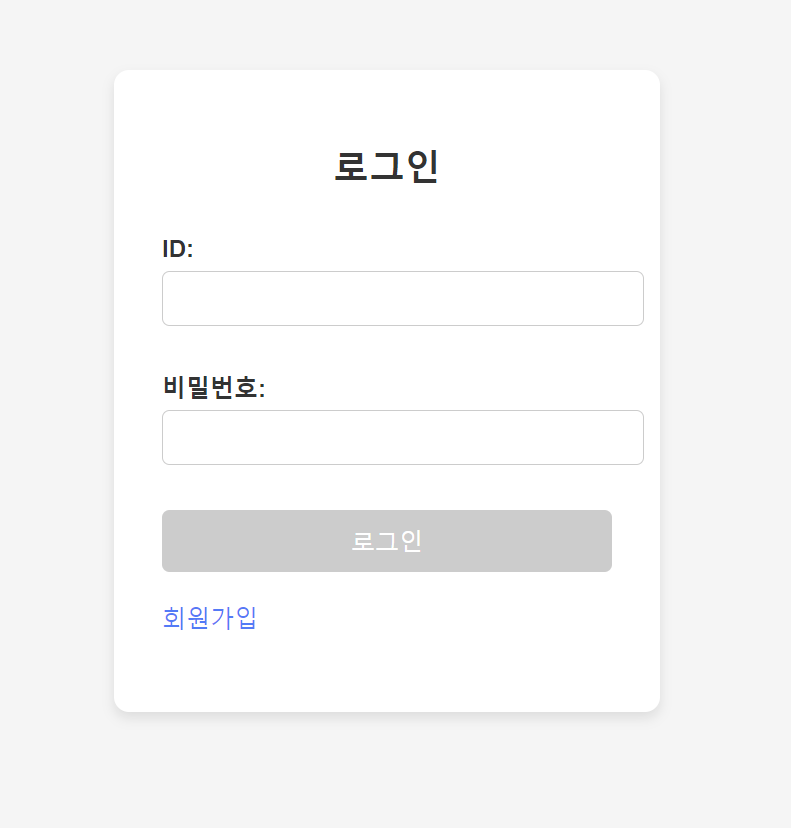
- 초기화면
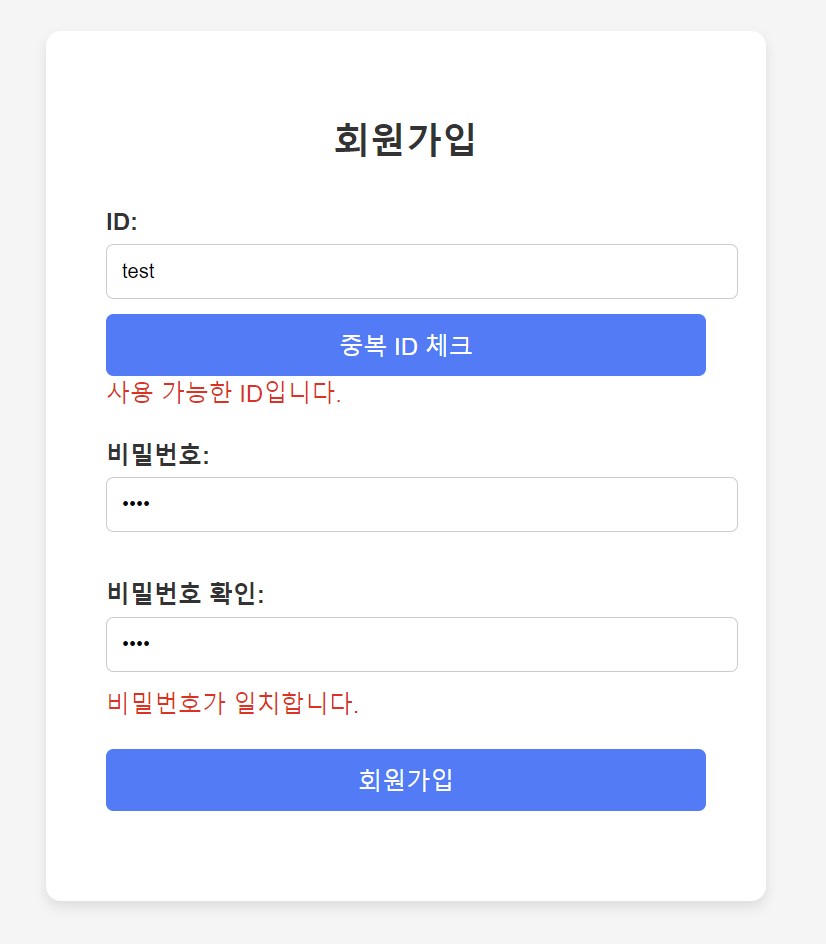
- 회원가입 화면
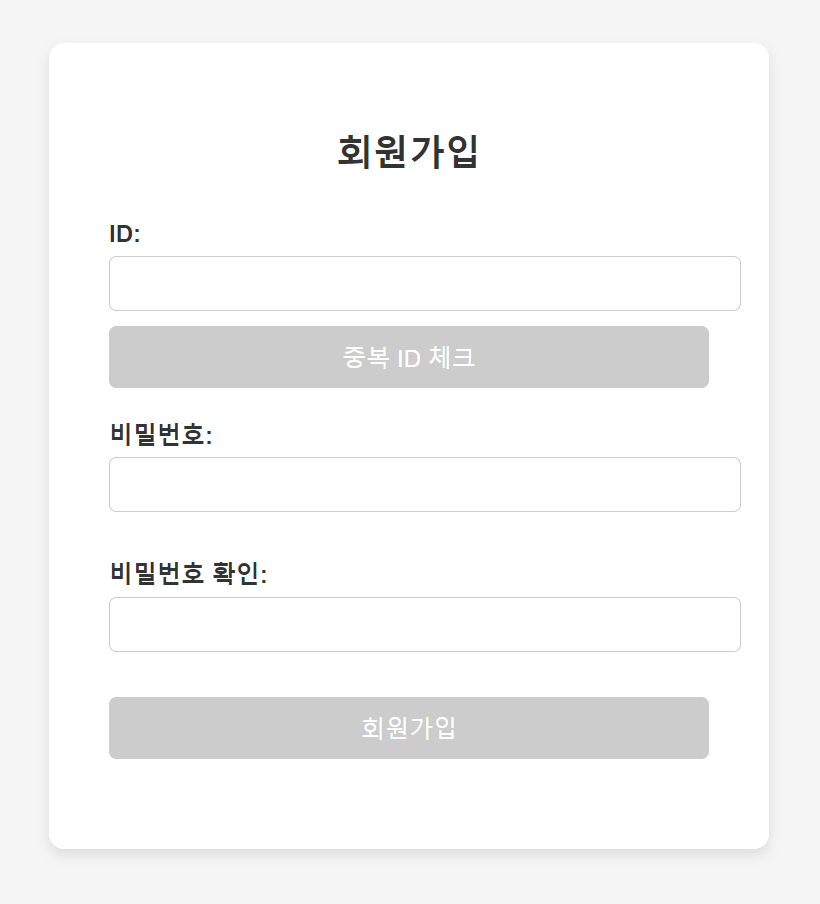
실시간으로 비밀번호 확인(onblur 사용)
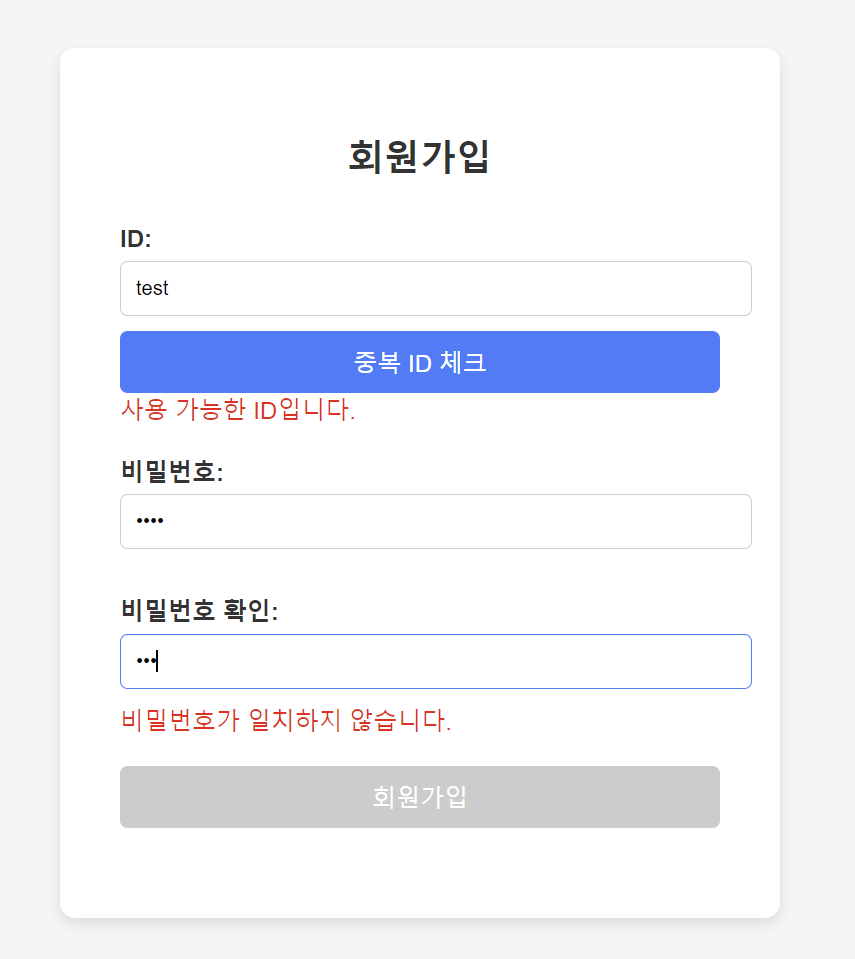
중복ID 체크를 하지 않으면 회원가입이 되지 않음
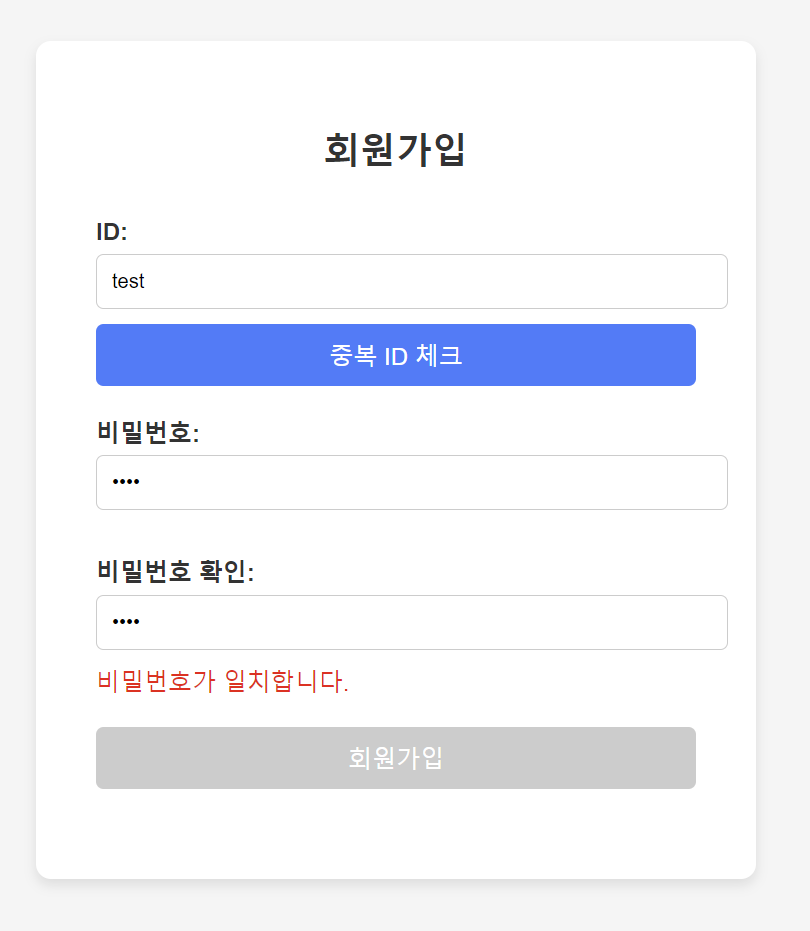
중복 ID 체크 이후 모습
- 로그인 성공 후 home으로 이동(아이디와 비번에 한 글자만 입력해도 로그인 버튼 활성화)
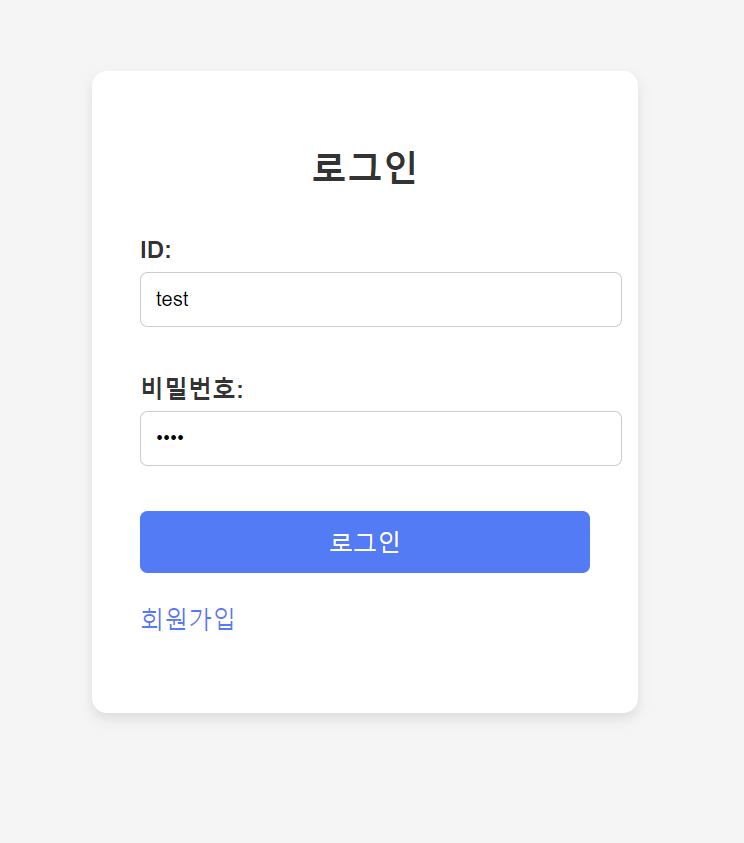
- 로그인 실패시 다음과 같은 화면 출력후 다시 login 페이지로 리다이렉션

대한민국의 미래를 묻는다면 고개를 들어 나를 쳐다보거라