Component Lifecycle
리액트 컴포넌트는 탄생부터 죽음까지 여러지점에서 개발자가 작업이 가능하도록
메서드를 오버라이딩 할 수 있게 해준다.
1. Component 생성 및 마운트(< v16.3) 16.3 이전버전
constructor - 생성되는 구간
ComponentWillMount - 마운트 되기 직전
render(최초 랜더) - 마운트
componentDidMount - 마운트 된 후
- 예시
const rootEl = document.querySelector("#root");

class App extends React.Component {
  state = {
    age: 31
  };

  constructor(props) {
    super(props);

    console.log("constructor", props);
  }

  render() {
    console.log("render");
    return (
      <div>
        <h2>
          hello {this.props.name} - {this.state.age}
        </h2>
      </div>
    );
  }
  componentWillMount() {
    console.log("componentWillMount");
  }

  componentDidMount() {
    console.log("componentDidMount");
  }
}
ReactDOM.render(<App name="kwak" />, rootEl);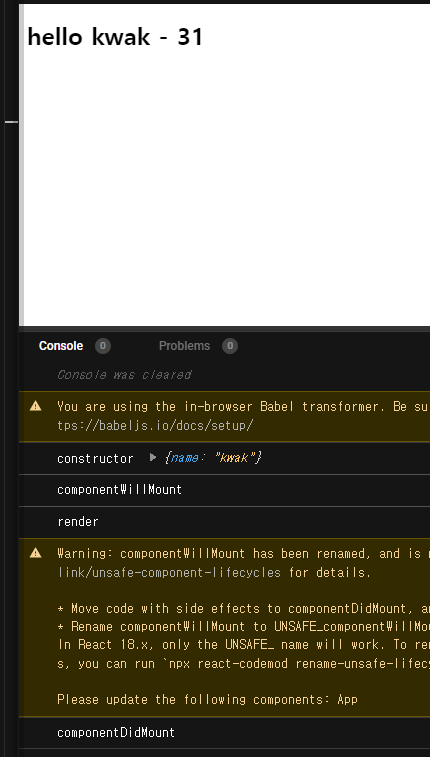
여기서 componentDidMount에 setInterval을 준다.
componentDidMount() {
  console.log("componentDidMount");

  //타이머
  setInterval(() => {
    //console.log("setInterval");
    this.setState((state) => ({ ...state, age: state.age + 1 }));
  }, 1000);
}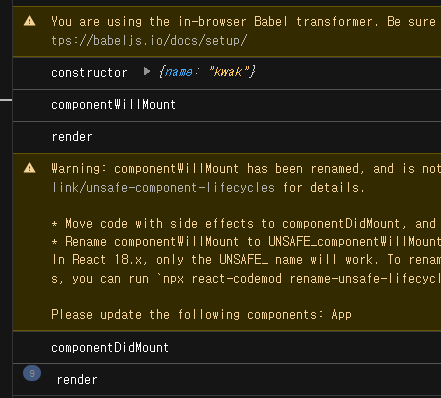
state가 바뀌면 render가 다시 실행되는걸 알 수 있다.
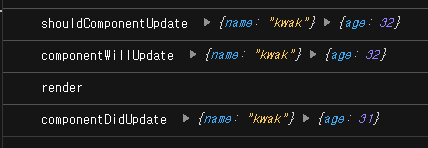
2. Component props, state 변경(< v16.3)
ComponentWillReceiveProps
shouldComponentUpdate
componentWillUpdate
render
componentDidUpdate
class App extends React.Component {
  state = {
    age: 31
  };

  constructor(props) {
    super(props);

    console.log("constructor", props);
  }

  render() {
    console.log("render");
    return (
      <div>
        <h2>
          hello {this.props.name} - {this.state.age}
        </h2>
      </div>
    );
  }
  componentWillMount() {
    console.log("componentWillMount");
  }

  componentDidMount() {
    console.log("componentDidMount");

    //타이머
    setInterval(() => {
      //console.log("setInterval");
      this.setState((state) => ({ ...state, age: state.age + 1 }));
    }, 10000);
  }

  componentWillReceiveProps(nextProps) {
    console.log("componentWillReceiveProps", nextProps);
  }
  shouldComponentUpdate(nextProps, nextState) {
    console.log("shouldComponentUpdate", nextProps, nextState);

    return true;
    //return 값이 true이어야 다음으로 넘어간다.
  }
  componentWillUpdate(nextProps, nextState) {
    console.log("componentWillUpdate", nextProps, nextState);
  }
  componentDidUpdate(prevProps, prevState) {
    console.log("componentDidUpdate", prevProps, prevState);
  }
}
2-1. componentWillReceiveProps
- props를 새로 지정했을 때 바로 호출된다.
- 여기는 state의 변경에 반응하지 않는다.
- 여기서 props의 값에 따라 steta를 변경해야 한다면,
- setState를 이용해 state를 변경한다.
- 그러면 다음 이벤트로 각각 가는것이 아니라 한번에 변경된다.
- 여기서 props의 값에 따라 steta를 변경해야 한다면,
2-2. shouldComponentUpdate
- props만 변경되어도
- state만 변경되어도
- props & state 둘다 변경되어도
- newProps와 new State를 인자로 해서 호출
- return type 이 boolean이다.
- true면 render
- false면 render가 호출되지 않는다.
- 이 함수를 구현하지 않으면, 디폴트는 true
2-3. componentWillUpdate
- 컴포넌트가 재 랜더링 되기 직전에 불린다.
- 여기선 setState 같은 것을 쓰면 안된다.
2-4. componentDidUpdate
- 컴포넌트가 재 랜저링을 마치면 불린다.
3. Component 언마운트 (< v16.3)
componentWillUnmount
컴포넌트가 사라지면 interval이 사라질것이다.
interval = null;

componentDidMount() {
  console.log("componentDidMount");

  //타이머
  this.interval = setInterval(() => {
    //console.log("setInterval");
    this.setState((state) => ({ ...state, age: state.age + 1 }));
  }, 2000);
}

componentWillUnMount() {
  clearInterval(this.interval);
}
Component 라이프사이클 변경 (v16이후)
1. Component 생성 및 마운트
constructor - 생성되는 구간
ComponentWillMount=> getDerivedStateFromProps - 마운트 되기 직전
render(최초 랜더) - 마운트
componentDidMount - 마운트 된 후
2. Component props, state 변경
ComponentWillReceiveProps=> getDerivedStateFromProps
shouldComponentUpdate
render
componentWillUpdate=> getSnapshotBeforeUpdate (dom에 적용되기 직전)
componentDidUpdate
3. Component 언마운트
componentWillUnmount
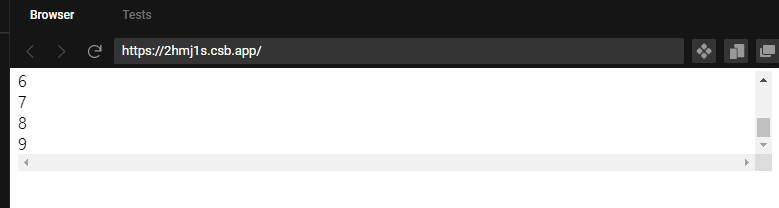
- 코드 수정
let i = 0;

class App extends React.Component {
  state = { list: [] };

  render() {
    return (
      <div id="list" style={{ height: 100, overflow: "scroll" }}>
        {this.state.list.map((i) => {
          return <div>{i}</div>;
        })}
      </div>
    );
  }

  componentDidMount() {
    setInterval(() => {
      this.setState((state) => ({
        list: [...state.list, i++]
      }));
    }, 5000);
  }

  getSnapshotBeforeUpdate(prevProps, prevState) {
    if (prevState.list.length === this.state.list.length) return null;
    const list = document.querySelector("#list");
    return list.scrollHeight - list.scrollTop;
  }

  componentDidUpdate(prevProps, prevState, snapshot) {
    console.log(snapshot);
    if (snapshot === null) return;
    const list = document.querySelector("#list");
    list.scrollTop = list.scrollHeight - snapshot;
  }
4. Component 에러 캐치
ComponentDidCatch
Error Boundaries
https://ko.reactjs.org/docs/error-boundaries.html#gatsby-focus-wrapper
class App extends React.Component {
  state = {
    hasError: false
  };
  render() {
    if (this.state.hasError) {
      return <div>예상치 못한 에러가 발생했다.</div>;
    }
    return <WebService />;
  }

  componentDidCatch(error, info) {
    this.setState({ hasError: true });
  }
}

ReactDOM.render(<App />, rootEl);