Defender for server 설정은 아래와 같이 할 수 있는데 사실 별 다른 특이사항 없이 설정할 수 있다고 본다.
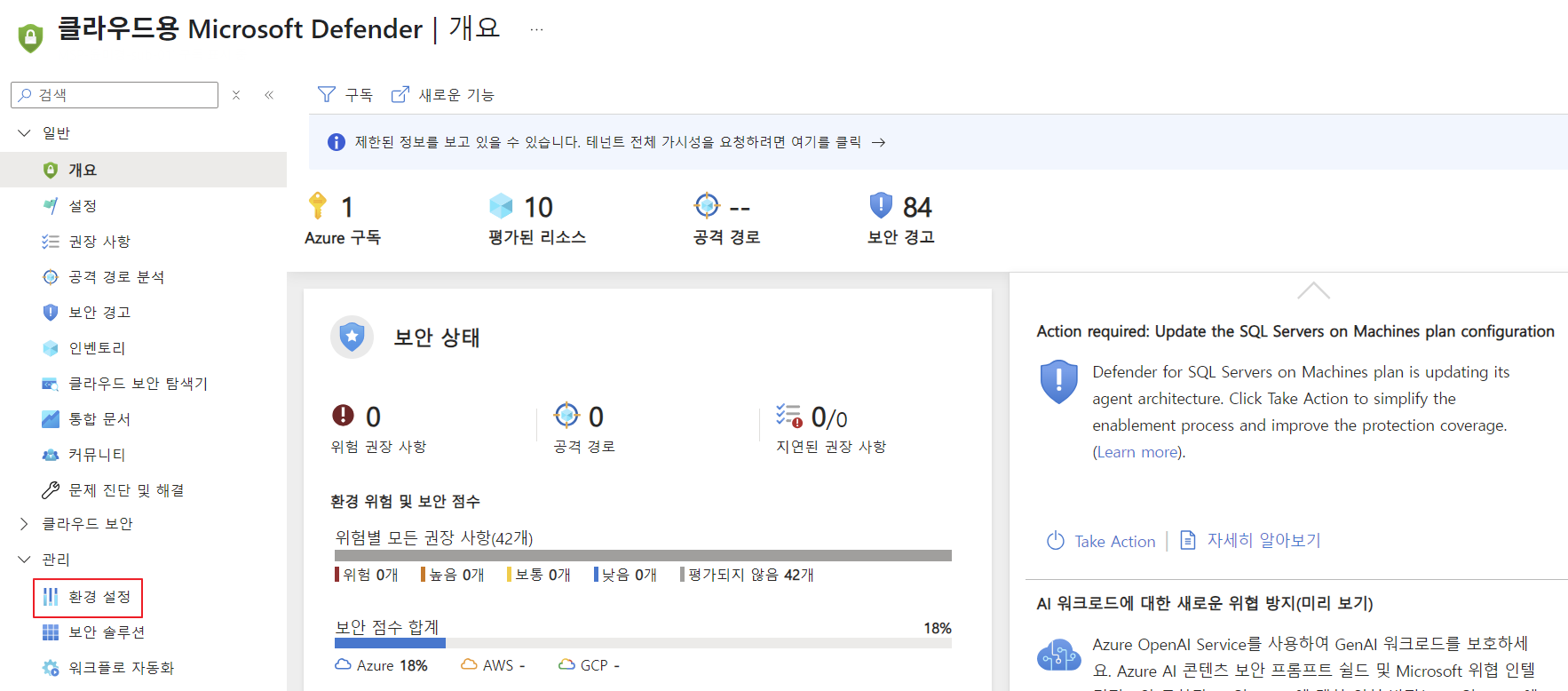
Microsoft Defender > 관리 | 환경 설정 > Azure | Tenant Root Group | 구독 선택
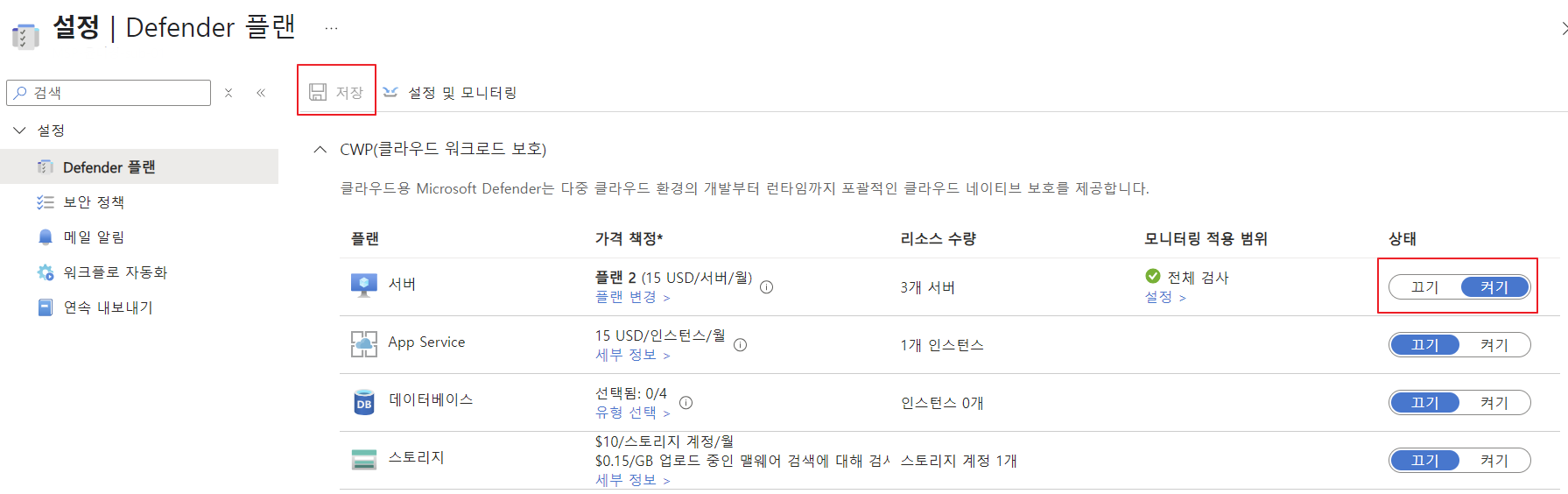
[가상머신 적용 확인]
mdatp health여러 구독에서 Defender for server를 적용했을 때 이와같은 결과가 확인됐다.
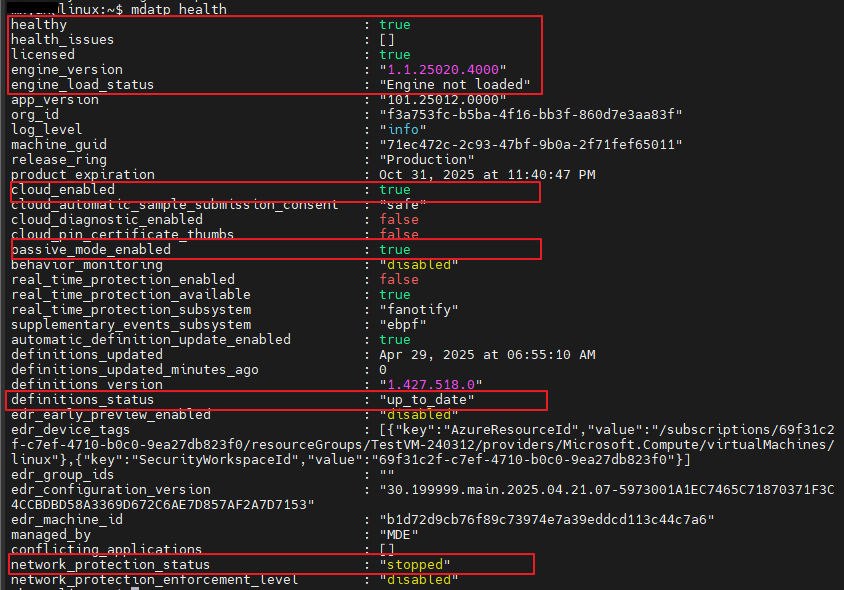
특정 기능 상태 확인
mdatp threat list //격리된 작업 확인
mdatp health --field real_time_protection_enabled //실시간 보호 확인
mdatp health --field definitions_status //최신 업데이트 정의 확인
mdatp health --field cloud_enabled //행동 모니터링 활성 확인

[해석]
| 항목 | 현재 값 | 해석 | 정상 여부 |
|---|---|---|---|
healthy | true | 에이전트 정상 작동 중 | |
health_issues | [] | 문제 없음 | |
licensed | true | 라이선스 정상 등록 | |
engine_load_status | Engine not loaded | 패시브 모드라 엔진 미로드 | (정책에 따라 정상) |
passive_mode_enabled | true | 패시브 모드(탐지만) 활성화 | (정책 따라 다름) |
real_time_protection_enabled | false | 실시간 보호 꺼짐 | (패시브 모드면 정상) |
definitions_status | update_failed/up_to_date | 탐지 정의 업데이트 실패/최신 보안 정의 (1.427.518.0) | |
cloud_enabled | true | 클라우드 연결 정상 | |
network_protection_status | stopped | 네트워크 보호 꺼짐 | 선택 사항 |
[조치]
$ sudo mdatp config behavior-monitoring –value enabled
$ sudo mdatp config behavior-monitoring –value disabled
| 작업 | 명령어 | 설명 |
|---|---|---|
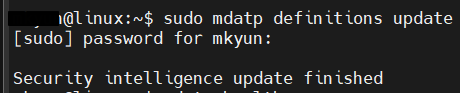
| 정의 업데이트 시도 | sudo mdatp definitions update | 실패할 경우 수동 업데이트 |
| Passive Mode 해제 (필요시) | sudo mdatp config passive-mode --value false | 실시간 방어 켜짐 |
| 행위 모니터링 활성화 | sudo mdatp config behavior-monitoring --value enabled | |
| 클라우드 기반 모니터 활성화 | mdatp health --field cloud_enabled | |
| 네트워크 보호 켜기 (선택사항) | sudo mdatp network-protection feature-control --feature web-browsing-protection --operation enable |
--> 정의 업데이트 시도 이후 up_to_date로 바뀜
mdatp health --field cloud_enabled
참고문서
https://learn.microsoft.com/ko-kr/azure/defender-for-cloud/integration-defender-for-endpoint
https://learn.microsoft.com/en-us/defender-endpoint/linux-support-install
https://jeffreyappel.nl/defender-for-endpoint-on-linux-onboarding-and-behavior-monitoring-detection/
https://techcommunity.microsoft.com/blog/microsoftdefenderatpblog/enhancing-linux-antivirus-with-behavior-monitoring-capabilities/2226705
https://learn.microsoft.com/en-us/defender-endpoint/health-status