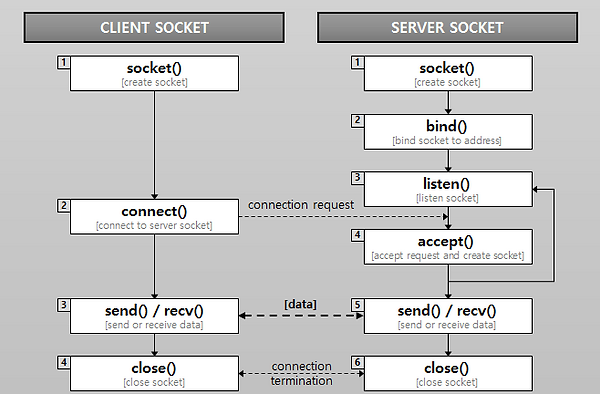
Transfer to ASCII
Client 에서 Server 에게 문자열을 전송하면, Server는 해당 문자열을 ASCII 코드 숫자로
반환하는 Program입니다.
Server.py
from socket import *

host = ''
port = 8080

SV = socket(AF_INET, SOCK_STREAM) #Socket for server
SV.bind((host, port)) #Bind server
SV.listen(1) #Listening port

connectionSock, addr = SV.accept()

def trans_ASCII(message): #Transfer message to ASCII Code
    return str([ord(c) for c in message])

print(str(addr), 'connected') #Print client ip address

recall = 1 #for while loop
while recall:
    recvData = connectionSock.recv(1024) #receive data from client
    print('Client :', recvData.decode('utf-8'))

    trans_msg = 'Transfer to ASCII : '
    trans_msg = trans_msg + trans_ASCII(recvData.decode('utf-8'))
    connectionSock.send(trans_msg.encode('utf-8'))
    print('Transfer Success')

    if (recvData.decode('utf-8') == 'stop'): #if receive stop, exit while loop and close server socket
        recall = 0


SV.close()
Server측 Python 코드입니다.
socket을 import하여 socket 관련 메소드를 사용할 수 있도록 합니다.
host와 port는 연결할 Server의 IP주소와 Port 번호입니다.
현재 코드에서는 IP주소이기 때문에 빼놓았으나,
실제 사용 시에는 Server 측의 IP주소를 사용하면 연결이 가능합니다.
- import한 socket을 활용하여 socket 생성, bind, listen 과정을 수행합니다.
- listen 과정 이후 Client에서는 Server에 Connect를 시도,
- 서버에서는 Server Socket인 SV를 이용하여 Accept합니다.
- 연결된 Client의 IP주소를 출력하고, Client와 연결된 Socket을 통해 recv, send 과정을 수행합니다.
- Client에게 message를 받아 앞에서 정의한 trans_ASCII 메소드를 통해 ASCII 코드 형태로 변경합니다.
- send를 통해 변형된 내용을 Client에게 전송합니다.
- 이후 Client 측에서 'stop' 메세지를 받으면 socket을 close합니다.
Client.py
from socket import *

host = ''
port = 8080

CL = socket(AF_INET, SOCK_STREAM) #Socket for client
CL.connect((host, port))
print("Successfully Connected")

recall = 1 #for while loop
while recall:
    sendData = input('Client : ') #Data for transfer to ASCII Code
    CL.send(sendData.encode('utf-8')) #Send data

    recvData = CL.recv(1024) #Receive data (ASCII Code) from server
    print(recvData.decode('utf-8')) #Print received data

    if (sendData == 'stop'): #if send stop, exit while loop and close client socket
        recall = 0

CL.close()
Client측 Python 코드입니다.
마찬가지로 host는 연결할 Server의 IP주소를 입력하면 됩니다.
- import한 socket을 활용하여 Client socket을 생성하고,
- 연결할 Server의 정보를 이용하여 connect합니다.
- 이는 Server의 listen 메소드까지 진행되어야 connect 할 수 있습니다.
- 연결이 완료되면 연결 완료 메세지를 출력하고,
- recv, send 과정을 수행합니다.
- Client 측에서 send를 통해 ASCII 코드로 변환하기를 원하는 문자열을 전송합니다.
- recv를 통해 Server에서 변경한 ASCII 코드를 받아 출력하고, Client가 stop을 입력할 경우 while문을 탈출하여 socket을 close합니다.
Client.py 실행 결과
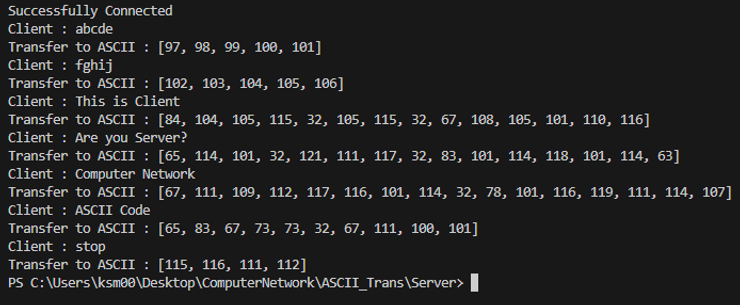
Server와의 연결이 성공적으로 되어 Successfully Connected 메세지가 출력되었습니다.
이후 Client에서 입력한 문자열들을 Server에서 ASCII 코드로 변환하여
Transfer to ASCII : 이후 변환된 ASCII 코드들이 출력됩니다.
마지막으로 Client에서 stop을 사용하면, stop 문자열까지 변환 후 socket을 close하고 연결이 종료됩니다.
Server.py 실행 결과
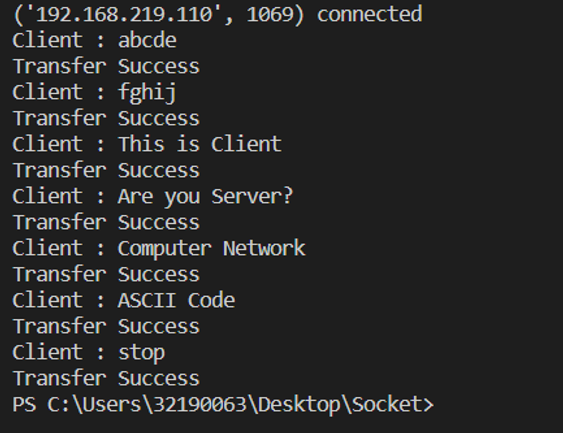
연결된 Client 측 연결 정보를 출력합니다.
Client에게 recv한 문자열들을 출력하고, 해당 문자열을 ASCII 코드로 변환하여
Client에게 send, 성공 메세지를 출력합니다.
Client에게 stop 입력을 받으면 while문을 탈출하여 socket을 close하고 연결을 종료합니다.
File Trans
Server에 존재하는 File을 Client 측에서 전송 받는 프로그램입니다.
Server.py
from socket import *
import sys
from os.path import exists

port = 8080

SV = socket(AF_INET, SOCK_STREAM)
SV.bind(('localhost', port))
SV.listen(1)

connectionSock, addr = SV.accept()

print(str(addr),'connected')

file_name = connectionSock.recv(2048) #receive file name from client
print('File name : ', file_name.decode('utf-8')) #Decode file name
data_size = 0

if not exists(file_name): #If file does not exists in Server
    print("File does not exists in Server")
    sys.exit()

print(f'Transfer start : {file_name}')
with open(file_name, 'rb') as f:
    try:
        send_data = f.read(2048) #read 2048 bytes from file
        while send_data: #while send_data does not exists
            data_size += connectionSock.send(send_data) #send 2048 bytes and save current size
            send_data = f.read(2048) #read 2048 bytes from file
    except Exception as ex:
        print(ex)

print(f'File transfer success : \'{file_name}\', Data size : \'{data_size}\'')
Server 측 코드입니다.
파일을 사용해야 하기 때문에, os.path, sys 를 import합니다.
마찬가지로 Server의 소켓 생성과 IP, port를 통한 bind, listen 과정이 선행됩니다.
- connectionSock을 통해 Client에서 들어온 connect 요청을 accept합니다.
- file_name은 client에서 받기를 요청하는 파일 이름을 저장합니다.
- Server 측에서도 확인을 위해 file_name을 출력합니다.
- file을 전송하기 위해 지정할 data_size를 선언하고,
exists를 통해 file_name이 Server 측에 없다면 File이 존재하지 않는다는 내용을 출력하고 exit합니다.- file이 존재한다면, 파일 전송 시작을 출력하고, file_name과 이름이 같은 파일을 open합니다.
- send_data는 file을 2048 bytes 만큼 읽어오고, 읽은 데이터를 전송하며
data_size에 전송한 size를 저장하여 보낼 file이 2048 bytes를 넘을 때를 위해
다시 file을 read하고 완전히 file이 보내질 때 까지 반복합니다.- 오류가 생기면 이를 출력하고, 전송이 완료되면 file의 이름과 총 크기를 출력하고 마무리됩니다.
Client.py
from socket import *
import sys
import os

host = 'localhost'
port = 8080

CL = socket(AF_INET, SOCK_STREAM)
CL.connect((host, port))

print('Connected Successfully.')
file_name = input('Enter the file name : ')
CL.sendall(file_name.encode('utf-8'))

recv_data = CL.recv(2048)
data_size = 0

if not recv_data:
    print(f'File \'{file_name}\' does not exists in Server')
    sys.exit()

directory = os.getcwd()

with open(directory+"\\"+file_name, 'wb') as f: #Receive file in current directory
    try:
        while recv_data: #while recv_data does not exists
            f.write(recv_data) #write file
            data_size += len(recv_data)
            recv_data = CL.recv(2048) #receive 2048 bytes
    except Exception as ex:
        print(ex)

print(f'File transfer success : \'{file_name}\' . Data size : \'{data_size}\'')
Client 측 코드입니다.
- sys, os를 import 하여 Client socket을 생성, Server에 connect합니다.
- Server에서 전송 받을 file 이름을 입력하고 sendall을 통해 Server에 전달합니다.
- recv_data로 Server에서 file을 받아오고, data_size를 지정합니다.
- recv_data가 없다면 file이 없다는 내용을 출력, exit합니다.
- directory에 getcwd를 통해 현재 작업 경로를 저장하고
현재 작업 경로에 file_name으로 파일을 open합니다.- 이후 recv_data를 통해 만들어진 file에 write 작업을 진행합니다.
- 마찬가지로 data_size를 통해 반복적으로 write 작업을 진행하고
- 작업이 완료되면 file_name과 총 파일 크기를 출력합니다.
File Trans 실행 결과
초기 Server 폴더에는 hello.txt가 존재
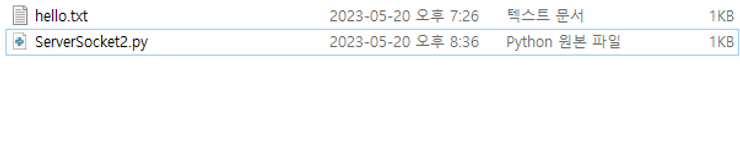
Client 측에는 hello.txt가 존재하지 않습니다.


Client 측에서 연결 완료 후, hello.txt 파일을 요청하기 위해 입력합니다.
file 전송이 완료되면 파일 이름과 크기를 출력합니다.
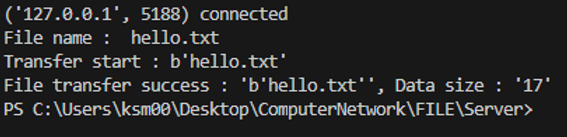
Server 측에서는 요청 받은 file 이름을 출력하고
전송한 file 이름과 크기를 출력합니다.

Client 측에도 hello.txt가 생성