Spring Security란?
스프링 시큐리티는 스프링 기반의 애플리케이션 보안(인증, 인가, 권한)을 담당하는 스프링 하위 프레임워크이다. CSRF 공격, 세션 고정 공격을 방어해주고, 요청 헤더도 보안 처리를 해주므로 개발자의 보안 부담이 줄어든다.
인증 Authentication
- 인증(
Authentication)은 사용자의 신원을 입증하는 과정이다. - ex) 사용자가 사이트에 로그인 하는 과정
인가 Authorization
- 인가는 사이트의 특정 부분에 접근할 수 있는 권한을 확인하는 작업이다.
- ex) 관리자 페이지에 관리자만 접근 가능
회원 도메인 생성
entity
@Table(name = "users")
@NoArgsConstructor(access = AccessLevel.PROTECTED)
@Getter
@Entity
public class User extends BaseTimeEntity {

    @Id
    @GeneratedValue(strategy = GenerationType.IDENTITY)
    @Column(name = "user_id", updatable = false)
    private Long id;

    @Column(nullable = false, unique = true)
    private String email;

    private String password;
    private String nickname;
    private int age;

    @Enumerated(EnumType.STRING)
    private Role role;

    @Builder
    public User(String email, String password, String nickname, int age, Role role) {
        this.email = email;
        this.password = password;
        this.nickname = nickname;
        this.age = age;
        this.role = role;
    }
}
repository
public interface UserRepository extends JpaRepository<User, Long> {
    Optional<User> findByEmail(String email);
}
Security 설정
UserDetailService
@Service
@RequiredArgsConstructor
public class UserDetailService implements UserDetailsService {

    private final UserRepository userRepository;

    @Override
    public UserDetails loadUserByUsername(String email) {
        User user = userRepository.findByEmail(email).orElseThrow(NotFoundUserException::new);

        return org.springframework.security.core.userdetails.User.builder()
                .username(user.getEmail())
                .password(user.getPassword())
                .roles(user.getRole().name())
                .build();
    }
}
exception
public class NotFoundUserException extends RuntimeException {
    public NotFoundUserException() {
        super("해당하는 사용자가 존재하지 않습니다.");
    }

    public NotFoundUserException(String message) {
        super(message);
    }
}
WebSecurityConfig
@Configuration
@EnableWebSecurity
@RequiredArgsConstructor
public class WebSecurityConfig {

    private final UserDetailService userDetailService;

    // Spring Security 기능 비활성화
    @Bean
    public WebSecurityCustomizer configure() {
        return (web) -> web.ignoring()
                .requestMatchers(PathRequest.toH2Console())
                .requestMatchers(new AntPathRequestMatcher("/static/**"));
    }

    // 특정 HTTP 요청에 대한 웹 기반 보안 구성
    @Bean
    public SecurityFilterChain filterChain(HttpSecurity http) throws Exception {
        return http
                .authorizeHttpRequests(auth -> auth
                        .requestMatchers("/login", "/signup", "/api/login", "/api/signup").permitAll()
                        .requestMatchers("/user/**").hasRole("USER")
                        .requestMatchers("/admin/**").hasRole("ADMIN")
                        .anyRequest().authenticated())  // 나머지 url은 인증 후에 접근 가능
                .formLogin(formLogin -> formLogin
                        .loginPage("/login")
                        .defaultSuccessUrl("/post", true)
                )
                .logout(logout -> logout
                        .logoutSuccessUrl("/login")
                        .invalidateHttpSession(true) // 로그아웃 이후 세션 전체 삭제 여부
                )
                .csrf(AbstractHttpConfigurer::disable)
                .build();
    }

    // 패스워드 인코더로 사용할 빈 등록
    @Bean
    public BCryptPasswordEncoder bCryptPasswordEncoder() {
        return new BCryptPasswordEncoder();
    }
}
-
h2-console/**경로에 대해Spring Security가 인증/인가를 수행하지 않도록 설정한 것이다. 따라서 H2 콘솔은 보안 필터 체인에 의해 차단되지 않고 정상적으로 동작할 것이다. -
로그인 및 로그아웃
/login경로는 커스텀 로그인 페이지로 지정되어 있습니다.- 로그인 성공 시
/post로 리다이렉트되며, 로그아웃 성공 시/login으로 리다이렉트된다.
-
비밀번호 암호화
BCryptPasswordEncoder가 정상적으로 설정되어 있으며, 이를 통해 사용자 비밀번호를 암호화하고 비교할 수 있다.
-
CSRF 비활성화
CSRF공격은 주로 사용자의 세션 쿠키를 악용하여 이루어진다. 서버가 세션 기반 인증을 사용하면, 공격자는 사용자의 브라우저가 자동으로 포함하는 세션 쿠키를 이용해 악의적인 요청을 전송할 수 있다.- 하지만
JWT는 일반적으로 브라우저의 쿠키 대신Authorization헤더에 포함되며, 이는 브라우저가 자동으로 전송하지 않기 때문에 CSRF 공격으로부터 비교적 안전하다. - Security 적용 이후에 JWT를 이용할 것이기 때문에 비활성화 해준다.
- 하지만
회원 가입 구현
Service
@Service
@Transactional(readOnly = true)
@RequiredArgsConstructor
@Slf4j
public class UserService {

    private final UserRepository userRepository;
    private final BCryptPasswordEncoder bCryptPasswordEncoder;

    @Transactional
    public SignUpUserResponse signUp(SignUpUserRequest signUpUserRequest) {
        if (userRepository.findByEmail(signUpUserRequest.email()).isPresent()) {
            throw new IllegalArgumentException("이미 존재하는 이메일입니다.");
        }
        if (userRepository.findByNickname(signUpUserRequest.nickname()).isPresent()) {
            throw new IllegalArgumentException("이미 존재하는 닉네임입니다.");
        }

        User user = User.builder()
                .email(signUpUserRequest.email())
                .password(bCryptPasswordEncoder.encode(signUpUserRequest.password()))
                .nickname(signUpUserRequest.nickname())
                .age(signUpUserRequest.age())
                .role(Role.USER)
                .build();

        userRepository.save(user);

        return SignUpUserResponse.toDto(user);
    }

    @Transactional
    public LoginResponse login(LoginRequest loginRequest) {
        log.debug("password -> {}", loginRequest.password());
        User user = userRepository.findByEmail(loginRequest.email()).orElseThrow(NotFoundUserException::new);

        if (!bCryptPasswordEncoder.matches(loginRequest.password(), user.getPassword())) {
            throw new IllegalArgumentException("비밀번호가 일치하지 않습니다.");
        }

        return new LoginResponse(user.getEmail());
    }

    public User findByEmail(String email) {
        return userRepository.findByEmail(email).orElseThrow(NotFoundUserException::new);
    }
}
api
Dto
Request
LoginRequest
public record LoginRequest(
        @Email
        @NotEmpty
        String email,
        @NotEmpty
        String password
) {
}
SignupUserRequest
public record SignUpUserRequest(
        @Email
        String email,
        @NotEmpty
        String password,
        @NotEmpty
        String nickname,
        @NotEmpty
        int age
) {
    public User toEntity(BCryptPasswordEncoder bCryptPasswordEncoder) {
        return User.builder()
                .email(email)
                .password(bCryptPasswordEncoder.encode(password))
                .nickname(nickname)
                .age(age)
                .role(Role.USER)
                .build();
    }
}
Response
@Builder
public record SignUpUserResponse(
        Long id,
        String email,
        String nickname,
        int age,
        LocalDateTime createdAt,
        LocalDateTime lastModifiedAt
) {
    public static SignUpUserResponse toDto(User user) {
        return SignUpUserResponse.builder()
                .id(user.getId())
                .email(user.getEmail())
                .nickname(user.getNickname())
                .age(user.getAge())
                .createdAt(user.getCreatedAt())
                .lastModifiedAt(user.getLastModifiedAt())
                .build();
    }
}
Controller
restController
@RequiredArgsConstructor
@RestController
@RequestMapping("/api")
public class UserController {

    private final UserService userService;

    @Operation(summary = "회원 가입", description = "파라미터로 넘어온 정보로 회원 가입을 한다.")
    @ApiResponse(responseCode = "201", description = "성공")
    @ApiResponse(responseCode = "400", description = "파라미터 오류")
    @PostMapping("/signup")
    public ResponseEntity<SignUpUserResponse> signUp(@Parameter(description = "사용자 email과 password")
                                                     @RequestBody @Valid SignUpUserRequest signUpUserRequest) {
        SignUpUserResponse signUpUserResponse = userService.signUp(signUpUserRequest);
        return ResponseEntity.status(HttpStatus.CREATED).body(signUpUserResponse);
    }

    @Operation(summary = "로그인", description = "파라미터로 넘어온 정보로 로그인 한다.")
    @ApiResponse(responseCode = "201", description = "성공")
    @ApiResponse(responseCode = "400", description = "파라미터 오류")
    @ApiResponse(responseCode = "401", description = "인증 실패")
    @PostMapping("/login")
    public ResponseEntity<LoginResponse> login(@RequestBody @Valid LoginRequest loginRequest) {
        LoginResponse loginResponse = userService.login(loginRequest);
        return ResponseEntity.ok(loginResponse);
    }


    // session 방식에서 사용하는 로그아웃 JWT에서는 변경
    @Operation(summary = "로그아웃", description = "로그아웃을 한다.")
    @ApiResponse(responseCode = "200", description = "성공")
    @GetMapping("/logout")
    public ResponseEntity<?> logout(HttpServletRequest request, HttpServletResponse response) {
        request.getSession().invalidate();
        return ResponseEntity.ok("logout successfully");
    }
}
ViewController
@Controller
@RequiredArgsConstructor
public class UserViewController {

    private final UserService userService;
    private final PasswordEncoder passwordEncoder;

    // 로그인 페이지
    @GetMapping("/login")
    public String login() {
        return "login";
    }

    // 회원가입 페이지
    @GetMapping("/signup")
    public String signup() {
        return "signup";
    }

    @PostMapping("/signup")
    public String processRegistration(SignUpUserRequest signUpUserRequest) {
        userService.signUp(signUpUserRequest);
        return "redirect:/login";
    }
}
View
login
<!DOCTYPE html>
<html xmlns:th="http://www.thymeleaf.org">
<head>
    <meta charset="UTF-8">
    <title>로그인</title>
    <link rel="stylesheet" href="https://cdn.jsdelivr.net/npm/bootstrap@4.6.1/dist/css/bootstrap.min.css">

    <style>
        .gradient-custom {
            background: linear-gradient(to right, rgba(106, 17, 203, 1), rgba(37, 117, 252, 1))
        }
    </style>
</head>
<body class="gradient-custom">
<section class="d-flex vh-100">
    <div class="container-fluid row justify-content-center align-content-center">
        <div class="card bg-dark" style="border-radius: 1rem;">
            <div class="card-body p-5 text-center">
                <h2 class="text-white">LOGIN</h2>
                <p class="text-white-50 mt-2 mb-5">서비스를 사용하려면 로그인을 해주세요!</p>

                <div class = "mb-2">
                    <form action="/login" method="POST">
                        <input type="hidden" th:name="${_csrf?.parameterName}" th:value="${_csrf?.token}" />
                        <div class="mb-3">
                            <label class="form-label text-white">Email address</label>
                            <input type="email" class="form-control" name="username">
                        </div>
                        <div class="mb-3">
                            <label class="form-label text-white">Password</label>
                            <input type="password" class="form-control" name="password">
                        </div>
                        <button type="submit" class="btn btn-primary">Submit</button>
                    </form>

                    <button type="button" class="btn btn-secondary mt-3" onclick="location.href='/signup'">회원가입</button>
                </div>
            </div>
        </div>
    </div>
</section>
</body>
</html>
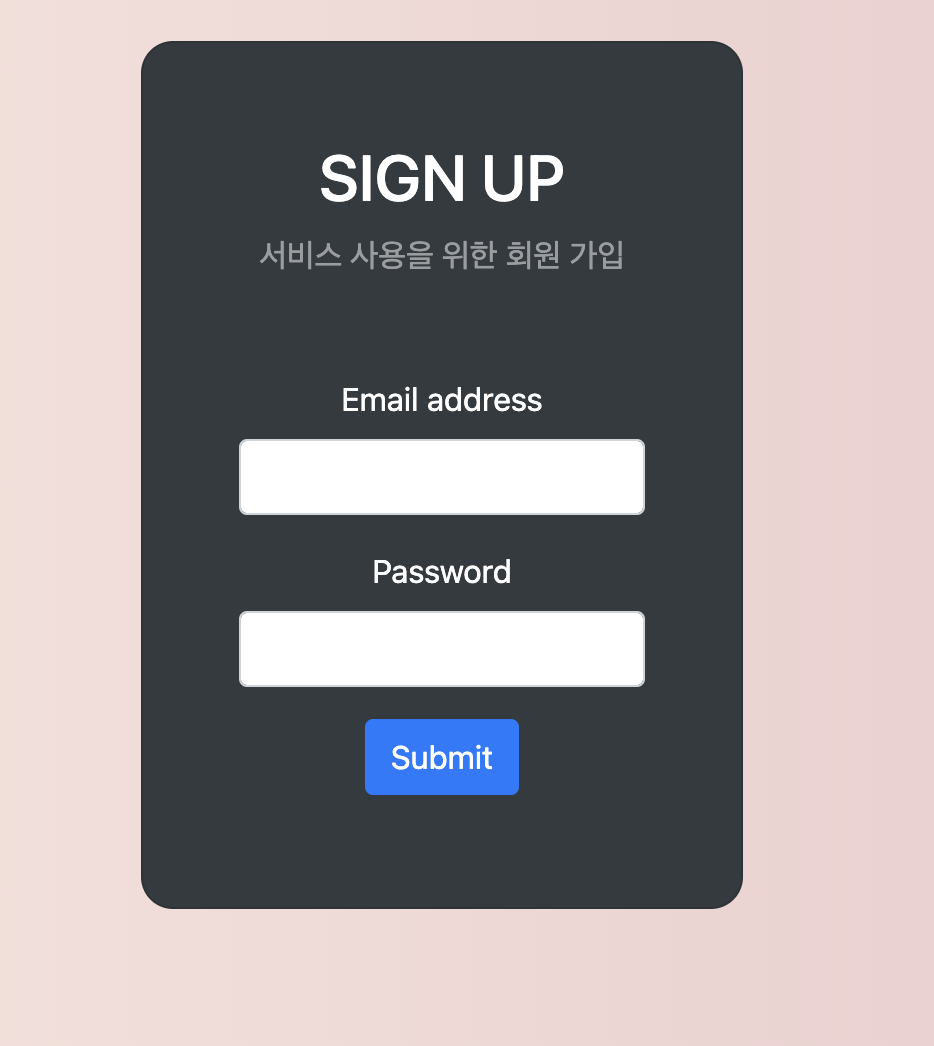
signup
<!DOCTYPE html>
<html xmlns:th="http://www.thymeleaf.org">
<head>
    <meta charset="UTF-8">
    <title>회원 가입</title>
    <link rel="stylesheet" href="https://cdn.jsdelivr.net/npm/bootstrap@4.6.1/dist/css/bootstrap.min.css">
    <style>
        .gradient-custom {
            background: linear-gradient(to right, rgba(254, 238, 229, 1), rgba(229, 193, 197, 1))
        }
    </style>
</head>
<body class="gradient-custom">
<section class="d-flex vh-100">
    <div class="container-fluid row justify-content-center align-content-center">
        <div class="card bg-dark" style="border-radius: 1rem;">
            <div class="card-body p-5 text-center">
                <h2 class="text-white">SIGN UP</h2>
                <p class="text-white-50 mt-2 mb-5">서비스 사용을 위한 회원 가입</p>

                <div class="mb-2">
                    <!-- Thymeleaf를 사용하여 CSRF 토큰 추가 -->
                    <form th:action="@{/signup}" method="POST">
<!--                        <input type="hidden" th:name="${_csrf.parameterName}" th:value="${_csrf.token}" />-->
                        <div class="mb-3">
                            <label class="form-label text-white">Email address</label>
                            <input type="email" class="form-control" name="email" required>
                        </div>
                        <div class="mb-3">
                            <label class="form-label text-white">Password</label>
                            <input type="password" class="form-control" name="password" required>
                        </div>
                        <div class="mb-3">
                            <label class="form-label text-white">Nickname</label>
                            <input type="text" class="form-control" name="nickname" required>
                        </div>
                        <div class="mb-3">
                            <label class="form-label text-white">Age</label>
                            <input type="number" class="form-control" name="age" required>
                        </div>
                        <button type="submit" class="btn btn-primary">Submit</button>
                    </form>
                </div>
            </div>
        </div>
    </div>
</section>
</body>
</html>
로그아웃 구현
Controller
    @GetMapping("/logout")
    public String logout(HttpServletRequest request, HttpServletResponse response) {
        new SecurityContextLogoutHandler().logout(request, response,
                SecurityContextHolder.getContext().getAuthentication());
        return "redirect:/login";
    }
View
postList
<button type="button" class="btn btn-secondary" onclick="location.href='/logout'">로그아웃</button>

<script size="/js/post.js"></script>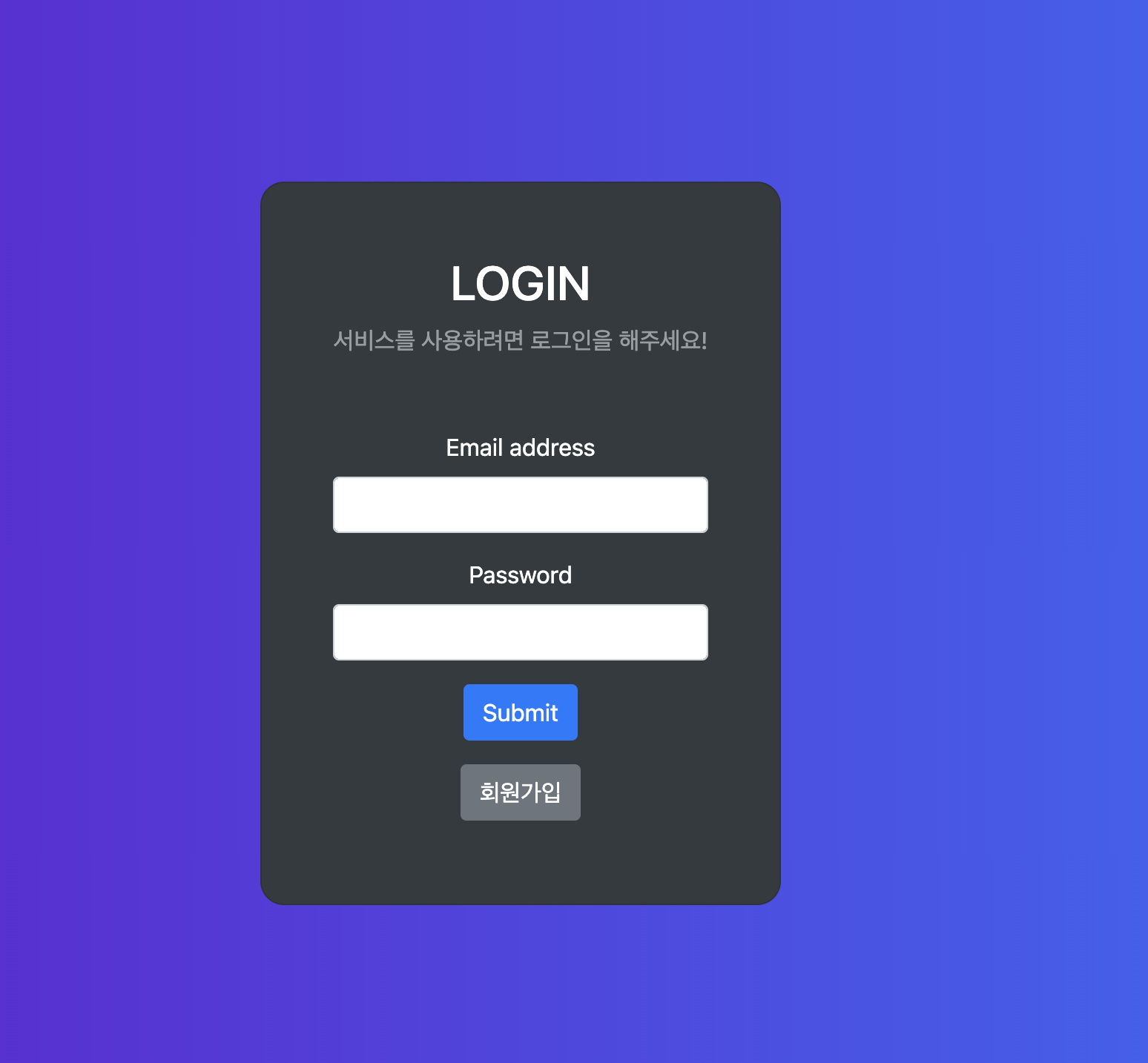

공부하는 초보 개발자