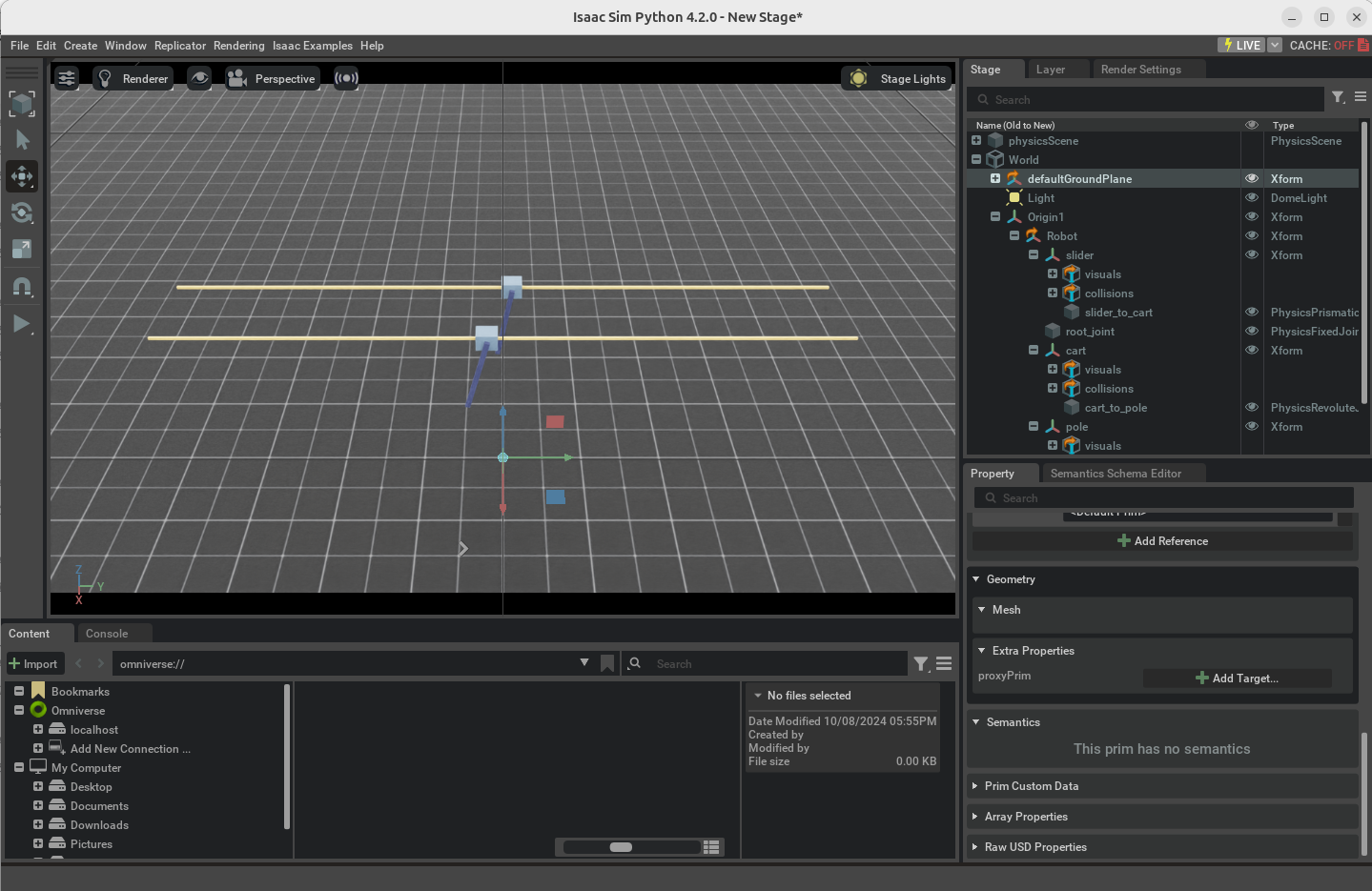
$ python source/standalone/tutorials/01_assets/run_articulation.py# 필수 모듈 불러오기
import argparse
from omni.isaac.lab.app import AppLauncher
# ArgumentParser() : 명령줄 인자를 처리하기 위한 parser을 생성
# script에 대한 간단한 설명 추가
parser = argparse.ArgumentParser(description="Tutorial on spawning and interacting with an articulation.")
# 파서를 앱런처에 추가
AppLauncher.add_app_launcher_args(parser)
# 파서를 args_cli에 저장
args_cli = parser.parse_args()
# 시뮬레이션 앱 객체를 생성
app_launcher = AppLauncher(args_cli)
simulation_app = app_launcher.app
import torch # 텐서 연산을 위해
# prims를 다루는 유틸리티 함수
import omni.isaac.core.utils.prims as prim_utils
# 시뮬레이션 관련 작업을 처리하는 유틸리티 함수
import omni.isaac.lab.sim as sim_utils
# 관절이 있는 복잡한 구조를 생성하고 관리하는 함수
# 여러 개의 joint로 이루어진 물리적 객체를 의미
from omni.isaac.lab.assets import Articulation
# 시뮬레이션의 물리 계산, 객체 상태 업데이트, 시뮬레이션 진행 등을 처리
from omni.isaac.lab.sim import SimulationContext
# cartpole은 사전 정의된 객체
# cartpole이라는 특정 로봇이나 기구를 시뮬레이션하는 데 필요한 물리적 속성, 관절 설정, 초기 상태등을 포함
from omni.isaac.lab_assets import CARTPOLE_CFG # isort:skip
def design_scene() -> tuple[dict, list[list[float]]]:
# 지면 생성
cfg = sim_utils.GroundPlaneCfg()
cfg.func("/World/defaultGroundPlane", cfg)
# 광원 생성
cfg = sim_utils.DomeLightCfg(intensity=3000.0, color=(0.75, 0.75, 0.75))
cfg.func("/World/Light", cfg)
'''
로봇 그룹 생성 "Origin1", "Origin2"
각 origin (x,y,z)는 관절 구조를 배치할 위치를 의미
'''
origins = [[0.0, 0.0, 0.0], [-1.0, 0.0, 0.0]]
prim_utils.create_prim("/World/Origin1", "Xform", translation=origins[0])
prim_utils.create_prim("/World/Origin2", "Xform", translation=origins[1])
# 미리 정의된 cartpole 구성을 복사
cartpole_cfg = CARTPOLE_CFG.copy()
# cartpole 경로를 설정
cartpole_cfg.prim_path = "/World/Origin.*/Robot"
# Articulation() : 관절 객체를 생성하는 코드. cartpole에서 정의된 관절 설정과 물리적 속성들이 articulation 객체에 적용
# Articulation 객체는 카트와 막대로 구성된 물리적 시스템을 의미하며 실시간 물리 시뮬레이션이 가능해짐
cartpole = Articulation(cfg=cartpole_cfg)
# 딕셔너리 형태로 저장해 접근을 용이하게함
scene_entities = {"cartpole": cartpole}
# cartpole과 origins(좌표)를 반환
return scene_entities, origins
run_simulator 인자
- sim: sim_utils.SimulationContext
- 물리 엔진, 시간 흐름, 객체 상태 업데이트 등을 제어하며 시뮬레이션 실행 상태 추적
- entities: dict[str, Articulation]
- scene내에 존재하는 여러 객체들을 저장한 딕셔너리값임
- 이 딕셔너리를 통해 시뮬레이션에서 각 객체에 힘, 속도 등을 적용하거나 위치, 속도를 업데이트 가능
- origins: torch.Tensor
- 다수의 객체를 시뮬레이션 내에 효율적으로 배치 가능
- 월드 좌표계에서 정확한 위치에 놓일 수 있도록함
def run_simulator(sim: sim_utils.SimulationContext, entities: dict[str, Articulation], origins: torch.Tensor):

    # cartpole 객체 robot에 저장
    robot = entities["cartpole"]

    # 시뮬레이션 시간 스텝 설정
    sim_dt = sim.get_physics_dt()  # Get the simulation time step
    count = 0

    # Simulation loop
    while simulation_app.is_running():
        # 매 500스텝마다 cartpole 객체 리셋. 이때 객체의 위치, 속도 등을 초기화하고 랜덤 노이즈 추가
        if count % 500 == 0:
            # reset counter
            count = 0

            # cartpole 객체의 초기 상태를 복사
            root_state = robot.data.default_root_state.clone()

            # 원점에서 origins로 위치 조정
            root_state[:, :3] += origins

            # 객체의 위치를 시뮬레이션에 반영
            robot.write_root_state_to_sim(root_state)

			'''
            robot.data.default_joint_pos() : cartpole의 관절 위치를 가져옴
            robot.data.default_joint_vel.clone() : cartpole의 관절 속도 가져옴
            joint_pos가 관절 위치, joint_vel이 관절 속도
            '''
            joint_pos, joint_vel = robot.data.default_joint_pos.clone(), robot.data.default_joint_vel.clone()

            # 여기서는 기본 위치와 속도를 복사한 후 위치 값에 약간의 랜덤 노이즈를 추가하여 객체가 매번 약간씩 다른 위치에 배치되게 함
            joint_pos += torch.rand_like(joint_pos) * 0.1

            # 시뮬레이션에 관절 위치와 속도를 반영
            robot.write_joint_state_to_sim(joint_pos, joint_vel)

            # clear internal buffers
            robot.reset()
            print("[INFO]: Resetting robot state...")


        # torch.randn_like() : 이 함수는 정규분포에서 랜덤 값을 생성해 관절 위치와 동일한 형태로 반환함. 생성된 값에 5를 곱하여 관절에 적용할 힘의 크기를 조정
        efforts = torch.randn_like(robot.data.joint_pos) * 5.0

        # cartpole 관절에 힘(effort)를 적용
        robot.set_joint_effort_target(efforts)

        # 데이터를 시뮬레이션에 반영
        robot.write_data_to_sim()

        # Perform step
        sim.step()

        # Increment counter
        count += 1

        # 객체 상태 업데이트. 시뮬레이션에서 경과한 시간을 기반으로 객체의 물리적 속성(위치, 속도)등을 업데이트
        robot.update(sim_dt)

def main():
    """Main function."""
    # GPU로 시뮬레이션 실행
    sim_cfg = sim_utils.SimulationCfg(device=args_cli.device)
    sim = SimulationContext(sim_cfg)

    # Set main camera
    sim.set_camera_view([2.5, 0.0, 4.0], [0.0, 0.0, 2.0])

    # Design scene
    scene_entities, scene_origins = design_scene()
    scene_origins = torch.tensor(scene_origins, device=sim.device)

    # Play the simulator
    sim.reset()

    # Now we are ready!
    print("[INFO]: Setup complete...")

    # Run the simulator
    run_simulator(sim, scene_entities, scene_origins)

if __name__ == "__main__":
    # run the main function
    main()

    # close sim app
    simulation_app.close()
데이터사이언스정복