1.게시글의 댓글을 저장할 수 있는 폼(form)을 다음과 같이 추가하자.
post_detail.html
<h1>제목:{{ post.title }}</h1>
<div>
  내용:{{ post.content }}
</div>
<form action="{% url 'boards:reply_create' post.id %}" method="post">
  {% csrf_token %}
  <textarea name="content" id="content" rows="15"></textarea>
  <input type="submit" value="댓글등록">
</form>
urls.py 추가
app_name = 'boards'

urlpatterns = [
...
   path('reply/create/<int:post_id>/', views.reply_create, name='reply_create'),
]
뷰함수
그리고 URL 매핑 규칙에 정의된 views.reply_create 함수를 boards/views.py 파일에 다음과 같이 추가하자.
[파일명: boards\views.py]
def reply_create(request, post_id):
    post = get_object_or_404(Post, pk=post_id)

    post.comment_set.create(content=request.POST.get('content'))
    return redirect('boards:detail', post_id=post.id)
reply_create 함수의 매개변수 question_id는 URL 매핑에 의해 값이 전달된다. 예를 들어, http://127.0.0.1:8000/boards/create/2/ 페이지를 요청하면 post_id 매개변수에 2라는 값이 전달된다.
그리고 답변을 등록할 때 텍스트창에 입력한 내용은 reply_create 함수의 첫 번째 매개변수인 request 객체를 통해 읽을 수 있다. 즉, request.POST.get('content')를 사용하면 텍스트창에 입력된 내용을 읽을 수 있다. 여기서 request.POST.get('content')는 POST 방식으로 전송된 폼 데이터 중 content 항목의 값을 의미한다.
그리고 답변을 생성하기 위해 post.comment_set.create를 사용했다. 여기서 post.comment_set은 해당 질문에 연결된 답변을 의미한다. 이는 Post과 Comment 모델이 ForeignKey로 연결되어 있기 때문에 가능한 사용 방식이다.
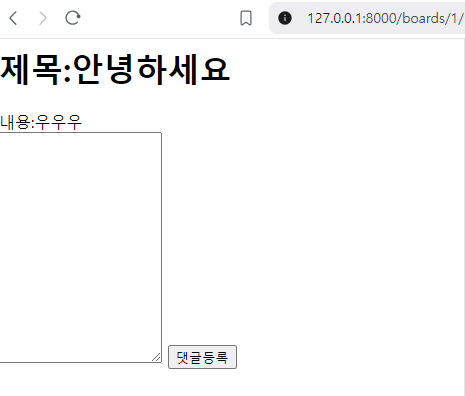
화면에는 아무런 변화가 없을 것이다. 이는 등록된 답변을 표시하는 기능을 추가 하여 보자
댓글 조회
post_detail.html
<h1>제목:{{ post.title }}</h1>
<div>
  내용:{{ post.content }}
</div>

<h5>{{ post.comment_set.count }}개의 댓글이 있습니다.</h5>
<div>
  <ul>
    {% for comment in post.comment_set.all %}
      <li>{{ comment.content }}</li>
    {% endfor %}
  </ul>
</div>

<form action="{% url 'boards:reply_create' post.id %}" method="post">
  {% csrf_token %}
  <textarea name="content" id="content" rows="15"></textarea>
  <input type="submit" value="댓글등록">
</form>
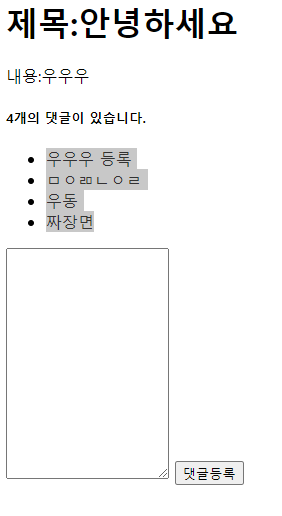
답변을 저장하고 확인할 수 있게 되었다.

쿵스보이(얼짱뮤지션)