StatelessWidget은 상태를 가지지 않기 때문에 생명주기 메서드가 따로 없고, 화면에 그려질 때 호출되는 build() 메서드만 존재한다.
반면, StatefulWidget은 상태 변경에 따른 다양한 생명주기 메서드를 제공한다.
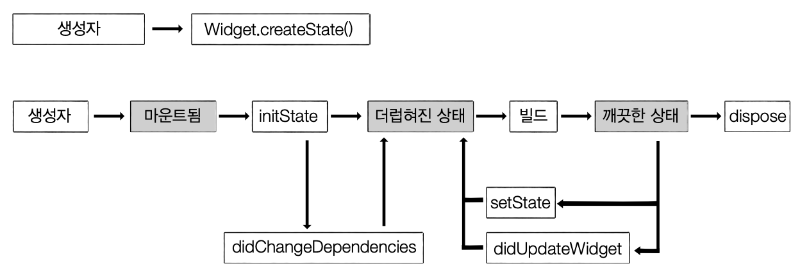
Flutter Widget Lifecycle (생명주기) 정리
📌 1. 개요
Flutter에서 Lifecycle(생명주기)는
👉 위젯이 생성되고, 화면에 그려지고, 업데이트되고, 제거될 때까지의 흐름을 의미함
특히 StatefulWidget에서 매우 중요
📌 2. 전체 흐름 (StatefulWidget 기준)
createState()
   ↓
initState()
   ↓
didChangeDependencies()
   ↓
build()
   ↓
(상태 변경 시)
   ↓
setState()
   ↓
build()
   ↓
didUpdateWidget()
   ↓
deactivate()
   ↓
dispose()
📌 3. 주요 메서드 설명
✅ 1. createState()
State<MyWidget> createState() => _MyWidgetState();- StatefulWidget이 생성될 때 호출
- State 객체 생성
✅ 2. initState()
void initState() {
super.initState();
}- 딱 1번만 실행
- 초기화 작업 수행
👉 사용 예
- API 호출
- 변수 초기화
- 애니메이션 시작
✅ 3. didChangeDependencies()
void didChangeDependencies() {
super.didChangeDependencies();
}- 의존성이 변경될 때 호출
InheritedWidget변화 감지
👉 예:
- Theme 변경
- Provider 값 변경
✅ 4. build()
Widget build(BuildContext context) {
return Container();
}- UI를 그리는 핵심 함수
- 매우 자주 호출됨
👉 호출되는 경우
- initState 이후
- setState 이후
- 부모 위젯 변경 시
✅ 5. setState()
setState(() {
  // 상태 변경
});- 상태 변경 알림
- build() 다시 호출됨
✅ 6. didUpdateWidget()
void didUpdateWidget(covariant MyWidget oldWidget) {
super.didUpdateWidget(oldWidget);
}- 부모 위젯이 변경될 때 호출
- 이전 위젯과 비교 가능
👉 사용 예
- props 변경 감지
✅ 7. deactivate()
void deactivate() {
super.deactivate();
}- 위젯이 트리에서 제거될 때 호출
- 하지만 완전히 삭제된 건 아님
👉 특징
- 다시 붙을 수도 있음
✅ 8. dispose()
void dispose() {
super.dispose();
}- 위젯이 완전히 제거될 때 호출
- 리소스 정리 필수
👉 사용 예
- controller 해제
- stream 종료
- timer 제거
📌 4. Lifecycle 흐름 그림
생성
 ↓
initState
 ↓
didChangeDependencies
 ↓
build
 ↓
(상태 변화)
 ↓
setState → build
 ↓
(부모 변경)
 ↓
didUpdateWidget → build
 ↓
제거
 ↓
deactivate
 ↓
dispose
📌 5. 실무에서 중요한 포인트
🔥 initState vs build
| 구분 | initState | build |
|---|---|---|
| 호출 횟수 | 1번 | 여러 번 |
| 용도 | 초기화 | UI 렌더링 |
| API 호출 | ✅ 가능 | ❌ 비추천 |
🔥 dispose 중요성
👉 메모리 누수 방지 핵심
void dispose() {
controller.dispose();
super.dispose();
}🔥 build 최적화
- 무거운 로직 넣지 말 것
- 네트워크 호출 ❌
- 계산 최소화
📌 6. 한 줄 요약
👉 init → build → update → dispose 흐름으로 동작
Flutter Widget Lifecycle 간단 예제
📌 목표
- Lifecycle 흐름을 콘솔 로그로 직접 확인
- 버튼 클릭 →
setState()→build()재호출 확인
✅ 전체 예제 코드 (한 파일)
import 'package:flutter/material.dart';
void main() {
runApp(const MyApp());
}
class MyApp extends StatelessWidget {
const MyApp({super.key});
Widget build(BuildContext context) {
return const MaterialApp(
home: LifecycleExample(),
);
}
}
class LifecycleExample extends StatefulWidget {
const LifecycleExample({super.key});
State<LifecycleExample> createState() => _LifecycleExampleState();
}
class _LifecycleExampleState extends State<LifecycleExample> {
int count = 0;
void initState() {
super.initState();
print("1️⃣ initState 호출");
}
void didChangeDependencies() {
super.didChangeDependencies();
print("2️⃣ didChangeDependencies 호출");
}
void didUpdateWidget(covariant LifecycleExample oldWidget) {
super.didUpdateWidget(oldWidget);
print("🔄 didUpdateWidget 호출");
}
void deactivate() {
super.deactivate();
print("⚠️ deactivate 호출");
}
void dispose() {
print("❌ dispose 호출");
super.dispose();
}
void _increase() {
setState(() {
count++;
print("👉 setState 호출 (count: $count)");
});
}
Widget build(BuildContext context) {
print("3️⃣ build 호출");
return Scaffold(
appBar: AppBar(title: const Text("Lifecycle Example")),
body: Center(
child: Column(
mainAxisAlignment: MainAxisAlignment.center,
children: [
Text("Count: $count", style: const TextStyle(fontSize: 24)),
const SizedBox(height: 20),
ElevatedButton(
onPressed: _increase,
child: const Text("증가"),
),
],
),
),
);
}
}📌 실행 시 콘솔 흐름
🔹 앱 처음 실행
1️⃣ initState 호출
2️⃣ didChangeDependencies 호출
3️⃣ build 호출
🔹 버튼 클릭 (setState)
👉 setState 호출 (count: 1)
3️⃣ build 호출
👉 핵심: setState → build 다시 실행
🔹 화면 이동 후 제거 시
⚠️ deactivate 호출
❌ dispose 호출
📌 핵심 포인트 정리
initState()👉 한 번만 실행 (초기화)build()👉 계속 호출됨 (UI 그림)setState()👉 상태 변경 + build 재실행dispose()👉 메모리 정리 (필수)
🚀 한 줄 핵심
👉 버튼 클릭 → setState → build 재실행 → UI 변경
실습예제
<import 'package:flutter/material.dart';
import 'life_cicle.dart';
void main() {
runApp(const MyApp());
}
class MyApp extends StatelessWidget {
const MyApp({super.key});
Widget build(BuildContext context) {
return const MaterialApp(
home: MediaQueryExample(),
);
}
}
class MediaQueryExample extends StatelessWidget {
const MediaQueryExample({super.key});
Widget build(BuildContext context) {
// 📌 MediaQuery 사용
final size = MediaQuery.of(context).size;
final width = size.width;
final height = size.height;
final isLandscape = width > height;
return Scaffold(
appBar: AppBar(title: const Text("MediaQuery Example")),
body: Column(
children: [
// 📊 화면 정보 표시
Text("width: $width"),
Text("height: $height"),
Text("가로 모드: $isLandscape"),
const SizedBox(height: 20),
// 📌 반응형 박스
Container(
width: width * 0.8,
height: 100,
color: Colors.blue,
child: const Center(
child: Text("화면 너비의 80%"),
),
),
const SizedBox(height: 20),
// 📌 버튼 → Navigator (context 사용)
ElevatedButton(
onPressed: () {
Navigator.of(context).push(
MaterialPageRoute(
builder: (context) => const SecondPage(),
),
);
},
child: const Text("다음 화면"),
),
],
),
);
}
}
class SecondPage extends StatelessWidget {
const SecondPage({super.key});
Widget build(BuildContext context) {
final padding = MediaQuery.of(context).padding;
return Scaffold(
appBar: AppBar(title: const Text("Second Page")),
body: Center(
child: Column(
mainAxisAlignment: MainAxisAlignment.center,
children: [
Text("상태바 높이: ${padding.top}"),
const SizedBox(height: 20),
// Text(
// "헤드라인",
// style: Theme.of(context)
// .textTheme
// .headlineMedium,
// ),
//
// const SizedBox(height: 20),
//
// Text(
// "본문 내용입니다.",
// style: Theme.of(context).textTheme.bodyMedium,
// ),
//
//
// Text(
// "작은 설명",
// style: Theme.of(context).textTheme.bodySmall,
// ),
ElevatedButton(
onPressed: () {
Navigator.of(context).pop();
},
child: const Text("뒤로가기"),
),
ElevatedButton(
onPressed: () {
Navigator.of(context).push(
MaterialPageRoute(
builder: (context) => const LifecycleExample(),
),
);
},
child: const Text("Life 사이클 페이지"),
),
],
),
),
);
}
}life_cicle.dart
import 'package:flutter/material.dart';
void main() {
runApp(const MyApp());
}
class MyApp extends StatelessWidget {
const MyApp({super.key});
Widget build(BuildContext context) {
return const MaterialApp(
home: LifecycleExample(),
);
}
}
class LifecycleExample extends StatefulWidget {
const LifecycleExample({super.key});
State<LifecycleExample> createState() => _LifecycleExampleState();
}
class _LifecycleExampleState extends State<LifecycleExample> {
int count = 0;
void initState() {
super.initState();
print("1️⃣ initState 호출");
}
void didChangeDependencies() {
super.didChangeDependencies();
print("2️⃣ didChangeDependencies 호출");
}
void didUpdateWidget(covariant LifecycleExample oldWidget) {
super.didUpdateWidget(oldWidget);
print("🔄 didUpdateWidget 호출");
}
void deactivate() {
super.deactivate();
print("⚠️ deactivate 호출");
}
void dispose() {
print("❌ dispose 호출");
super.dispose();
}
void _increase() {
setState(() {
count++;
print("👉 setState 호출 (count: $count)");
});
}
Widget build(BuildContext context) {
print("3️⃣ build 호출");
return Scaffold(
appBar: AppBar(title: const Text("Lifecycle Example")),
body: Center(
child: Column(
mainAxisAlignment: MainAxisAlignment.center,
children: [
Text("Count: $count", style: const TextStyle(fontSize: 24)),
const SizedBox(height: 20),
ElevatedButton(
onPressed: _increase,
child: const Text("증가"),
),
],
),
),
);
}
}
쿵스보이(얼짱뮤지션)