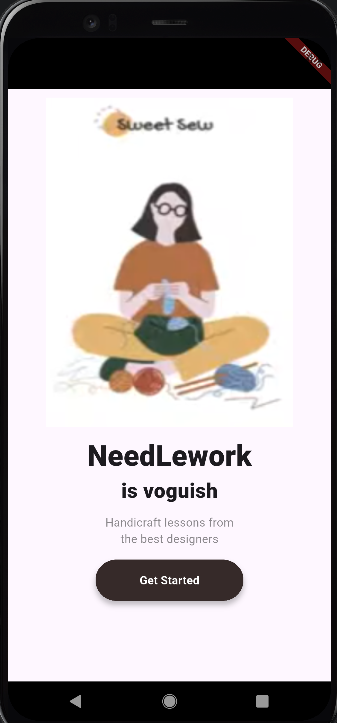
위와 같이 클론 코딩을 하시오.
class MyApp extends StatelessWidget {
  const MyApp({super.key});

  @override
  Widget build(BuildContext context) {
    return MaterialApp(
      home: SafeArea(
        child: Scaffold(
          body: Center(
            child: Column(
              children: [
                SizedBox(height: 10,),
                Image.asset("assets/images/banner.png",
                  width: 300,
                  height: 400,
                  fit: BoxFit.fill,
                ),
                SizedBox(height: 10,),
                Text("NeedLework",
                  style: TextStyle(
                    fontSize: 35,
                    fontWeight: FontWeight.w800,
                  ),
                ),
                Text("is voguish",
                  style: TextStyle(
                    fontSize: 25,
                    fontWeight: FontWeight.w800,
                  ),
                ),
                SizedBox(height: 10,),
                Text("Handicraft lessons from",
                  style: TextStyle(
                    color: Colors.black45
                  ),
                ),
                Text("the best designers",
                  style: TextStyle(
                      color: Colors.black45
                  ),
                ),
                SizedBox(height: 15,),
                ElevatedButton(
                  onPressed: () {},
                  style: ElevatedButton.styleFrom(
                    elevation: 5, // 그림자
                    backgroundColor: Color(0xff362a29),
                    minimumSize: Size(180, 50),
                  ),
                  child: Text(
                    "Get Started",
                    style: TextStyle(
                      color: Colors.white,
                      fontWeight: FontWeight.w600
                    ),
                  ),
                ),
              ],
            ),
          ),
        )
      ),
    );
  }
}
쿵스보이(얼짱뮤지션)