유니티 에셋 분홍색 (머테리얼 깨짐) 오류
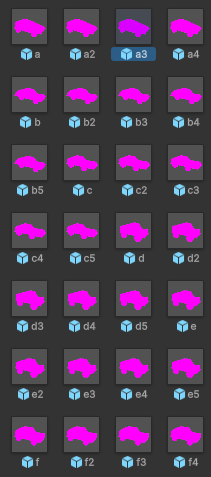
Built-in으로 만든 에셋을 SRP(URP,HDRP)에서 사용하려 하면 사진처럼 텍스쳐가 뭉개진다.
 에셋스토어에서 호환되는 버전을 확인할 수 있으나 적혀있지 않다면 보통
 Built-in으로 제작해서 호환이 되지않기 때문인데
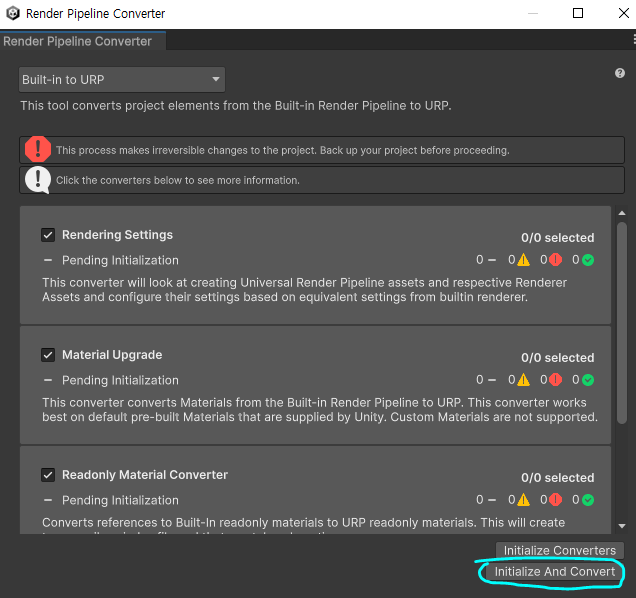
Window - Rendering - Render Pipelin Converter로 컨버터를 킨다.
좌측 상단의 Built-in to URP를 확인한 뒤 체크박스를 모두 체크한 뒤
Initialize & Convert로 컨버팅을 해준다.
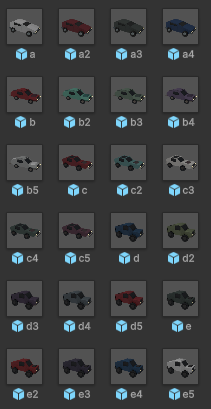 커스텀 셰이더가 있을 경우 100% 성공 보장은 못하지만 거의 대부분은 해결된다.
Mesh Collider - Convex
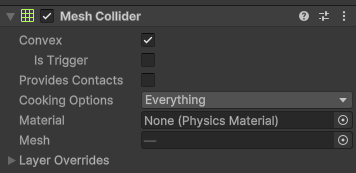
Mesh Collider에서 Convex를 활성화하면 파인 곳을 없애서 퍼포먼스가 좋아진다.
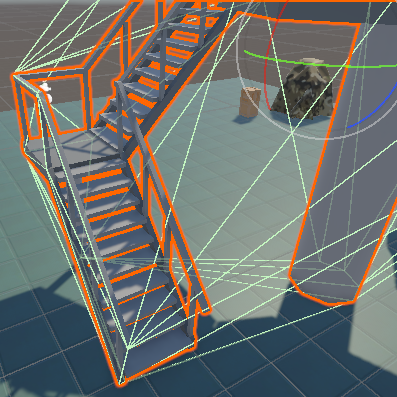 다만 정밀 조절은 불가능해서 사진처럼 계단이 있는 복잡한 구조물의 경우
 Convex를 사용하지 않는 것이 좋다.
TextMeshPro 한글 폰트 적용
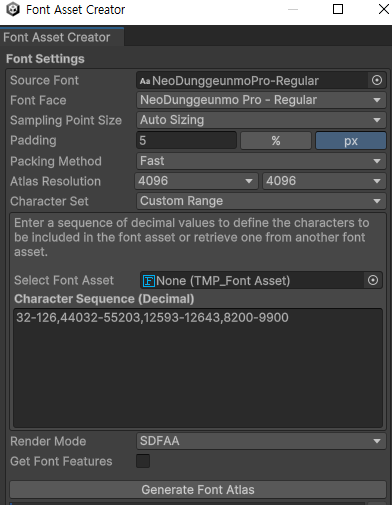 Window - TextMeshPro - Font Asset Creater - Character Set
이후
-
Custom Characters
필요한 문자 적기 -
Custom Range
32-126,44032-55203,12593-12643,8200-9900
영어 : 32-126
한글 : 44032-55203
한글자모 : 12593-12643
특수문자 : 8200-9900 -
Characters from File
한글 텍스트가 담긴 txt 파일
셋 중 한가지로 설정한 뒤 Generate Font Atlas → 완료되면 Save
적용할 텍스트 컴포넌트에 만들어진 폰트 에셋을 지정해서 사용
Atlas Resolution으로 설정한 크기 (4096x4096) 내 문자를 등록해서 구워내는 방식
Newtonsoft Json
using Newtonsoft.Json;
using System.Collections.Generic;
using UnityEngine;

public class JsonTest : MonoBehaviour
{
    Dictionary<string, string> dict = new Dictionary<string, string>();

    void Start()
    {
        dict.Add("티모", "나쁜놈");
        dict.Add("요네", "개사기");

        // 직렬화
        string json1 = JsonConvert.SerializeObject(dict);
        Debug.Log(json1);

        // 역직렬화
        Dictionary<string, string> dict2 = JsonConvert.DeserializeObject<Dictionary<string, string>>(json1);
        Debug.Log(dict2["요네"]);
    }
}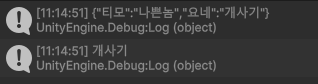
Debug.Log(json1)
// 직렬화 실행결과
→ "티모":"나쁜놈","요네":"개사기"

Debug.Log(dict2["요네"])
// 역직렬화 실행결과
→ 개사기
응용
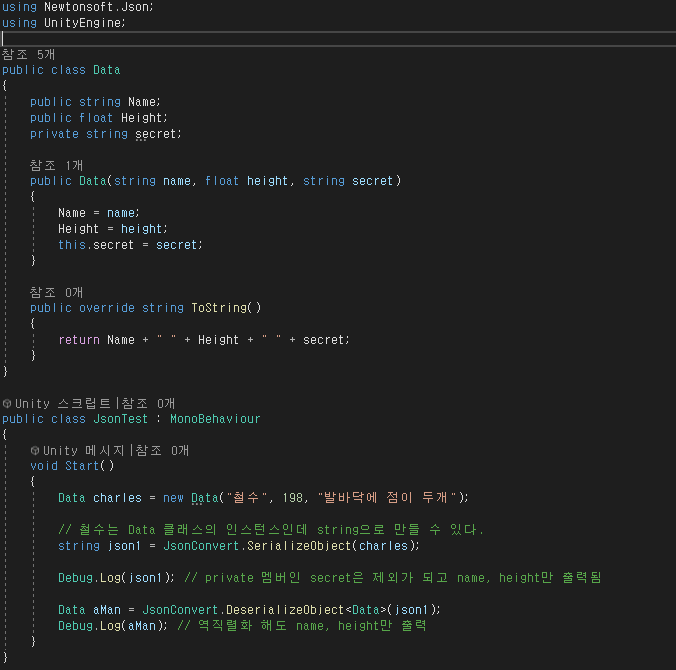

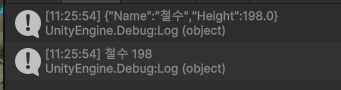

Json을 이용한 데이터 저장 및 불러오기
위 코드에서 이어집니다.
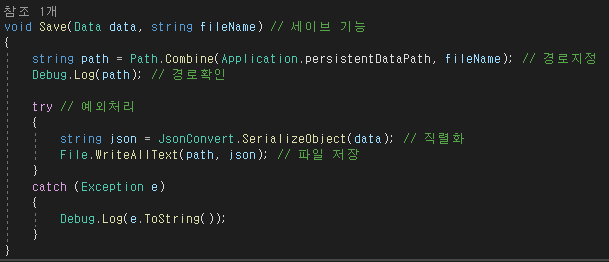
persistentDataPath는 OS마다 앱이 사용할 수 있도록 허용한 경로.
(운영체제마다, 예로 Android나 IOS에서 경로를 찍어보면 다 다르게 나온다)
이후 Data를 json을 이용해 string 멤버로 직렬화하고
File.WriteAllText 함수로 경로에 직렬화된 데이터를 저장한다.
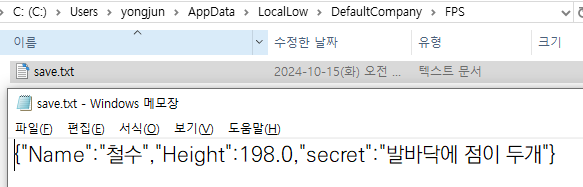 파일 저장 확인
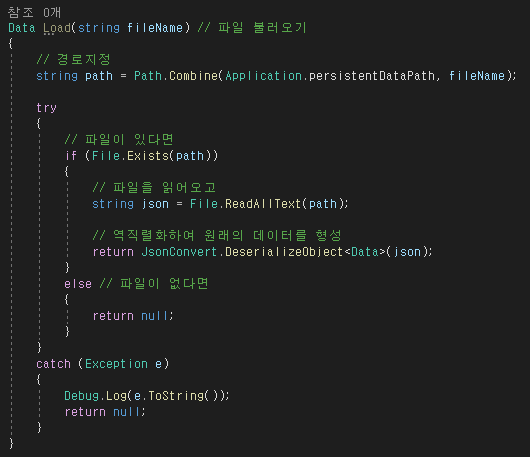 파일 불러오는 기능은 다음과 같다.
코드 전체
using Newtonsoft.Json;
using System;
using System.IO;
using UnityEngine;

public class Data
{
    public string Name;
    public float Height;
    [JsonProperty] // 이 속성으로 인해 private 멤버도 Serailize 된다
    private string secret;

    public Data(string name, float height, string secret)
    {
        Name = name;
        Height = height;
        this.secret = secret;
    }

    public override string ToString()
    {
        return Name + " " + Height + " " + secret;
    }
}

public class JsonTest : MonoBehaviour
{
    void Start()
    {
        // 멤버 추가
        Data charles = new Data("철수", 198, "발바닥에 점이 두개");
        Data yongjun = new Data("용준", 120, "비밀입니다");

        // 직렬화
        string json1 = JsonConvert.SerializeObject(charles);
        string json2 = JsonConvert.SerializeObject(yongjun);

        #region // 역직렬화 테스트
        /*Data firstData = JsonConvert.DeserializeObject<Data>(json1);
        Debug.Log(firstData); // 역직렬화 해도 name, height만 출력 */
        #endregion

        Save(charles, "firstData.txt");
        Save(yongjun, "secondData.txt");

    }

    void Save(Data data, string fileName) // 파일 저장
    {
        // 경로 지정
        string path = Path.Combine(Application.persistentDataPath, fileName);

        // 경로 확인
        Debug.Log(path);

        // 예외처리
        try
        {
            // 직렬화
            string json = JsonConvert.SerializeObject(data);

            // 파일 저장
            File.WriteAllText(path, json);
        }
        catch (Exception e)
        {
            Debug.Log(e.ToString());
        }
    }

    Data Load(string fileName) // 파일 불러오기
    {
        // 경로지정
        string path = Path.Combine(Application.persistentDataPath, fileName);

        try
        {
            // 파일이 있다면
            if (File.Exists(path))
            {
                // 파일을 읽어오고
                string json = File.ReadAllText(path);

                // 역직렬화하여 원래의 데이터를 형성
                return JsonConvert.DeserializeObject<Data>(json);
            }
            else // 파일이 없다면
            {
                return null;
            }
        }
        catch (Exception e)
        {
            Debug.Log(e.ToString());
            return null;
        }
    }
}
제네릭 타입으로 수정한다면...
다음과 같이 수정이 가능하다.
대신 Load 함수의 예외처리에서
return null대신return default을 사용해야 하는데제네릭 타입으로 받아온 멤버 변수가 null이 아닐 수도 있기 때문에 그렇다.

암호화 / 복호화
using System;
using System.IO;
using System.Security.Cryptography;
using System.Text;

public static class SimpleEncryptionUtility
{
    // AES 암호화를 위한 고정된 키 (32바이트, 256비트)
    private static readonly string key = "12345678901234567890123456789012"; // 32바이트

    // AES 암호화 메서드 (매번 새로운 IV 생성)
    public static string Encrypt(string plainText)
    {
        byte[] keyBytes = Encoding.UTF8.GetBytes(key);
        byte[] plainBytes = Encoding.UTF8.GetBytes(plainText);

        using (Aes aes = Aes.Create())
        {
            aes.Key = keyBytes;

            // 새로운 IV 생성
            aes.GenerateIV();
            byte[] ivBytes = aes.IV;

            ICryptoTransform encryptor = aes.CreateEncryptor(aes.Key, ivBytes);
            using (MemoryStream ms = new MemoryStream())
            {
                // IV를 먼저 메모리 스트림에 기록
                ms.Write(ivBytes, 0, ivBytes.Length);

                // 평문을 암호화하여 메모리 스트림에 기록
                using (CryptoStream cs = new CryptoStream(ms, encryptor, CryptoStreamMode.Write))
                {
                    cs.Write(plainBytes, 0, plainBytes.Length);
                    cs.FlushFinalBlock();

                    // IV와 암호문이 함께 포함된 결과를 반환
                    return Convert.ToBase64String(ms.ToArray());
                }
            }
        }
    }

    // AES 복호화 메서드 (저장된 IV 사용)
    public static string Decrypt(string cipherText)
    {
        byte[] fullCipher = Convert.FromBase64String(cipherText);
        byte[] keyBytes = Encoding.UTF8.GetBytes(key);

        using (Aes aes = Aes.Create())
        {
            aes.Key = keyBytes;

            // 암호문에서 IV 추출 (처음 16바이트)
            byte[] ivBytes = new byte[16];
            Array.Copy(fullCipher, 0, ivBytes, 0, ivBytes.Length);

            // 나머지 부분은 암호화된 데이터
            byte[] cipherBytes = new byte[fullCipher.Length - ivBytes.Length];
            Array.Copy(fullCipher, ivBytes.Length, cipherBytes, 0, cipherBytes.Length);

            aes.IV = ivBytes;
            ICryptoTransform decryptor = aes.CreateDecryptor(aes.Key, aes.IV);

            using (MemoryStream ms = new MemoryStream(cipherBytes))
            using (CryptoStream cs = new CryptoStream(ms, decryptor, CryptoStreamMode.Read))
            using (StreamReader reader = new StreamReader(cs))
            {
                return reader.ReadToEnd();
            }
        }
    }
}
키(숫자)를 연산자로 오버라이딩하는 방식으로 암호화를 한다.
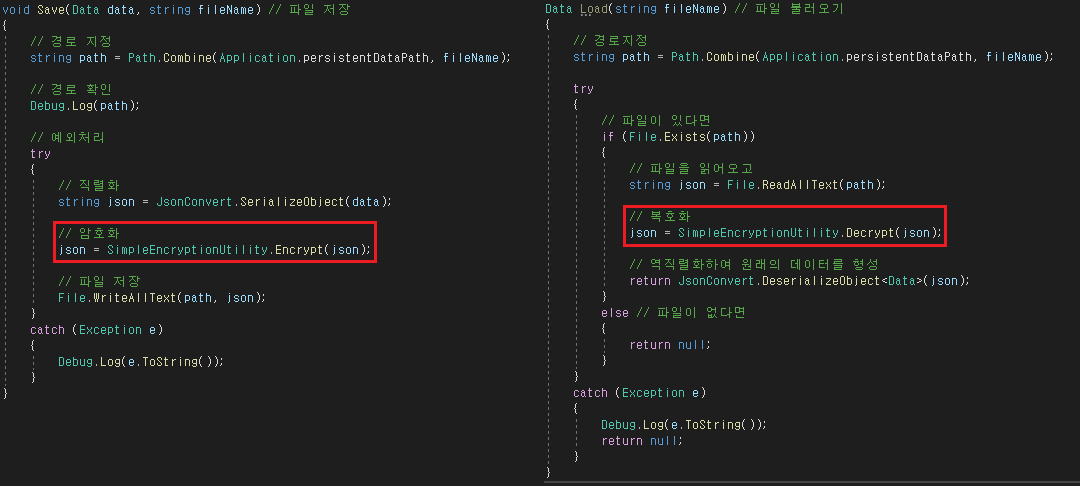
        Data charles = new Data("철수", 198, "발바닥에 점이 두개");
        Data yongjun = new Data("용준", 120, "비밀입니다");
        string json1 = JsonConvert.SerializeObject(charles);
        string json2 = JsonConvert.SerializeObject(yongjun);
        Save(charles, "firstData.txt");
        Save(yongjun, "secondData.txt");
위 데이터를 암호화하면
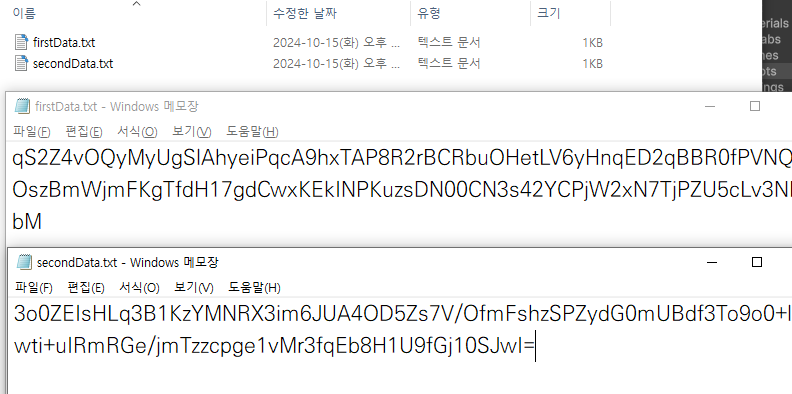 다음과 같이 저장이 된다.
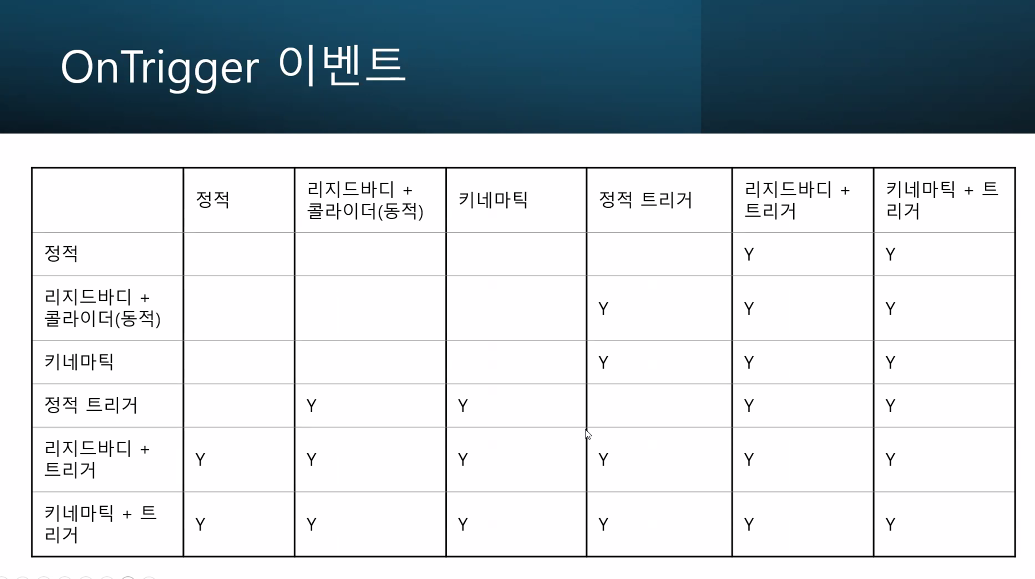
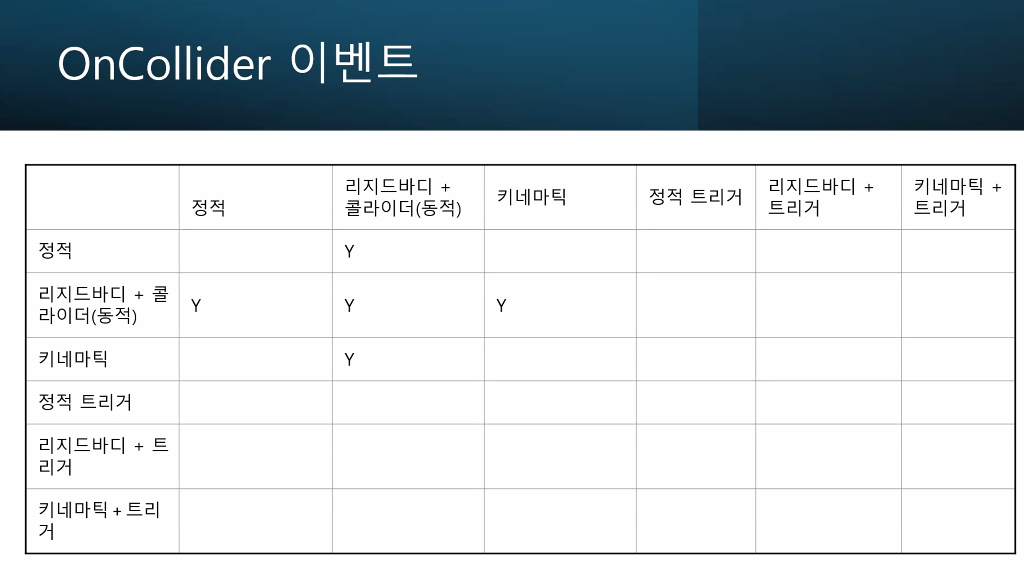
OnTrigger, OnCollider 조건