이번 포스트에서는 제가 구현했던 Server 코드를 분석 및 설명하겠습니다.
미들웨어 설정
app.use(cors({
  origin: 'http://localhost:3001/manage', // CORS를 허용할 도메인입니다.
  methods: ['GET', 'POST'], // 허용할 HTTP 메서드입니다.
  credentials: true, // 쿠키를 포함한 요청을 허용합니다.
}));

app.use(bodyParser.urlencoded({ extended: true })); // URL-encoded 데이터를 파싱합니다.
app.use(bodyParser.json()); // JSON 데이터를 파싱합니다.
MongoDB 연결
const mongoose = require('mongoose'); // Mongoose 모듈을 가져옵니다.

mongoose.connect(config.mongoURI, { useNewUrlParser: true }) // MongoDB에 연결합니다.
  .then(() => console.log('MongoDB Connected...')) // 연결 성공 시 메시지를 출력합니다.
  .catch((err) => console.log(err)); // 연결 실패 시 오류를 출력합니다.
날짜 포맷 함수
// 날짜를 특정 형식으로 변환하는 함수입니다.
const formatDate = (dateString) => {
  const date = new Date(dateString);
  const year = date.getFullYear();
  const month = String(date.getMonth() + 1).padStart(2, '0');
  const day = String(date.getDate()).padStart(2, '0');
  const hours = String(date.getHours()).padStart(2, '0');
  const minutes = String(date.getMinutes()).padStart(2, '0');
  const seconds = String(date.getSeconds()).padStart(2, '0');
  return `${year}-${month}-${day} ${hours}:${minutes}:${seconds}`;
};
상품 재고 상태 업데이트
app.post('/test', async (req, res) => {
  try {
    const arrayToUpdate = req.body; // 클라이언트에서 받은 상품 목록입니다.

    // 모든 상품을 가져와 이름과 현재 수량을 저장합니다.
    const allProducts = await Product.find({}, { name: 1, now_amount: 1 });
    const previousState = allProducts.map((product) => ({
      name: product.name,
      now_amount: product.now_amount,
    }));

    const time = formatDate(new Date()); // 현재 시간을 포맷합니다.

    for (let product of previousState) {
      // 현재 수량이 1이고 요청된 배열에 없는 경우
      if (product.now_amount === 1 && !arrayToUpdate.includes(product.name)) {
        await Product.updateOne(
          { name: product.name },
          { $set: { now_amount: 0 } }
        );

        // 제품 이름을 한글로 변환합니다.
        if (product.name === 'sprite') product.name = '스프라이트';
        if (product.name === 'cola') product.name = '코카 콜라';
        if (product.name === 'welchs') product.name = '웰치스';
        if (product.name === 'swingchip') product.name = '스윙칩';
        if (product.name === 'pepero') product.name = '아몬드 빼빼로';
        if (product.name === 'postick') product.name = '포스틱';
        if (product.name === 'crownsando') product.name = '크라운산도';
        if (product.name === 'oreo') product.name = '오레오';
        if (product.name === 'moncher') product.name = '몽쉘';

        // 알람을 생성하고 저장합니다.
        const alarm = new Alarm({
          title: `${product.name}을 주문해주세요.`,
          body: `${product.name}의 재고가 다 떨어졌습니다.`,
          date: time,
        });
        await alarm.save();

        console.log(`${product.name} 알람이 생성되었습니다.`);
        io.emit('dataFromServer', { product: product.name, time: time }); // Socket.io로 데이터 전송
      }
      // 현재 수량이 0이고 요청된 배열에 있는 경우
      else if (product.now_amount === 0 && arrayToUpdate.includes(product.name)) {
        await Product.updateOne(
          { name: product.name },
          { $set: { now_amount: 1 } }
        );
      }
    }

    return res.status(200).json({ success: true, message: '데이터베이스 수정 완료' });
  } catch (err) {
    return res.status(500).json({ success: false, error: err.message });
  }
});
상품 등록
app.post('/register', async (req, res) => {
  try {
    const product = new Product(req.body); // 클라이언트에서 받은 데이터를 기반으로 상품을 생성합니다.
    await product.save(); // 상품을 데이터베이스에 저장합니다.
    return res.status(200).json({ success: true });
  } catch (err) {
    return res.json({ success: false, err });
  }
});
상품 목록 조회
app.get('/products', async (req, res) => {
  try {
    const products = await Product.find({}); // 모든 상품을 조회합니다.

    // 제품 이름을 한글로 변환합니다.
    products.forEach((product) => {
      if (product.name === 'sprite') product.name = '스프라이트';
      if (product.name === 'cola') product.name = '코카 콜라';
      if (product.name === 'welchs') product.name = '웰치스';
      if (product.name === 'swingchip') product.name = '스윙칩';
      if (product.name === 'pepero') product.name = '아몬드 빼빼로';
      if (product.name === 'postick') product.name = '포스틱';
      if (product.name === 'crownsando') product.name = '크라운산도';
      if (product.name === 'oreo') product.name = '오레오';
      if (product.name === 'moncher') product.name = '몽쉘';
    });

    return res.status(200).json({ success: true, products });
  } catch (err) {
    return res.json({ success: false, err });
  }
});
상품 수정
app.put('/product/:id', async (req, res) => {
  try {
    const productId = req.params.id; // URL 파라미터에서 상품 ID를 가져옵니다.
    const update = req.body; // 수정할 데이터를 요청 본문에서 가져옵니다.
    const options = { new: true };

    const updatedProduct = await Product.findByIdAndUpdate(productId, update, options);

    if (!updatedProduct) {
      return res.status(404).json({ success: false, message: 'Product not found' });
    }

    return res.status(200).json({ success: true, updatedProduct });
  } catch (err) {
    return res.status(500).json({ success: false, error: err.message });
  }
});
알람 등록
app.post('/alarm/register', async (req, res) => {
  try {
    const alarm = new Alarm(req.body); // 요청 본문에서 알람 데이터를 가져옵니다.
    await alarm.save(); // 알람을 데이터베이스에 저장합니다.

    return res.status(200).json({ success: true });
  } catch (err) {
    return res.json({ success: false, err });
  }
});
알람 목록 조회
app.get('/alarms', async (req, res) => {
  try {
    const alarms = await Alarm.find().sort({ createdAt: -1 }).limit(20); // 최근 20개의 알람을 조회합니다.
    return res.status(200).json({ success: true, alarms: alarms.reverse() }); // 역순으로 반환합니다.
  } catch (err) {
    return res.status(500).json({ success: false, error: err.message });
  }
});
온오프 상태 변경
app.post('/onoff', async (req, res) => {
  try {
    const { onoff_now } = req.body; // 클라이언트에서 현재 온오프 상태를 가져옵니다.
    onoff = onoff_now;

    // 아두이노로 명령어를 보냅니다.
    if (onoff_now) {
      com6.write('o'); // 켜기 명령어
      console.log("Sent 'o' to Arduino");
    } else {
      com6.write('f'); // 끄기 명령어
      console.log("Sent 'f' to Arduino");
    }

    return res.status(200).json({ success: true, onoff: onoff_now });
  } catch (err) {
    return res.status(500).json({ success: false, error: err.message });
  }
});

app.get('/onoff', (req, res) => {
  res.send(onoff); // 현재 온오프 상태를 반환합니다.
});
무단 침입 감지
app.post('/people', async (req, res) => {
  try {
    com6.write('w'); // 아두이노로 경고 신호를 보냅니다.

    setTimeout(() => {
      com6.write('f'); // 5초 후 경고를 중지합니다.
    }, 5000);

    const currentTime = new Date(); // 현재 시간을 가져옵니다.
    const time = `${currentTime.getMonth() + 1}월 ${currentTime.getDate()}일 ${currentTime.getHours()}시 ${currentTime.getMinutes()}분`;
    const today = new Date().toISOString().slice(0, 10); // 오늘 날짜를 형식화합니다.

    // 무단 침입 알람을 생성하고 저장합니다.
    const alarm = new Alarm({
      title: `🚨사람이 무단침입했습니다!!🚨`,
      body: `${time}에 사람이 무단침입했습니다!!`,
      date: today,
    });
    await alarm.save();

    return res.status(200).json({ success: true, message: '데이터베이스 수정 완료' });
  } catch (err) {
    return res.status(500).json({ success: false, error: err.message });
  }
});
아두이노와 시리얼 통신
const com6 = new SerialPort({ path: '/dev/cu.usbmodem21401', baudRate: 9600 }); // 시리얼 포트와 보드레이트 설정

com6.on('open', function () {
  console.log('open serial communication'); // 시리얼 포트가 열리면 메시지를 출력합니다.

  com6.on('data', function (data) {
    buffer += data.toString(); // 들어오는 데이터를 버퍼에 추가합니다.

    const lines = buffer.split('\n');
    for (let i = 0; i < lines.length - 1; i++) { // 마지막 줄을 제외하고 처리합니다.
      const line = lines[i];
      const numbers = line.match(/\d+/g); // 숫자를 추출합니다.

      if (numbers && numbers.length === 3) { // 정확히 세 개의 숫자가 있는 경우
        const [light, temp, humi] = numbers;
        io.emit('sensorData', { light, temp, humi }); // Socket.io를 통해 센서 데이터를 전송합니다.
      }
    }

    buffer = lines.pop(); // 마지막 줄은 다음 이벤트 때 사용하기 위해 버퍼에 남겨둡니다.
  });
});

io.on('connection', (socket) => {
  console.log('a user connected'); // 사용자가 연결되면 메시지를 출력합니다.
});
const [items, setItems] = useState([]);

  useEffect(() => {
    fetchAlarms();
  }, []);

  const fetchAlarms = async () => {
    try {
      const response = await axios.get('http://localhost:3000/alarms');
      setItems(response.data.alarms);
    } catch (error) {
      console.error("Failed to fetch alarms:", error);
    }
  };

// 알람 확인 페이지 View 코드
<View style={styles.background}>
  	<FlatList
    	data={items}
        numColumns={1}
        style={styles.flatList}
        renderItem={renderAlarmItem}
        keyExtractor={(item) => item._id}
        contentContainerStyle={styles.contentContainer}
  	/>
</View>
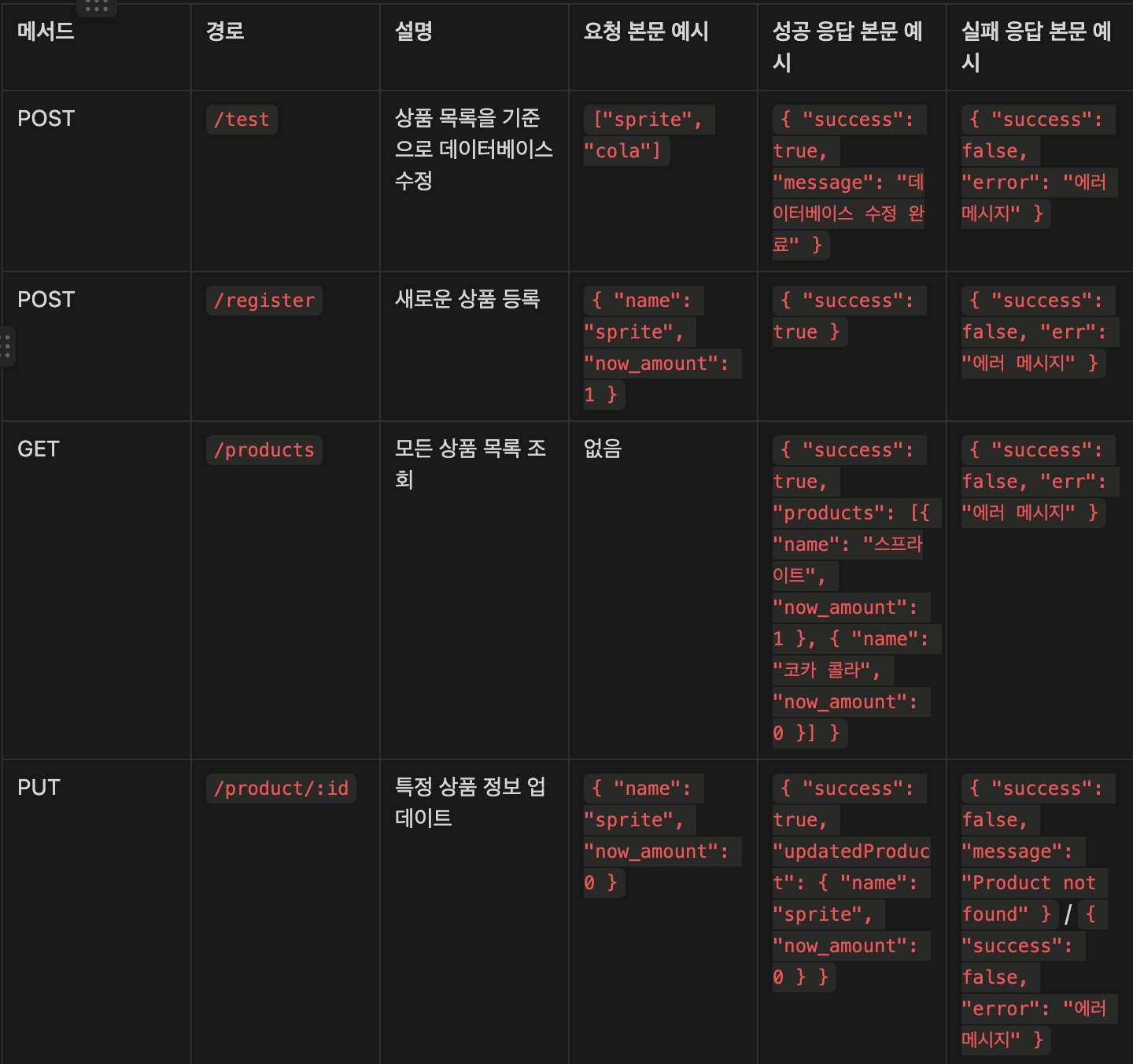
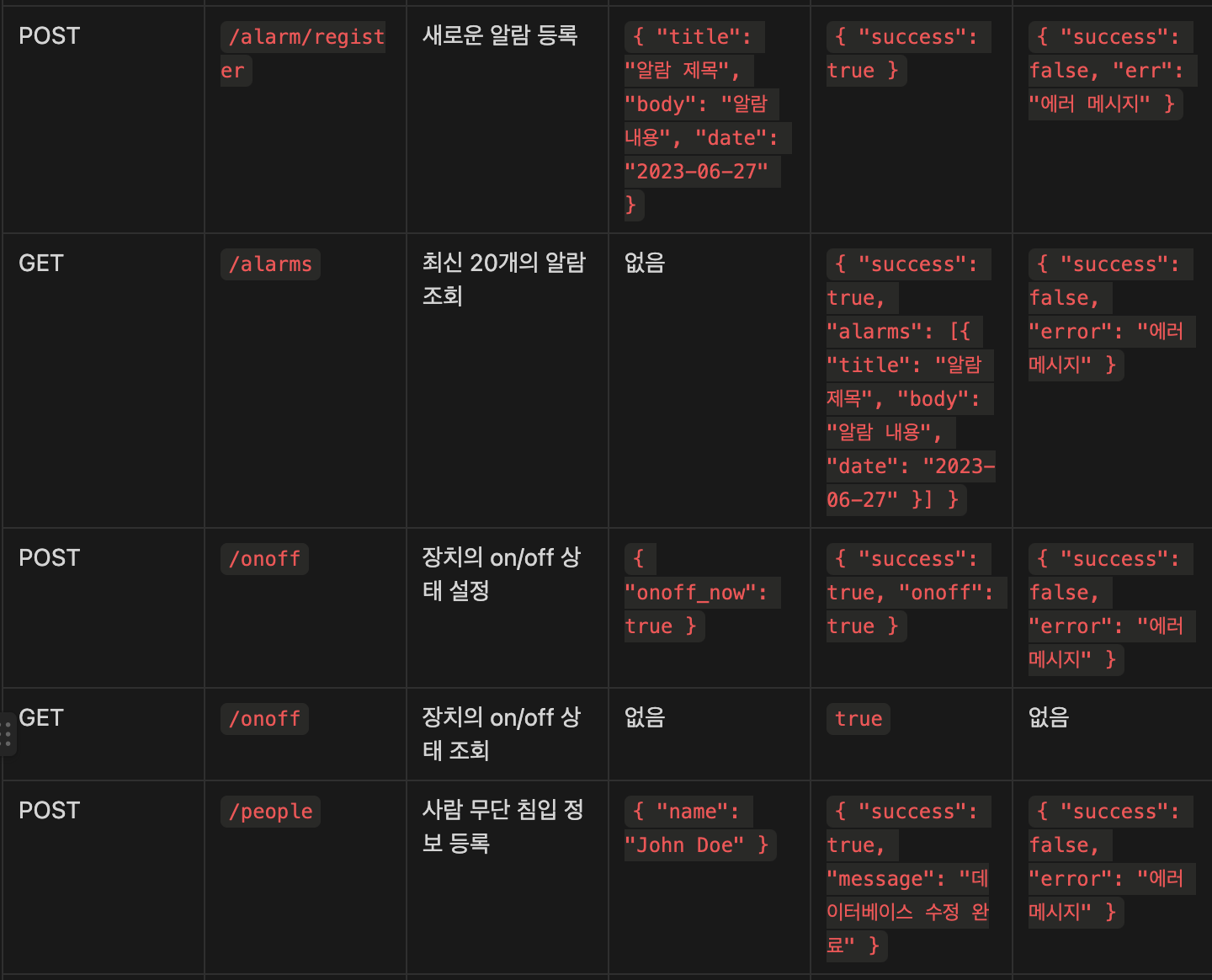
API 명세서

소통하며 성장하는 프론트엔드 개발자 이승섭입니다! 👋