URL
- Uniform Resource Location
- 정형화된 자원의 경로 표기방법(
웹 주소를 의미한다.) - 형식
프로토콜://호스트:포트/URLMapping?파라미터=값&파라미터=값&파라미터=값...
https://search.naver.com:443/search.naver?where=nexearch&sm=top_hty&fbm=0&ie=utf8&query=폭염
1) 프로토콜 : 통신규약, https(secure + http : 보안 처리된 하이퍼텍스트 전송 프로토콜)
2) 호스트 : 서버주소
3) 포트번호 : Well known port → http(80), https(443), ftp(21), ssh(22)
4) URLMapping : 서버경로
5) 파라미터 : 서버로 보내는 데이터
java.net.URL 클래스
- URL을 관리하는 클래스이다.
- URL을 분석하여 원하는 정보를 얻어낼 수 있다.
- URL에 접속할 수 있는 URLConnection을 생성할 수 있다.
    // URL 정보 분석하기
    String apiURL = "https://search.naver.com:443/search.naver?where=nexearch&sm=top_hty&fbm=0&ie=utf8&query=폭염";

    // URL 객체 선언
    URL url = null;

    try {

      // URL 객체 생성
      url = new URL(apiURL);  // MalformedURLException 발생

      // URL 분석
      System.out.println("프로토콜: " + url.getProtocol());
      System.out.println("호스트: " + url.getHost());
      System.out.println("포트번호: " + url.getPort());
      System.out.println("파라미터: " + url.getQuery());

    } catch (MalformedURLException e) {
      System.out.println("apiURL 형식 오류");
    }
HttpURLConnection
HTTP 응답코드
- 200 : 정상
- 4XX : 잘못된 요청 (클라이언트의 잘못된 요청)
- 5XX : 서버 오류 (잘못된 개발)
- URL 객체 생성 (MalformedURLException 발생)
url = new URL(spec); //String spect = 주소 - HttpURLConnection 객체 생성 (IOException 발생)
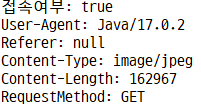
con = (HttpURLConnection)url.openConnection(); - 접속 여부 확인
int responseCode = con.getResponseCode();
System.out.println("접속여부: " + (responseCode ==HttpURLConnection.HTTP_OK)); - 요청 헤더(User-Agent) : 무엇으로 접속했는가?
String userAgent = con.getRequestProperty("User-Agent");
System.out.println("User-Agent: " + userAgent); - 요청 헤더(Referer) : 이전 주소가 무엇인가?
String referer = con.getRequestProperty("Referer");
System.out.println("Referer: " + referer); - 컨텐트 타입 : 어떤 타입인가?
String contentType = con.getContentType();
System.out.println("Content-Type: " + contentType); - 컨텐트 크기 : 크기가 얼마인가?
int contentLength = con.getContentLength();
System.out.println("Content-Length: " + contentLength);
웹 상의 파일 읽기 Binary InputStream
   // 웹 상의 파일 읽기

   // 접속할 주소(다음 로고 이미지)
   String spec = "https://t1.daumcdn.net/daumtop_chanel/op/20200723055344399.png";

   // URL 객체 선언
   URL url = null;

   // HttpURLConnection 객체 선언
   HttpURLConnection con = null;

   // 입력스트림 선언 (다음 로고 이미지 읽는 스트림)
   BufferedInputStream bin = null;

   // 출력스트림 선언 (C:/storage/banner.PNG 파일을 만드는 스트림)
   BufferedOutputStream bout = null;

   try {

     // URL 객체 생성
     url = new URL(spec);

     // HttpURLConnection 객체 생성
     con = (HttpURLConnection) url.openConnection();

     // 입력스트림 생성
     bin = new BufferedInputStream(con.getInputStream());

     // 출력할 파일 File 객체
     File dir = new File("C:/storage");
     if(dir.exists() == false) {
       dir.mkdirs();
     }
     String contentType = con.getContentType(); // image/png
     String extName = contentType.substring(contentType.indexOf("/") + 1);
     String fileName = "banner." + extName;
     File file = new File(dir, fileName);

     // 출력스트림 생성
     bout = new BufferedOutputStream(new FileOutputStream(file));

     // 읽은 데이터를 저장할 바이트 배열
     byte[] b = new byte[1024];  // 1KB씩 읽기

     // 실제로 읽은 바이트 수
     int readByte = 0;

     // 읽기 (다음 배너 이미지를 byte[] b에 저장하기)
     // 쓰기 (byte[] b의 내용을 banner.png 파일로 보내기)
     while((readByte = bin.read(b)) != -1) {
       bout.write(b, 0, readByte);
     }

     // 확인 메시지
     System.out.println(fileName + " 파일 생성 완료(다운로드 완료)");

   } catch (MalformedURLException e) {
     System.out.println("URL 주소 오류");
   } catch (IOException e) {
     System.out.println("URL 접속 오류");
   } finally {
     try {
       // 생성의 역순으로 닫기
       if(bout != null) { bout.close(); }
       if(bin != null) { bin.close(); }
       if(con != null) { con.disconnect(); }
     } catch(IOException e) {
       e.printStackTrace();
     }
   }
웹 상의 텍스트 파일 읽기 (XML)
  public static void main(String[] args) {

    // 웹 상의 텍스트 파일 읽기 (XML)
    // 구글 : "기상청 rss" 검색 - 동네예보>중기예보 - 전국

    // 주소
    String spec = "http://www.kma.go.kr/weather/forecast/mid-term-rss3.jsp?stnId=108";

    // URL 객체 선언
    URL url = null;

    // HttpURLConnection 객체 선언
    HttpURLConnection con = null;

    // 입력스트림 선언 (전국 중기예보를 읽는 스트림)
    BufferedReader reader = null;

    // 출력스트림 선언 (C:/storage/weather.xml 파일을 만드는 스트림)
    BufferedWriter writer = null;

    try {

      // URL 객체 생성
      url = new URL(spec);

      // HttpURLConnection 객체 생성
      con = (HttpURLConnection) url.openConnection();

      // 입력스트림 생성 (버퍼끼우기 ← 문자스트림으로변경 ← 바이트입력스트림)
      reader = new BufferedReader(new InputStreamReader(con.getInputStream()));

      // 출력스트림 생성
      File dir = new File("C:/storage");
      if(dir.exists() == false) {
        dir.mkdirs();
      }
      File file = new File(dir, "weather.xml");
      writer = new BufferedWriter(new FileWriter(file));

      // 입력스트림으로부터 한 줄 읽기 → 읽은 한 줄 그대로 출력스트림으로 보내기
      String line = null;
      while((line = reader.readLine()) != null) {
        writer.write(line + "\n");
      }

      // 결과 메시지
      System.out.println(file.getPath() + " 파일 내려받기 성공");

    } catch (MalformedURLException e) {  // url 생성
      System.out.println(e.getMessage());
    } catch (IOException e) {  // con 생성, reader 생성, writer 생성 등
      System.out.println(e.getMessage());
    } finally {
      try {
        if(writer != null) writer.close();
        if(reader != null) reader.close();
        if(con != null) con.disconnect();
      } catch (Exception e) {
        e.printStackTrace();
      }
    }

  }
인코더, 디코더
Encoding : 원본 데이터를 암호화 하는 것
Decoding : 암호화 된 데이터를 원본 데이터로 복호화 하는 것
    try {

      // 원본 데이터
      String originData = "홍길동 tom 12345 !@#$%^&*()_+";
      System.out.println("원본: " + originData);

      // Encoding(암호화)
      String encodeData = URLEncoder.encode(originData, "UTF-8");  // UnsupportedEncodingException 발생
      System.out.println("암호: " + encodeData);

      // Decoding(복호화)
      String decodeData = URLDecoder.decode(encodeData, "UTF-8");  // UnsupportedEncodingException 발생
      System.out.println("복호: " + decodeData);

    } catch(UnsupportedEncodingException e) {
      System.out.println("인코딩 오류");
} 
