CSS
- Cascade Style Sheet
- HTML 구성 요소에 스타일을 지정하는 언어이다.
- 스타일 지정 방식
1) internal :<head>태그 내부에<style>태그를 추가하고 CSS 작업하는 방식
2) external : 별도의 CSS 파일을 만들어서<link>태그로 등록하는 방식
3) inline : HTML 구성 요소에 직접 style 속성을 추가하고 CSS 작업하는 방식 - 스타일 우선 순위

- 스타일 작성 방식
선택자 {
CSS속성: 값;
CSS속성: 값;
...
} - CSS 주석 : / 주석 /
text style
    p {
      font-family: '맑은 고딕', '고딕', sans-serif;  /* '맑은 고딕' 사용, 없으면 '고딕' 사용, 없으면 고딕 계열(sans-serif) 사용 */
      font-family: '궁서', '명조', serif;  /* '궁서' 사용, 없으면 '명조', 없으면 명조 계열(serif) 사용 */
      font-size: 32px;  /* 디폴트 16px */
      font-weight: 900;  /* 디폴트 400, 100~900 */
      font-style: italic;  /* italic(기울임), normal(안 기울임) */

      color: crimson;
      color: rgb(0, 0, 0);  /* red(0), green(0), blue(0) - black */
      color: rgb(255, 255, 255);  /* red(255), green(255), blue(255) - white */
      color: #000000;  /* 16진수 색상코드 : red(0), greed(0), blue(0) - black */
      color: #FFFFFF;  /* 16진수 색상코드 : red(255), green(255), blue(255) - white */
      color: rgba(0, 0, 0, 1);  /* red(0), green(0), blue(0), alpha(0 ~ 1) : 투명도(0은 투명, 1은 불투명) */

      letter-spacing: -1px;  /* 글자 사이 간격(자간) */
      line-height: 64px;  /* 행 높이(세로 가운데 정렬할 때 주로 사용) */
    }
블록 요소, 인라인 요소
블록 : div, hr, h1~h6, p, pre, ul, ol, li, dl, dt, dd, table, form
인라인 : span, br, strong, em, ins, del, mark, img, audio, video, a, input, select, textarea, button, label
    pre {
      /* 블록 요소는 정렬이 된다. */
      text-align: center;  /* 가로 가운데 정렬 */
    }

    a {
      /* 인라인 요소는 정렬이 되지 않는다. */
      text-align: center;  /* 가로 가운데 정렬 (적용안됨) */
      text-decoration: none;  /* 밑줄 없음 */
    }
벤더 프리픽스
- Vendor Prefix
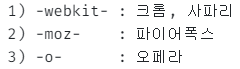
- CSS속성 앞에 브라우저 벤더(제공업체)를 작성할 수 있다.
- 종류
구글폰트
- https://fonts.google.com/에 접속한다.
- 원하는 폰트를 선택한다.
- 폰트를 포함하는 방식 2가지 중 1가지 방식을 선택한다.
1)link>태그
2) @import : 수업에서 선택한 방식 - CSS속성을 적용한다. (CSS rules to spectify families)
  <style>
    @import url('https://fonts.googleapis.com/css2?family=Noto+Sans+KR&display=swap');
    h1 {
      font-family: 'Noto Sans KR', sans-serif;
    }
  </style>
fontawesome 아이콘
- https://cdnjs.com/에 접속한다.
- "font-awesome"을 조회해서 fontawesome 아이콘을 가져올 수 있는 URL을 알아낸다.
- 알아낸 URL을 HTML 문서로 가져온다.
1)<ink rel="stylesheet" href="알아낸 URL">
2) @import url(알아낸 URL) - https://fontawesome.com/에 접속한다.
- 원하는 아이콘의
<i class="xxx"></i>태그를 가져온다.
  <p>
    휴지통<i class="fa-solid fa-trash"></i>
    휴지통<i class="fa-solid fa-trash fa-2x"></i>
    휴지통<i class="fa-solid fa-trash fa-3x"></i>
    휴지통<i class="fa-solid fa-trash fa-4x"></i>
    휴지통<i class="fa-solid fa-trash fa-5x"></i>
  </p>
크기 지정 가능

ID와 클래스
id 속성
- 모든 태그가 가질 수 있는 전역 속성
- 문서 내의 모든 요소는 중복된 id를 가질 수 없음
- id 선택자
#id
class 속성
- 모든 태그가 가질 수 있는 전역 속성
- 문서 내의 모든 요소는 동일한 class 를 가질 수 있음
- 동일한 특성을 가지는 요소들은 동일한 class 속성을 가짐
- 하나의 요소가 여러 개의 class를 가질 수 있음. (각 class를 공백으로 구분)
- class 선택자
.class
자식 후손 형제 선택자
- 자식 선택자 : 부모 > 자식
- 후손 선택자 : 조상 후손
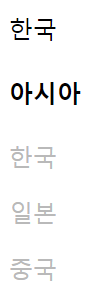
- 모든 형제 선택자 : 형제 ~ 형제
   <style>
    .asia > h4 ~ p { /*h4와 같은 수준에 있는 모든 p (기준 이전 형제는 포함되지 않음)*/
      color: rgb(185, 185, 185);
    }
   </style>

   <div class="asia">
    <p>한국</p>
    <h4>아시아</h4>
    <p>한국</p>
    <p>일본</p>
    <p>중국</p>
   </div>
- 인접 형제 선택자 : 형제 + 형제
   <style>
    .hobby > h4 + input + label {
      color: #c2c3c4;
    }
  </style>

  <div class="hobby">
    <h4>취미</h4>
    <input type="checkbox" id="fitness">
    <label for="fitness">헬스</label>
    <input type="checkbox" id="travel">
    <label for="travel">여행</label>
    <input type="checkbox" id="cook">
    <label for="cook">요리</label>
  </div>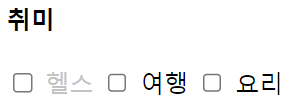
구조 선택자
- 요소:first-of-type : 첫번째 요소
- 요소:last-of-type : 마지막 요소
- 요소:nth-of-type(n) : n번째 요소
속성 선택자
- 요소[속성] 속성을 가지고 있는 요소
- 요소[속성=값] 속성=값인 요소
- 요소[속성^=값] 속성이 값으로 시작하는 요소
- 요소[속성$=값] 속성이 값으로 끝나는 요소
- 요소[속성*=값] 속성이 값을 포함하는 요소
상태 선택자
- 요소:focus 포커스를 가질 때 (입력 상자를 선택한 경우)
- 요소:checked 선택했을 때 (radio, checkbox를 선택한 경우)
마우스 반응 선택자
- 요소:hover 요소에 마우스를 가져다 대고 있는 동안
- 요소:active 요소를 마우스로 누르고 있는 동안
Pseudo Element(의사 요소)
- 요소::before 요소의 앞에 의사 요소를 추가
- 요소::after 요소의 뒤에 의사 요소를 추가
