용어
- 말뭉치(corpus, corpora): NLP 머신러닝 모델을 학습 시키기 위한 자연어 데이터 셋.
- 어간(stem)
- 어간은 접미사나 다른 변화 형태가 추가되기 전의 단어 기본 형태를 말한다. 즉 활용시 변하지 않는 부분을 말한다.
- view + ing, view + er
- 먹 + 습니다. 먹 + 었다. 먹 + 고
- 예쁘 + 다, 예쁘+ 고, 예쁘 + 지만, 예쁘+ 어서(예뻐서) - 어미
- 어미는 어간(주로 용언-동사,형용사) 뒤에 붙어서 단어의 문법적 기능이나 의미를 구체화하는 요소.
- walked: walk+ed: 과거시제, run+s: 3인칭 단수 주어의 동사에 붙는 어미.
- 먹 + 었다, 먹 + 다, 갔습니까? : 가 + ㅆ습니까? - 조사
- 조사는 체언(명사, 대명사) 뒤에 붙어 그 단어의 문법적인 기능이나 관계(예: 주체, 목적, 소유, 방향 등)를 나타내는 요소.
- 학교 + 에서 (장소를 나타내는 조사), 책+을 읽다. (목적어를 타나내는 조사.), 우리+가 간다. (주어를 나타내는 조사) - 어절(word segment)
- 문장 성분의 최소 단위로 띄어 쓰기의 기준이 된다.
- 나는 학교에 간다. -> "나는", "학교에", "간다" - 형태소(morpheme): 의미(뜻)을 가진 가장 작은 언어의 단위, 더 이상 나눌 수 없는 언어의 조각 단위. 형태소는 그 자체로 의미를 가지며 단어를 형성하거나 변형 시키는데 사용한다.
- 자립 형태소: 명사, 동사, 형용사 같이 독립적으로 사용될 수 있는 형태소
- 나, 너, 택시, 가다, you, have
- 의존 형태소: 조사, 접미사, 접두사 같이 다른 형태소와 결합해서 사용 되야 하는 형태소.
- ~의, ~가, un~, ~able
- 어간과 형태소의 차이
- 형태소는 언어의 의미를 가진 최소 단위이며, 자립 형태소와 의존 형태소로 나뉩니다.
어간은 특정 단어에서 그 단어의 핵심 의미를 담은 부분으로, 주로 자립 형태소에 해당하지만, 어미와 같은 의존 형태소가 결합하여 문법적 기능이나 형태를 변화시킬 수 있습니다.
- 형태소는 의미를 구성하는 기본 단위로서의 역할을 하며, 어간은 특히 단어를 형성하고 변형 시키는 기반으로서의 역할을 합니다.
- 언어 형태 유형 종류
- 교착어
- 정의: 교착어는 단어에 하나 이상의 접사가 추가되어 새로운 의미나 문법적 기능을 형성하는 언어
- 예) "책"
- 책이
- 책의
- 책에
- 책을
- 예) "책"
- 주요 언어: 한국어, 몽골어, 튀르키예어, 우랄어족(핀란드어, 헝가리어) 등
- 정의: 교착어는 단어에 하나 이상의 접사가 추가되어 새로운 의미나 문법적 기능을 형성하는 언어
- 굴절어
- 정의: 굴절어는 단어 내의 모음이나 자음의 변화로 문법적 기능을 나타내는 언어이다. 이 변화는 단어의 뜻을 변경하지 않으면서도 시제, 인칭, 수, 성 등을 표현할 수 있습니다.
- 단어 내의 변화로 문법적 기능을 표현.
- 예) 라틴어에서 "liber"는 책을 의미
- liber (단수 주격, 남성) - "책이/책은"
- libri (단수 소유격, 남성) - "책의"
- libro (단수 여격, 남성) - "책에"
- librum (단수 목적격, 남성) - "책을"
- 주요 언어: 라틴어, 그리스어, 이탈리아어, 스페인어, 독일어, 러시아어, 힌디어 등
- 정의: 굴절어는 단어 내의 모음이나 자음의 변화로 문법적 기능을 나타내는 언어이다. 이 변화는 단어의 뜻을 변경하지 않으면서도 시제, 인칭, 수, 성 등을 표현할 수 있습니다.
- 고립어
- 정의: 어형 변화나 접사가 없고 위치에 의해서 단어가 문장 속에서 가지는 여러가지 관계가 결정되는 언어. 분석어, 위치어라고도 한다.
- 주요 언어: 영어, 중국어, 베트남어, 태국어
- 교착어
자연어 처리 모델링 프로세스
- Corpus(말뭉치) 수집
- 자연어 학습을 위한 수집한 언어 표본 집합
- 수집방법
- 공개데이터 사용
- 구매
- 크롤링
- 토큰화(Tokenization) 및 전처리
- 텍스트 토큰화
- 분석의 최소단위로 나누는 작업
- 보통 단어단위나 글자단위로 나눈다.
- 텍스트 전처리
- 정제(cleaning)
- 문서내의 노이즈(불필요한 문자, 기호들, 빈도수 적은 단어)들을 제거한다.
- 토큰화 전,후 또는 지속적으로 진행한다.
- 정규화(Normalization)
- 같은 의미의 토큰들을 하나로 만들어준다. (말하다. 말하면, 말하기 -> 말)
- 어간추출(stemming), 원형복원(lemmatization, 표제어추출), 형태소분석
- Stop word(불용어-분석에 필요 없는 토큰) 제거
- 정제(cleaning)
- 텍스트 토큰화
- Embedding/Feature vectorization
- Token을 기계가 이해할 수 있는 Vector로 변환하는 작업
- 빈도수 기반 통계적 방식과 딥러닝(뉴럴 네트워크)를 이용한 데이터학습방식이 있다.
- TF/IDF, Word2Vec, FastText,
- 모델링
- Embedding된 데이터를 입력으로 받아 자연어 관련 해결하려는 문제를 처리하는 머신러닝(딥러닝) 모델을 구현한다.
NLTK 주요기능
텍스트 토큰화/정규화/전처리등 처리를 위한 기능 제공
- 토큰화(Tokenization)
- Stop word(불용어) 제공
- 형태소 분석
- 형태소
- 의미가 있는 가장 작은 말의 단위
- 형태소 분석
- 말뭉치에서 의미있는(분석시 필요한) 형태소들만 추출하는 것
- 어간추출(Stemming)
- 원형복원(Lemmatization)
- 품사부착(POS tagging - Part Of Speech)
- 형태소
텍스트 분석 기능을 제공
텍스트 토큰화
- 분석을 위해 문서를 작은 단위로 나누는 작업.
- 토큰(Token)
- 나뉜 문자열의 단위를 말한다.
- 정하기에 따라 문장, 단어일 수도 있고 문자일 수도 있다.
- Tokenizer
- 문장을 token으로 나눠주는 함수
- NLTK 주요 tokenizer
- sent_tokenize() : 문장단위로 나눠준다. (
.를 기준으로 나눈다.) - word_tokenize() : 단어단위로 나눠준다. (공백을 기준으로 나눈다.)
- regexp_tokenize() : 토큰의 단위를 정규표현식으로 지정
- 반환타입 : 토큰하나 하나를 원소로 하는 list
- sent_tokenize() : 문장단위로 나눠준다. (
text_sample = """Beautiful is better than ugly.
Explicit is better than implicit.
Simple is better than complex.
Complex is better than complicated.
Flat is better than nested.
Sparse is better than dense.
Readability counts.
Special cases aren't special enough to break the rules.
Although practicality beats purity.
Errors should never pass silently.
Unless explicitly silenced.
In the face of ambiguity, refuse the temptation to guess.
There should be one-- and preferably only one --obvious way to do it.
Although that way may not be obvious at first unless you're Dutch.
Now is better than never.
Although never is often better than *right* now.
If the implementation is hard to explain, it's a bad idea.
If the implementation is easy to explain, it may be a good idea.
Namespaces are one honking great idea -- let's do more of those!"""
## 문장 단위 토큰화 import nltk sent_list = nltk.sent_tokenize(text_sample) print(type(sent_list), len(sent_list)) sent_list[:5]['Beautiful is better than ugly.',
'Explicit is better than implicit.',
'Simple is better than complex.',
'Complex is better than complicated.',
'Flat is better than nested.']
txt1 = "Many of life’s failures are people who didn't realize how close they were to success when they gave up."# 단어 단위 토큰화 word_list1 = nltk.word_tokenize(txt1) print(word_list1)['Many', 'of', 'life', '’', 's', 'failures', 'are', 'people', 'who', 'did', "n't", 'realize', 'how', 'close', 'they', 'were', 'to', 'success', 'when', 'they', 'gave', 'up', '.']
# 토큰 패턴을 지정해서 토큰화
regex_list1 = nltk.regexp_tokenize(
    txt1, #대상 문자열
    r"\w+"  # 토큰 패턴 정규표현식. \w: 일반글자, 숫자, `_` , +: 한글자 이상
)
regex_list1
['Many',
'of',
'life',
's',
'failures',
'are',
'people',
'who',
'didn',
't',
'realize',
'how',
'close',
'they',
'were',
'to',
'success',
'when',
'they',
'gave',
'up']## Penn Treebank 토큰화 - word 단위 토큰화 #### 규칙1: 하이픈(-) 으로 구성된 것은 하나의 토큰으로 유지 "home-base" #### 규칙2: didn't 접어를 이용해서 축약한 경우는 분할 해준다. tokenizer = nltk.TreebankWordTokenizer() tb_list1 = tokenizer.tokenize(txt1) tb_list1['Many',
'of',
'life’s',
'failures',
'are',
'people',
'who',
'did',
"n't",
'realize',
'how',
'close',
'they',
'were',
'to',
'success',
'when',
'they',
'gave',
'up',
'.']
Stopword (불용어)
- 분석에 필요없는 단어들을 말한다.
- 문장내에서는 많이 사용되지만 문장의 전체 맥락이나 내용 파악에는 필요 없는 단어들을 말한다.
- 많이 나오기 때문에 중요한 단어로 인식 할 수 있다. 그래서 제거하는 것이 좋다.
- 대표적인 불용어들은 조사, 접미사, 접속사, 대명사 등이 있다.
- 실제 분석대상에 맞는 Stop word 를 만들어서 사용한다.
- 보통 text 파일에 저장하여 관리한다.
- nltk는 언어별로 일반적인 Stop word 사전을 제공.
import nltk
# nltk.download('stopwords')
from nltk.corpus import stopwords
# NLTK가 제공하는 stopword 언어
print(stopwords.fileids())
['arabic', 'azerbaijani', 'basque', 'bengali', 'catalan', 'chinese', 'danish', 'dutch', 'english', 'finnish', 'french', 'german', 'greek', 'hebrew', 'hinglish', 'hungarian', 'indonesian', 'italian', 'kazakh', 'nepali', 'norwegian', 'portuguese', 'romanian', 'russian', 'slovene', 'spanish', 'swedish', 'tajik', 'turkish']
stopwords.words('english')['i',
'me',
'my',
'myself',
'we',
'our',
'ours',
'ourselves',
'you',
"you're",
"you've",
"you'll",
"you'd",
'your',
'yours',
'yourself',
'yourselves',
'he',
'him',
'his',
'himself',
'she',
"she's",
'her',
'hers',
...
"weren't",
'won',
"won't",
'wouldn',
"wouldn't"]
#  토큰화한 내용에 stopword 적용
[word for word in word_list1 if word.lower() not in stopwords.words('english')]
['Many',
'life',
'’',
'failures',
'people',
"n't",
'realize',
'close',
'success',
'gave',
'.']
import nltk
from nltk.corpus import stopwords
def tokenize_text(text):
    """
    전체 문장들을 토큰화해 반환하는 함수
    문장별로 단어 리스트(의미를 파악하는데 중요한 단어들)를 2차원 배열 형태로 반환
    구두점/특수문자, 숫자, 불용어(stop words)들은 모두 제거한다.
    [매개변수]
        text: string - 변환하려는 전체문장
    [반환값]
        2차원 리스트. 1차원: 문장 리스트, 2차원: 문장내 토큰.
    """
    #1. 받은 문장을 모두 소문자로 변환.
    text = text.lower()
    #2. 문장단위 토큰화
    sent_tokens = nltk.sent_tokenize(text)
    #3. 클린징 작업 - 불용어, 특수문자, 숫자 등등을 제거
    ## 불용어사전 loading
    stop_words = stopwords.words("english")
    stop_words.extend(['although', 'unless', 'may']) # 필요하다면 불용어 단어를 추가할 수있다.
    result_list = [] # 최종 결과를 저장할 리스트
    for sent in sent_tokens:  # 한문장씩 처리
        result = nltk.regexp_tokenize(sent, r"[A-Za-z]+")
        # 불용어제거
        result = [word for word in result if word not in stop_words]
        result_list.append(result)
    return result_list
result = tokenize_text(text_sample)
result[:10]
[['beautiful', 'better', 'ugly'],
['explicit', 'better', 'implicit'],
['simple', 'better', 'complex'],
['complex', 'better', 'complicated'],
['flat', 'better', 'nested'],
['sparse', 'better', 'dense'],
['readability', 'counts'],
['special', 'cases', 'special', 'enough', 'break', 'rules'],
['practicality', 'beats', 'purity'],
['errors', 'never', 'pass', 'silently']]
한국어에서 토큰화가 어려운 이유
- 영어는 띄어쓰기(공백)을 기준으로 토큰화를 진행해도 큰 문제가 없다.
- 한국어는 교착어이기 때문에 띄어쓰기를 기준으로 토큰화를 하면 같은 단어가 다른 토큰으로 인식되어 여러개 추출되는 문제가 발생한다.
- 예) "그가", "그는", "그의", "그와" 모두 "그"를 나타내지만 붙은 조사가 달라 다 다른 토큰으로 추출되게 된다.
- 그래서 한국어는 어절 단위 토큰화는 하지 않도록 한다.
- 대신 형태소에 기반한 토큰화를 하는 것이 좋다.
형태소 분석
- 형태소
- 일정한 의미가 있는 가장 작은 말의 단위
- 형태소 분석
- 말뭉치에서 의미있는(분석에 필요한) 형태소들만 추출하는 것
- 보통 단어로 부터 어근, 접두사, 접미사, 품사등 언어적 속성을 파악하여 처리한다.
- 형태소 분석을 위한 기법
- 어간추출(Stemming)
- 원형(기본형) 복원 (Lemmatization)
- 품사부착 (POS tagging - Part Of Speech)
어간추출(Stemming)
- 어간: 활용어에서 변하지 않는 부분
- painted, paint, painting → 어간: paint
- 보다, 보니, 보고 → 어간 보-
- 어간 추출
- 단어에서 어미를 제거하고 어간을 추출하는 작업
- 목적
- 같은 의미를 가지는 단어의 여러가지 활용이 있을 경우 다른 단어로 카운트 되는 문제점을 해결한다.
- flower, flowers 가 두개의 단어로 카운트 되는 것을 flower로 통일한다.
- 같은 의미를 가지는 단어의 여러가지 활용이 있을 경우 다른 단어로 카운트 되는 문제점을 해결한다.
- nltk의 주요 어간 추출 알고리즘
- Porter Stemmer
- Lancaster Stemmer
- Snowball Stemmer
- 메소드
stemmer객체.stem(단어)
- stemming의 문제
- 완벽하지 않다는 것이 문제이다.
- ex) new와 news는 다른 단어 인데 둘다 new로 처리한다.
- 처리후 눈으로 직접 확인해야 한다.
- 완벽하지 않다는 것이 문제이다.
원형(기본형)복원(Lemmatization)
- 단어의 기본형을 반환한다.
- ex) am, is, are => be
- 단어의 품사를 지정하면 정확한 결과를 얻을 수 있다.
WordNetLemmatizer객체.lemmatize(단어 [, pos=품사])
어간추출과 원형복원은 문법적 또는 의미적으로 변한 단어의 원형을 찾는 역할은 동일하다.
원형복원은 품사와 같은 문법적요소와 문장내에서의 의미적인 부분을 감안해 찾기 때문에 어간추출 방식보다 더 정교하다.
품사부착-POS Tagging(Part-Of-Speech Tagging)
- 형태소에 품사를 붙이는 작업.
- 품사의 구분이나 표현은 언어, 학자마다 다르다.
- NLTK는 펜 트리뱅크 태그세트(Penn Treebank Tagset) 이용
- 명사 : N으로 시작 (NN-일반명사, NNP-고유명사)
- 형용사 : J로 시작(JJ, JJR-비교급, JJS-최상급)
- 동사: V로 시작 (VB-동사원형, VBP-3인칭 아닌 현재형 동사)
- 부사: R로 시작 (RB-부사)
nltk.help.upenn_tagset('키워드'): 도움말
pos_tag(단어_리스트)- 단어와 품사를 튜플로 묶은 리스트를 반환
품사부착과 원형복원을 이용해 원형복원하기.
- 품사부착으로 품사 조회
- pos_tag와 lemmatization이 사용하는 품사 형태 다르기 때문에 변환함수 만듬
- lemmatization하기.
# Pos-tag 에서 반환한 품사표기(펜 트리뱅크 태그세트)을 WordNetLemmatizer의 품사표기로 변환
def get_wordnet_pos(pos_tag):
    """
    펜 트리뱅크 품사표기를 WordNetLemmatizer에서 사용하는 품사표기로 변환
    형용사/동사/명사/부사 표기 변환
    """
    if pos_tag.startswith("J"):
        return wordnet.ADJ
    elif pos_tag.startswith("V"):
        return wordnet.VERB
    elif pos_tag.startswith("N"):
        return wordnet.NOUN
    elif pos_tag.startswith("R"):
        return wordnet.ADV
    else:
        return None
# 품사태깅 + 원형복원
words_tagging = [(word, get_wordnet_pos(pos)) for word, pos in pos_tag(words) \
                                              if get_wordnet_pos(pos)!=None]
words_tagging
[('Working', 'v'),
('works', 'n'),
('worked', 'v'),
('Painting', 'n'),
('Painted', 'v'),
('paints', 'n'),
('Happy', 'a'),
('happier', 'a'),
('happiest', 'a'),
('am', 'v'),
('are', 'v'),
('is', 'v')]
# 원형 복원.
lemm = WordNetLemmatizer()
[lemm.lemmatize(word.lower(), pos=pos) for word, pos in words_tagging]
['work',
'work',
'work',
'painting',
'paint',
'paint',
'happy',
'happy',
'happy',
'be',
'be',
'be']
###### 특정 품사만 추출 (명사만 추출)
[word for word, pos in pos_tag(words) if pos.startswith('N')]
['works', 'Painting', 'paints']
#### tokenize + cleaning 처리 함수 + 원형복원(stemming-어간추출)
import nltk
from nltk.corpus import stopwords, wordnet
from nltk.tag import pos_tag
from nltk.stem import WordNetLemmatizer
def get_wordnet_pos(pos_tag):
    """
    펜 트리뱅크 품사표기를 WordNetLemmatizer에서 사용하는 품사표기로 변환
    형용사/동사/명사/부사 표기 변환
    """
    if pos_tag.startswith("J"):
        return wordnet.ADJ
    elif pos_tag.startswith("V"):
        return wordnet.VERB
    elif pos_tag.startswith("N"):
        return wordnet.NOUN
    elif pos_tag.startswith("R"):
        return wordnet.ADV
    else:
        return None
def tokenize_text2(text):
    """text 토큰화 처리 함수"""
    #1. 소문자 변환
    text = text.lower()
    #2. 문장단위로 토큰화
    sent_tokens = nltk.sent_tokenize(text) # [문장1, 문장2, 문장3, ..]
    ### 토큰화 + cleaning 작업
    # 3. stopword들 loading
    stop_words = stopwords.words("english") # 필요하면 더 추가, 제거.
    # 4. lemmatizer 객체 생성
    lemm = WordNetLemmatizer()
    # 최종 결과를 담을 리스트
    result_tokens = []
    # 문장별로 처리
    for sent in sent_tokens:
        # regexp 토큰화
        word_tokens = nltk.regexp_tokenize(sent, r"[a-zA-Z]+") #[단어1, 단어2, 단어3,.... ]
        #불용어 제거
        word_tokens = [word for word in word_tokens if word not in stop_words]
        # 원형 복원
        ## 품사부착
        word_tokens = pos_tag(word_tokens)  #[ (단어1, 품사), (단어2, 품사), ....]
        ## lemmatizer에서 사용하는 품사 string으로 변환. "NN" -> "n"
        word_tokens = [(word, get_wordnet_pos(pos))  \
                               for word, pos in word_tokens \
                               if get_wordnet_pos(pos) is not None]
        ## 원형복원
        word_tokens = [lemm.lemmatize(word, pos=pos) for word, pos in word_tokens]
        result_tokens.append(word_tokens)
    return result_tokens
result = tokenize_text2(text_sample)
result[:5]
[['beautiful', 'good', 'ugly'],
['explicit', 'well', 'implicit'],
['simple', 'well', 'complex'],
['complex', 'well', 'complicate'],
['flat', 'well', 'nest']]
분석을 위한 클래스들
Text클래스
- 문서 분석에 유용한 여러 메소드 제공
- 토큰 리스트을 입력해 객체생성 후 제공되는 메소드를 이용해 분석한다.
생성
- Text(토큰리스트, [name=이름])
주요 메소드
- count(단어)
- 매개변수로 전달한 단어의 빈도수
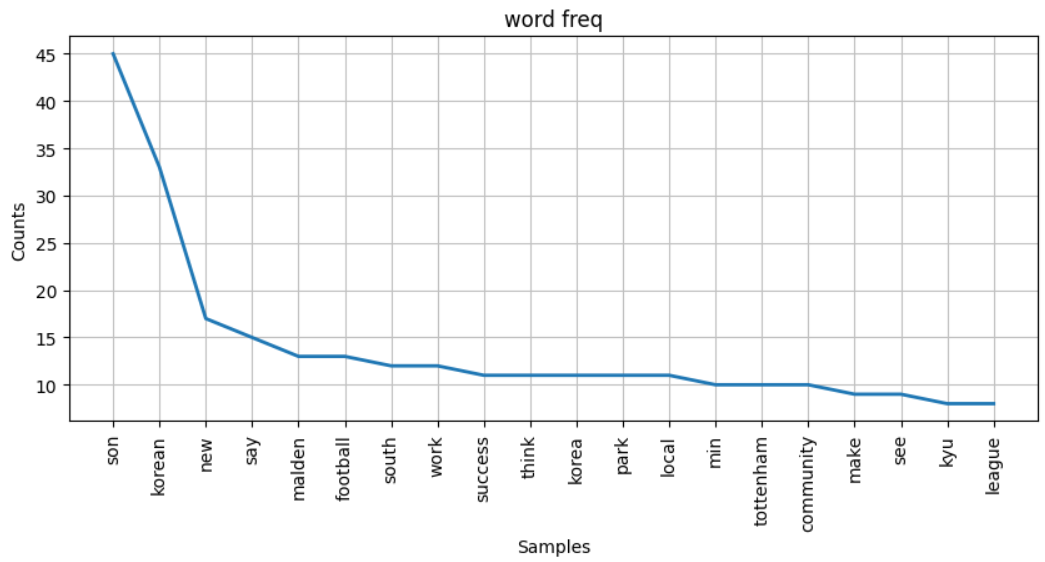
- plot(N)
- 빈도수 상위 N개 단어를 선그래프로 시각화
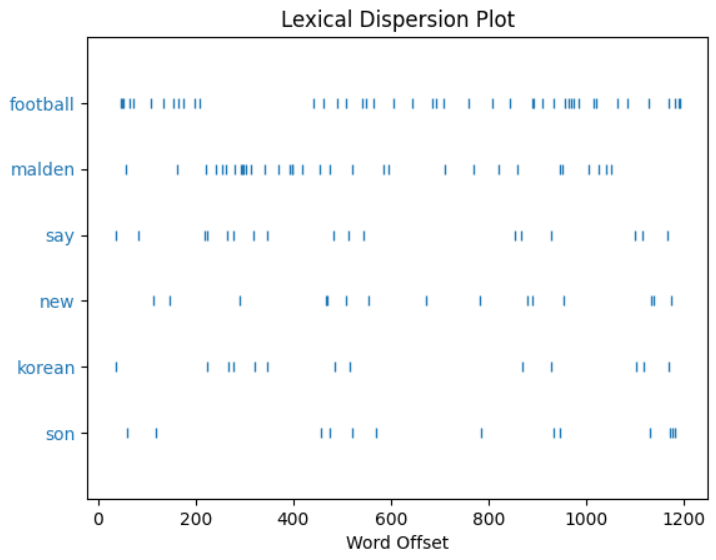
- dispersion_plot(단어리스트)
- 매개변수로 전달한 단어들이 전체 말뭉치의 어느 부분에 나오는지 시각화
- count(단어)
with open("data/news.txt", encoding='UTF-8') as f:
   news_txt = f.read()
# 토큰화
news_tokens = tokenize_text2(news_txt)
news_tokens[:5]
[['sit', 'parent', 'hair', 'salon', 'min', 'kyu', 'bury', 'computer', 'game'],
['wear',
'gray',
'soccer',
'kit',
'boot',
'constantly',
'click',
'tile',
'floor',
'year',
'old',
'lose',
'parallel',
'universe',
'far',
'distract',
'noise',
'electric',
'clipper',
'faint',
'smell',
'hairspray'],
['seem',
'happen',
...
'tottenham',
'football',
'star',
'national',
'hero']]
# 2차원(중첩) 리스트 -> 1차원
news_words = []
for lst in news_tokens:
    news_words += lst
news_words[:10]
['sit',
'parent',
'hair',
'salon',
'min',
'kyu',
'bury',
'computer',
'game',
'wear']
# Text 클래스 객체 생성 -> 토큰 리스트를 전달
from nltk import Text
import matplotlib.pyplot as plt
news_text = Text(news_words, name="손흥민 뉴스")
news_text
<Text: 손흥민 뉴스>
# 토큰 조회
print(news_text[0])
print(news_text[ : 10])
sit
['sit', 'parent', 'hair', 'salon', 'min', 'kyu', 'bury', 'computer', 'game', 'wear']
# 특정 토큰의 빈도수
news_text.count("son")
45
plt.figure(figsize=(10,4))
plt.title("word freq")
news_text.plot(20)  # 빈도수가 큰 상위 20개 단어에 대해 선그래프를 작성
plt.show()
## 특정 단어가 문서의 어느부분들에 나오는지 시각화
plt.figure(figsize=(10, 10))
news_text.dispersion_plot(
    ['son', 'korean', "new", 'say', 'malden', 'football']
);
FreqDist
- document에서 사용된 토큰(단어)의 사용빈도 데이터를 가지는 클래스
- 토큰(단어)를 key, 개수를 value로 가지는 딕셔너리 형태
- 생성
- Text 객체의 vocab() 메소드로 조회한다.
- 생성자(Initializer)에 토큰 List를 직접 넣어 생성가능
- 주요 메소드
- B(): 출연한 고유 단어의 개수
- [Apple, Apple] -> 1
- N(): 총 단어수
- [Apple, Apple] -> 2
- get(단어) 또는 FreqDist['단어'] : 특정 단어의 출연 빈도수
- freq(단어): 총 단어수 대비 특정단어의 출연비율
- most_common() : 빈도수 순서로 정렬하여 리스트로 반환
- B(): 출연한 고유 단어의 개수
from nltk import FreqDist
# Text객체를 이용해서 생성
fd = news_text.vocab()
# 토큰 리스트
fd2 = FreqDist(news_words)
# 문서 string
fd3 = FreqDist(news_txt)  # 글자단위 토큰화.
print(fd)
fd.pprint()
fd3.pprint()
<FreqDist with 560 samples and 1197 outcomes>
FreqDist({'son': 45, 'korean': 33, 'new': 17, 'say': 15, 'malden': 13, 'football': 13, 'south': 12, 'work': 12, 'success': 11, 'think': 11, ...})
FreqDist({' ': 2241, 'e': 1172, 'a': 859, 't': 857, 'o': 849, 'n': 732, 'i': 674, 's': 655, 'r': 587, 'h': 547, ...})
print("총 토큰수:", fd.N())
print("고유 토큰의 개수:", fd.B())
word = "new"
print(f"{word}의 빈도수: {fd.get(word)}")
print(f"{word}의 비율: {fd.freq(word)}")
총 토큰수: 1197
고유 토큰의 개수: 560
new의 빈도수: 17
new의 비율: 0.014202172096908938
# 빈도수 순위
fd.most_common(10) # 상위 N개. 개수 생략-> 전체
[('son', 45),
('korean', 33),
('new', 17),
('say', 15),
('malden', 13),
('football', 13),
('south', 12),
('work', 12),
('success', 11),
('think', 11)]
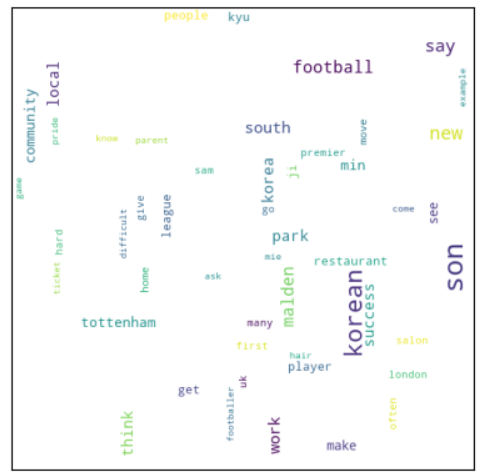
wordcloud
- 단어의 빈도수를 시각화
- 많이 출현한 단어를 크게 적게 출현한 단어를 작게 표현하여 핵심단어들을 쉽게 파악할 수있게 한다.
- wordcloud 패키지 사용
- 설치:
pip install wordcloud
- 설치:
import matplotlib.pyplot as plt
from wordcloud import WordCloud
# WordCloud 객체 생성 -> 어떻게 그릴지 설정.
wc = WordCloud(
    max_words=50, # 최대 몇개 단어를 사용할지 설정.
    prefer_horizontal=0.5, # 가로쓰기 비율(기본: 0.9)
    width=500,
    height=500,
    relative_scaling=0.5, # 빈도수가 증가할 때 글씨 크기를 얼마나 크게할지 비율.
                              #1: 빈도수와 폰트크기를 같은 비율로 확대. (빈도수가 두배면 폰트 크기도 두배.)
    min_font_size=1,
    max_font_size=30,
    background_color="white"
)
# generate_from_frequencies({"단어":빈도, ...})
word_cloud = wc.generate_from_frequencies(fd)
# 파일로 저장
word_cloud.to_file("news_wordcloud.png")
plt.imshow(word_cloud)
plt.xticks([])
plt.yticks([])
plt.show()