KoNLPy(코엔엘파이)
- KoNLPY는 한국어 자연어 처리(Natural Language Processing) 파이썬 라이브러리이다. 한국어 처리를 위한 tokenize, 형태소 분석, 어간추출, 품사부착(POS Tagging) 등의 기능을 제공한다.
- http://KoNLPy.org/ko/latest/
- 기존의 개발된 다양한 형태소 분석기를 통합해서 동일한 interface로 호출 할 수 있게 해준다.
KoNLPy 제공 말뭉치
- kolaw: 대한민국 헌법 말뭉치
- constitution.txt
- kobill: 대한민국 국회 의안(국회에서 심의하는 안건-법률, 예산등) 말뭉치
-1809890.txt ~ 1809899.txt
형태소 분석기/사전
- 형태소 사전을 내장하고 있으며 형태소 분석 함수들을 제공하는 모듈
KoNLPy 제공 형태소 분석기
- Hannanum(한나눔)
- KAIST Semantic Web Research Center 에서 개발
- http://semanticweb.kaist.ac.kr/hannanum/
- Kkma(꼬꼬마)
- 서울대학교 IDS(Intelligent Data Systems) 연구실 개발.
- http://kkma.snu.ac.kr/
- Komoran(코모란)
- Shineware에서 개발.
- 오픈소스버전과 유료버전이 있음
- https://github.com/shin285/KOMORAN
- Mecab(메카브)
- 일본어용 형태소 분석기를 한국에서 사용할 수 있도록 수정
- windows에서는 설치가 안됨
- https://bitbucket.org/eunjeon/mecab-ko
- Open Korean Text
형태소 분석기 공통 메소드
morphs(string): 형태소 단위로 토큰화(tokenize)nouns(string): 명사만 추출하여 토큰화(tokenize)pos(string): 품사 부착- 형태소 분석기 마다 사용하는 품사태그가 다르다.
tagset: 형태소 분석기가 사용하는 품사태그 설명하는 속성.
# 형태소 분석기 클래스를 import
from konlpy.tag import Okt, Mecab
# 객체 생성
okt = Okt()
mecab = Mecab()
# 형태소 단위 토큰화
# okt_tokens = okt.morphs(sample)
okt_tokens = okt.morphs(sample, stem=True) # stem=True: 원형복원 (Okt의 기능.)
mecab_tokens = mecab.morphs(sample)
print(okt_tokens[:5])
print(mecab_tokens[:5])
['올해', '처음', '수도권', '오존', '주의보', '연합뉴스', '오후', '인천', '남부', '역']['올해', '처음', '수도', '오존', '주의보', '연합', '뉴스', '일', '오후', '시']
###### 명사만 추출
okt_nouns = okt.nouns(sample)
mecab_nouns = mecab.nouns(sample)
print(okt_nouns[:10])
print(mecab_nouns[:10])
['올해', '처음', '수도권', '오존', '주의보', '연합뉴스', '오후', '인천', '남부', '역']['올해', '처음', '수도', '오존', '주의보', '연합', '뉴스', '일', '오후', '시']
### 품사부착(pos tagging)
okt_pos = okt.pos(sample)
mecab_pos = mecab.pos(sample)
print(okt_pos[:10])
print(mecab_pos[:10])
[('올해', 'Noun'), ('들어', 'Verb'), ('처음', 'Noun'), ('으로', 'Josa'), ('수도권', 'Noun'), ('에', 'Josa'), ('오존', 'Noun'), ('주의보', 'Noun'), ('가', 'Josa'), ('내려졌다', 'Verb')][('올해', 'NNG'), ('들', 'VV'), ('어', 'EC'), ('처음', 'NNG'), ('으로', 'JKB'), ('수도', 'NNG'), ('권', 'XSN'), ('에', 'JKB'), ('오존', 'NNG'), ('주의보', 'NNG')]
sample2 = "이것도 되나욬ㅋㅋㅋ"
okt.morphs(sample2)
['이', '것', '도', '되나욬', 'ㅋㅋㅋ']
okt.morphs(sample2, norm=True) # Okt: norm=True -> 비속어 처리.
# mecab은 지원하지 않는 기능.
['이', '것', '도', '되나요', 'ㅋㅋㅋ']
# 비속어 처리 문자열을 반환
print(okt.normalize(sample2)) # Okt 기능.
##### Konlpy와 nltk를 이용해 헌법 text 분석.
from nltk import Text, FreqDist
from konlpy.tag import Okt
from konlpy.corpus import kolaw
law_txt = kolaw.open("constitution.txt").read()
print(law_txt[:20])
대한민국헌법
유구한 역사와 전통에
# 토큰화
## 형태소 단위로 분리 (품사부착)
okt = Okt()
tokens = okt.pos(law_txt)
print(tokens[:20])
[('대한민국', 'Noun'), ('헌법', 'Noun'), ('\n\n', 'Foreign'), ('유구', 'Noun'), ('한', 'Josa'), ('역사', 'Noun'), ('와', 'Josa'), ('전통', 'Noun'), ('에', 'Josa'), ('빛나는', 'Verb'), ('우리', 'Noun'), ('대', 'Modifier'), ('한', 'Modifier'), ('국민', 'Noun'), ('은', 'Josa'), ('3', 'Number'), ('·', 'Punctuation'), ('1', 'Number'), ('운동', 'Noun'), ('으로', 'Josa')]
## 명사, 동사만 추출
# okt.tagset
# Verb, Noun
tokens = [word for word, pos in tokens if pos in ['Verb', 'Noun']]
tokens[:20]
['대한민국',
'헌법',
'유구',
'역사',
'전통',
'빛나는',
'우리',
'국민',
'운동',
'건립',
'된',
'대한민국',
'임시정부',
'법',
'통과',
'불의',
'항거',
'민주',
'이념',
'계승']
text = Text(tokens, name="대한민국 헌법")
text
<Text: 대한민국 헌법>
text[:10], text[0](['대한민국', '헌법', '유구', '역사', '전통', '빛나는', '우리', '국민', '운동', '건립'], '대한민국')
# 토큰별 빈도수
print(text.count('대한민국'))
print(text.count('국민'))
print(text.count('헌법'))
11
61
53
# 빈도수 선그래프
import matplotlib.pyplot as plt
plt.rcParams['font.family'] = 'malgun gothic'
plt.rcParams['axes.unicode_minus'] = False
plt.figure(figsize=(12, 5))
plt.title("헌법 단어 빈도수", fontsize=20)
text.plot(30)
plt.show()

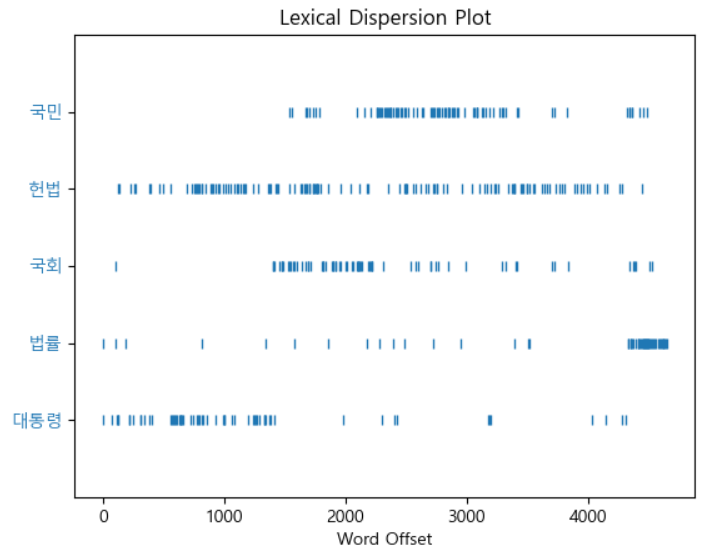
# 특정 단어들이 어디에 나오는 지 확인.
plt.figure(figsize=(10, 6))
text.dispersion_plot(['대통령', '법률', '국회', '헌법', '국민'])
### 빈도수 관련 분석
fd = text.vocab()
print("고유 토큰 개수:", fd.B())
print("총 토큰수:", fd.N())
print("가장 많이 나온 토큰:", fd.max())
print("법률의 빈도수:", fd.get('법률'))
print(f"가장 많이 나온 토큰({fd.max()})의 빈도수: {fd.get(fd.max())}")
print(f"가장 많이 나온 토큰의 총 토큰수 대비 비율: {fd.freq(fd.max()) * 100:.2f}%")
고유 토큰 개수: 1014
총 토큰수: 4661
가장 많이 나온 토큰: 제
법률의 빈도수: 127
가장 많이 나온 토큰(제)의 빈도수: 175
가장 많이 나온 토큰의 총 토큰수 대비 비율: 3.75%
# 빈도수 순위
fd.most_common(5)
[('제', 175), ('한다', 155), ('법률', 127), ('할', 100), ('정', 89)]
###### 말뭉치를 구성하는 토큰들 + 그 토큰의 빈도수를 모아놓은 것. ==> Vocab(어휘 사전)
####### FreqDist : 어휘 사전 역할을 가지고 있다.
fd.pprint()
FreqDist({'제': 175, '한다': 155, '법률': 127, '할': 100, '정': 89, '수': 88, '대통령': 83, '국가': 73, '국회': 68, '하는': 64, ...})
# DataFrame을 정리
import pandas as pd
law_vocab = pd.DataFrame(fd.most_common(), columns=["단어", "빈도수"])
law_vocab.head(10)
단어 빈도수
0 제 175
1 한다 155
2 법률 127
3 할 100
4 정 89
5 수 88
6 대통령 83
7 국가 73
8 국회 68
9 하는 64
# 폰트 조회
import matplotlib.font_manager as fm
[(f.name, f.fname) for f in fm.fontManager.ttflist if "malgun" in f.name.lower() ]
[('Malgun Gothic', 'C:\Windows\Fonts\malgun.ttf'),
('Malgun Gothic', 'C:\Windows\Fonts\malgunsl.ttf'),
('Malgun Gothic', 'C:\Windows\Fonts\malgunbd.ttf')]
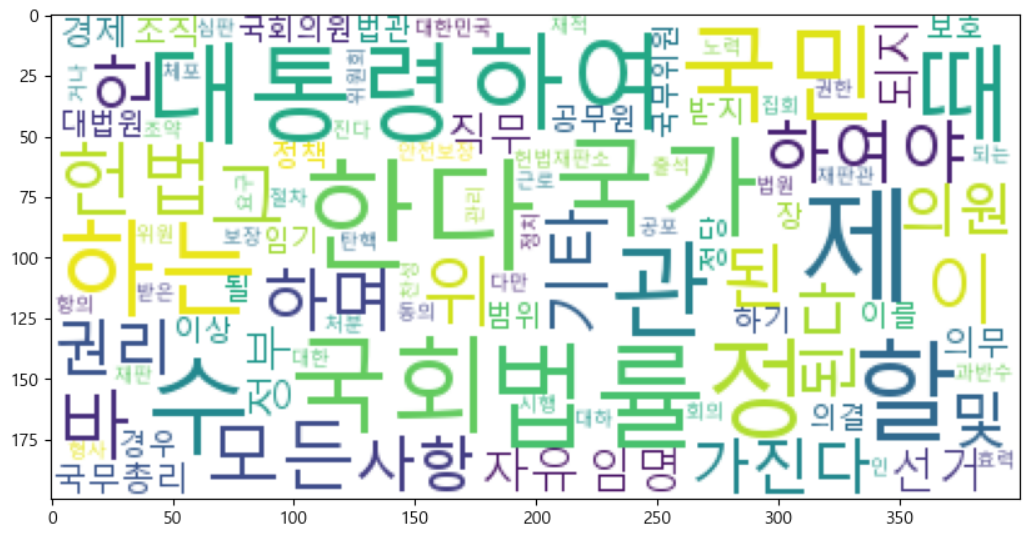
## WordCloud from wordcloud import WordCloud wc = WordCloud( font_path=r"c:\Windows\Fonts\malgun.ttf", max_words=100, min_font_size=1, max_font_size=50, relative_scaling=0.2, background_color="white" ) # 파일 저장 # 출력 이미지 word_cloud_img = wc.generate_from_frequencies(fd) word_cloud_img.to_file("constitution_wc.png")plt.figure(figsize=(10,10)) plt.imshow(word_cloud_img);
TODO
- data/news_text.txt 읽어서 konlpy와 nltk를 이용해서 문서 내용을 분석
- 명사, 동사 단위 토큰화
- 불용어 사전을 만들어서 불용어 제거
- 빈도수 선그래프 시각화
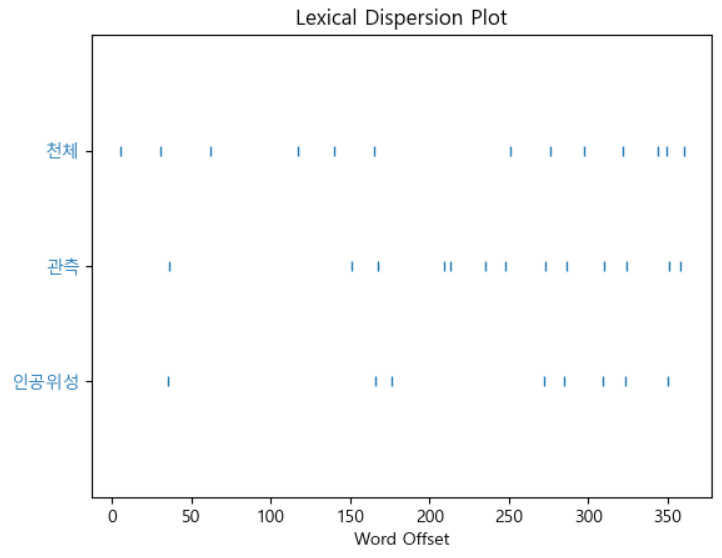
- 빈도수 많은 3개 토큰들의 문서상 위치를 시각화
- 어휘사전 DataFrame으로 생성
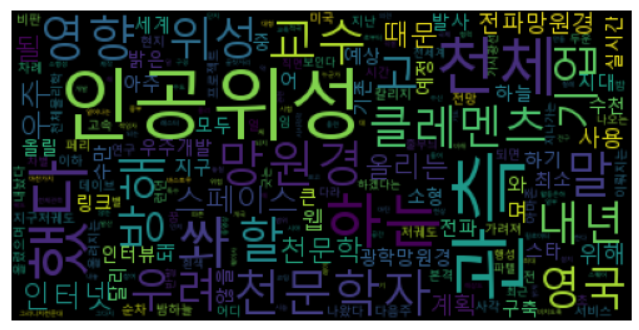
- WordCloud 출력
with open("data/news_text.txt", encoding="utf-8") as f :
    news_txt = f.read()
from konlpy.tag import Okt stopwords = ['이', '그', '저', '있다', '없다', '것', '수', '은', '는', '이', '가', '을', '를', '등', '개'] okt = Okt() tokens = [word for word, pos in okt.pos(news_txt) if pos in ['Verb', 'Noun'] and word not in stopwords] len(tokens)from nltk import Text import matplotlib.pyplot as plt txt = Text(tokens, name='뉴스')
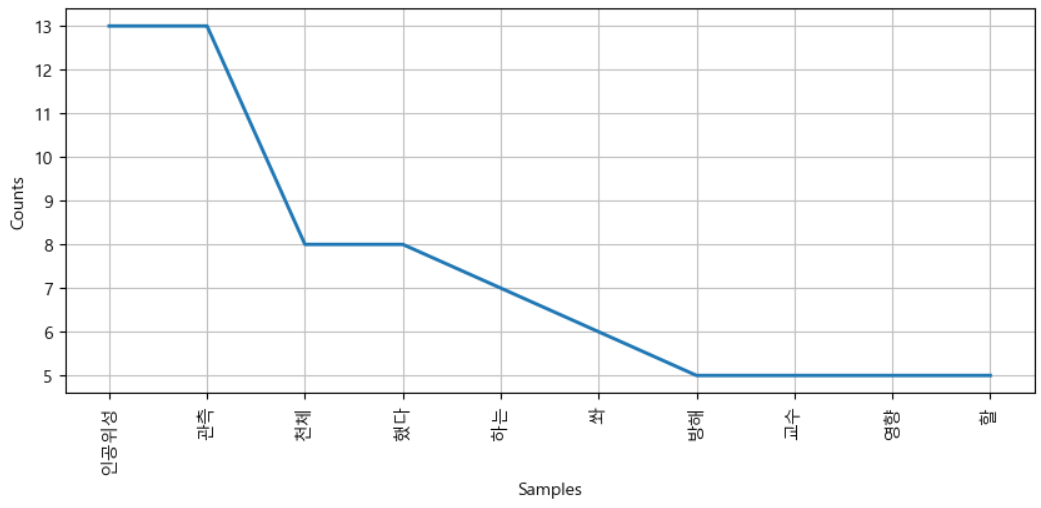
plt.figure(figsize=(10, 4))
text.plot(10)
plt.show()
plt.figure(figsize=(7,7))
text.dispersion_plot(['인공위성', '관측', '천체'])
# 빈도수 순위
fd = text.vocab()
fd.most_common(10)
[('인공위성', 13),
('관측', 13),
('천체', 8),
('했다', 8),
('하는', 7),
('쏴', 6),
('방해', 5),
('교수', 5),
('영향', 5),
('할', 5)]
# 어휘사전
import pandas as pd
news_vocab = pd.DataFrame(fd.most_common(), columns=['단어', '빈도수'])
news_vocab.head()
단어 빈도수
0 인공위성 13
1 관측 13
2 천체 8
3 했다 8
4 하는 7
### word cloud from wordcloud import WordCloud font = r"c:\Windows\Fonts\malgun.ttf" wc = WordCloud( font_path=font, max_font_size=50, min_font_size=1, relative_scaling=0.5) word_cloud = wc.generate_from_frequencies(fd)word_cloud.to_file('news_wc.png') plt.imshow(word_cloud) plt.axis('off') plt.show()