1. Servlet Container
- 클라이언트의 요청을 처리하고, 그 결과를 반환하는 Servlet 클래스의 구현 규칙을 지킨 자바 웹 프로그래밍 기술이다.
- 간단히 말해서, 서블릿이란 자바를 사용하여 웹을 만들기 위해 필요한 기술이다.
- 클라이언트가 요청하면 그 결과를 다시 전송해주어야 하는데,
이러한 역할을 하는 자바 프로그램이다.
1-1. 서블릿의 과정
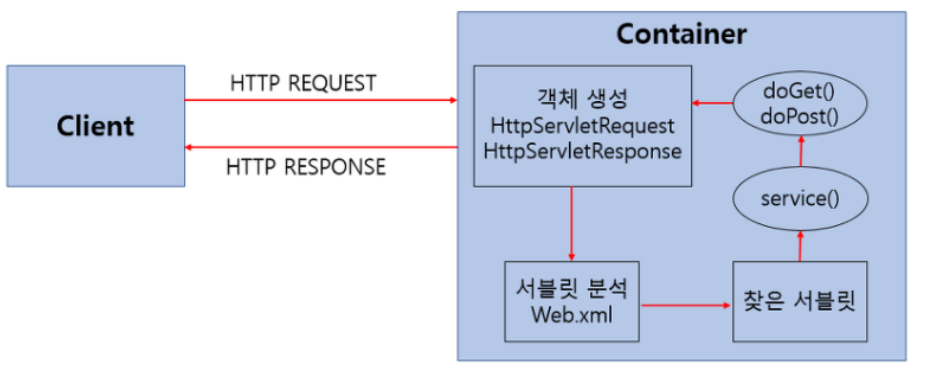
- 사용자가 URL을 입력한다 :
HTTP Request가 Servlet Container로 전송한다. - 요청을 전송받은 Servlet Container :
HttpServletRequest, HttpServletResponse 객체를 생성한다. - web.xml :
사용자가 요청한 URL이 어느 서블릿에 대한 요청인지를 찾는다. - 해당 서블릿 :
- service 메소드를 호출 한 후,
- 클라이언트의 GET, POST 여부에 따라 doGet(), doPost() 호출한다.
- doGet(), doPost() 메소드 :
- 동적 페이지를 생성한 후,
- HttpServletResponse 객체에 응답을 보낸다.
- 응답을 보낸다 :
HttpServletRequest, HttpServletResponse 두 객체를 소멸시킨다.
1-2. 서블릿 소스코드 구현
이클립스에서 어떻게 표현되는지 알아보기 위해서 소스코드로 표현을 해보자
01. HttpServlet클래스를 상속받는 MyServlet라는 클래스를 생성해보자
public class MyServlet extends HttpServlet {

}
02. request객체와 response객체를 담는 service() 메서드를 호출한다.
(이때, 서블릿이나 입출력시 발생할 수 있는 예외처리가 존재한다.)
@Override
protected void service(HttpServletRequest arg0, HttpServletResponse arg1) throws ServletException, IOException {
}
✅ 03. MyServlet 클래스 위에 @WebServlet("/서블릿 요청주소") 애너테이션을 통해 좀 더 간단하게 서블릿 경로를 설정할 수 있다.
(어노테이션방식은 web.xml과 중복으로 작성할 수는 없다.)
@WebServlet("/hello2")
public class MyServlet2 extends HttpServlet {

	@Override
	protected void service(HttpServletRequest arg0, HttpServletResponse arg1) throws ServletException, IOException {
		PrintWriter out = arg1.getWriter();
		out.println("Hello Servlet!!!");
	}

}PrintWriter는 브라우저 상에 출력할 수 있는 출력 스트림 객체를 생성한다.
web.xml에서 서블릿 등록을 한다.<servlet> // 해당 서블릿이름 <servlet-name>myServlet</servlet-name> // 서블릿 클래스 지정 <servlet-class>com.kh.web.servlet.MyServlet</servlet-class> </servlet>
- 해당 url(/hello)에 요청이 올때, 서블릿(myServlet)으로 요청하고 이 클래스(MyServlet)가 호출된다.
<servlet-mapping>
   // 서블릿 이름을 매핑
   <servlet-name>myServlet</servlet-name>
   // 서블릿요청주소 매핑
   <url-pattern>/hello</url-pattern>
</servlet-mapping>
1-3. Servlet 에서의 한글인코딩 처리
- 자바에서는 한글에 대한 인코딩이 필요하다.
- 브라우저마다 랜더링이 다른데 보통은 한글인코딩은 되지 않아 인코딩에 대한 명령 코딩 작성이 필요하다.
- response 객체에 응답을 보내줄 때, "UTF-8"로 한글 인코딩을 해준다.
arg1.setCharacterEncoding("UTF-8");
arg1.setContentType("text/html; charset=UTF-8");
- PrintWriter객체를 생성하여 브라우저에 출력까지 구현한다.
PrintWriter out = arg1.getWriter();
		for (int i=0; i<100; i++) {
			out.println((i+1) + " 안녕 Servlet!!!<br/>");
		}
}
1-4. Servlet의 request객체의 활용
- getParameter() 메서드 : http 통신을 통해 클라이언트가 request객체로 요청을 보내오면 서블릿의 request에서 getParameter() 메서드를 활용하여 name속성을 키값으로 파라미터를 얻어올 수 있다. request객체의 할당받는 값은 문자열의 형태이다.
request.getParameter("(name속성값)");만약, 동일한 name속성값이 여러개가 있으면 "배열의 형태"로 파라미터를 받아온다.
String[] 변수명 = request.getParameterValues("name속성값");pram값 예외상황
/hello?cnt=3: 문자열 "3" 값으로 처리
/hello?cnt=: 문자열 " " 값으로 처리
/hello?: 문자열이 null값으로 처리 (key값을 parse하지 않음)
/hello: 문자열이 null값으로 처리 (key값을 parse하지 않음)
- 따라서, param이 null이거나 ""값일때의 예외상황 처리를 할 수 있다.
// 초기값 세팅
int cnt = 100;
if (paramCnt != null && !paramCnt.equals("")) {
// 문자열을 숫자값으로 처리한다. )
cnt = Integer.parseInt(paramCnt);
}
1-5. 프론트엔드와의 연결
// (호스트이름)/cnt로 이동
<a href="cnt">인사하기1</a>
// (호스트이름)/cnt?cnt=5로 이동
<a href="cnt?cnt=5">인사하기2</a>
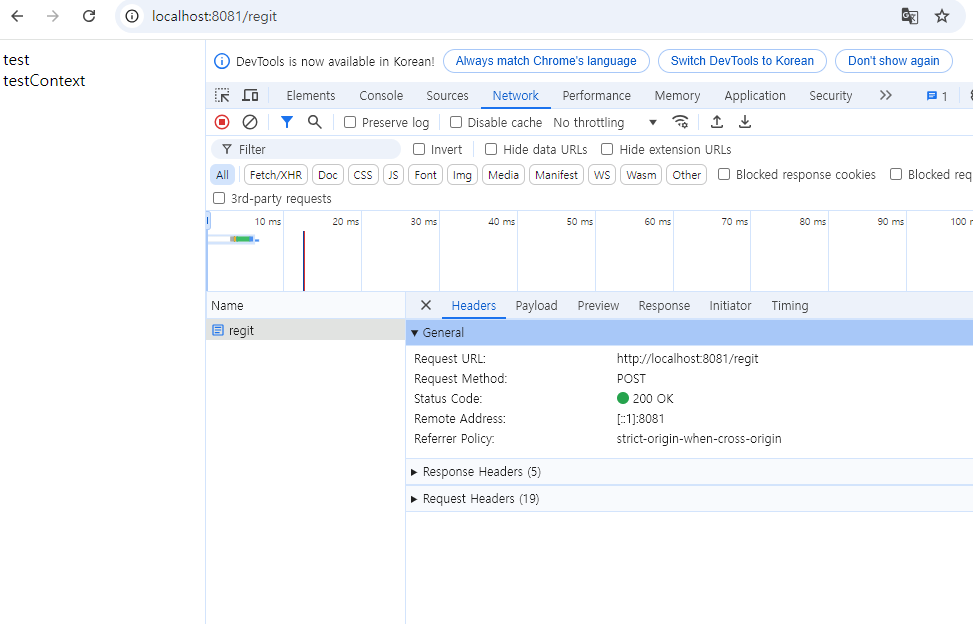
1-6. GET방식과 POST방식의 차이
1. GET
- 서블릿의 데이터를 전송할 때 데이터가 URL뒤에 name = value 형태로 전송
- 보안에 취약하다.
- 전송 가능 데이터는 최대 255자이다.
- 기본 전송방식으로 사용이 쉽다.
- 웹 브라우저에서 직접 전송 입력하여 전송가능
- 여러개의 데이터를 전송할 때 "&"로 구분하여 전송
- doGet()로 처리 가능

2. POST
- 서블릿에 데이터를 전송할 때 HEAD영역에 숨겨진 채 전송한다.
- 보안에 유리하다.
- 전송 데이터는 용량 무제한
- 전송시 서블릿에서 또 다시 가져오는 작업이 필요하므로 GET방식보다 처리속도가 느리다. get방식보다 상대적으로 그렇다...
- doPost()으로 처리가능
2. Filter
-
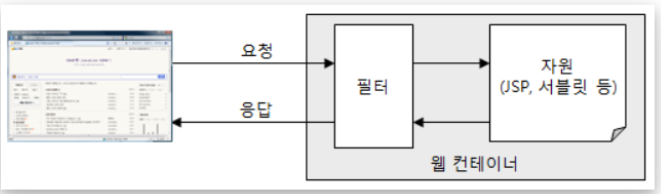
클라이언트로부터 요청이 백엔드로 가기 전에 가로채서 서버로부터의 응답이 클라이언트로 보내지기 전에 조작하기 위해서 사용한다.
-
모든 요청에 대한 URL을 필터를 지나가게 한다.
@WebFilter("/*")jakarta.servlet.Filter"API" 안에 존재하는 "Filter"라는 인터페이스를 상속받는다.
public class CharacterEncodingFilter implements Filter{

	@Override
	public void doFilter(ServletRequest arg0, ServletResponse arg1, FilterChain arg2)
			throws IOException, ServletException {
		// 필터에 대한 요청은 받아온다
        arg0.setCharacterEncoding("UTF-8");
        // filterchain으로 다음작업 진행 여부를 정한다.
		arg2.doFilter(arg0, arg1);
        // 필터에 대한 요청을 보내준다.
		arg1.setCharacterEncoding("UTF-8");
		arg1.setContentType("text/html; charset=UTF-8");
	}

}
3. 서버상태 코드
- HTTP통신에서의 상태 코드가 있다.
- 응답 상태 코드 목록은 다음과 같다.
1XX(정보)
: 요청을 받았으며 프로세스를 계속한다.
2XX(성공)
: 요청을 성공적으로 받았으며 인식했고 수용하였다.
3XX(리다이렉션)
: 요청완료를 위해 추가작업조치가 필요하다.
4XX(클라이언트 오류)
: 요청의 문법이 잘못 되었거나 요청을 처리할 수 없다.
5XX(서버 오류)
: 서버가 명백히 유효한 요청에 대해 충족을 실패했다.
- 출처 : 위키백과
