[Terraform] Basic Command
[1] terraform init
| terraform init is used to initialize the provider with a plugin.
1. What Does terraform init Do?
- The
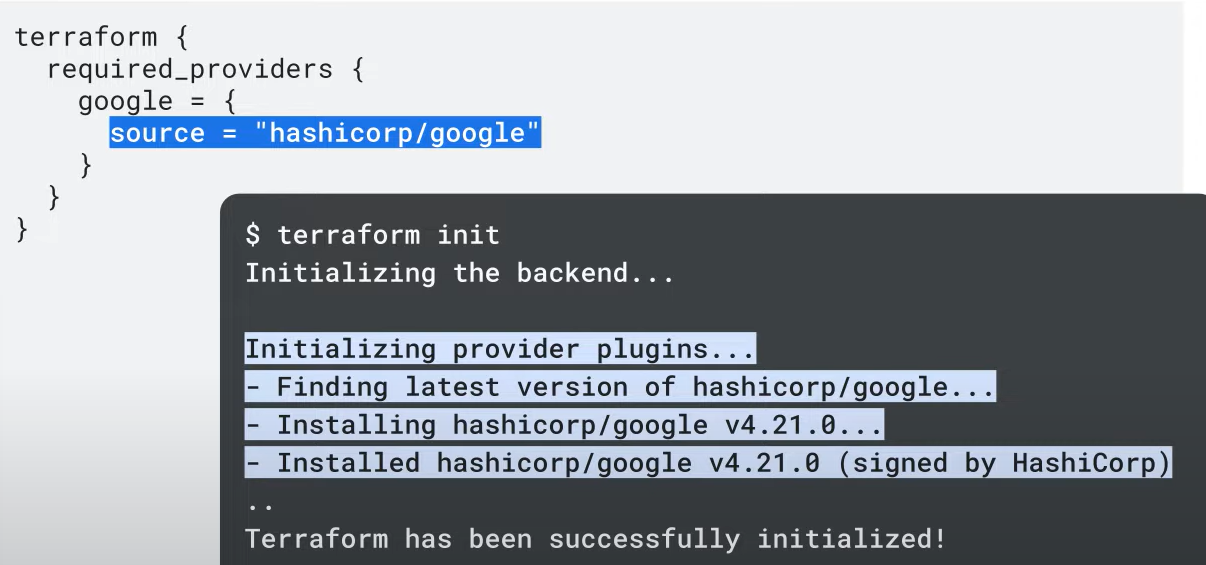
terraform initcommand ensures that the required provider plugins (e.g., Google) are downloaded and installed in a subdirectory of the current working directory. - Along with provider plugins, other bookkeeping files are also set up.
2. Provider Block and Source Attribute
- The provider block includes a
sourceattribute specifying where the provider plugins are downloaded from. - Terraform supports many providers using a plugin-based architecture, where each provider is an encapsulated binary distributed separately from Terraform.
3. Provider Plugin Installation
- When running
terraform init, Terraform will automatically download and install the provider binaries for the providers specified in the configuration.
4. The .terraform Directory
- After running
terraform init, a hidden.terraformdirectory is created inside the working directory. - The initialization process shows a message "Initializing provider plugins", indicating that Terraform is downloading the required plugins.
- The output of the command will display the installed provider version, for example, version
4.21for Google.
[2] terraform plan
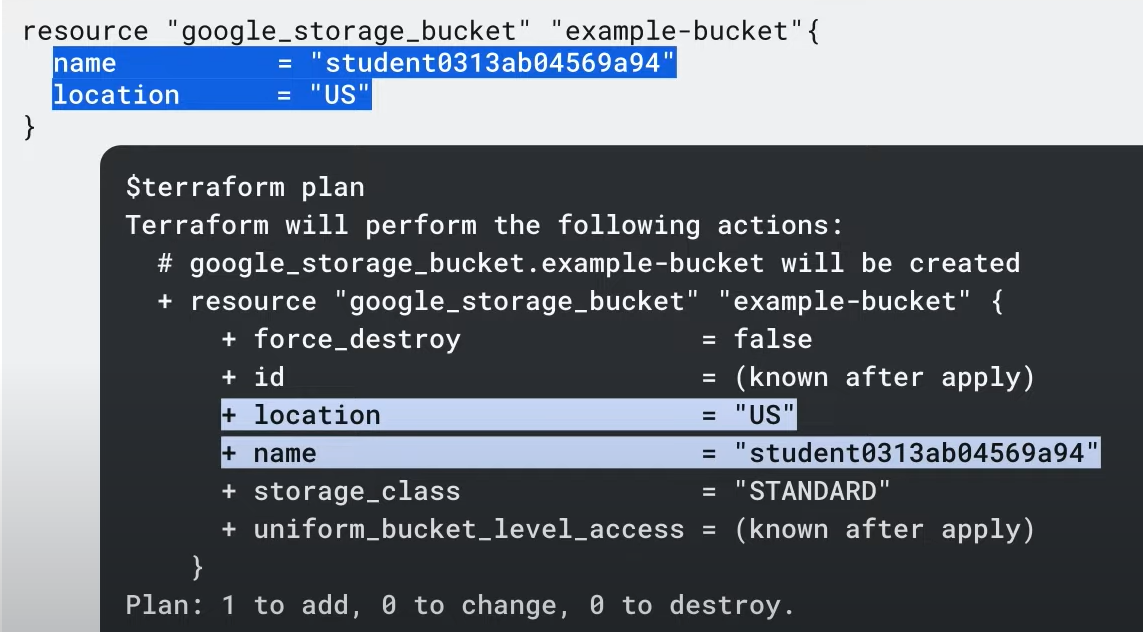
| terraform plan provides a preview of the resources that will be created after terraform apply.
Understanding terraform plan:
The terraform plan command creates an execution plan that outlines the changes Terraform will make to your infrastructure, including the resources that will be created, modified, or destroyed when terraform apply is run.
Key Steps:
- State Update: Terraform reads the current state of existing remote resources to ensure the local state is up to date.
- Difference Detection: It compares the current configuration with the prior state and identifies any differences.
- Execution Plan: Terraform builds a plan that only modifies what's necessary to achieve the desired infrastructure state.
Important Notes:
terraform plandoes not create or modify infrastructure. It allows you to preview changes before applying them.- This is useful before committing a change to version control, ensuring expected behavior.
Optional Feature:
- Use the
-out=FILEoption to save the plan to a file. You can then execute it later by passing the file toterraform applyas an argument.
[3] terraform apply
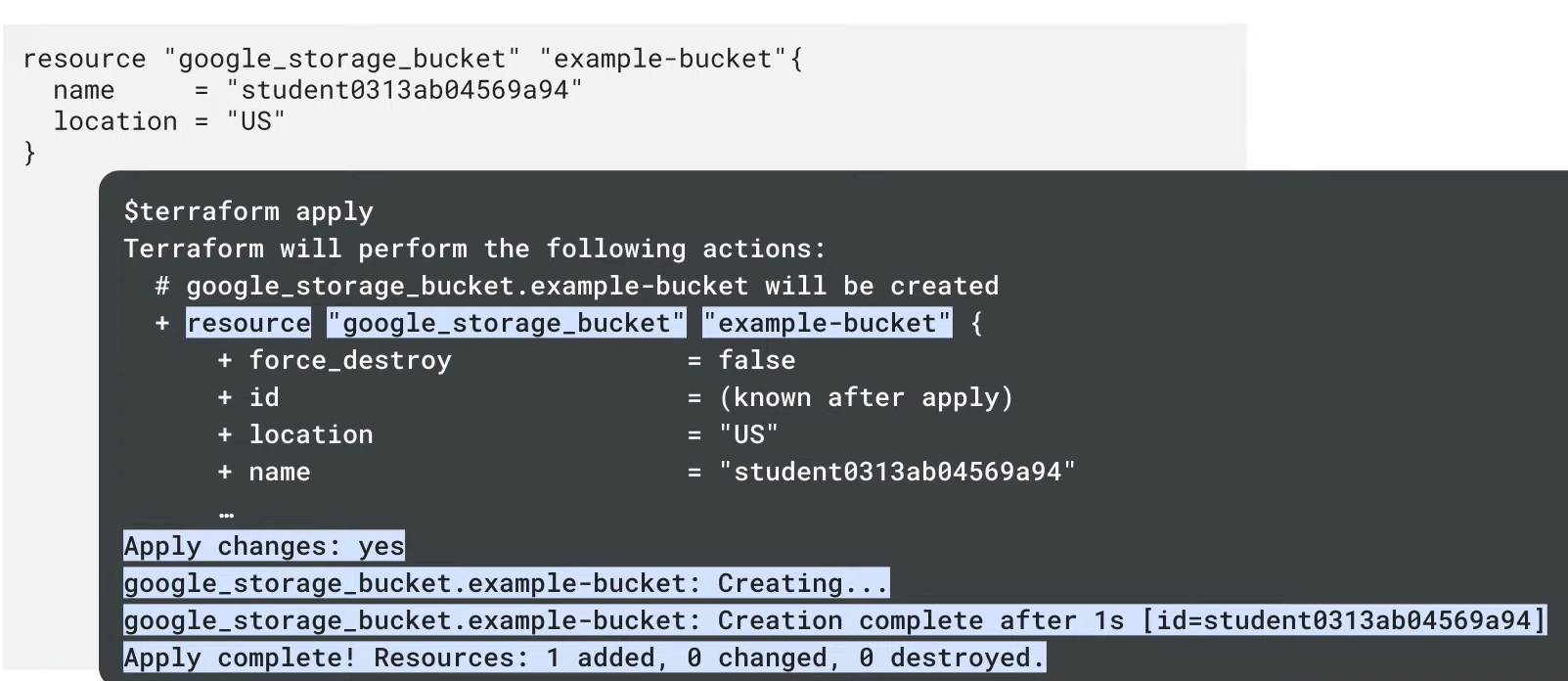
| terraform apply creates infrastructure resources.
Understanding terraform apply:
The terraform apply command executes the actions proposed in a Terraform plan, creating resources and establishing dependencies as outlined in the plan.
Key Indicators:
+: Terraform will create the resource.-+: Terraform will destroy and recreate the resource, instead of updating it in place.~: Terraform will update the resource in place.-: Terraform will destroy the resource.
Execution Workflow:
- Plan Execution: Terraform shows the execution plan, indicating what will be created, modified, or destroyed, and then waits for approval.
- Pause for Approval: After generating the plan, Terraform pauses, allowing you to review and either approve or abort the changes if something is incorrect or unsafe.
- Failure Handling: If
terraform applyfails, troubleshoot using the error message. - Resource Dependency Management: Terraform ensures resources are destroyed or created in the correct order (e.g., Google Cloud won’t allow a VPC to be deleted if it has resources attached). Terraform will destroy dependent resources first (e.g., an instance before the network).
[4] terraform destroy
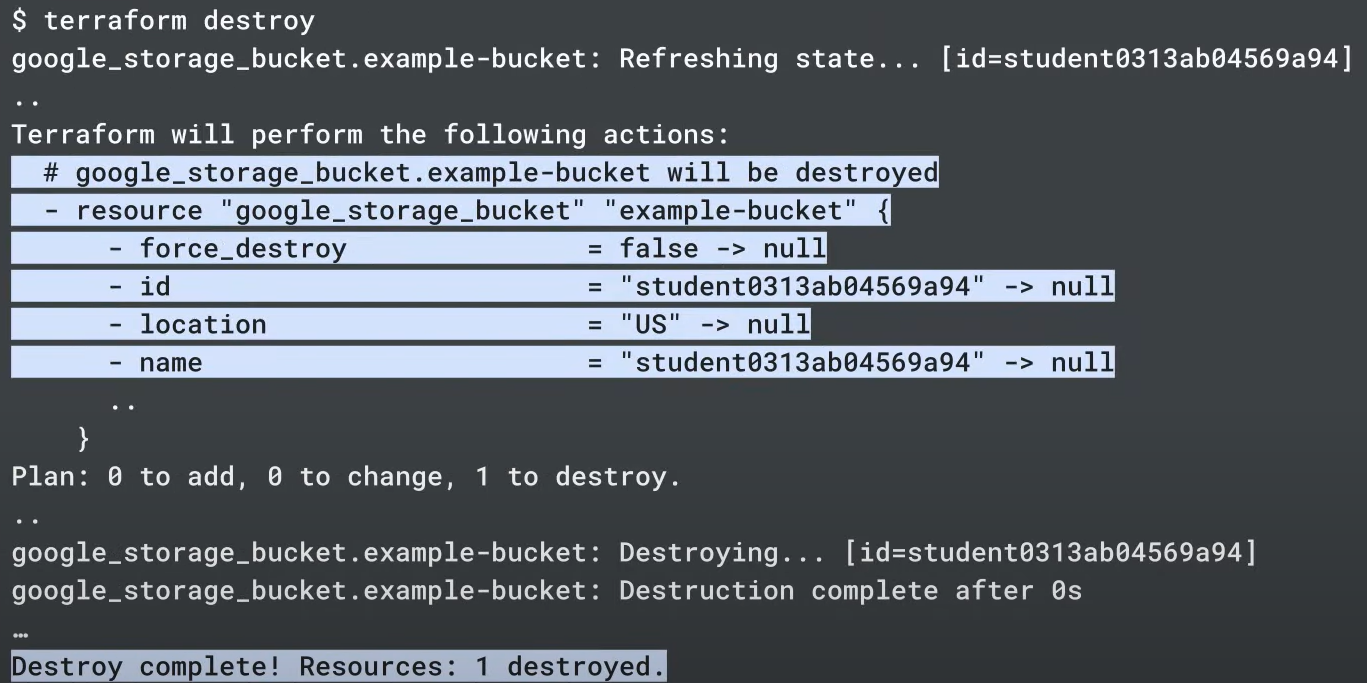
| terraform destroy destroys infrastructure resources.
Understanding terraform destroy
The terraform destroy command is used to destroy resources managed by your Terraform configuration.
Key Points:
-
Similar to
terraform apply: It behaves liketerraform applybut acts as if all resources have been removed from the configuration. -
Ephemeral Infrastructure:
terraform destroyis commonly used to manage temporary or ephemeral infrastructure in development environments. It provides a convenient way to clean up once work is completed. -
Targeted Destruction: You can destroy specific resources by specifying a target in the command, rather than destroying everything.
-
Rare in Production: While it's uncommon to destroy infrastructure in production,
terraform destroyis useful in multi-environment setups (e.g., development, testing, staging).
Use with Caution:
- Data Loss Warning: Use
terraform destroycarefully, as it will destroy resources and associated data. For instance, data in a bucket will be permanently lost if the bucket is destroyed.
Ensure you fully understand the impact of running this command, especially in sensitive environments.
[5] terraform fmt
| terraform fmt auto formats to match canonical conventions.
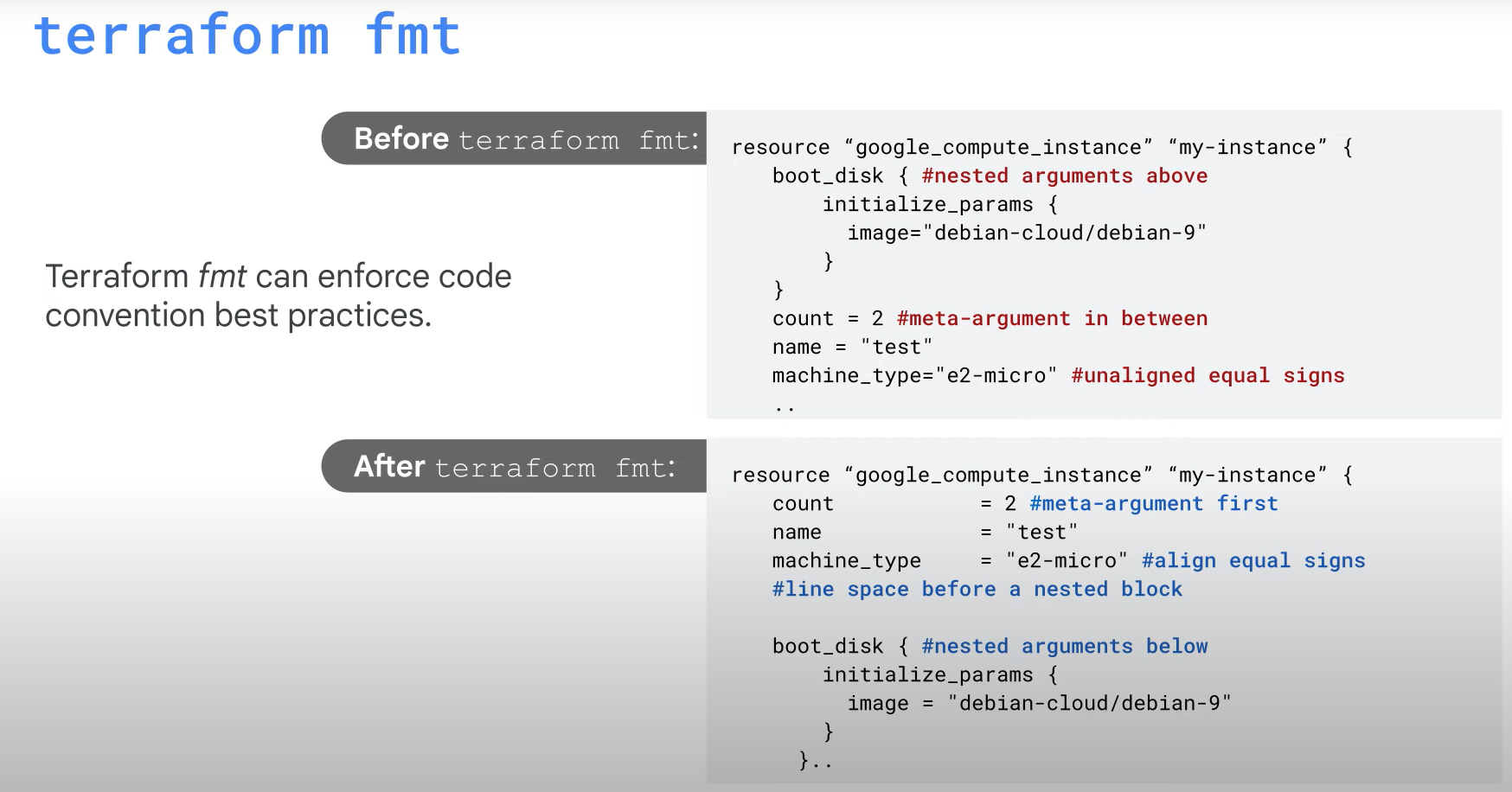
Terraform Code Formatting Best Practices
When writing Terraform configuration, maintaining readability and consistency is important. Here are some key formatting best practices:
Key Guidelines:
-
Meta Arguments Positioning: Place meta arguments (like
provider,count,depends_on) either at the beginning or the end of the block, separated by a blank line. -
Indentation: Use two spaces for indenting arguments within a block.
-
Alignment: Align the equal signs (
=) when defining multiple arguments within the same block for better readability. -
Nested Blocks: Place nested blocks (e.g.,
lifecycle,provisioner) after all the other arguments in the block. -
Block Separation: When your code contains multiple blocks, separate them with a blank line for better readability.
Automation with terraform fmt:
- Use the
terraform fmtcommand to automatically format your modules and configuration files according to these best practices. It applies consistent formatting rules across your codebase, ensuring readability and adherence to standards without manual intervention.
[6] gcloud beta terraform vet (optional)
Understanding the Terraform Validator in the Workflow
The Terraform Validator plays a crucial role in validating infrastructure-as-code (IaC) configurations, ensuring compliance with organizational policies before deployment. It fits into the workflow between the plan and apply phases.
Key Features of Terraform Validator:
- Policy Enforcement: It ensures infrastructure complies with security, governance, and compliance policies, reducing the risk of violations.
- Integration with CI/CD: As part of a CI/CD pipeline, Terraform Validator automates pre-deployment checks against organizational constraints, helping teams identify issues before production.
Usage:
- Run the Terraform Validator with
gcloud beta terraform vet, which checks infrastructure policies and retrieves project data via Google Cloud APIs for accurate validation. - Detect Policy Violations: Terraform Validator can provide warnings or stop deployments if policies are violated, enforcing guardrails in the deployment pipeline.
Difference Between terraform validate and Terraform Validator:
terraform validate: Checks the syntax and structure of the configuration without deploying resources.- Terraform Validator: Enforces policy compliance based on organizational constraints, ensuring security and governance standards are met.
Benefits of Terraform Validator:
- Automated Policy Validation: Reduces manual errors by enforcing policies automatically at every stage of application development.
- Consistency: A single paradigm for all policy management simplifies compliance across teams.
- Platform Teams: Can set guardrails in CI/CD pipelines, reducing their involvement by letting the Validator handle pre-deployment policy checks.
- Application Teams: Validate configurations against central policies early in development, preventing misconfigurations before entering CI/CD.
- Security Teams: Maintain a centralized policy library used across the organization to ensure compliance with security and governance standards.
Use Cases:
- Platform Teams: Add guardrails to pipelines, validate infrastructure, and provide feedback on policy violations.
- Application Teams: Ensure Terraform configurations are compliant before pushing to CI/CD pipelines.
- Security Teams: Centralize policies to ensure security and governance standards across the organization.
This makes the Terraform Validator a vital tool for maintaining consistency, security, and governance in an infrastructure-as-code environment.
Reference:

2개의 댓글

You know your projects stand out of the herd. There is something special about them. It seems to me all of them are really brilliant! purple magic amanita mushroom gummy effects
This is very educational content and written well for a change. It's nice to see that some people still understand how to write a quality post! thc cartridge 1000mg