[Terraform] Hands-on Create Instance with bucket
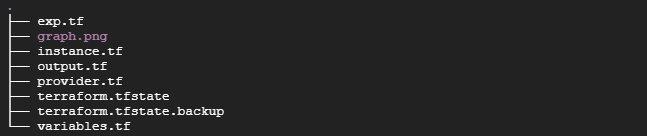
provider.tf
  provider "google" {
  project = "<project ID>"
  region  = "us-east1"
  zone    = "us-east1-c"
}
instance.tf
 resource "google_compute_address" "vm_static_ip" {
  name = "terraform-static-ip"
}
 resource google_compute_instance "vm_instance" {
name         = "${var.instance_name}"
zone         = "${var.instance_zone}"
machine_type = "${var.instance_type}"
boot_disk {
    initialize_params {
      image = "debian-cloud/debian-11"
      }
  }
 network_interface {
    network = "default"
    access_config {
      # Allocate a one-to-one NAT IP to the instance
      nat_ip = google_compute_address.vm_static_ip.address
    }
  }
}
variable.tf
variable "instance_name" {
  type        = string
  description = "Name for the Google Compute instance"
}
variable "instance_zone" {
  type        = string
  description = "Zone for the Google Compute instance"
}
variable "instance_type" {
  type        = string
  description = "Disk type of the Google Compute instance"
  default     = "e2-medium"
  }
output.tf
output "network_IP" {
  value = google_compute_instance.vm_instance.instance_id
  description = "The internal ip address of the instance"
}
output "instance_link" {
  value = google_compute_instance.vm_instance.self_link
  description = "The URI of the created resource."
}
exp.tf
resource "google_compute_instance" "another_instance" {

  name         = "terraform-instance-2"
  machine_type = "e2-micro"
  boot_disk {
    initialize_params {
      image = "debian-cloud/debian-11"
    }
  }
  network_interface {
    network = "default"
    access_config {
    }
  }
  # Tells Terraform that this VM instance must be created only after the
  # storage bucket has been created.
  depends_on = [google_storage_bucket.example_bucket]
}
resource "google_storage_bucket" "example_bucket" {
  name     = "<UNIQUE-BUCKET-NAME>"
  location = "US"
  website {
    main_page_suffix = "index.html"
    not_found_page   = "404.html"
  }
}
How to generate graph and convert into the image
terraform graph | dot -Tpng > graph.png