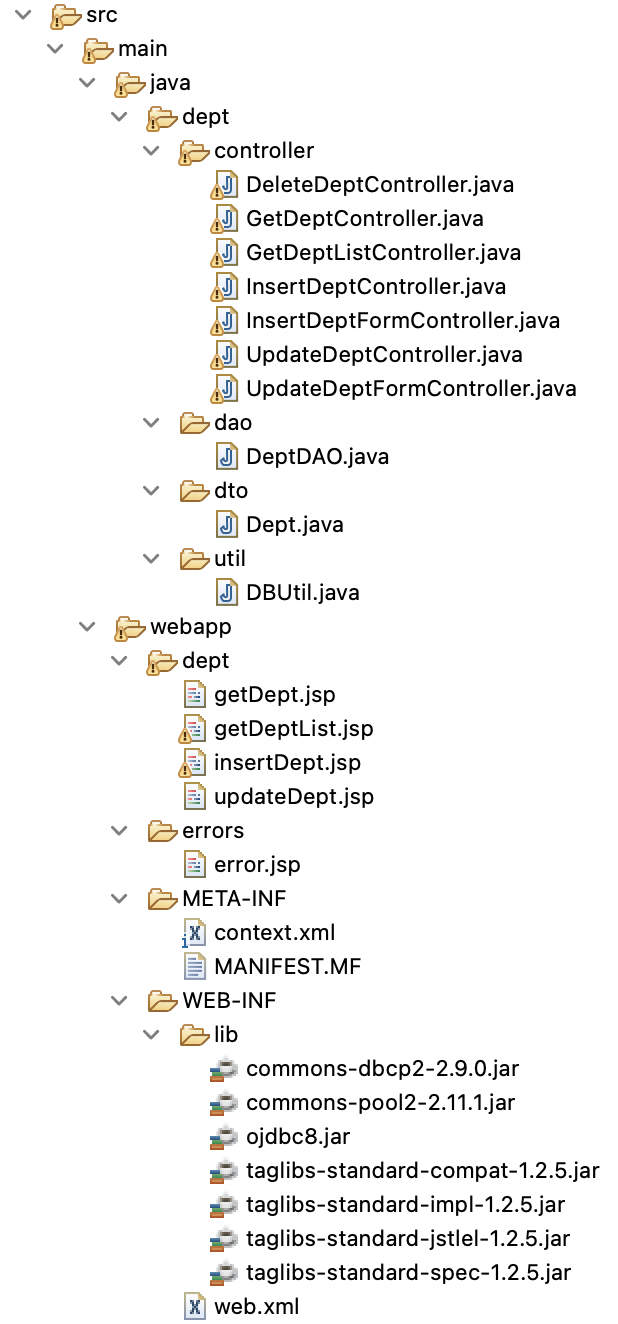
1. TIL
A. JSP (Array, ArrayList)
1. 배열, ArrayList
! ArrayList는 import를 해야 사용할 수 있음
<%@ page language="java" contentType="text/html; charset=UTF-8" pageEncoding="UTF-8"%>
<%@ page import="java.util.ArrayList, user.dto.User" %>
<!DOCTYPE html>
<html>
<head>
<meta charset="UTF-8">
<title>EL</title>
</head>
<body>
	<h4>배열</h4>
	<%
		String[] strs = {"a", "b", "c"};
		request.setAttribute("strs", strs);
	%>

	<%= strs[1] %>
	<div>${ requestScope.strs[1] }</div>


	<h4>ArrayList</h4>
	<%
		ArrayList<String> strList = new ArrayList<String>();
		strList.add("a");
		strList.add("b");
		strList.add("c");
		session.setAttribute("strList", strList);
	%>
	<div>${ sessionScope.strList.get(1) }</div>
	<div>${ sessionScope.strList[1] }</div> <!-- 배열 처럼 [ ]로 가져올 수 있음 -->


	<h4>DTO</h4>
	<%
		ArrayList<User> users = new ArrayList<User>();
		users.add(new User("IT", 28));
		users.add(new User("Dev", 30));
		session.setAttribute("users", users);
	%>
	<div>${ sessionScope.users.get(1).getAge() }</div> <!-- index로 접근해서 getter 사용 -->
	<div>${ sessionScope.users.get(1).age }</div> <!-- EL 태그에서 이렇게 사용할 수 있음 -->
</body>
</html>
B. JSTL
JSP Standard Tag Library
반복, 조건 로직 등을 tag로 구현 가능한 알고리즘이 적용된 tag
https://tomcat.apache.org/download-taglibs.cgi
4개 라이브러리 전부 Web-INF - lib에 저장
필수 입력
*uri : 통합 자원 식별자, prefix: 접두사
<%@ taglib prefix="c" uri="http://java.sun.com/jsp/jstl/core" %>1. 조건문
조건에 맞으면 c:if(when) 사이의 블럭이 실행됨
<%@ page language="java" contentType="text/html; charset=UTF-8"
    pageEncoding="UTF-8"%>
<%@ taglib prefix="c" uri="http://java.sun.com/jsp/jstl/core" %>

<!DOCTYPE html>
<html>
<head>
<meta charset="UTF-8">
<title>Condition</title>
</head>
<body>
	<!-- 조건문 -->
	<c:if test="${ 10 < 11 }">
		조건이 참이면 실행
	</c:if>

	<% request.setAttribute("customer", null); %>
	<c:if test="${not empty requestScope.customer }">
		null이 아니면 실행
		${ requestScope.customer.getName() }
	</c:if>

	<!-- 다중 조건문 -->
	<% session.setAttribute("floor", 2); %>
	<c:choose>
		<c:when test="${ sessionScope.floor == 1 }">
			<div>1층</div>
		</c:when>
		<c:when test="${ sessionScope.floor == 2 }">
			<div>2층</div>
		</c:when>
		<c:otherwise>
			<div>이외/div>
		</c:otherwise>
	</c:choose>
	<hr/>
</body>
</html>
2. 반복문
<%@ page language="java" contentType="text/html; charset=UTF-8"
    pageEncoding="UTF-8" import="java.util.ArrayList, user.dto.User" %>
<%@ taglib prefix="c" uri="http://java.sun.com/jsp/jstl/core" %>

<!DOCTYPE html>
<html>
<head>
<meta charset="UTF-8">
<title>Loop</title>
</head>
<body>
	<h4>Loop</h4>
	<c:forEach begin="1" end="5" var="i">
		${ i } <br/>
	</c:forEach>

	<!-- loop.index : 인덱스, loop.count : 반복횟수-->
	<c:forEach begin="1" end="5" var="i" varStatus="loop">
		${loop.count} - ${i} <br/>
	</c:forEach>

	<h4>ArrayList</h4>
	<%
		ArrayList<String> strList = new ArrayList<String>();
		strList.add("a");
		strList.add("b");
		strList.add("c");
		session.setAttribute("strList", strList);
	%>
	<c:forEach items="${ sessionScope.strList }" var="list" varStatus="loop">
		<div>${loop.count}번 데이터 : ${ list }</div>
	</c:forEach>

    <!-- Ver2 User 클래스는 생략함 -->
	<%
	 	ArrayList<User> userList = new ArrayList<User>();
	 	userList.add(new User("it", 26));
	 	userList.add(new User("dev", 28));
	 	userList.add(new User("server", 30));
	 	session.setAttribute("userList", userList);
	%>
	<c:forEach items="${ sessionScope.userList }" var="list" varStatus="loop">
		<div>${loop.count}번 데이터 - 이름 : ${list.getName()} 나이 : ${list.getAge()}</div>
	</c:forEach>

</body>
</html>
C. Connection Pooling
CP : DB 시스템의 동시 접속자 수를 강제적으로 제한 하는 기술
context.xml을 만들어 META-INF하단 위치시켜야 함
- JNDI(Java Naming and Directory Interface)
- 패키지.클래스의 이름으로 객체를 획득하는 API
- 패키지.클래스의 이름으로 객체를 획득하는 API
https://docs.oracle.com/cd/E13222_01/wls/docs81/ConsoleHelp/jdbc_connection_pools.html
Connection Pooling 래퍼런스
필수? 라이브러리
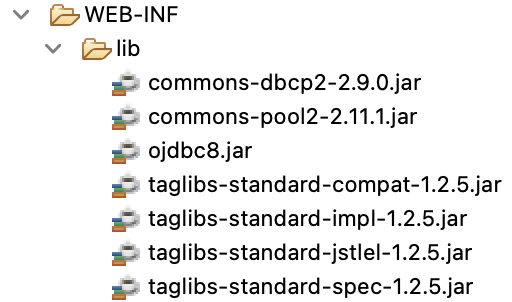
1. 연결
context.xml
name : 설정 정보를 구분하기 위한 고유한 자원의 별칭 (JNDI의 N)
auth : 컨테이너에게 자원 관리 권한을 넘김
DataSource : 자바 소스와 서버 설정 정보의 중간 매개체 객체 타입
나머지는 기존 db.properties와 동일함
<?xml version="1.0" encoding="UTF-8"?>
<Context>
<Resource
		name="jdbc/oracle"
		auth="Container"
		type="javax.sql.DataSource"
		driverClassName="oracle.jdbc.OracleDriver"
		url="jdbc:oracle:thin:@localhost:1521:xe"
		username="ID"
		password="PW"
		maxTotal="20"
		maxIdle="10"
		maxWaitMillis="-1" />
</Context>
DBUtil.java
package dept.util;

import java.sql.Connection;
import java.sql.ResultSet;
import java.sql.SQLException;
import java.sql.Statement;

import javax.naming.Context;
import javax.naming.InitialContext;
import javax.naming.NamingException;
import javax.sql.DataSource;

public class DBUtil {
	// DataSource 객체는 항상 대기 해야하므로 static
	static DataSource ds;

	// Context 객체 초기화, 인터페이스므로 직접 객체 생성은 안됨
	static {
		Context initContext = null;

		try { //Context를 읽을 때 아래 name에 대한 환경설정을 사용
			initContext = new InitialContext();
			Context envContext = (Context)initContext.lookup("java:/comp/env");
			ds = (DataSource)envContext.lookup("jdbc/oracle");
		} catch (NamingException e) {
			e.printStackTrace();
		}
	}

	// DB 연결
	public static Connection getConnection() throws SQLException {
		return ds.getConnection();
	}

	// 자원 반환
	public static void close(ResultSet rset, Statement stmt, Connection con) throws SQLException {
		if(rset != null) {
			rset.close();
		}
		if(stmt != null) {
			stmt.close();
		}
		if(con != null) {
			con.close();
		}
	}

	// 자원 반환
	public static void close(Statement stmt, Connection con) throws SQLException {
		if(stmt != null) {
			stmt.close();
		}
		if(con != null) {
			con.close();
		}
	}
}
D. Ex) Dept
DTO, DBUtil 생략, import 생략
1. getDeptList
view
<%@page import="dept.dto.Dept"%>
<%@page import="java.util.ArrayList"%>
<%@ page language="java" contentType="text/html; charset=UTF-8"
    pageEncoding="UTF-8"%>
<%@ taglib prefix="c" uri="http://java.sun.com/jsp/jstl/core" %>

<!DOCTYPE html>
<html>
<head>
<meta charset="UTF-8">
<title>Dept List</title>
</head>
<body>

<!-- 서버 데이터 확인 -->
<!-- ${ requestScope.deptList } -->

<table align="center" border="0" cellpadding="5" cellspacing="2" width="100%" bordercolordark="white" bordercolorlight="black">
	<tr>
        <td bgcolor="#336699">
            <p align="center">
            <font color="white"><b><span style="font-size:12pt;">부서번호</span></b></font></p>
        </td>
        <td bgcolor="#336699">
            <p align="center"><font color="white"><b><span style="font-size:12pt;">부서명</span></b></font></p>
        </td>
        <td bgcolor="#336699">
            <p align="center"><font color="white"><b><span style="font-size:12pt;">위치</span></b></font></p>
        </td>
    </tr>

	<!-- 부서 객체 유무 검증 -->
	<c:if test="${empty requestScope.deptList }">
		<tr>
	        <td colspan="5">
	            <p align="center"><b><span style="font-size:12pt;">등록된 부서가 존재하지 않습니다.</span></b></p>
	        </td>
	    </tr>
	</c:if>

	<!-- 반복 출력 -->
	<c:forEach items="${requestScope.deptList}" var="dept">
		    <tr>
		        <td bgcolor="">
		            <p align="center">
			            <span style="font-size:12pt;">
			            	<!-- 부서번호 -->
			            	<b>${dept.deptno}</b>
			            </span>
		            </p>
		        </td>
		        <td bgcolor="">
					<p align="center">
						<span style="font-size:12pt;">
							<!--부서명 클릭 시, 부서번호로 해당부서 상세정보 출력-->
							<b>
								<a href="getDept.do?deptno=${dept.deptno}">${dept.dname}</a>
							</b>
						</span>
					</p>
		        </td>
		        <td bgcolor="">
		            <p align="center">
		            	<span style="font-size:12pt;">
		            		<!-- 부서위치 -->
		             		<b>${dept.loc}</b>
		             	</span>
		             </p>
		        </td>
		    </tr>
	</c:forEach>
</table>
<hr>
<div align=center>
	<!-- 메인으로 클릭 시, 모든 부서 정보 출력 -->
	<span style="font-size:12pt;"><input type="button" value="메인으로" onclick="location.href='/getDeptList.do'"></span>
	<!-- 부서생성 클릭 시, 새로운 부서 정보 입력 페이지로 이동 -->
	<span style="font-size:12pt;"><input type="button" value="부서생성" onclick="location.href='insertDeptForm.do'"></span>
</div>
</body>
</html>
controller
@WebServlet("/getDeptList.do")
public class GetDeptListController extends HttpServlet {
	protected void doGet(HttpServletRequest request, HttpServletResponse response) throws ServletException, IOException {
		String url = "errors/error.jsp";

		ArrayList<Dept> deptList = null;

		try {
			deptList = DeptDAO.getDeptList();

			if(deptList == null) {
				// option1
//				response.sendRedirect(url);

				//option2
				request.setAttribute("error", "모든 부서 정보 미존재");
				request.getRequestDispatcher(url).forward(request, response);
				return;
			} else {
				request.setAttribute("deptList", deptList);
				url = "dept/getDeptList.jsp";
				request.getRequestDispatcher(url).forward(request, response);
				return;
			}


		} catch (SQLException e) {
//			e.printStackTrace();
			request.setAttribute("error", "모든 부서 정보 출력 실패");
			request.getRequestDispatcher(url).forward(request, response);
			return;
		}
	}
}
2. getDept
view
<%@ page language="java" contentType="text/html; charset=UTF-8"
pageEncoding="UTF-8"%>
<%@ taglib prefix="c" uri="http://java.sun.com/jsp/jstl/core" %>
<!DOCTYPE html>
<html>
<head>
<meta charset="UTF-8">
<title>Dept Detail</title>
</head>
<body>
<!-- action, method -->
<form action="" method="" name="detailForm">
<table align="center" cellpadding="5" cellspacing="1" width="600" border="1">
<tr>
<td width="1220" height="20" colspan="2" bgcolor="#336699">
<p align="center">
<font color="white" size="3">
<b>부서 상세 정보</b>
</font>
</p>
</td>
</tr>
<tr>
<td width="150" height="20">
<p align="center"><b><span style="font-size:12pt;">부서번호</span></b></p>
</td>
<td width="450" height="20" align="center">
<b>
<span id="deptno" style="font-size:12pt;">
${dept.deptno}
</span>
</b>
</td>
</tr>
<tr>
<td width="150" height="20">
<p align="center"><b><span style="font-size:12pt;">부 서 명</span></b></p>
</td>
<td width="450" height="20" align="center">
<b>
<span style="font-size:12pt;">
${dept.dname}
</span>
</b>
</td>
</tr>
<tr>
<td width="150" height="20">
<p align="center"><b><span style="font-size:12pt;">부서위치</span></b></p>
</td>
<td width="450" height="20" align="center">
<b>
<span style="font-size:12pt;">
${dept.loc}
</span>
</b>
</td>
</tr>
<tr>
<td width="150" height="20">
<p align="center"><b><span style="font-size:12pt;"> </span></b></p>
</td>
<td width="450" height="20" align="center">
<b>
<span style="font-size:12pt;">
<!-- 수정할 부서번호 서버로 전달 -->
<input type="hidden" name="" value="">
<input type="submit" value="부서수정">
</span>
</b>
</td>
</tr>
</table>
</form>
<hr>
<div align=center>
<span style="font-size:12pt;"><input type="button" value="메인으로" onclick="location.href='/getDeptList.do'"></span>
<span style="font-size:12pt;"><input type="button" value="부서생성" onclick="location.href='/insertDeptForm.do'"></span>
<!-- 부서 삭제 로직 -->
<span style="font-size:12pt;"><input type="button" value="부서삭제" onclick=""></span>
</div>
<script type="text/javascript">
/* https://developer.mozilla.org/en-US/docs/Learn/Forms/Sending_forms_through_JavaScript */
/* https://www.javascripttutorial.net/javascript-dom/javascript-form/ */
</script>
</body>
</html>controller
@WebServlet("/getDept.do")
public class GetDeptController extends HttpServlet {
	protected void doGet(HttpServletRequest request, HttpServletResponse response) throws ServletException, IOException {
		String url = "errors/error.jsp";

		String deptno = request.getParameter("deptno");

		if(deptno == null) {
			return;
		}

		Dept dept = null;

		try {
			dept = DeptDAO.getDeptByDeptno(Integer.parseInt(deptno));

			if(dept == null) {
				request.setAttribute("error", "존재하지 않는 부서");
				request.getRequestDispatcher(url).forward(request, response);
				return;
			} else {
				request.setAttribute("dept", dept);
				url = "dept/getDept.jsp";
				request.getRequestDispatcher(url).forward(request, response);
				return;
			}
		} catch (Exception e) {
//			e.printStackTrace();
			request.setAttribute("error", "부서 정보 출력 실패");
			request.getRequestDispatcher(url).forward(request, response);
		}
	}
}
3. insertDept
view
<%@ page language="java" contentType="text/html; charset=UTF-8"
pageEncoding="UTF-8"%>
<!DOCTYPE html>
<html>
<head>
<meta charset="UTF-8">
<title>Dept Insertion</title>
</head>
<body>
<!-- action, method -->
<form action="insertDept.do" method="POST">
<table align="center" cellpadding="5" cellspacing="1" width="600" border="1">
<tr>
<td width="1220" height="20" colspan="2" bgcolor="#336699">
<p align="center">
<font color="white" size="3">
<b>새로운 부서 생성</b>
</font>
</p>
</td>
</tr>
<tr>
<td width="150" height="20">
<p align="center"><b><span style="font-size:12pt;">부서번호</span></b></p>
</td>
<td width="450" height="20" align="center">
<b>
<span style="font-size:12pt;">
<input type="text" name="deptno" size="30">
</span>
</b>
</td>
</tr>
<tr>
<td width="150" height="20">
<p align="center"><b><span style="font-size:12pt;">부 서 명</span></b></p>
</td>
<td width="450" height="20" align="center">
<b>
<span style="font-size:12pt;">
<!-- input 박스 -->
<input type="text" name="dname" size="30">
</span>
</b>
</td>
</tr>
<tr>
<td width="150" height="20">
<p align="center"><b><span style="font-size:12pt;">부서위치</span></b></p>
</td>
<td width="450" height="20" align="center">
<b>
<span style="font-size:12pt;">
<!-- input 박스 -->
<input type="text" name="loc" size="30">
</span>
</b>
</td>
</tr>
<tr>
<td width="150" height="20">
<p><b><span style="font-size:12pt;"> </span></b></p>
</td>
<td width="450" height="20" align="center">
<b>
<span style="font-size:12pt;">
<input type="submit" value="부서생성">
<input type="reset" value="다시작성">
</span>
</b>
</td>
</tr>
</table>
</form>
<hr>
<div align=center>
<span style="font-size:12pt;"><input type="button" value="메인으로" onclick="location.href='/getDeptList.do'"></span>
</div>
</body>
</html>controller (insertDept.jsp로 이동)
@WebServlet("/insertDeptForm.do")
public class InsertDeptFormController extends HttpServlet {
	protected void doGet(HttpServletRequest request, HttpServletResponse response) throws ServletException, IOException {
		String url = "dept/insertDept.jsp";

//		response.sendRedirect(url);
		request.getRequestDispatcher(url).forward(request, response);
	}
}
controller (insert 기능에 대한 controller)
@WebServlet("/insertDept.do")
public class InsertDeptController extends HttpServlet {
	protected void doPost(HttpServletRequest request, HttpServletResponse response) throws ServletException, IOException {
		String url = "errors/error.jsp";

//		int deptno = Integer.parseInt(request.getParameter("deptno"));
		String deptno = request.getParameter("deptno");
		String dname = request.getParameter("dname");
		String loc = request.getParameter("loc");

		if(deptno == null || dname == null || loc == null) {
			return;
		}

		boolean result = false;

		try {
			result = DeptDAO.insertDept(new Dept(Integer.parseInt(deptno), dname, loc));

			if (result) {
				url = "getDeptList.do";
				response.sendRedirect(url);
			} else {
				request.setAttribute("error", "부서 생성 실패");
				request.getRequestDispatcher(url).forward(request, response);
			}
		} catch (Exception e) {
			request.setAttribute("error", "부서 생성 실패");
			request.getRequestDispatcher(url).forward(request, response);
		}
	}
}
4. DeptDAO
public class DeptDAO {
	// getDeptList
	// Query : SELECT * FROM dept;
	public static ArrayList<Dept> getDeptList() throws SQLException {
		Connection con = null;
		PreparedStatement pstmt = null;
		ResultSet rset = null;

		ArrayList<Dept> deptList = null;

		String sql = "SELECT * FROM dept";

		try {
			con = DBUtil.getConnection();

			pstmt = con.prepareStatement(sql);

			rset = pstmt.executeQuery();

			deptList = new ArrayList<Dept>();

			while(rset.next()) {
				deptList.add(new Dept(rset.getInt("deptno"), rset.getString("dname"), rset.getString("loc")));
			}
		}finally {
			DBUtil.close(rset, pstmt, con);
		}

		return deptList;
	}

	// getDeptByDeptno
	// Query : SELECT * FROM dept WHERE deptno = ?
	public static Dept getDeptByDeptno(int deptno) throws SQLException {
		Connection con = null;
		PreparedStatement pstmt = null;
		ResultSet rset = null;

		Dept dept = null;

		String sql = "SELECT * FROM dept WHERE deptno = ?";

		try {
			con = DBUtil.getConnection();

			pstmt = con.prepareStatement(sql);
			pstmt.setInt(1, deptno);

			rset = pstmt.executeQuery();


			if(rset.next()) {
				dept = new Dept(rset.getInt("deptno"), rset.getString("dname"), rset.getString("loc"));
			}
		}finally {
			DBUtil.close(rset, pstmt, con);
		}

		return dept;
	}

	// insertDept
	// Query : INSERT INTO dept(deptno, dname, loc) VALUES (?, ?, ?)
	public static boolean insertDept(Dept dept) throws SQLException {
		Connection con = null;
		PreparedStatement pstmt = null;

		int result = 0;

		String sql = "INSERT INTO dept(deptno, dname, loc) VALUES (?, ?, ?)";

		try {
			con = DBUtil.getConnection();

			pstmt = con.prepareStatement(sql);
			pstmt.setInt(1, dept.getDeptno());
			pstmt.setString(2, dept.getDname());
			pstmt.setString(3, dept.getLoc());

			result = pstmt.executeUpdate();

			if(result != 0) {
				return true;
			}
		}finally {
			DBUtil.close(pstmt, con);
		}

		return false;
	}

	// updateDept
	// Query : UPDATE dept SET dname =?, loc = ? WHERE deptno = ?
	public static boolean updateDept(Dept dept) throws SQLException {
		Connection con = null;
		PreparedStatement pstmt = null;

		int result = 0;

		String sql = "UPDATE dept SET dname =?, loc = ? WHERE deptno = ?";

		try {
			con = DBUtil.getConnection();

			pstmt = con.prepareStatement(sql);
			pstmt.setString(1, dept.getDname());
			pstmt.setString(2, dept.getLoc());
			pstmt.setInt(3, dept.getDeptno());

			result = pstmt.executeUpdate();

			if(result != 0) {
				return true;
			}
		}finally {
			DBUtil.close(pstmt, con);
		}

		return false;
	}

	// deleteDept
	// Query : DELETE FROM dept WHERE deptno = ?
	public static boolean deleteDeptByDeptno(int deptno) throws SQLException {
		Connection con = null;
		PreparedStatement pstmt = null;

		int result = 0;

		String sql = "DELETE FROM dept WHERE deptno = ?";

		try {
			con = DBUtil.getConnection();

			pstmt = con.prepareStatement(sql);
			pstmt.setInt(1, deptno);

			result = pstmt.executeUpdate();

			if(result != 0) {
				return true;
			}
		}finally {
			DBUtil.close(pstmt, con);
		}

		return false;
	}
}
2. 에러
문제점 : 분명 JDK11버전을 사용하고 있었는데 tomcat서버를 사용하면서 JavaSE, JRE는 15버전으로 사용되어지고 있는 상황이 발생 (특별한 에러는 에러는 없었지만 추후 충돌 우려가 있음)
해결 : Setting → installed JREs에서 11버전을 제외하고 모두 삭제, Build/Path 전부 수정
터미널 colima 실행 에러는 재부팅으로 해결함
3. 보완 해야 할 것
JSP에서 태그에 대한 관리부터
Servlet, JSP에 MVC까지 합쳐지니 코드 양이 너무 많아짐
흐름을 놓치지지 않으면서 주소에 대한 변화를 잘 알아야 할 것으로 예상됨
초기 설정해야하는 환경도 많아지고 코드 양이 길어짐에 따라 예외에 대한 부분도 많이 발생하므로 유의 해야함
4. 느낀점
간단한 View 부터 DB까지의 연결이 끝났다.
정말 Web에서 사용하는 간단한 기능까지 들어갔고
생각 외로 예외처리에 대한 부분과 특정 조건이 없으면 실행되지 않는 로직이 엄청 많았다.
초기에 Service라는 클래스를 따로관리했는데 이게 servlet의 service로 대체 된 것 같기도 하다?
