1. TIL
A. JNDI update, delete
WEB-INF 아래에 위치시키면 외부에서 접근할 수 없음
webapp 폴더에 layout, css폴더/파일을 만들고 include하여 사용함 (정적 자원 관리)
1. getDept.jsp
수정 버튼(input) 클릭 시 : /updateDeptForm.do로 이동
삭제 버튼(input) 클릭 시 : javascript 함수를 이용하여 하나의 Form에 2개의 submit을 관리함 '/deleteDept.do' 로 이동
<%@ page language="java" contentType="text/html; charset=UTF-8"
pageEncoding="UTF-8"%>
<%@ taglib prefix="c" uri="http://java.sun.com/jsp/jstl/core" %>
<!DOCTYPE html>
<html>
<head>
<meta charset="UTF-8">
<title>Dept Detail</title>
<link href="../css/layout.css" rel="stylesheet" type="text/css" />
</head>
<body>
<%@ include file="../layout/header.jsp" %>
<!-- action, method -->
<form action="/updateDeptForm.do" method="POST" name="detailForm" id="detailForm">
<table align="center" cellpadding="5" cellspacing="1" width="600" border="1">
<tr>
<td width="1220" height="20" colspan="2" bgcolor="#336699">
<p align="center">
<font color="white" size="3">
<b>부서 상세 정보</b>
</font>
</p>
</td>
</tr>
<tr>
<td width="150" height="20">
<p align="center"><b><span style="font-size:12pt;">부서번호</span></b></p>
</td>
<td width="450" height="20" align="center">
<b>
<span id="deptno" style="font-size:12pt;">
${dept.deptno}
</span>
</b>
</td>
</tr>
<tr>
<td width="150" height="20">
<p align="center"><b><span style="font-size:12pt;">부 서 명</span></b></p>
</td>
<td width="450" height="20" align="center">
<b>
<span style="font-size:12pt;">
${dept.dname}
</span>
</b>
</td>
</tr>
<tr>
<td width="150" height="20">
<p align="center"><b><span style="font-size:12pt;">부서위치</span></b></p>
</td>
<td width="450" height="20" align="center">
<b>
<span style="font-size:12pt;">
${dept.loc}
</span>
</b>
</td>
</tr>
<tr>
<td width="150" height="20">
<p align="center"><b><span style="font-size:12pt;"> </span></b></p>
</td>
<td width="450" height="20" align="center">
<b>
<span style="font-size:12pt;">
<!-- 수정할 부서번호 서버로 전달 -->
<input type="hidden" name="deptno" value="${ dept.deptno }">
<input type="submit" value="부서수정">
</span>
</b>
</td>
</tr>
</table>
</form>
<hr>
<div align=center>
<span style="font-size:12pt;"><input type="button" value="메인으로" onclick="location.href='/getDeptList.do'"></span>
<span style="font-size:12pt;"><input type="button" value="부서생성" onclick="location.href='/insertDeptForm.do'"></span>
<!-- 부서 삭제 로직 -->
<span style="font-size:12pt;"><input type="button" value="부서삭제" onclick="deletefunc(${dept.deptno})"></span>
</div>
<%@ include file="../layout/footer.jsp" %>
<script type="text/javascript">
function deletefunc (deptno) {
let detailForm = document.getElementById("detailForm");
detailForm.deptno = deptno;
detailForm.action = '/deleteDept.do';
detailForm.method = 'POST'
detailForm.submit();
}
</script>
<!-- https://developer.mozilla.org/en-US/docs/Learn/Forms/Sending_forms_through_JavaScript -->
<!-- https://www.javascripttutorial.net/javascript-dom/javascript-form/ -->
</body>
</html>2. controller (/updateDeptForm.do)
dept 객체 유무를 확인하고 참이면 dept/updateDept.jsp로 이동
@WebServlet("/updateDeptForm.do")
public class UpdateDeptFormController extends HttpServlet {
	protected void doPost(HttpServletRequest request, HttpServletResponse response) throws ServletException, IOException {
		String url = "errors/error.jsp";

		String deptno = request.getParameter("deptno");

		if (deptno == null) {
			return;
		}

		Dept dept = null;
		try {
			dept = DeptDAO.getDeptByDeptno(Integer.parseInt(deptno));

			if (dept == null) {
				request.setAttribute("error", "해당 부서 미존재");
				request.getRequestDispatcher(url).forward(request, response);
			} else {
				request.setAttribute("dept", dept);
				url = "dept/updateDept.jsp";
				request.getRequestDispatcher(url).forward(request, response);
			}
		} catch (Exception e) {
//			e.printStackTrace();
			request.setAttribute("error", "해당 부서 출력 실패");
			request.getRequestDispatcher(url).forward(request, response);
		}

	}
}
3. updateDept.jsp
수정 버튼(input) 클릭 시 : /updateDept.do로 이동
<%@ page language="java" contentType="text/html; charset=UTF-8"
pageEncoding="UTF-8"%>
<%@ taglib prefix="c" uri="http://java.sun.com/jsp/jstl/core" %>
<!DOCTYPE html>
<html>
<head>
<meta charset="UTF-8">
<title>Dept Update</title>
<link href="../css/layout.css" rel="stylesheet" type="text/css" />
</head>
<body>
<%@ include file="../layout/header.jsp" %>
<!-- action, method -->
<form action="/updateDept.do" method="POST">
<table align="center" cellpadding="5" cellspacing="1" width="600" border="1">
<tr>
<td width="1220" height="20" colspan="2" bgcolor="#336699">
<p align="center">
<font color="white" size="3">
<b>부서 정보 업데이트</b>
</font>
</p>
</td>
</tr>
<tr>
<td width="150" height="20">
<p align="center"><b><span style="font-size:9pt;">부서번호</span></b></p>
</td>
<td width="450" height="20" align="center">
<b>
<span style="font-size:9pt;">
<!-- 부서번호는 수정되지 않도록 지정 -->
<input type="text" name="deptno" size="30" value="${dept.deptno}" readonly>
</span>
</b>
</td>
</tr>
<tr>
<td width="150" height="20">
<p align="center"><b><span style="font-size:9pt;">부 서 명</span></b></p>
</td>
<td width="450" height="20" align="center">
<b>
<span style="font-size:9pt;">
<!-- 부서명 출력 -->
<input type=text name="dname" size="30" value="${dept.dname}">
</span>
</b>
</td>
</tr>
<tr>
<td width="150" height="20">
<p align="center"><b><span style="font-size:9pt;">부서위치</span></b></p>
</td>
<td width="450" height="20" align="center">
<b>
<span style="font-size:9pt;">
<!-- 부서위치 출력 -->
<input type=text name="loc" size="30" value="${dept.loc}">
</span>
</b>
</td>
</tr>
<tr>
<td width="150" height="20">
<p><b><span style="font-size:9pt;"> </span></b></p>
</td>
<td width="450" height="20" align="center">
<b>
<span style="font-size:9pt;">
<input type="submit" value="부서수정">
<input type="reset" value="다시작성">
</span>
</b>
</td>
</tr>
</table>
</form>
<hr>
<div align=center>
<span style="font-size:12pt;"><input type="button" value="메인으로" onclick="location.href='/getDeptList.do'"></span>
<span style="font-size:12pt;"><input type="button" value="부서생성" onclick="location.href='/insertDeptForm.do'"></span>
</div>
<%@ include file="../layout/footer.jsp" %>
</body>
</html>4. controller (/updateDept.do)
@WebServlet("/updateDept.do")
public class UpdateDeptController extends HttpServlet {
	protected void doPost(HttpServletRequest request, HttpServletResponse response) throws ServletException, IOException {
		String url = "errors/error.jsp";

		/*
		 * 시나리오
		 * 1) 화면으로부터 전받은 3가지 정보 유무 판단
		 * 2) 전달받은 deptno를 가지고 해당 부서 존재 유무 판단
		 * 3) 해당 부서 ㅇ ->전달받은 나머지 dname, loc 수정 -> 상세 페이지로 이동
		 * 			  X -> 에러 페이지 이동
		 * 4) 이동 결과 확인
		 */

		String deptno = request.getParameter("deptno");
		String dname = request.getParameter("dname");
		String loc = request.getParameter("loc");

		if (deptno == null || dname == null || loc == null) {
			request.setAttribute("error", "입력값이 없습니다,");
			request.getRequestDispatcher(url).forward(request, response);
			return;
		}

		boolean result = false;
		Dept dept = null;

		try {
			dept = DeptDAO.getDeptByDeptno(Integer.parseInt(deptno));

			if(dept == null) {
				request.setAttribute("error", "해당 부서 미존재");
				request.getRequestDispatcher(url).forward(request, response);
			} else {
				dept.setDname(dname);
				dept.setLoc(loc);

				result = DeptDAO.updateDept(dept);
			}

			if (result) {
				url = "/getDept.do?deptno=" + deptno;
				response.sendRedirect(url);
			} else {
				request.setAttribute("error", "부서 정보 수정 실패");
				request.getRequestDispatcher(url).forward(request, response);
			}

		} catch (Exception e) {
//			e.printStackTrace();
			request.setAttribute("error", "해당 부서 출력 실패");
			request.getRequestDispatcher(url).forward(request, response);
		}
	}
}
5. controller (/deleteDept.do)
@WebServlet("/deleteDept.do")
public class DeleteDeptController extends HttpServlet {
	protected void doPost(HttpServletRequest request, HttpServletResponse response) throws ServletException, IOException {
		String url = "errors/error.jsp";

		String deptno = request.getParameter("deptno");

		if(deptno == null) {
			return;
		}

		boolean result = false;

		Dept dept = null;
		try {
			dept = DeptDAO.getDeptByDeptno(Integer.parseInt(deptno));

			if(dept == null) {
				request.setAttribute("error", "존재 하지 않는 부서");
				request.getRequestDispatcher(url).forward(request, response);
				return;
			} else {
				result = DeptDAO.deleteDeptByDeptno(dept.getDeptno());
			}

			if(result) {
				url = "/getDeptList.do";
				response.sendRedirect(url);
				return;
			}else {
				request.setAttribute("error", "부서 삭제 실패");
				request.getRequestDispatcher(url).forward(request, response);
				return;
			}
		} catch (Exception e) {
			request.setAttribute("error", "부서 삭제 실패, 알 수 없는 에러");
			request.getRequestDispatcher(url).forward(request, response);
		}
	}
}
B. filter
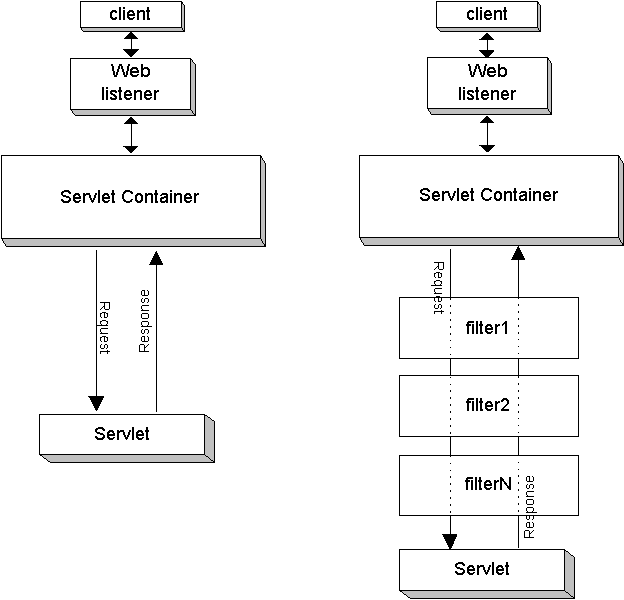
출처 : https://docs.oracle.com/cd/A97329_03/web.902/a95878/filters.htm
클라이언트의 요청을 사전 처리하여 서블릿에 전달하고,서블릿의 응답을 사후 처리하여 클라이언트에 전달 하는 기능
특정 로직이 실행되기 전, 후로 필터링을 함
어노테이션 주소가 같으면 필터파일의 이름 순으로 실행됨
(ABC순으로 파일명을 지정하는 상황이 발생함 또는 순서를 보장하지 않을 수 있음)
따라서 web.xml에서 순서를 정해주는 것이 더 알맞음
Annotation, web.xml 중 하나만 사용해야함, 본문은 web.xml을 사용함
1. Controller (filter, listener)
@WebServlet("/loading.do")
public class LoadingEventController extends HttpServlet {
	private static final long serialVersionUID = 1L;

	public LoadingEventController() {
		System.out.println("컨트롤러 생성자");
	}

	protected void service(HttpServletRequest request, HttpServletResponse response) throws ServletException, IOException {
		// 컨텍스트 리스너 테스트를 위한 코드
		ServletContext context = getServletContext();
		context.setAttribute("contextId", "DEV");

		// 세션 리스너 테스트를 위한 코드
		HttpSession session = request.getSession();
		session.setAttribute("sessionUser", new User("DEV"));

		session.getAttribute("sessionUser");

		session.removeAttribute("sessionUser");
		session.invalidate();

		System.out.println("컨트롤러 핵심 기능 수행");
	}
}
2. Filter(1)
//@WebFilter(urlPatterns =  "*.do",
//			initParams = {@WebInitParam(name = "charset", value="UTF-8")})
public class FirstFilter implements Filter {
	String encoding = null;

    public FirstFilter() {
    	System.out.println("first 필터 생성자");
    }

    public void init(FilterConfig fConfig) throws ServletException {
    	System.out.println("first 필터 init 생성자");
    	encoding = fConfig.getInitParameter("charset");

    	System.out.println(encoding);
    }

	public void destroy() {
		System.out.println("first 필터 destroy 생성자");
	}

	public void doFilter(ServletRequest request, ServletResponse response, FilterChain chain) throws IOException, ServletException {
		System.out.println("first 필터 pre-loading");
		request.setCharacterEncoding(encoding);

		chain.doFilter(request, response);

		System.out.println("first 필터 post-loading");
	}
}
3. Filter(2)
//@WebFilter(urlPatterns = "*.do")
public class SecondFilter implements Filter {
	public SecondFilter() {
        System.out.println("second 필터 생성자");
    }

    public void init(FilterConfig fConfig) throws ServletException {
    	System.out.println("second 필터 init()");
    }

    public void destroy() {
		System.out.println("second 필터 destroy()");
	}

	public void doFilter(ServletRequest request, ServletResponse response, FilterChain chain) throws IOException, ServletException {

		System.out.println("second 필터 pre-loading");

		chain.doFilter(request, response);

		System.out.println("second 필터 post-loading");
	}
}
4. web.xml
second filter가 먼저 처리하도록 설계 (순서를 정할 수 있음)
<?xml version="1.0" encoding="UTF-8"?>
<web-app xmlns:xsi="http://www.w3.org/2001/XMLSchema-instance" xmlns="http://xmlns.jcp.org/xml/ns/javaee" xsi:schemaLocation="http://xmlns.jcp.org/xml/ns/javaee http://xmlns.jcp.org/xml/ns/javaee/web-app_4_0.xsd" id="WebApp_ID" version="4.0">
  <display-name>step08_LoadingEvent</display-name>
  <welcome-file-list>
    <welcome-file>index.html</welcome-file>
  </welcome-file-list>

  <filter>
  	<filter-name>second</filter-name>
  	<filter-class>filter.SecondFilter</filter-class>
  </filter>
  <filter-mapping>
  	<filter-name>second</filter-name>
  	<url-pattern>*.do</url-pattern>
  </filter-mapping>

   <filter>
  	<filter-name>first</filter-name>
  	<filter-class>filter.FirstFilter</filter-class>
  	<init-param>
  		<param-name>charset</param-name>
  		<param-value>UTF-8</param-value>
  	</init-param>
  </filter>
  <filter-mapping>
  	<filter-name>first</filter-name>
  	<url-pattern>*.do</url-pattern>
  </filter-mapping>

</web-app>
C. Listener
웹 애플리케이션의 주요 이벤트를 추적하여 효율적으로 자원 관리, 자동화 처리 등의 기능
기능 :
-
ServletContextListener : ServletContext 객체의 생성과 삭제 이벤트 처리
-
HttpSessionListener : HttpSession 객체의 생성과 삭제 이벤트 처리
-
ServletRequestListener : HttpServletRequest 객체의 생성과 삭제 이벤트 처리
-
ServletContextAttributeListener : ServletContext 객체에 정보 등록/삭제/대체 이벤트 처리
-
HttpSessionAttributeListener : HttpSession 객체에 정보 등록/삭제/대체 이벤트 처리
-
ServletRequestAttributeListener : HttpServletRequest 객체에 정보 등록/삭제/대체 이벤트 처리
1. ContextListener
@WebListener
public class ContextListener implements ServletContextListener, ServletContextAttributeListener {

    public ContextListener() {
    	System.out.println("context 리스너 생성자");
    }

    public void attributeAdded(ServletContextAttributeEvent event)  {
    	System.out.println("context 리스너 : attributeAdded()");
    }

    public void attributeRemoved(ServletContextAttributeEvent event)  {
    	System.out.println("context 리스너 : attributeRemoved()");
    }

    public void contextDestroyed(ServletContextEvent sce)  {
    	System.out.println("context 리스너 : contextDestroyed()");
    }

    public void attributeReplaced(ServletContextAttributeEvent event)  {
    	System.out.println("context 리스너 : attributeReplaced()");
    }

    public void contextInitialized(ServletContextEvent sce)  {
    	System.out.println("context 리스너 : contextInitialized()");
    }
}
2. SessionListener
@WebListener
public class SessionListener implements HttpSessionIdListener, HttpSessionBindingListener, HttpSessionActivationListener, HttpSessionAttributeListener, HttpSessionListener {

	public SessionListener() {
		System.out.println("session 리스너 생성자");
    }

    public void sessionCreated(HttpSessionEvent se)  {
    	System.out.println("session 객체 생성");
    }

    public void sessionIdChanged(HttpSessionEvent arg0, String arg1)  {
    	System.out.println("session 객체 변경");
    }

    public void valueBound(HttpSessionBindingEvent event)  {
    	System.out.println("특정 객체를 session 등록");
    }

    public void sessionDidActivate(HttpSessionEvent se)  {
    	System.out.println("session 객체 활성화");
    }

    public void sessionDestroyed(HttpSessionEvent se)  {
    	System.out.println("session 객체 제거");
    }

    public void attributeAdded(HttpSessionBindingEvent se)  {
    	System.out.println("session 객체 속성 추가");
    }

    public void attributeRemoved(HttpSessionBindingEvent se)  {
    	System.out.println("session 객체 속성 제거");
    }

    public void attributeReplaced(HttpSessionBindingEvent se)  {
    	System.out.println("session 객체 속성 변경");
    }

    public void sessionWillPassivate(HttpSessionEvent se)  {
    	System.out.println("session 객체 비활성화");
    }

    public void valueUnbound(HttpSessionBindingEvent event)  {
    	System.out.println("특정 객체를 session 제거");
    }
}
3. DTO
메소드 오버라이딩을 사용함
public class User implements HttpSessionBindingListener{
	private String id;

	public User() {}
	public User(String id) {
		this.id = id;
	}

	public String getId() {
		return id;
	}

	public void setId(String id) {
		this.id = id;
	}

	@Override
    public void valueBound(HttpSessionBindingEvent event)  {
	    	System.out.println("User : session 등록");
    }

	@Override
    public void valueUnbound(HttpSessionBindingEvent event)  {
	    	System.out.println("User : session 제거");
    }

	@Override
	public String toString() {
		return "User [id=" + id + "]";
	}
}
Front Controller
Front Controller : 여러 개의 컨트롤러를 관리하는 하나의 컨트롤러
Front Controller Patten
2. 에러
다른 작업을 하는 중 모든 프로젝트의 webapp 폴더 아래 java폴더가 없어지는 상황이 발생함
다행히 프로젝트에 src/main/java라는 폴더로 남아있어서 파일은 보존 됬지만 tomcat의 web Module 이 초기화되는 상황도 발생함
단순히 src/main/java를 밖으로 떼어낸 것으로 생각했지만 예측불가한 예외가 발생할 수 도 있을 것으로 보임
해결 : 아직 해결하지 못함
프로젝트를 만들 때 open associated perspective창과 관련이 있는 것으로 보임
새 프로젝트는 main 아래 java 폴더가 보임
3. 보완 해야 할 것
JNDI를 활용한 MVC패턴의 기능 수행 중 정말 다양한 예외를 만난 것 같음
input의 null 여부만 처리했는데 빈 값(빈 문자열)을 입력하면 insert가 되어버리는 경우
Primary Key 때문에 특정 데이터는 삭제가 안되거나 (이 부분은 ON DELETE CASCADE로 해결)
등 기능 수행에 대해 많은 것을 고려해야 되는 것을 배움
jsp는 html, css, javascript, java 지식이 모두 사용되므로 더 숙련시켜야함
Filter는 아주 중요한 전후처리를 담당하므로 눈에 익혀두는게 좋을 것 같음
4. 느낀점
코드에 관환 예외는 구글링이나 직접 찾아가며 처리할 수 있지만 오늘 발생한 java폴더 실종같은 환경설정의 변화로 발생한 예외들은 정말 스트레스 받게하는 것 같다.
언제나 코드보다 환경설정에서 더 많은 피로를 느낀다.
